
MSBA-300 · Lesson 6 of 12 · 22 min
Matrix builds
▶ Video coming soon A video version of this lesson is on the way.
Malik Osei came to the sixth clinic as a guest. He maintains the small trail-report validator that checks the files volunteers submit to TrailCheck, and he had just learned that a hiking club wanted to run it on Windows laptops and that another volunteer used a Mac. The validator ran on Node.js, and its tests passed on his Linux laptop with one Node version. "I have no idea whether it works anywhere else," he said. Priya's answer was a matrix: one job definition that GitHub expands into a job for every combination of operating system and Node version they cared about.
One job, many combinations
A matrix strategy lets a single job definition run as several jobs, each with different values for a set of variables. You define the matrix under strategy.matrix as one or more named lists. GitHub takes every combination of the values, the Cartesian product, and creates a job for each. Inside the job, the matrix context gives the values for that combination, so runs-on, setup steps and commands can change from job to job.
jobs:
  test:
    strategy:
      matrix:
        os: [ubuntu-latest, windows-latest, macos-latest]
        node: ["22", "24"]
    runs-on: ${{ matrix.os }}
    steps:
      - uses: actions/checkout@v5
      - uses: actions/setup-node@v5
        with:
          node-version: ${{ matrix.node }}
      - run: npm ci
      - run: npm test
The six jobs appear in the run as test (ubuntu-latest, 22), test (ubuntu-latest, 24) and so on, with the matrix values in brackets after the job id. They run in parallel, subject to the runner concurrency limits of the plan. A matrix can generate at most 256 jobs in a workflow run, a limit that applies to both hosted and self-hosted runners. Versions are quoted because, as lesson 2 explained, YAML would otherwise read some of them as numbers.
Naming matrix jobs
The default names are fine for small matrices but become hard to read when values are long. Give the job a name that uses matrix values, such as Validator on the operating system with Node and the version, and the checks list on a pull request becomes readable. Be careful with required status checks: a required check is matched by name, so renaming matrix jobs, or adding a value, changes the check names that branch protection waits for. Many teams add a small final job that needs the whole matrix and make that single job the required check.
Shaping the matrix with exclude and include
Real matrices are rarely a perfect grid. exclude removes combinations: each item lists values, and any generated combination that matches all of them is dropped. include adds to the matrix: an item that matches an existing combination adds extra variables to it, and an item that matches nothing becomes an extra combination of its own. GitHub processes exclude before include, so you can exclude a combination and then add back a variant of it.
strategy:
  matrix:
    os: [ubuntu-latest, windows-latest, macos-latest]
    node: ["22", "24"]
    exclude:
      - os: macos-latest
        node: "22"
    include:
      - os: ubuntu-latest
        node: "26"
        experimental: true
      - os: windows-latest
        shell-name: pwsh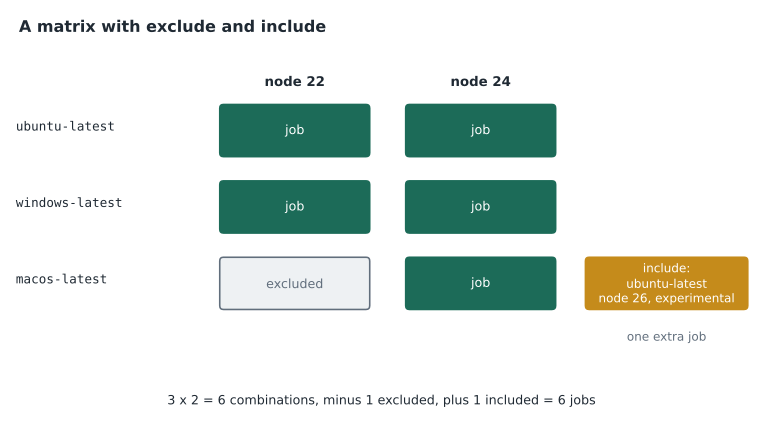
Counting jobs is a common exam task. Start with the product of the list lengths, here three times two, which is six. Subtract the excluded combinations, one, giving five. Then look at each include item: the Node 26 item matches no existing combination, so it adds one job; the Windows item matches the two existing Windows jobs and only adds the shell-name variable to them, so it adds no jobs. The total is six jobs, one of which has experimental set to true.
A matrix made only of include
You can also write a matrix entirely with include, listing each combination explicitly with all its variables. That suits cases where the combinations do not form a grid, such as a deployment to three regions, each with its own URL and approval rules. And because matrix values can come from an expression, a matrix can be built at run time: an earlier job writes a JSON array to its outputs, and the matrix reads it with fromJSON. Tidewater later used that pattern to test only the trail regions whose data had changed.
jobs:
  plan:
    runs-on: ubuntu-latest
    outputs:
      regions: ${{ steps.find.outputs.regions }}
    steps:
      - uses: actions/checkout@v5
      - id: find
        run: echo 'regions=["fundy","acadian-coast"]' >> "$GITHUB_OUTPUT"
  validate:
    needs: plan
    runs-on: ubuntu-latest
    strategy:
      matrix:
        region: ${{ fromJSON(needs.plan.outputs.regions) }}
    steps:
      - run: echo "Validating ${{ matrix.region }}"
Using matrix values inside the job
Matrix values can be used anywhere an expression is allowed inside the job: in runs-on, in step inputs, in environment variables and in conditions. That makes it easy to handle the differences between platforms without writing separate jobs. A step that only makes sense on Windows can carry a condition comparing matrix.os with windows-latest, or, more robustly, comparing runner.os with Windows, which keeps working even if the matrix later uses a pinned Windows label instead of the latest one. A step can pick a different command per platform from a variable added with include, as the shell-name example above did.
The strategy context adds a little more. strategy.job-index gives the position of the current job in the matrix, starting at zero, and strategy.job-total the number of jobs. Teams use these to split a long test suite into equal slices, so that eight matrix jobs each run an eighth of the tests and finish in a fraction of the time. The slices are not combinations of settings at all, just a list of numbers in the matrix, which shows how general the feature is.
strategy:
  fail-fast: false
  matrix:
    shard: [1, 2, 3, 4]
steps:
  - uses: actions/checkout@v5
  - run: npm ci
  - name: Run one quarter of the tests
    run: npx vitest run --shard=${{ matrix.shard }}/${{ strategy.job-total }}
  - name: Windows-only path check
    if: runner.os == 'Windows'
    run: ./scripts/check-paths.ps1
    shell: pwsh
Matrix, separate jobs or reusable workflow
A matrix is the right tool when the jobs are the same except for a few values. When jobs differ in their steps, separate jobs are clearer than a matrix full of conditions; a matrix in which half the steps are skipped on half the platforms is a sign that it should be split. When the same multi-job process must run for several targets, such as building and deploying three sites, a reusable workflow called from a matrix job combines both ideas: the matrix supplies the values and the reusable workflow supplies the jobs. Lesson 9 shows that pattern.
Worked problem
Reading a failure pattern
After adding the matrix, the validator results show: all three Linux and macOS jobs green, and both Windows jobs red with an error that a file named data/regions/fundy.json was not found, although the file exists in the repository. What is the most likely cause, and how would you confirm it?
Show solution
- The failure follows the operating system, not the Node version, so the cause is platform-specific.
- The file exists, so the code is probably building a path in a way that only works with forward slashes, or depending on case sensitivity.
- Confirm by re-running one Windows job with debug logging or by adding a step that prints the path the code computes.
- Fix by using the path module of the language to join paths, then re-run only the Windows combinations.
Answer: A path built for Unix-style separators; confirm by printing the computed path in a Windows job, fix with proper path joining, and re-run the failed combinations.
That was exactly the bug Malik found. The fix was one line, replacing string concatenation with the platform's path-joining function, and the matrix proved it on all three systems in under five minutes.
Controlling failures and parallelism
By default a matrix is fail-fast: if any job in the matrix fails, GitHub cancels the jobs of that matrix that are still queued or running. That saves minutes when one failure means the change is broken everywhere, but it hides information when failures differ by platform. Set fail-fast to false to let every combination finish and report its own result, which is what Malik wanted, because the question was precisely which platforms work.
For a single combination that is allowed to fail, such as a preview version of Node, use continue-on-error at the job level with a matrix expression, so the experimental job can fail without failing the run or canceling the others. max-parallel limits how many matrix jobs run at once. By default GitHub runs as many as runner availability allows; a lower limit protects a shared resource, such as a test server that can handle only two runs at a time, or keeps a self-hosted runner pool from being swamped.
jobs:
  test:
    name: Validator on ${{ matrix.os }} with Node ${{ matrix.node }}
    runs-on: ${{ matrix.os }}
    continue-on-error: ${{ matrix.experimental == true }}
    strategy:
      fail-fast: false
      max-parallel: 4
      matrix:
        os: [ubuntu-latest, windows-latest, macos-latest]
        node: ["22", "24"]
        include:
          - os: ubuntu-latest
            node: "26"
            experimental: true
    steps:
      - uses: actions/checkout@v5
      - uses: actions/setup-node@v5
        with:
          node-version: ${{ matrix.node }}
- run: npm ci && npm test| Setting | Default | Use it when |
|---|---|---|
| fail-fast | true | Set false when each combination's result matters on its own |
| max-parallel | As many as runners allow | A shared resource or runner pool needs protecting |
| continue-on-error (job) | false | One combination, such as a preview version, may fail |
| exclude | None | Some combinations are impossible or pointless |
| include | None | Add variables to combinations or add one-off combinations |
Optimizing matrix size and cost
A matrix multiplies everything, including cost and waiting time. Adding a third operating system to a two-by-three matrix adds three jobs, and hosted macOS minutes cost much more than Linux minutes. The GH-200 outline asks you to optimize matrix size for cost and performance, which in practice means four habits. Test the full matrix where it matters, usually on pushes to main and on release branches, and a smaller set on every pull request. Exclude combinations that no user runs. Keep the slow and expensive axes short. And cache dependencies in every job, so that six jobs do not each download the same packages from scratch.
Image changes affect matrices in a particular way. When a latest label moves, every job using it moves at once, so a matrix that lists both ubuntu-latest and a pinned Ubuntu version may suddenly test the same image twice, or a Windows job may start using a different Visual Studio version. Reviewing the matrix whenever GitHub announces an image migration takes a few minutes and avoids confusing results.
How many matrix jobs run at once
Two limits decide how quickly a large matrix finishes. The first is max-parallel, which you set. The second is the plan's concurrency limit for GitHub-hosted runners, which you do not: GitHub documents a maximum number of concurrent jobs per account, such as 20 on GitHub Free, 60 on GitHub Team and 500 on GitHub Enterprise Cloud for standard runners, with much lower limits for macOS, 5 on most plans and 50 on Enterprise. Jobs beyond the limit queue until a slot frees. A 24-job matrix on a Team plan therefore runs in one wave if only Linux is involved, but a matrix with ten macOS combinations runs in two waves, and other workflows in the account compete for the same slots. Self-hosted runners have no such cap; the size of your runner pool is the limit.
Caching interacts with all of this. Each matrix job restores and saves its own cache, so the cache key should include the operating system and any version that changes the dependencies, or jobs will restore files built for the wrong platform. The setup actions do this automatically when their cache input is used, which is one more reason to prefer them over hand-written cache steps in a matrix.
Reading matrix results and re-running
When a matrix job fails, the run page shows which combination failed, and the job name tells you the values. Compare the failing combinations: if all Windows jobs fail and nothing else does, suspect paths, line endings or the shell; if only the newest Node version fails, suspect a changed API; if one job fails at random, suspect a flaky test or a network dependency. You can re-run a single failed job, including a single matrix combination, from the run page, without repeating the whole matrix, which saves minutes and keeps the green results you already have.
Worked problem
Counting jobs with include and exclude
A matrix lists os with ubuntu-latest and windows-latest, and browser with chrome, firefox and edge. It excludes ubuntu-latest with edge. It includes an item with os windows-latest and browser edge plus beta: true, and another item with os macos-latest and browser safari. How many jobs run?
Show solution
- The product is 2 times 3, which is 6 combinations.
- Excluding ubuntu-latest with edge leaves 5.
- The windows-latest and edge include matches an existing combination, so it only adds the beta variable: still 5.
- The macos-latest and safari include matches nothing, so it adds one combination: 6.
Answer: Six jobs, one of which carries beta set to true.
Common mistakes
MistakeAssuming every include item adds a job.
InsteadAn include item that matches an existing combination only adds variables to it.
MistakeLeaving fail-fast on when you need to know which platforms fail.
InsteadSet fail-fast to false so every combination reports its own result.
MistakeMaking each matrix job a required check by name.
InsteadAdd one final job that needs the matrix and require that job, so matrix changes do not break branch protection.
MistakeRunning the full matrix on every pull request without thinking about cost.
InsteadRun a smaller matrix on pull requests and the full one on main or releases, and cache dependencies.
By the end of the session Malik's validator had a seven-job matrix. Six jobs passed; the experimental Node 26 job failed on a deprecated date function, which Malik fixed the same evening. The Windows jobs revealed one real bug, a path built with forward slashes that worked by luck on Linux and macOS, and the hiking club got a validator that worked on their laptops.
Summary and key terms
- A matrix strategy expands one job into a job for every combination of its variables, read through the matrix context.
- A matrix can create at most 256 jobs per workflow run; quote version numbers.
- exclude removes matching combinations; include adds variables to matching combinations or adds new ones.
- Matrices can be built dynamically from a JSON job output with fromJSON.
- fail-fast defaults to true; max-parallel limits concurrency; job-level continue-on-error allows experimental failures.
- Optimize size and cost, plan for runner image changes, and re-run only the failed combinations.
- Matrix strategy
- A job setting that runs one definition for every combination of listed values.
- Cartesian product
- Every combination formed by taking one value from each list.
- exclude
- A matrix key that removes combinations matching all the listed values.
- include
- A matrix key that adds variables to matching combinations or adds new combinations.
- fail-fast
- A matrix setting that cancels remaining matrix jobs when one fails.
- max-parallel
- A matrix setting that limits how many matrix jobs run at the same time.
- Dynamic matrix
- A matrix whose values come from an earlier job's output at run time.
Practice problems
Work each problem on paper first, then reveal the answer to check.
A matrix has 4 operating systems and 3 versions with no include or exclude. How many jobs?
Show answer
Twelve.
Which setting lets all matrix jobs finish even if one fails?
Show answer
fail-fast set to false.
How can one experimental combination fail without failing the run?
Show answer
Set continue-on-error at the job level using a matrix variable, such as experimental.
Lesson quiz · 5 questions
Score 60% or more to complete this lesson.
Create a free account to save your progress, take quizzes and earn a certificate.