
MSBA-300 · Lesson 1 of 12 · 22 min
What GitHub Actions does
▶ Video coming soon A video version of this lesson is on the way.
Two things happened at Tidewater Trail Guides in Portland in the same week. First, a volunteer trail reporter opened a pull request that changed the closures page of TrailCheck, and the check workflow that Priya Nair had set up in the Git lunches failed with a red cross that nobody could explain. Second, Lena Fischer, the newest web developer, told Priya she wanted to sit Exam GH-200: GitHub Actions. "I can read our two workflow files," Lena said, "but I could not have written them, and I certainly could not have fixed that one." Priya agreed to run a short series she called the Actions clinic: one working session a week, each built around a real problem in the TrailCheck and guidebook repositories, with Lena doing the typing and the rest of the team dropping in when the topic touched their work.
The first session started with a question Priya likes to ask before any tool: what job are we hiring it for? Tidewater already used GitHub for code, guidebook chapters, issues and pull requests. What it still did by hand was everything that happened around a change: checking spelling and links before a merge, building the website, publishing it, producing a PDF proof of a guidebook chapter for the printer, and tidying up stale issues. Every one of those chores followed the same pattern. Something happens in the repository, and then a predictable list of commands should run somewhere, with the result reported back to the people involved. That pattern is what GitHub Actions automates.
Automation that lives in the repository
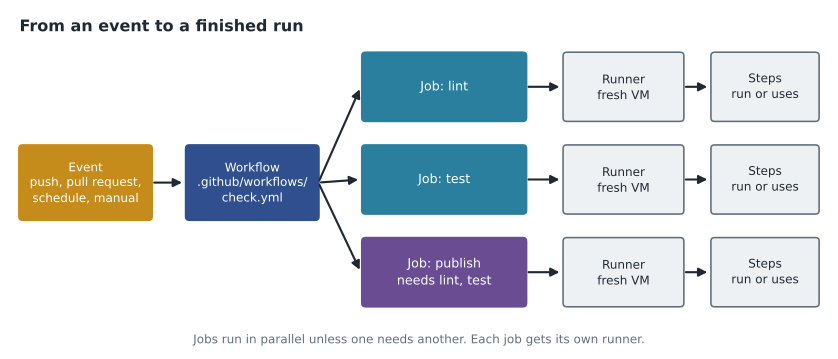
GitHub Actions is GitHub's automation platform. You describe automation in a workflow, a text file written in YAML and stored in the repository under .github/workflows. When an event that the workflow listens for happens, such as a push, a new pull request, a schedule or a person pressing a button, GitHub starts a workflow run. The run is made of one or more jobs, each job runs on a machine called a runner, and each job is an ordered list of steps. A step either runs shell commands or uses an action, a packaged, reusable piece of automation that someone has published.
Because the workflow is a file in the repository, it is versioned with everything else. A change to the automation goes through the same pull request and review as a change to the website. You can see who changed a workflow and why, you can revert a bad change, and a branch can carry its own experimental version of a workflow while main keeps the stable one. This is the main difference from older build servers, where the configuration often lived in a web console that only one person understood.
The vocabulary, one term at a time
Lena asked for the vocabulary first, so Priya put the terms on the whiteboard in the order a run uses them. Learning them precisely pays off on the exam, where answer options often differ by one word, and in the logs, which use the same words.
| Term | What it is | TrailCheck example |
|---|---|---|
| Workflow | A configurable automated process defined by one YAML file in .github/workflows | check.yml, which checks every pull request |
| Event | Activity that triggers a workflow | A pull request is opened against main |
| Workflow run | One execution of a workflow, with a number, a status and logs | Run 214 of check.yml |
| Job | A set of steps that run on the same runner | The lint job and the build job |
| Step | A single task in a job: a shell command or an action | Install dependencies; run the spelling checker |
| Action | A reusable unit of automation used as a step | actions/checkout, which fetches the repository |
| Runner | A machine that runs a job | A GitHub-hosted Ubuntu virtual machine |
Two distinctions trip up beginners. The first is between a workflow and a run. The workflow is the definition, like a recipe; a run is one occasion on which the recipe was followed, with its own result. A workflow can have hundreds of runs, some green and some red. The second distinction is between a job and a step. All steps in a job share one runner, so a file written by step two is still there for step three. Separate jobs run on separate runners by default, so nothing on the disk carries from one job to another unless you pass it on deliberately, which later lessons cover.
What people use it for
The name "Actions" hides how broad the platform is. The most common use is continuous integration, usually shortened to CI: building and testing every change automatically, so that problems are found while the change is small and its author still remembers it. The second is continuous delivery or deployment: publishing a website, releasing a package or updating a server once a change has passed its checks. But workflows can respond to almost anything that happens on GitHub, so teams also use them for chores that have nothing to do with building code.
| Category | Typical workflow | Tidewater candidate |
|---|---|---|
| Continuous integration | Lint, test and build every pull request | Spelling, links and the trail-report validator on TrailCheck |
| Continuous delivery | Publish a site or package after merge | Build TrailCheck and publish it to GitHub Pages |
| Release automation | Create a release and attach files when a tag is pushed | Attach a PDF proof to each guidebook release |
| Repository chores | Label new issues, close stale ones, add items to a project | Move correction issues on the guidebook project |
| Scheduled jobs | Run a report or a check at a fixed time | Check all external links every Monday morning |
| Manual tools | A button that runs a task with inputs | Rebuild one guidebook chapter on request |
Owen Tremblay, the editor who had passed GH-900 in the Git lunches series, asked whether all this was only for programmers. Priya pointed at the last two rows. The guidebook repository had no code at all, only Markdown chapters and images, yet a workflow could still check spelling, catch broken internal links between chapters and produce a PDF proof. Automation helps wherever people repeat the same steps after the same kind of change.
Where the work actually runs
Every job needs a runner. GitHub offers GitHub-hosted runners, virtual machines that GitHub creates for a job and destroys afterwards. You choose one with a label such as ubuntu-latest, windows-latest or macos-latest, and GitHub publishes the list of preinstalled software for each image. Standard hosted runners for Linux on x64 and Arm, Windows and macOS are available on every plan; GitHub Team and Enterprise customers can also use larger runners with more cores, more memory, GPUs or static IP addresses.
The alternative is a self-hosted runner: a machine you own or rent, on which you install GitHub's runner application. It can reach private networks and special hardware, and it keeps whatever software you install, but you are responsible for patching it, securing it and cleaning up after jobs. Lesson 4 compares the options in detail. For Tidewater, a small team with no servers worth mentioning, hosted runners were the obvious choice.
What it costs
Actions is free for public repositories on standard GitHub-hosted runners. For private repositories, each plan includes a monthly allowance of hosted-runner usage and artifact storage, and use beyond the allowance is billed by the minute, at rates that depend on the operating system and the machine size. GitHub cut its hosted-runner prices by up to 39 percent on January 1, 2026. In December 2025 it also announced a per-minute platform charge for self-hosted runner usage in private repositories, to start in March 2026, and then postponed that change within days to re-evaluate it; check the current billing documentation before planning around it. Rosa Delgado, who pays Tidewater's GitHub bill, asked for one thing: a budget alert, so that a runaway workflow could not surprise her at the end of the month.
Worked problem
Counting minutes for a budget
Suppose TrailCheck were a private repository. Its check workflow runs on ubuntu-latest and takes about 4 minutes per run. On a busy week the team opens 30 pull requests and each gets pushed to 3 times, and the publish workflow runs 25 times at 3 minutes each. Roughly how many Linux runner minutes is that per week, and why does Rosa care more about the macOS minutes the team is considering for the mobile app?
Show solution
- Check runs: 30 pull requests times 3 pushes is 90 runs, times 4 minutes is 360 minutes.
- Publish runs: 25 times 3 minutes is 75 minutes.
- Total is about 435 Linux minutes a week, well inside what a small team usually expects.
- Hosted macOS minutes are priced many times higher than Linux minutes and count heavily against any allowance, so moving a job to macOS changes the bill far more than adding Linux jobs.
Answer: About 435 Linux minutes a week. macOS jobs cost far more per minute, so they need deliberate limits and a budget alert.
A first workflow, read line by line
Priya opened the existing check workflow so that Lena could see the parts in a real file. The details of every key come later; for now the goal was to recognize the shape.
name: Check

on:
  pull_request:
    branches: [main]

permissions:
  contents: read

jobs:
  spelling:
    runs-on: ubuntu-latest
    steps:
      - uses: actions/checkout@v5
      - name: Install tools
        run: npm ci
      - name: Check spelling
        run: npm run spell
The name line sets what appears in the Actions tab. The on block says the workflow runs for pull requests that target main. The permissions block limits what the automatic token for this run can do: here, only read the repository contents. The jobs block defines one job, spelling, that runs on the latest Ubuntu runner. Its three steps check out the repository, install the project's tools from the lock file and run the spelling script. If any step exits with an error, the step fails, the job fails, and the pull request shows a red cross next to "Check / spelling".
Lena noticed that the checkout step was not optional. A fresh runner starts with an empty workspace; it knows nothing about the repository until a step fetches it. The checkout action does that, and it is the first step of almost every job that works with the repository's files.
How results reach people
Results appear in several places at once. The Actions tab of the repository lists every run with its status, trigger, branch and duration, and lets you open a run to see its jobs, logs and artifacts. On a pull request, each job appears as a check, and branch protection rules or rulesets can require named checks to pass before the pull request can merge. Commits show a green tick, red cross or yellow dot. People who watch the repository or who triggered the run can receive notifications, and the workflow itself can post comments, write a job summary or add annotations to lines of code.
Actions alongside the rest of GitHub
Actions connects to almost every other GitHub feature, which is why the exam treats it as a platform rather than a build tool. A workflow can be required by a ruleset or branch protection rule, so a pull request cannot merge until its checks pass. It can publish to GitHub Pages, push container images to GitHub Packages, create releases, update projects and comment on issues. Security features build on it too: code scanning with CodeQL usually runs as a workflow, and Dependabot can open pull requests that your workflows then test.
That reach is also the reason to treat workflows with care. A workflow runs with a token that can change the repository, it can read secrets, and it executes code from actions written by other people. Lesson 8 introduces environments and protection rules, and the companion course on managing and securing Actions goes deeper, but one habit starts now: every workflow at Tidewater would declare the smallest permissions it needed, and every action it used would come from a source the team trusted.
Worked problem
Spotting the parts
A colleague describes a setup: "When someone opens an issue with the label correction, a robot adds it to the guidebook project and comments with the editing checklist." Name the event, and say whether this needs a runner.
Show solution
- The event is issue activity, specifically an issue being labeled.
- Adding to a project and commenting are steps, done with an action or a call to the GitHub API.
- Any job, however small, runs on a runner, so yes, a hosted runner executes it for a few seconds.
Answer: The event is an issue being labeled; the work runs as a short job on a runner.
Common mistakes
MistakeTreating a workflow and a workflow run as the same thing.
InsteadThe workflow is the file that defines the automation; a run is one execution of it, with its own number, status and logs.
MistakeExpecting files from one job to be on the disk in the next job.
InsteadEach job gets its own runner. Pass data between jobs with outputs or artifacts.
MistakeForgetting the checkout step and wondering why the files are missing.
InsteadA fresh runner has an empty workspace; actions/checkout fetches the repository.
MistakeThinking Actions is only for compiling code.
InsteadWorkflows can respond to issues, schedules, releases and manual triggers, and can automate chores in repositories that contain no code.
By the end of the session Lena had written her own glossary, Rosa had set a budget alert, and the team had a list of six chores to automate over the coming weeks. The failed closures-page check was still red. Priya promised that by lesson 11 Lena would be able to explain it without help.
Summary and key terms
- GitHub Actions runs automation defined in YAML workflow files stored in .github/workflows.
- An event triggers a workflow run; a run contains jobs; each job runs on a runner and executes steps in order.
- A step runs shell commands with run or a reusable action with uses.
- Jobs run in parallel on separate runners unless one needs another; steps in a job share a runner.
- Common uses: continuous integration, deployment, release automation, repository chores, scheduled and manual tasks.
- Hosted runners are free for public repositories; private repositories use a plan allowance and then pay per minute.
- Workflow
- An automated process defined by a YAML file in .github/workflows.
- Event
- Activity in or around a repository that can trigger a workflow.
- Workflow run
- One execution of a workflow.
- Job
- A set of steps executed on the same runner.
- Step
- A single task in a job, either a shell command or an action.
- Action
- A reusable unit of automation used as a step.
- Runner
- A machine that executes jobs, hosted by GitHub or by you.
- Continuous integration
- Building and testing every change automatically so problems are found early.
Practice problems
Work each problem on paper first, then reveal the answer to check.
Where must a workflow file be stored for GitHub to find it?
Show answer
In the .github/workflows directory of the repository, as a .yml or .yaml file.
Two steps in the same job need the same downloaded file. Do you need an artifact?
Show answer
No. Steps in one job share a runner and its workspace.
Name two things a workflow can do that are not building or testing code.
Show answer
For example, labeling new issues and running a scheduled link check.
Lesson quiz · 5 questions
Score 60% or more to complete this lesson.
Create a free account to save your progress, take quizzes and earn a certificate.