
MSBA-291 · Lesson 8 of 12 · 22 min
Security configurations at scale
▶ Video coming soon A video version of this lesson is on the way.
Freya had a phrase for the security settings in Skerry's old organizations: "opt-in by accident." Secret scanning was on in some repositories because a developer had turned it on after a conference talk. Dependabot alerts were on almost everywhere because GitHub enables them by default for many repositories, but nobody read them. Code scanning ran in 41 repositories, set up by three different people with three different workflow files. There was no answer to the simplest question an auditor might ask: which repositories have which protections?
This session was about replacing that with security configurations, GitHub's way to define a set of security settings once and apply it to many repositories, and about the reporting that shows whether the result matches the plan.
The security products
GitHub's security features fall into a few groups, and understanding the licensing is the first step. Since April 2025, GitHub Advanced Security has been sold as two products. GitHub Secret Protection covers secret scanning and push protection for private and internal repositories, along with related features such as custom patterns and delegated bypass. GitHub Code Security covers code scanning with CodeQL and third-party tools, Copilot Autofix for code scanning alerts, dependency review and security campaigns. Both are licensed per active committer, meaning a person who has pushed to a repository where the product is enabled in the last 90 days.
Some features need no extra license. The dependency graph and Dependabot alerts and security updates are available to everyone. Secret scanning and push protection are free for public repositories. And push protection for users, which stops people pushing supported secrets to any public repository, is on by default for personal accounts.
| Feature group | Main features | License for private and internal repositories |
|---|---|---|
| Supply chain | Dependency graph, Dependabot alerts, Dependabot security and version updates | None needed |
| Dependency review | Showing dependency changes and their vulnerabilities in pull requests | GitHub Code Security |
| Secrets | Secret scanning, push protection, custom patterns, delegated bypass | GitHub Secret Protection |
| Code | Code scanning with CodeQL or other tools, Copilot Autofix, security campaigns | GitHub Code Security |
What a security configuration is
A security configuration is a named collection of enablement settings for security features: whether the dependency graph, Dependabot alerts, secret scanning, push protection, code scanning default setup and other features are on, off or left unchanged. Organizations and enterprises can create configurations and apply them to chosen repositories. When a configuration is applied, the repository's settings change to match it, and the repository shows which configuration it uses.
GitHub provides a GitHub-recommended security configuration that turns on the features GitHub considers a sensible baseline. It changes as GitHub adds features, which is convenient but means the baseline can shift under a team. Most enterprises start from it and then create custom security configurations for their own needs, which change only when the enterprise changes them.
Levels and defaults
Configurations exist at two levels. Enterprise configurations are created by enterprise owners, or people with the right enterprise role, and can be applied to repositories in any organization. Organization configurations are created by organization owners and security managers for their own organization. A configuration can be set as the default for new repositories, so that every repository created afterwards, of a chosen visibility, starts with it. That default is what turns security from something people remember into something that simply happens.
| Configuration at Skerry | Level | Applies to | Main settings |
|---|---|---|---|
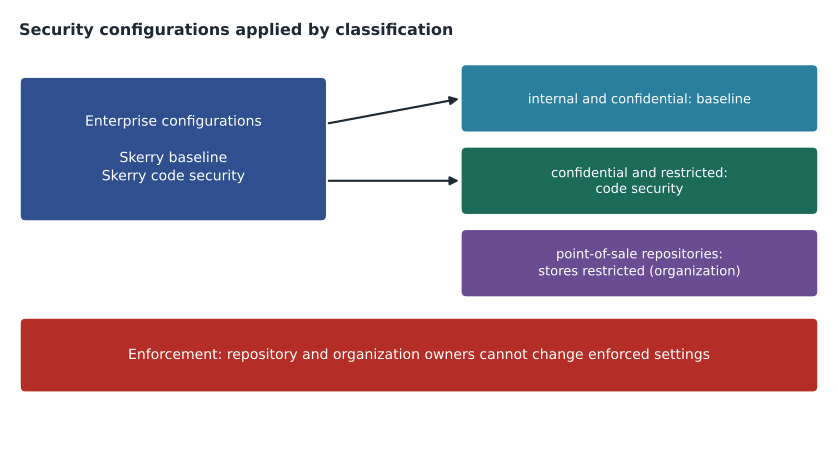
| Skerry baseline | Enterprise | All repositories; default for new private and internal repositories | Dependency graph, Dependabot alerts and security updates, secret scanning, push protection |
| Skerry code security | Enterprise | Repositories classified confidential or restricted | Baseline plus code scanning default setup and dependency review |
| Stores restricted | Organization (skerry-stores) | Point-of-sale repositories | Code security settings plus delegated bypass for push protection reviewed by security |
Applying Secret Protection everywhere and Code Security only to confidential and restricted code was a licensing decision as much as a security one. Lorcan Adeyemi-Brooke, the finance partner for technology, wanted to know what each choice cost.
Worked problem
Estimating license counts
Skerry has about 1,100 developers. Roughly 1,020 of them push code in a typical 90-day period, and about 430 of those push to confidential or restricted repositories. How many active committers would each product count under Skerry's design?
Show solution
- Secret Protection is enabled on all repositories, so every active committer counts: about 1,020.
- Code Security is enabled only on confidential and restricted repositories, so only people who pushed there count: about 430.
- A person counts once per product however many repositories they push to.
Answer: About 1,020 Secret Protection committers and about 430 Code Security committers.
Enforcement
Applying a configuration sets a repository's settings, but by default a repository administrator could later change them. In September 2026 GitHub added stronger enforcement for enterprise configurations. The enforcement setting offers three options: don't enforce, enforce for repository owners, and enforce for repository and organization owners. Under the first, anyone with the right access can change the settings later. Under the second, repository administrators cannot change the enforced settings. Under the third, which was the new option, organization owners cannot change them either. Skerry enforced its two enterprise configurations for repository and organization owners, so the baseline could be changed only through the governance repository and an enterprise owner.
Push protection and delegated bypass
Push protection blocks a push that contains a supported secret, telling the developer what was found and where. By default the developer can bypass the block by giving a reason, such as a false positive or a test credential, and the bypass is recorded. Delegated bypass changes that: instead of bypassing themselves, developers must request a bypass, which a chosen group of reviewers approves or denies. Skerry used delegated bypass in skerry-stores, with Freya's team as reviewers, and the default self-bypass elsewhere. Every bypass appeared in security overview and the audit log.
| Push protection mode | What a developer can do when blocked | Where Skerry used it |
|---|---|---|
| Default | Bypass with a reason, which is recorded | skerry and skerry-sandbox |
| Delegated bypass | Request a bypass that reviewers approve or deny | skerry-stores |
Code scanning at scale
Code scanning can be set up in two ways. Default setup lets GitHub choose the languages and queries and run CodeQL automatically, with no workflow file in the repository. Advanced setup uses a workflow file the team controls, for languages or build steps default setup cannot handle. Security configurations can turn on default setup across many repositories at once, which is how Skerry went from 41 repositories with code scanning to 1,260 in a week. The remaining repositories that needed advanced setup, mostly store-systems code built with an older toolchain, used a shared reusable workflow from the governance repository.
Code scanning results connect back to rulesets. The require code scanning results rule from lesson 2 blocks merges when alerts at or above a chosen severity are present, so a configuration that turns scanning on and a ruleset that acts on its results work together. Copilot Autofix suggests fixes for many code scanning alerts, which made the backlog easier to work through. Security campaigns let a security team pick a set of alerts, for example every SQL injection alert across the enterprise, assign them to owners with a due date and track progress.
Security overview
Security overview is the reporting side. At organization and enterprise level it shows which features are enabled where, how many alerts are open by severity and age, how quickly they are fixed, and how often push protection blocked or was bypassed. For an auditor's question about coverage, it is the answer. For a security lead deciding what to work on next, its risk and metrics views are the starting point.
Worked problem
Reading coverage
Security overview shows that of 4,000 active repositories in the new enterprise, 3,964 have secret scanning enabled. The 36 others were migrated last week and have not had a configuration applied. What should happen?
Show solution
- Coverage is 3,964 divided by 4,000, about 99.1 percent.
- The gap is explained: the migration created repositories before the configuration was applied.
- Apply the baseline configuration to the 36 repositories.
- Add a step to the migration runbook that applies configurations as soon as each batch lands.
Answer: Apply the baseline to the 36 repositories and change the migration runbook so new batches are covered immediately.
Roles for security work
Running all this does not need owners. The security manager role, covered in MSBA-290, lets a team manage security alerts and settings across an organization, with read access to all repositories, without any other administrative power. Skerry's security team held it in every organization. Enterprise-level security management was still in preview, so enterprise configurations themselves were changed by enterprise owners through the governance repository.
Rolling out without drowning
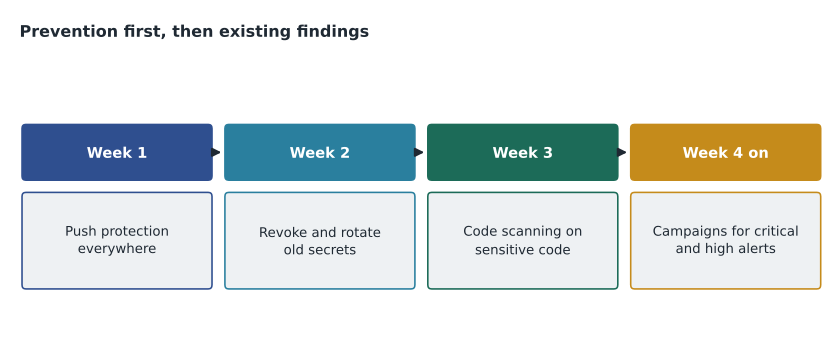
Turning on security features across thousands of repositories creates thousands of alerts. Freya had seen teams switch on everything at once and then ignore all of it. Her plan had three rules. First, turn on prevention before detection: push protection stops new secrets entering, so turn it on before working through old secret alerts. Second, triage by severity and exposure: critical alerts in production code first, sandbox code last. Third, give every alert an owner, using the owning-team custom property to route alerts to the right team.
| Week | Step | Result at Skerry |
|---|---|---|
| 1 | Apply the baseline with push protection to all repositories | New secrets blocked; 212 historical secret alerts found |
| 2 | Revoke and rotate the historical secrets, highest risk first | 198 resolved, 14 confirmed false positives |
| 3 | Apply code security to confidential and restricted repositories | Code scanning in 1,260 repositories; 3,400 alerts |
| 4 onward | Campaigns for critical and high alerts, routed by owning team | Critical alerts cleared in five weeks |
Custom patterns and validity checks
Secret scanning recognizes many token formats out of the box. Companies also have their own secrets, such as internal API keys with a known prefix. Custom patterns, part of Secret Protection, let an organization or enterprise define regular expressions for those formats so that secret scanning and push protection treat them like any other secret. Skerry defined two: the internal payment gateway's test and live keys, which both began with recognizable prefixes. Secret scanning can also run validity checks for some partner token types, asking the issuing service whether a found token is still active, which helps teams spend their time on live secrets first.
Dependabot at scale
Dependabot is the oldest and most familiar of the features in this lesson, and also the easiest to neglect. Dependabot alerts tell a repository when a dependency has a known vulnerability. Dependabot security updates open pull requests that update a vulnerable dependency to a fixed version. Dependabot version updates, configured with a file in the repository, keep dependencies current even when nothing is vulnerable. Security configurations can turn alerts and security updates on everywhere; version updates still need each team's configuration file, which Skerry included in its repository templates.
At scale the issue is volume. Skerry's first full week of security updates opened 1,900 pull requests. The team used grouped updates, which combine several dependency updates into one pull request, and Dependabot auto-triage rules to dismiss alerts in development-only dependencies that could not reach production. Within a month the weekly volume settled at about 300 pull requests, most merged by their owning teams without discussion because the rulesets' required checks already gave confidence.
Worked problem
Grouping updates
A repository receives 12 separate Dependabot pull requests each week, one per minor dependency update, and the team ignores most of them. What change would make the updates manageable?
Show solution
- Configure groups in the Dependabot version updates file so that minor and patch updates for related packages arrive as one pull request.
- Keep major updates separate, because they are more likely to need code changes.
- Let the required build and test checks from the rulesets show whether the grouped update is safe.
Answer: Group minor and patch updates into one weekly pull request and keep major updates separate.
Common mistakes
MistakeRelying on the GitHub-recommended configuration as a fixed baseline.
InsteadIt changes as GitHub adds features; use a custom configuration for a stable baseline.
MistakeApplying a configuration and assuming it stays in place.
InsteadEnforce it, so repository and organization owners cannot change it.
MistakeTurning on every detection feature before prevention.
InsteadTurn on push protection first, then work through existing alerts.
MistakeMaking the security team organization owners.
InsteadUse the security manager role.
Summary and key terms
- Since April 2025 GitHub Advanced Security is sold as Secret Protection and Code Security, licensed per active committer.
- Security configurations are named sets of security settings applied to repositories at organization or enterprise level.
- A configuration can be the default for new repositories, so coverage happens automatically.
- Enforcement, extended in September 2026, can stop repository and organization owners changing enforced settings.
- Push protection blocks secrets; delegated bypass sends bypass requests to reviewers.
- Security overview reports coverage and alerts; campaigns and Copilot Autofix help clear backlogs.
- Security configuration
- A named collection of security feature settings applied to repositories.
- GitHub Secret Protection
- The licensed product for secret scanning and push protection in private and internal repositories.
- GitHub Code Security
- The licensed product for code scanning, dependency review and related features.
- Active committer
- A person who pushed to a repository with a product enabled in the last 90 days.
- Push protection
- Blocking pushes that contain supported secrets.
- Delegated bypass
- A push protection mode in which reviewers approve or deny bypass requests.
- Security overview
- Organization and enterprise dashboards for security coverage and alerts.
Practice problems
Work each problem on paper first, then reveal the answer to check.
Which product covers push protection for private repositories?
Show answer
GitHub Secret Protection.
What does setting a configuration as the default for new repositories achieve?
Show answer
Every new repository of the chosen visibility starts with those security settings.
Which enforcement option stops organization owners changing enforced settings?
Show answer
Enforce for repository and organization owners.
Lesson quiz · 5 questions
Score 60% or more to complete this lesson.
Create a free account to save your progress, take quizzes and earn a certificate.