
MSBA-291 · Lesson 5 of 12 · 21 min
Actions policies and allowed actions
▶ Video coming soon A video version of this lesson is on the way.
Yevgenia Kowalczyk-Arce ran build infrastructure at Skerry, which meant she spent much of her life inside GitHub Actions. She joined the working sessions for the next three weeks, starting with a slide that listed every third-party action used by a workflow in the old organizations. There were 1,140 distinct actions. Some came from GitHub itself, such as the checkout and cache actions. Hundreds came from well-known vendors. And more than 300 came from individual accounts that nobody at Skerry knew anything about, referenced by tags that their authors could move to different code at any moment. "Every one of these runs with access to our source code and, in some workflows, our cloud credentials," she said. "We are trusting a lot of strangers."
This lesson covers the policies that decide which workflows may run, which actions they may use, what permissions they get and what happens with workflows from forks. Lesson 6 covers where workflows run.
Where Actions policies live
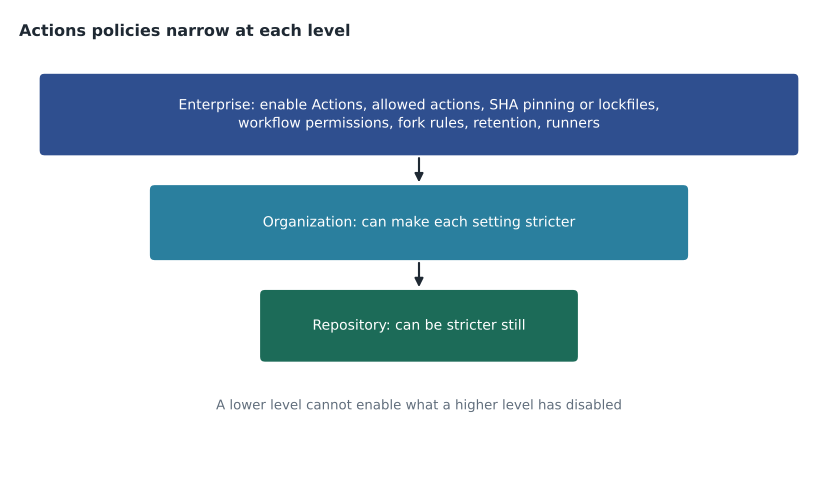
Actions policies exist at three levels. Enterprise policies apply to every organization and can be enforced. Organization policies apply to the organization's repositories within whatever room the enterprise leaves. Repository settings apply to one repository within whatever room the organization leaves. The general rule is that a lower level can be stricter but never looser: an organization can disable a capability the enterprise allows, but it cannot enable one the enterprise has disabled.
Enabling Actions
The first enterprise policy decides whether Actions runs at all. Enterprise owners can enable Actions for all organizations, enable it for specific organizations, or disable it everywhere. Skerry enabled it for all three organizations in the main enterprise. In the separate skerry-oss enterprise, Actions was enabled too, but with the stricter fork settings described below, because public repositories accept workflows from strangers.
Allowed actions and reusable workflows
The heart of the policy is the list of allowed actions and reusable workflows. The enterprise setting has three main choices.
| Option | What may run | Typical use |
|---|---|---|
| Allow all actions and reusable workflows | Anything, from anywhere | Small teams; not recommended for regulated enterprises |
| Allow enterprise actions and reusable workflows only | Actions in the enterprise's own repositories; this blocks even GitHub's own actions such as actions/checkout | Very locked-down environments that mirror every action internally |
| Allow enterprise, and select non-enterprise, actions and reusable workflows | The enterprise's own actions plus chosen outside ones | Most enterprises |
The third option has sub-options. Owners can allow actions created by GitHub, meaning those in the actions and github organizations. They can allow Marketplace actions by verified creators, publishers GitHub has verified. And they can list specific actions and reusable workflows by pattern, using an asterisk as a wildcard and commas between patterns. A pattern can name an owner and every action it publishes, a single action at any version, or a single action at a specific version or commit.
Since August 2025 the patterns can also block actions. A pattern starting with an exclamation mark blocks what it matches, even if another pattern would allow it. That made it possible for Skerry to allow a vendor's whole organization while blocking one action from it with a known problem. Local actions, referenced with a path such as ./.github/actions/setup, are never restricted by these policies, because they are code in the repository itself.
# Patterns for allowed actions and reusable workflows (one per line here; the setting takes a comma-separated list)
actions/*,
github/*,
aws-actions/configure-aws-credentials@*,
azure/login@*,
docker/build-push-action@*,
skerry/shared-workflows/.github/workflows/*@*,
!some-vendor/legacy-deploy-action@*
Pinning to a commit
A tag such as v4 is a moving label. The author of an action can point it at new code whenever they like, which is convenient for updates and dangerous if the author's account is compromised. Pinning a workflow to a full-length commit SHA means it runs exactly the code that was reviewed. In August 2025 GitHub added a policy setting that requires actions to be pinned to a full-length commit SHA, available at enterprise, organization and repository level. When it is on, a workflow that references an action by tag fails to run. The requirement applies to actions; reusable workflows can still be referenced by tag.
Pinning has two practical costs. Workflows become harder to read, because a 40-character hash says nothing about which version it is. And pinning a direct action does not pin the actions it calls in turn, such as the steps inside a composite action. In October 2026 GitHub released Actions lockfiles to address both. A lockfile, kept at .github/workflows/actions.lock, records the exact commit of every action a workflow uses, including transitive dependencies, while the workflow itself keeps readable tags. The runner executes the locked commits even if a tag later moves. Lockfiles reached general availability on October 28, 2026, with a require lockfile policy that administrators can enable at enterprise, organization or repository level. Locked dependencies satisfy the SHA-pinning requirement, and they are matched against the allowlist by commit, so allowlist entries pinned to a tag do not match them.
| Approach | What is fixed | Readability | Transitive dependencies |
|---|---|---|---|
| Tag reference (v4) | Nothing; the tag can move | Good | Not fixed |
| Full commit SHA | The direct action | Poor | Not fixed |
| Lockfile | Every action in the workflow, direct and transitive | Good | Fixed |
A lockfile guarantees which commits run, not that those commits are safe. Skerry's rule was that a new action, or a major version change, needed a review by the build infrastructure team before the lockfile could be updated, and Dependabot pull requests that bumped an action had to be approved by a code owner.
Worked problem
Choosing a pinning policy
Skerry wants every workflow in skerry-stores to run only reviewed action code, including the actions that composite actions call internally, without making workflows unreadable. Which policy should it require?
Show solution
- Tags alone fix nothing.
- Requiring SHA pinning fixes direct actions but not transitive ones, and makes workflows hard to read.
- A lockfile records direct and transitive commits and keeps tags readable.
- Require lockfiles in skerry-stores, and keep SHA pinning as an option for repositories that cannot adopt lockfiles yet.
Answer: Require lockfiles for skerry-stores; they fix transitive dependencies and keep workflows readable.
Workflow permissions
Every workflow run receives an automatic GITHUB_TOKEN, a short-lived token that lets it act on its own repository. The default permissions of that token are a policy decision. For enterprises and organizations created on or after February 2, 2023, the default is read-only access to repository contents and packages. Older ones may still default to read and write, which Skerry's 2019 enterprise did. Workflows can always ask for more permissions in a permissions block, but starting from read-only means a workflow gets write access only where its author asked for it.
A separate setting decides whether workflows may create and approve pull requests. It is off by default. Leaving it off stops a workflow from approving its own changes, which would defeat the review rules from lesson 2.
name: build
on:
  pull_request:
permissions:
  contents: read
  checks: write
jobs:
  test:
    runs-on: ubuntu-latest
    steps:
      - uses: actions/checkout@v5
      - run: make test
Workflows from forks
A pull request from a fork brings code from someone who may not be trusted. Actions treats such workflows carefully, and administrators can make it stricter.
For public repositories, the settings decide which fork contributors need approval before their workflows run: first-time contributors who are new to GitHub, all first-time contributors, or all outside collaborators. Skerry chose the strictest option in skerry-oss: every outside collaborator's workflow waited for a maintainer's approval.
For private and internal repositories, the settings decide whether workflows from fork pull requests run at all and, if they do, whether they receive write tokens or secrets. By default a fork's workflow gets a read-only token and no secrets. Organizations can turn an enterprise-enabled setting off for their own repositories but cannot turn on one the enterprise has disabled.
One trigger needs special mention. Workflows triggered by pull_request_target run in the context of the base repository, with access to its secrets, even when the pull request comes from a fork. Used carelessly, for example by checking out and running the fork's code, it lets a stranger steal secrets. GitHub responded in stages during 2026. In June it changed the checkout action's defaults for this trigger. In September it made workflow execution protections generally available: rules, set at enterprise, organization or repository level, that decide which actors and which events may start workflows, optionally for specific workflow files, with an evaluate mode and insights. And it announced that from December 2, 2026, pull_request_target would be blocked by default in public repositories on GitHub.com unless an event policy explicitly allows it, after brownouts on November 9 and November 16. Private and internal repositories and GitHub Enterprise Server are not affected by that default.
| Date | Change | Who it affects |
|---|---|---|
| February 2, 2023 | New enterprises and organizations default to a read-only GITHUB_TOKEN | New accounts |
| August 15, 2025 | Allowed-actions patterns can block actions; SHA pinning can be required | Administrators who opt in |
| September 17, 2026 | Workflow execution protections generally available | Administrators who opt in |
| October 28, 2026 | Actions lockfiles and the require-lockfile policy generally available | Administrators who opt in |
| December 2, 2026 | pull_request_target blocked by default in public repositories without an allowing event policy | Public repositories on GitHub.com |
Skerry's skerry-oss enterprise used pull_request_target in one workflow, which labeled incoming pull requests. Yevgenia used the insights view in October to confirm it was the only one, and wrote an event policy that allowed the trigger for that single workflow file. Every other workflow in the two public repositories was left under the default block.
Retention
Actions keeps run logs and artifacts for a period that administrators can set. The default is 90 days. Public repositories can keep them between 1 and 90 days, and private and internal repositories between 1 and 400 days. Caches have their own retention and size limits. Since October 1, 2026, the configured retention also applies to checks, workflow runs and commit statuses, which previously were kept for 400 days or more regardless. Skerry kept 90 days generally and 400 days in skerry-stores, where release evidence had to survive an annual audit.
Worked problem
A retention question
An auditor asks to see the build logs for a point-of-sale release made 13 months ago. Skerry-stores keeps logs for 400 days. Are they still available?
Show solution
- Thirteen months is about 395 days.
- The retention period is 400 days.
- 395 is less than 400, so the logs should still exist, though only just.
- For evidence that must outlive retention, export it as part of the release.
Answer: Yes, just; but the team also attaches build evidence to each release so that it does not depend on log retention.
Governing reusable workflows
Allowing actions is only half the picture. Skerry wanted most teams to stop writing their own deployment logic altogether and use shared, reviewed reusable workflows from a central repository, skerry/shared-workflows. The allowlist permitted them, the required-workflow rule from lesson 2 made the security workflow mandatory in confidential repositories, and code owners on the shared repository meant every change was reviewed by build infrastructure and security.
Yevgenia's last slide showed the effect. After the policy rollout, the 1,140 distinct actions in the old estate became 96 allowed patterns in the new enterprise. Of the 300 actions from unknown individual accounts, 41 were still needed; the build infrastructure team forked or rewrote them into the enterprise, where they could be reviewed and maintained.
Who maintains the allowlist
An allowlist is only as good as the process behind it. Skerry put the allowed-actions patterns in a file in the governance repository, described in lesson 12, so that adding an action was a pull request. The pull request template asked four questions: who publishes the action, what permissions and secrets it needs, whether a GitHub-created or existing allowed action already does the job, and which team will own updates. Build infrastructure reviewed the answers and security reviewed any action that would receive cloud credentials. Most requests were approved within a day; the process mattered less for its gatekeeping than for making someone look at the action before thousands of workflows trusted it.
Common mistakes
MistakeChoosing enterprise actions only and expecting actions/checkout to keep working.
InsteadThat option blocks GitHub's own actions too; allow GitHub-created actions explicitly if needed.
MistakeRelying on tags for third-party actions.
InsteadRequire SHA pinning or, better, lockfiles, and review changes.
MistakeLeaving an older enterprise's read and write GITHUB_TOKEN default in place.
InsteadSet the default to read-only and let workflows request more.
MistakeChecking out fork code in a pull_request_target workflow.
InsteadAvoid running untrusted code with base-repository secrets; allow the trigger only for specific workflows.
Summary and key terms
- Actions policies apply at enterprise, organization and repository level; lower levels may be stricter but not looser.
- Allowed-actions policies can permit GitHub-created, verified-creator and listed actions, and since August 2025 can block patterns.
- SHA pinning can be required; lockfiles, generally available since October 28, 2026, pin direct and transitive actions while keeping tags readable.
- GITHUB_TOKEN defaults to read-only for accounts created on or after February 2, 2023; workflows request more only where needed.
- Fork settings control approvals, tokens and secrets; workflow execution protections and the December 2, 2026 pull_request_target default address a common attack.
- Retention for logs and artifacts defaults to 90 days and can be up to 400 days for private repositories.
- Allowed actions policy
- A setting that decides which actions and reusable workflows may run.
- SHA pinning
- Referencing an action by its full commit hash so that the exact reviewed code runs.
- Actions lockfile
- A file that records the exact commits of every action a workflow uses, including transitive ones.
- GITHUB_TOKEN
- The automatic, short-lived token each workflow run receives for its repository.
- pull_request_target
- A trigger that runs workflows in the base repository's context, with its secrets, for pull requests from forks.
- Workflow execution protections
- Rules that control which actors and events may start workflows.
- Reusable workflow
- A workflow that other workflows call, often kept in a central repository.
Practice problems
Work each problem on paper first, then reveal the answer to check.
Can an organization enable an Actions capability that the enterprise has disabled?
Show answer
No; lower levels can only be stricter.
What does a lockfile fix that SHA pinning does not?
Show answer
The commits of transitive dependencies, such as actions inside composite actions.
What changes on December 2, 2026?
Show answer
pull_request_target is blocked by default in public repositories on GitHub.com unless an event policy allows it.
Lesson quiz · 5 questions
Score 60% or more to complete this lesson.
Create a free account to save your progress, take quizzes and earn a certificate.