
MSBA-270 · Lesson 7 of 12 · 19 min
Security for developers
▶ Video coming soon A video version of this lesson is on the way.
Dr. Philippa Ondaatje-Ruiz, Lumenvale's privacy officer, attended one developer session a term, and she chose the one on security. She came with three questions she asked about every new piece of code. Who can run it? What data can it reach, and as whom? And where do its secrets and logs go? Signe said those three questions were most of the subject. Dataverse has a strong security model, but code can step around it if the developer is careless, and the developer is responsible for making sure it does not.
The security model code runs inside
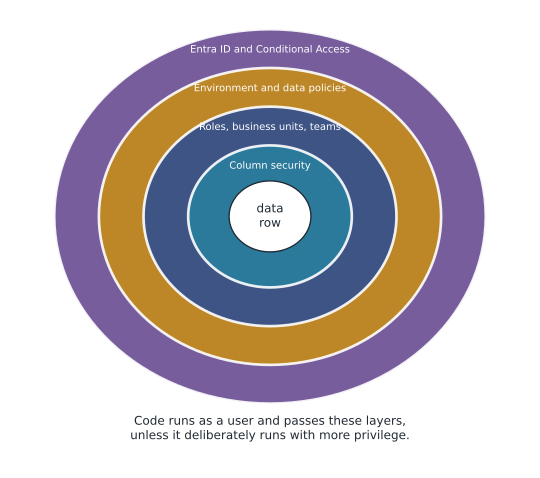
Dataverse security is built from security roles, which grant privileges such as Create, Read, Write and Delete on each table at a depth (user, business unit, parent and child business units, or organization); business units, which divide data by part of the organization; teams, including Microsoft Entra group teams, which give roles to groups of people; record sharing for exceptions; column security for sensitive columns; and, in some environments, hierarchy security. MSBA-250 covers these in detail. The developer's question is how code interacts with them.
Who code runs as
A plug-in runs in the context of a user. By default a step runs as the calling user, the person or application whose request triggered it, so the plug-in can read and change only what that user could. A step can instead be registered to run as a specific user, and inside the code a developer can create an organization service for a chosen user ID or, by passing no user, for the SYSTEM user, which bypasses the caller's security. Running with elevated privilege is sometimes necessary, for example to update a counter on a table the caller cannot write to, but it must be deliberate, narrow and documented. A plug-in that elevates and then returns data to the caller can leak information the caller was never meant to see.
var factory = (IOrganizationServiceFactory)serviceProvider.GetService(typeof(IOrganizationServiceFactory));

// Runs with the calling user's privileges (the safe default)
IOrganizationService asCaller = factory.CreateOrganizationService(context.UserId);

// Runs as SYSTEM: bypasses the caller's security. Use only for a narrow, documented purpose.
IOrganizationService asSystem = factory.CreateOrganizationService(null);
The context offers two user IDs. InitiatingUserId is the user who started the operation, and UserId is the user the plug-in is running as, which differs when the step is registered to run as someone else. Code that writes audit information or checks the caller's role should use the right one. Philippa asked the team to list every place in their code that used SYSTEM, with the reason, in the technical design document. There were two.
Who can run custom APIs
A custom API is a new message, and like any message it can be called by any user who can reach the API unless it is protected. When defining a custom API a developer can set an execute privilege name, a custom privilege that a security role must grant before a user can call it. Lumenvale's Calculate Transcript Fee API was harmless to call, but a second API the team designed, Waive Transcript Fee, was not; it was given its own privilege, granted only to the Transcript Officer role. A custom API can also be marked as private, which hides it from the metadata that tools use to discover messages, and as a function or action, which controls whether it can change data.
Application users and service principals
Integrations and pipelines should not sign in as people. Instead an app registration in Microsoft Entra ID is created, and an application user linked to it is added to the environment with the security roles it needs, and no more. The application authenticates with a certificate or a client secret, or, better, with a federated credential or managed identity where the calling service supports it, so there is no secret to store. The alarm feed's Azure Function was designed this way: it would use its managed identity to obtain tokens, and the matching application user in the Facilities environments would have a custom role with Create on the alarm table, Create on work orders through the custom API and nothing else.
Plug-ins themselves sometimes need to call Azure services, such as Key Vault or a storage account. Dataverse supports managed identity for plug-ins: a plug-in assembly or package is associated with a managed identity record linked to an Entra app registration with a federated credential, so the plug-in can request tokens for Azure resources without any secret in code or configuration. AB-400 lists configuring managed identity among the plug-in skills.
| Authentication option | Secret to manage? | Typical use |
|---|---|---|
| Client secret | Yes, expires and must be rotated | Quick integrations; least preferred |
| Certificate | Yes, a certificate to store and renew | Integrations and pipelines |
| Federated credential (workload identity federation) | No long-lived secret | GitHub Actions and Azure DevOps pipelines |
| Managed identity | No secret | Azure Functions, other Azure services, Dataverse plug-ins |
Secrets and configuration
Secrets never belong in code, solution files or plain environment variables. Power Platform supports environment variables of the secret type, which store a reference to a secret in Azure Key Vault rather than the value itself. Flows and plug-ins can read the secret at run time, subject to permissions, and the solution can move between environments with each environment pointing at its own vault. Connection details for connectors are held in connection references, so a flow in a solution uses whatever connection each environment provides, and nobody's personal connection travels with the solution.
// Solution component (not executable): an environment variable of type Secret
Display name:   BMS Alarm Feed API Key
Schema name:    lcc_BmsAlarmFeedApiKey
Type:           Secret (Azure Key Vault)
Value (test):   /subscriptions/<sub>/resourceGroups/rg-facilities-test/providers/
                Microsoft.KeyVault/vaults/kv-facilities-test/secrets/bms-api-key
Value (prod):   set in production, never in the solution
Data in code: logs, traces and errors
Philippa's third question was about logs. Trace messages written by plug-ins are stored in the plug-in trace log, and telemetry sent to Application Insights is stored in Azure. Both can be read by more people than the data itself. The team's rule was that traces and telemetry contain identifiers and outcomes, never personal data such as names, dates of birth, health details or student numbers. Error messages shown to users follow the same rule: "This request cannot be completed because the student has a registrar hold" is fine; an error that echoes the hold reason and the student's full record is not. Column security does not apply to what code writes into a trace.
Securing client-side code and code apps
Client scripts and component framework controls run in the user's browser with the user's permissions. They cannot grant more access than the user has, but they can display data carelessly or call external services. Code that calls external endpoints from the browser should use only approved services. Code apps add a Content Security Policy, which controls which sources a code app may load scripts, styles and data from, and administrators can set it per environment. Developers should keep it strict, listing only the origins the app needs. Input from users should always be validated on the server as well as in the browser, because anything in the browser can be changed by a determined user.
Governance controls that affect developers
Administrators set controls that developer code must live within. Data policies classify connectors as business, non-business or blocked and stop flows and apps from combining business and non-business connectors; custom connectors must be classified too. Tenant isolation restricts connections to other Microsoft Entra tenants. Environment security groups limit who can access an environment. A developer who builds a custom connector for an external service should expect it to be reviewed and classified before makers can use it in production.
Worked problem
Reviewing a plug-in for least privilege
A draft plug-in on Create of a transcript request runs as SYSTEM, reads the student's contact record including date of birth and hold reason, writes both to the trace log, and sets a column showing the hold reason on the request so advisers can see it. Advisers are not allowed to see hold reasons. What should change?
Show solution
- Running as SYSTEM lets the plug-in read hold reasons that the caller cannot see, and then exposes them on the request: an information leak.
- If the plug-in only needs to know whether a hold exists, it can check that as SYSTEM but return only a yes or no, not the reason.
- The trace must not contain the date of birth or hold reason; it should log the request ID and the outcome.
- The column showing the hold reason should be removed, or secured with column security so only Transcript Officers can read it.
Answer: Elevate only to check that a hold exists, expose only a yes or no to advisers, keep personal data out of traces and secure any sensitive column.
Securing custom connectors
Custom connectors are a common way for developers to bring an external API into Power Platform, and they need their own security design. The connector definition declares how callers authenticate to the API: no authentication, an API key, basic authentication, or OAuth 2.0, including Microsoft Entra ID for APIs the organization hosts. OAuth 2.0 with Entra ID is the strongest choice for internal APIs, because each user signs in with their own identity and the API can apply that user's permissions. When a connector uses a shared API key, every maker who creates a connection with that key acts with the same rights, so the key must be limited on the API side. The Student Records connector that Signe built used Entra ID, so the registrar system knew which adviser was asking about a hold.
Connectors can also include a small amount of custom code, written in C#, that transforms requests and responses. That code runs in the connector runtime with tight limits on time and capability, and it should do only light work, such as reshaping a response. It must not contain secrets. Once built, a connector is shared with makers and classified in the data policies before it can be used in production environments.
Developers and defensive testing
Security also belongs in testing. The integration tests for a custom API include a call as a user without the execute privilege, expecting a refusal. The tests for a plug-in that elevates include a check that the returned data contains only what the caller may see. Solution checker flags some insecure patterns in web resources and plug-ins, and code reviews look for the common problems in this lesson. None of this is exotic; it is the same care a developer takes in any system that holds people's records, applied to the places where code meets Dataverse security.
| Component | Security check before release |
|---|---|
| Plug-in | Runs as the calling user, or elevation is documented; no personal data in traces |
| Custom API | Execute privilege set if the operation is sensitive; tested with an unprivileged user |
| Custom connector | Strongest available authentication; classified in data policies |
| Client script or control | Calls only approved endpoints; no secrets in code |
| Code app | Content Security Policy lists only needed origins; Premium licenses confirmed |
| Integration | Application user with least privilege; managed identity or federated credential |
Privacy by design
Philippa's last point was that the best way to protect personal data in code is not to touch it. Plug-ins and integrations should read only the columns they need, which is also a performance rule. Integrations should send other systems only the fields those systems require. Test data should be synthetic. When a developer needs to investigate a problem with real data, the investigation should happen in production under the normal access rules, not by copying records to a developer environment. These habits mean that most of the college's code never handles anything sensitive at all, and the review questions about elevated privilege and logging have short answers.
Common mistakes
MistakeRunning every plug-in as SYSTEM to avoid permission errors.
InsteadRun as the calling user by default; elevate narrowly and document why.
MistakeStoring API keys in plug-in code or plain environment variables.
InsteadUse secret environment variables backed by Azure Key Vault, or managed identity.
MistakeWriting personal data to trace logs or telemetry.
InsteadLog identifiers and outcomes only.
MistakeLeaving a sensitive custom API callable by everyone.
InsteadSet an execute privilege name and grant it only to the roles that need it.
At the end of the session Philippa added two items to the college's privacy review form for new solutions: "List any code that runs with elevated privilege" and "Confirm logs and telemetry contain no personal information". Signe said it was the first time a form had made her job easier.
Summary and key terms
- Code runs inside Dataverse security: roles, business units, teams, sharing, column security and hierarchy security.
- Plug-ins run as the calling user by default; running as SYSTEM bypasses security and must be narrow and documented.
- Custom APIs can require an execute privilege so only some roles may call them.
- Integrations use application users linked to Entra app registrations, preferably with managed identity or federated credentials; plug-ins can use managed identity for Azure resources.
- Secrets belong in Azure Key Vault through secret environment variables; logs and errors must not contain personal data; data policies and other governance controls apply to developer components.
- Calling user
- The user or application whose request triggered a plug-in, and whose privileges apply by default.
- Application user
- A Dataverse user linked to a Microsoft Entra app registration, used by integrations and services.
- Managed identity
- An identity managed by Azure that lets a service obtain tokens without storing secrets.
- Execute privilege name
- A custom privilege a user must hold to call a protected custom API.
- Secret environment variable
- An environment variable that stores a reference to a secret in Azure Key Vault.
Practice problems
Work each problem on paper first, then reveal the answer to check.
What is the risk of a plug-in that runs as SYSTEM and returns data to the caller?
Show answer
It can expose data the caller is not allowed to see, bypassing security roles and column security.
How can a custom API be limited to certain roles?
Show answer
By setting an execute privilege name and granting that privilege only to those roles.
Where should an integration's API key be stored?
Show answer
In Azure Key Vault, referenced by a secret environment variable, or avoided altogether with managed identity.
Lesson quiz · 5 questions
Score 60% or more to complete this lesson.
Create a free account to save your progress, take quizzes and earn a certificate.