
MSBA-270 · Lesson 11 of 12 · 19 min
Technical design documents
▶ Video coming soon A video version of this lesson is on the way.
In the second-to-last session Rupert brought an old binder. It held the design for the college's previous room booking system, written in 2014 by a contractor nobody remembered. It was 140 pages long, described screens that no longer existed and said nothing at all about the nightly script that had actually kept the system running until it was retired. "This is what I do not want," he said. What he wanted was a document that a new developer could read in an hour and understand what had been built, why, and what would break if they changed it. Signe called that a technical design document, and she had a template.
Why write a technical design
A technical design document (TDD) describes how a solution will be built to meet its requirements. It sits between the functional design, which says what the business needs, and the code and configuration themselves. For a Power Platform solution it records the decisions this course has covered: which components, where the logic lives, which table types, how security works, how the solution moves through ALM and how it is tested and monitored. It serves several readers: reviewers who must approve the design before building, developers and makers who build it, administrators who run it, and future developers who change it.
The document is most valuable before the build, when changing a decision costs a conversation rather than a rewrite, and after the build, when someone needs to understand it. Its worst failure is to be written once and never updated, like Rupert's binder. Lumenvale's answer was to keep the TDD as Markdown files in the solution's repository, next to the code, so that a pull request that changed the design also changed the document.
What a Power Platform TDD contains
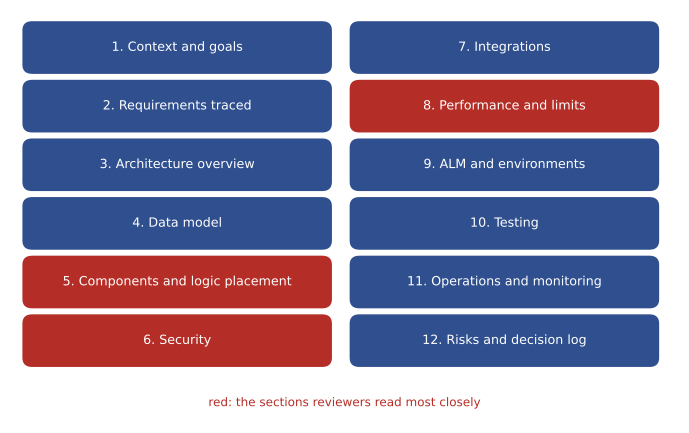
| Section | Contains | Example from the facilities solution |
|---|---|---|
| Context and goals | Problem, scope, out of scope | Work orders for three campuses; contractor invoices out of scope |
| Requirements traced | Each requirement and the component that meets it | R7 "safety jobs need a photo" met by plug-in P1 |
| Architecture overview | One diagram of components and connections | Apps, Dataverse, flows, agent, connectors |
| Data model | Tables, types, relationships, key columns | Work Order (standard), Alarm Event (elastic) |
| Components and logic placement | Each component and why it is configuration or code | Business rule for defaults; plug-in for safety rule |
| Security | Roles, teams, column security, elevated code, application users | Two SYSTEM uses, with reasons |
| Integrations | Systems, direction, volume, authentication, failure handling | Building management system via Service Bus (planned) |
| Performance and limits | Expected volumes and how limits are respected | Peak 3,600 alarms an hour; batching and back-off |
| ALM and environments | Solutions, layers, pipelines, settings | Core and Facilities solutions; deployment settings |
| Testing | Test layers and key cases | Unit, integration, Playwright, UAT scenarios |
| Operations and monitoring | Telemetry, alerts, support, runbooks | Application Insights alerts on plug-in failures |
| Risks and decisions | Open risks, decisions with dates and reasons | Decision D4: elastic table for alarms |
Tracing requirements
A table that links each requirement to the components that meet it, and to the tests that prove it, is one of the most useful parts of a TDD. It shows reviewers that nothing has been missed, shows testers what to test and shows future developers why a component exists. Lumenvale used short identifiers, R for requirements, C for components, T for tests, so the table stayed small enough to keep current.
| Requirement | Component | Test |
|---|---|---|
| R7 Safety jobs need a photo before completion, in any app | P1 BlockSafetyCloseWithoutPhoto (PreOperation, Update) | T3-unit, T11-integration, T14-UI |
| R9 Dispatchers see the room on a floor plan | C4 RoomPicker component control | T15-UI, UAT-6 |
| R12 Alarms older than 30 days are removed | Alarm Event elastic table with time to live | T17-integration |
| R15 Transcript fee is correct at save in every app | P2 fee plug-in and API A1 Calculate Transcript Fee | T20-unit, T21-integration |
Recording decisions
Designs are full of choices that look obvious once made and mysterious a year later. Why an elastic table? Why a custom API rather than a flow? Why does one plug-in run as SYSTEM? A decision log, sometimes kept as short architecture decision records, captures each choice with its date, the options considered, the decision and the reason. When circumstances change, such as a new platform feature, the team can revisit a decision knowing why it was made. Signe's rule was that any decision a reviewer questioned went into the log.
## D4: Store raw building alarms in an elastic table
Date: 2026-11-12
Status: Accepted (for the planned building management integration)
Context: The alarm feed can send several thousand alarms an hour during power events; most are repeats.
Options: (a) standard table; (b) elastic table with time to live; (c) keep alarms only in Azure.
Decision: (b). Raw alarms go to lcc_alarmevent (elastic, 30-day expiry); only qualifying alarms create work orders.
Reasons: volume and bulk writes suit elastic tables; 30-day history supports pattern analysis in Dataverse.
Consequences: no cross-row transactions on alarms; reports use the summarizing function's output.
Diagrams
One clear architecture diagram is worth more than many detailed ones. It should show the main components, the data stores, the external systems and the direction of each connection, with authentication noted on connections that cross a boundary. Sequence diagrams help for important flows, such as "technician completes a safety job", showing which component does what in what order. Diagrams should be kept as source files in the repository, in a format the team can edit, so they change with the design.
Non-functional requirements
Business requirements describe what the solution does. Non-functional requirements describe how well: response times, volumes, availability, data location, accessibility, privacy, support hours and recovery. They are often missing from requests and must be asked for. For the facilities solution the team recorded that saving a work order should take under two seconds, that the solution should handle 300 work orders a month growing to 1,000, that data stays in the Canada region, that apps meet the college's accessibility standard and that a failure in the planned alarm integration must not block manual work orders. Each of these drove design choices in earlier lessons.
Reviewing a design
Lumenvale's design review was a one-hour meeting with the developer, a second developer, Rupert for governance and, where personal data was involved, Philippa for privacy. Reviewers read sections 5, 6 and 8 first, because logic placement, security and limits were where most problems hid. The review produced a short list of required changes and the decision to proceed. The same questions appear throughout AB-400's design objectives, so writing and reviewing designs is also good exam preparation.
| Reviewer question | Where the answer should be |
|---|---|
| Could this be configuration instead of code? | Components and logic placement |
| Which code runs with elevated privilege, and why? | Security |
| What happens at peak volume? | Performance and limits |
| How is it deployed and configured per environment? | ALM and environments |
| How will we know it is failing? | Operations and monitoring |
| What did we decide not to do? | Context and decision log |
Worked problem
Finding the gap in a draft design
A draft TDD for the athletics equipment-loan code app describes screens, the Equipment and Loan tables and a flow that emails overdue reminders. It says nothing about licenses, the Content Security Policy, or who maintains the code. What should the reviewers ask for?
Show solution
- Licensing: code app users need Power Apps Premium; how many users, and who pays?
- Security: what origins does the app load from, and what will the Content Security Policy allow?
- Ownership: the athletics department's developer writes the code; who supports it when they are away, and is the code in the college's repository?
- Operations: are errors sent to Application Insights, and who receives alerts?
Answer: The draft covered function but not licensing, security policy, ownership or operations. All four were added before approval.
Operations and support in the design
A design that ends at deployment is incomplete. The operations section answers questions that arrive after go-live: who supports the solution during college hours and outside them, how users report problems, which alerts exist and who receives them, how to rerun a failed job, how to roll back a bad release and how long data is kept. For Lumenvale, support for facilities solutions was the service desk first, then the CoE developers; alerts went to a shared mailbox and a Teams channel rather than to one person; and rollback meant reinstalling the previous managed solution version from the pipeline's artifacts. Writing this down before go-live meant the service desk had a page to read on the first day.
| Operations question | Facilities answer |
|---|---|
| Who supports it? | Service desk, then CoE developers |
| How do we know it is failing? | Application Insights alerts and flow failure notices to a shared channel |
| How do we roll back? | Reinstall the previous managed version from pipeline artifacts |
| How do we rerun a job? | The documented command or flow run, with a runbook |
| How long is data kept? | Work orders seven years; alarm events 30 days |
Estimating and planning from the design
A good design also makes estimating possible. Once each requirement is mapped to components, each component can be sized: configuration tasks in hours, a plug-in with tests in days, a component control in a week or more, integration work with an external vendor in weeks, with a margin for unknowns. Lumenvale estimated the preventive maintenance extension this way, component by component, and added the testing and documentation effort that teams often forget. The estimate went to Octavia with the design, so the decision to fund the work was based on the same document the developers would build from.
Keeping the document short
Rupert's binder failed partly because it was long. A technical design should be as short as it can be while still answering the reviewers' questions. Diagrams replace pages of description; tables replace paragraphs of lists; links to Microsoft documentation replace copied explanations of how the platform works. Anything that would be out of date within a month, such as screen-by-screen descriptions of a canvas app under active development, does not belong. Signe's target for a medium-sized solution was ten to fifteen pages, read in under an hour.
Templates and consistency
Using the same template for every solution made designs faster to write and faster to review, because reviewers knew where to look. The template was a Markdown file with the twelve section headings, a short prompt under each describing what belonged there, and placeholders for the architecture diagram and traceability table. A new solution copied it into its docs folder at the start. Sections that did not apply, such as Integrations for a solution with none, were kept with the single line "None", so a reviewer could see the question had been considered rather than forgotten. Over the fall, Lumenvale wrote five designs with the template, and the review meetings shortened from ninety minutes to about an hour.
| Template element | Purpose |
|---|---|
| Fixed section headings | Reviewers know where to find each answer |
| Prompt under each heading | Authors know what to write |
| Placeholders for diagram and traceability table | Ensures both exist |
| "None" for sections that do not apply | Shows the question was considered |
Who writes the design
At Lumenvale the developer who would lead the build wrote the technical design, with help from the maker or champion who knew the process and the business owner who approved the requirements. Writing it was itself a test of understanding: when Wiremu could not fill in the operations section for preventive maintenance, it showed that nobody had yet decided who would watch the nightly job. Gaps found while writing are the cheapest gaps of all.
Reviewing designs after go-live
A design is also worth revisiting a few months after release. Signe scheduled a short review for each solution after its first term in production, comparing actual volumes, performance and support calls with the design's assumptions. Where the numbers differed, the document was updated and, if needed, a decision was revisited. The facilities solution's first such review was planned for the end of the winter term.
Common mistakes
MistakeWriting the design after the build.
InsteadWrite it before building, when decisions are cheap to change, and update it with the code.
MistakeKeeping the design in a document nobody can find.
InsteadKeep it in the repository next to the solution files.
MistakeDescribing screens in detail and skipping integrations and limits.
InsteadSpend most words on logic placement, security, volumes and operations.
MistakeLeaving decisions unexplained.
InsteadRecord options, decisions and reasons in a decision log.
Rupert put the old binder back on the shelf. The facilities TDD, at that point, was eleven pages of Markdown and four diagrams, and Wiremu had already updated it twice that week.
Summary and key terms
- A technical design document records how a solution will be built: components, logic placement, data, security, integrations, limits, ALM, testing and operations.
- It is most useful before building and when changing the solution later, so it should live in the repository and change with the code.
- Traceability tables link requirements to components and tests; decision logs record choices and reasons.
- Non-functional requirements such as volume, response time, data location and accessibility drive many design choices and must be asked for.
- Design reviews focus on logic placement, security and limits, the same judgments AB-400 tests.
- Technical design document
- A document describing how a solution will be built to meet its requirements.
- Traceability table
- A table linking each requirement to the components that meet it and the tests that prove it.
- Decision log
- A record of design decisions with their context, options, choice and reasons.
- Non-functional requirement
- A requirement about how well a solution performs, such as speed, volume, availability or privacy.
- Architecture diagram
- A diagram of a solution's main components, data stores, external systems and connections.
Practice problems
Work each problem on paper first, then reveal the answer to check.
Why keep the technical design in the repository?
Show answer
So it changes with the code in the same pull requests and stays current and findable.
What three things does a traceability table connect?
Show answer
Requirements, the components that meet them and the tests that prove them.
Give two examples of non-functional requirements.
Show answer
Any two of: response time, volume, availability, data location, accessibility, privacy, support hours, recovery.
Lesson quiz · 5 questions
Score 60% or more to complete this lesson.
Create a free account to save your progress, take quizzes and earn a certificate.