
MSBA-270 · Lesson 12 of 12 · 19 min
Case study: extending a model-driven app
▶ Video coming soon A video version of this lesson is on the way.
The last session of the term was a working design review. The facilities team's next project, once the December deployment of work orders was done, was preventive maintenance: scheduled inspections and servicing of boilers, air handlers, fire doors and greenhouse heaters, so that jobs were planned rather than discovered when something failed. Octavia Brenner-Lau had approved it as the first project for the new year. Signe asked Wiremu to lead the technical design, with herself as second reviewer, Rupert for governance and Delphine as business owner, and to treat it as a rehearsal for the kind of scenario the AB-400 exam describes. This lesson follows that review. Everything in it is a design and a prototype in Wiremu Dev; nothing had been deployed when the term ended.
The brief
Delphine's requirements, gathered over two meetings, were short.
| ID | Requirement |
|---|---|
| R1 | Each asset, such as a boiler or fire door, has one or more maintenance plans with a frequency (for example every 30 days or every 6 months) and a checklist. |
| R2 | Work orders for due plans are created automatically, two weeks ahead, assigned to the right campus team. |
| R3 | A plan cannot be saved with a frequency that breaks the asset type's legal inspection interval where one exists, such as fire door checks. |
| R4 | Dispatchers see the asset's room on the floor plan inside the work order and plan forms. |
| R5 | The Contractor section of a plan appears only when the plan is marked as external. |
| R6 | Completing a preventive job records the checklist results and moves the plan's next due date. |
| R7 | Facilities managers see compliance: the share of plans completed on time, by campus and asset type. |
| R8 | Non-functional: up to about 2,500 plans; saves under two seconds; data stays in Canada; accessible apps. |
Step 1: data model and table types
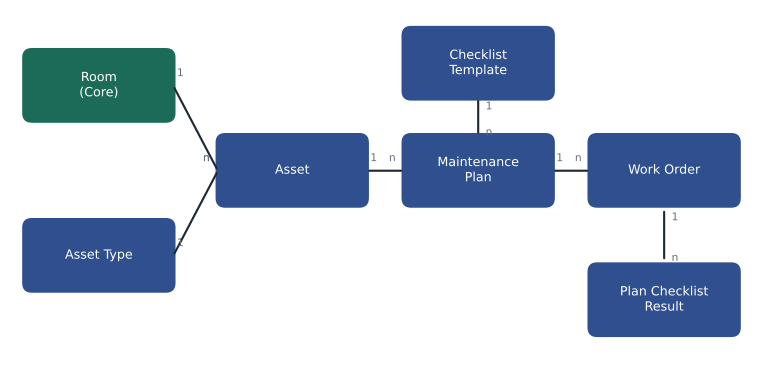
Wiremu proposed three new standard tables in the Facilities solution: Asset (linked to the existing Room table from Lumenvale Core, with an Asset Type lookup), Maintenance Plan (asset, frequency, next due date, checklist template, external flag, contractor) and Plan Checklist Result (one row per checklist item per job). The existing Work Order table gained a lookup to Maintenance Plan and a Job Source choice: Reactive, Preventive or Alarm. Asset Type held a Minimum Interval in Days column, filled in by Tobiah Rennart, the fire safety specialist, for asset types with legal minimums. Volumes were modest, a few thousand plans and tens of thousands of checklist results a year, so standard tables were right; nothing needed elastic tables.
Step 2: placing the logic
Each requirement was walked through the decision chart from lesson 5.
| Requirement | Placement | Reason |
|---|---|---|
| R1 plans and checklists | Configuration: tables, forms, views | Standard model-driven features |
| R2 create due work orders | Custom API "Generate Preventive Jobs" called by a scheduled cloud flow each night | Transactional, reusable, testable; the flow only schedules it |
| R3 minimum interval | PreOperation plug-in on Create and Update of Maintenance Plan, filtered on frequency and asset | Must hold for every caller, including imports; needs a lookup to Asset Type |
| R4 floor plan | RoomPicker component framework control on both forms | No standard control; reuse across forms |
| R5 contractor section | Client script on the plan form OnLoad and OnChange of the external flag | Business rules cannot hide sections |
| R6 complete and roll forward | PostOperation synchronous plug-in on Update of Work Order when status becomes Completed and Job Source is Preventive | Next due date must move in the same transaction as completion |
| R7 compliance | Power BI report on Dataverse, through Link to Microsoft Fabric | Analytics without custom export |
Signe challenged two choices. Why a custom API rather than letting the nightly flow create work orders directly? Wiremu's answers: the generation logic, finding plans due within fourteen days that have no open job, working out the campus team, creating the jobs, was complex enough to want unit tests; it should run in one place whether called by the nightly flow or by a dispatcher pressing a "Generate now" command for one asset; and a custom API can be protected with an execute privilege, granted only to the Facilities Manager role and the flow's application user. Why a synchronous plug-in for R6 rather than an asynchronous one? Because a dispatcher who completed a job and immediately opened the plan should see the new due date, and if rolling forward failed, completion should fail too rather than leave the plan stale.
Step 3: the plug-ins and the custom API
// Registration summary (design document excerpt)
P3  ValidateMinimumInterval
    Message: Create, Update   Table: lcc_maintenanceplan   Stage: PreOperation (20)   Mode: Sync
    Filtering (Update): lcc_frequencydays, lcc_asset
    Pre-image (Update): lcc_asset, lcc_frequencydays
    Reads: lcc_asset -> lcc_assettype -> lcc_minimumintervaldays (one query, two columns)
    Fails with: "Fire doors must be checked at least every N days; this plan's frequency is longer."

P4  RollForwardPlanOnCompletion
    Message: Update   Table: lcc_workorder   Stage: PostOperation (40)   Mode: Sync
    Filtering: lcc_status      Pre-image: lcc_jobsource, lcc_maintenanceplan, lcc_status
    Action: set lcc_nextduedate on the plan = completion date + frequency; runs as calling user

A2  lcc_GeneratePreventiveJobs (custom API, action)
    Inputs: AssetId (optional), DaysAhead (default 14)   Output: CreatedCount
    Execute privilege: prvlcc_GeneratePreventiveJobs (Facilities Manager, flow application user)
    Writes with CreateMultiple; idempotent (skips plans with an open preventive job)
Two details showed the earlier lessons at work. The interval rule was wrong in Wiremu's first draft: it rejected frequencies shorter than the interval, but a legal inspection interval is a maximum gap between checks, so a plan must not be longer than it. The excerpt above shows the corrected message. Tobiah caught the wording in review, and the rule's unit tests were rewritten around the correct comparison. And the custom API was designed to be idempotent: running it twice in a night must not create duplicate jobs, which mattered because flows can retry.
Step 4: the user experience
The RoomPicker control would be a component framework field control bound to the Room lookup, drawing the floor plan from an SVG stored per building and highlighting the room. Signe asked how it would behave without a floor plan for a building, on a phone, and for a keyboard or screen reader user. The design answers: show the room name as text when no plan exists; on narrow screens show a "View floor plan" link that opens a dialog; give the room highlight an accessible label and keep the control usable without a mouse. The contractor section script was ten lines, but it was still designed: it ran on OnLoad and on OnChange of the external flag, made no network calls, and was registered through the form's event handlers in the solution, not added by hand in production. MSBA-271 covers building both in detail.
// Contractor section toggle (JavaScript web resource, simplified)
function lcc_toggleContractorSection(executionContext) {
  const formContext = executionContext.getFormContext();
  const isExternal = formContext.getAttribute("lcc_isexternal").getValue() === true;
  formContext.ui.tabs.get("tab_general").sections.get("sec_contractor").setVisible(isExternal);
}
Step 5: security
The security section listed new privileges for the three tables in the existing Facilities roles: dispatchers create and update plans for their campus business unit, technicians read plans and create checklist results, Facilities Managers have organization-level read for compliance, and only Facilities Managers and the flow's application user hold the execute privilege for the generation API. Neither plug-in elevated to SYSTEM. P4 ran as the calling user, which meant technicians completing jobs needed Write on Maintenance Plan's next due date; rather than give technicians broad Write on plans, the design used column-level security on the other sensitive columns and granted Write at user level only through the team that owned the plan, which Rupert accepted. The application user for the flow had a custom role with exactly the privileges the API needed.
Step 6: performance, ALM and testing
Performance was straightforward at this volume, but the design still stated the numbers: up to 2,500 plans, roughly 100 jobs generated a night, created with CreateMultiple in one call; plug-ins filtered and using images; no external calls in synchronous steps. ALM followed lesson 8: components in the Facilities solution, Asset and Asset Type added only with the columns and forms the solution owned, a new environment variable for "days ahead", and the build pipeline extended to compile and test the new plug-ins and the control. The test plan followed lesson 9.
| Layer | Key cases |
|---|---|
| Unit | Interval rule for each asset type; roll-forward dates across month ends and leap years; generation skips plans with open jobs |
| Integration | P3 blocks a long fire-door frequency via the Web API; API refuses callers without the privilege; running the API twice creates no duplicates |
| UI (Playwright) | Dispatcher creates an external plan and sees the contractor section; completing a preventive job updates the plan |
| UAT | Delphine, Arlo and Tobiah run twelve scenarios on Lakeshore assets |
Step 7: operations
The last section asked how the team would know something had gone wrong. The nightly flow would post a summary to the facilities Teams channel with the count created, and alert Rupert's team if it failed or created zero jobs on a weekday. Plug-in exceptions and the generation API would send telemetry to Application Insights in the Canada region, without personal data, with an alert on any spike in failures. A short runbook described how to rerun generation for one asset with the "Generate now" command and how to read the plug-in trace log.
Worked problem
The review's required changes
At the end of the review, Signe, Rupert and Delphine agreed a list of required changes before building. Based on the discussion, what were they?
Show solution
- Correct R3's rule and message: a plan's frequency must not exceed the legal maximum interval; rename the column to Maximum Interval in Days.
- Make the generation API idempotent and say so in the design, with a test.
- Add the no-floor-plan and keyboard behavior to the RoomPicker design.
- Record decision D7, custom API rather than direct creation in the flow, with reasons.
- Confirm with Philippa that checklist results contain no personal data beyond the technician's user reference.
Answer: Five changes, none requiring a different architecture; the design was approved to build in January.
Reflecting on the design
After the review, Signe asked Wiremu to write a short reflection on how the design used each lesson of the term. He found that almost every earlier lesson had shaped at least one decision. Lesson 2's limits had pushed the job generation into one bulk call. Lesson 4's pipeline had decided the stages. Lesson 5's decision chart had placed each requirement. Lesson 7's security had removed an early idea to run the roll-forward plug-in as SYSTEM. Lesson 8 had decided how Asset and Asset Type would be added to the solution. Lesson 9 had shaped the test plan, and lesson 11 had given the review its structure. Only lesson 10 had played a smaller part, through the instructions file that steered Copilot when he drafted the plug-ins in his developer environment.
| Lesson | Where it showed up in the design |
|---|---|
| 2 Architecture and limits | Standard tables at this volume; bulk creation of jobs |
| 4 Event pipeline | PreOperation validation; synchronous PostOperation roll-forward |
| 5 Low-code or pro-code | Configuration first; custom API, plug-ins, control and script only where needed |
| 7 Security | No elevated code; execute privilege on the API |
| 8 Solutions and ALM | Only owned subcomponents added; new environment variable |
| 9 Testing | Unit, integration, Playwright and UAT layers |
| 11 Technical design | Traceability, decision D7 and the review itself |
Applying the method to the exam
AB-400's scenario questions often describe a business need like Delphine's and ask which component, stage, table type or security setting fits. The method in this case study answers most of them: identify whether the need is configuration, logic, user experience, integration or AI; decide whether it must apply to every caller and within the transaction; choose the component; then check security, limits and ALM. Practicing on real requirements, as Wiremu did, builds the habit of asking those questions in order, which is useful in the exam and far more useful at work.
Common mistakes
MistakeGenerating jobs directly in a flow with logic spread across actions.
InsteadPut complex, reusable logic in a tested custom API and let the flow schedule it.
MistakeUsing an asynchronous step where the user needs the result immediately.
InsteadUse a synchronous PostOperation step when the change must be visible and consistent at once.
MistakeDesigning a custom control only for a mouse on a large screen.
InsteadDesign for narrow screens, missing data and keyboard and screen reader use.
MistakeLeaving a generation process that can run twice without protection.
InsteadMake it idempotent so retries and reruns do not create duplicates.
Delphine had one question at the end: when would dispatchers see it? Wiremu answered carefully: build in January, test with Lakeshore in February, the other campuses after that, "if the tests agree". Signe booked her AB-400 exam for the same month. The design document went into the repository that afternoon.
Summary and key terms
- The capstone designs a preventive maintenance extension to the Facilities Hub model-driven app, from requirements to operations.
- Configuration handles tables, forms and views; a custom API, two plug-ins, a component control and a short client script handle what configuration cannot.
- Plug-ins are placed by stage and mode for correctness: validation in PreOperation, roll-forward in synchronous PostOperation.
- Security uses existing roles, an execute privilege on the API and no elevated code; operations include alerts, telemetry without personal data and a runbook.
- A design review found a wrong rule, a missing idempotency guarantee and gaps in accessibility before any code was written.
- Preventive maintenance
- Planned, scheduled maintenance carried out before equipment fails.
- Idempotent
- Able to run more than once with the same result as running once.
- Execute privilege
- A privilege required to call a protected custom API.
- Runbook
- A short guide for operating and recovering a system, such as rerunning a failed job.
- Design review
- A structured meeting where reviewers question a design and agree required changes before building.
Practice problems
Work each problem on paper first, then reveal the answer to check.
Why did the design use a custom API for job generation instead of creating jobs in the flow?
Show answer
The logic is complex and reusable, can be unit tested, can be protected with an execute privilege and can be called both nightly and on demand.
Why was the roll-forward plug-in synchronous?
Show answer
So the plan's next due date changes in the same transaction as completion and is visible immediately; if it fails, completion fails too.
What does idempotent mean for the generation API?
Show answer
Running it twice does not create duplicate work orders.
Lesson quiz · 5 questions
Score 60% or more to complete this lesson.
Create a free account to save your progress, take quizzes and earn a certificate.