
MSBA-263 · Lesson 10 of 12 · 18 min
Subscriptions and alerts
▶ Video coming soon A video version of this lesson is on the way.
Not every reader wants to open a report. Some want the numbers to come to them on a schedule; others want to hear only when something goes wrong. Power BI offers both: subscriptions send snapshots of reports and dashboards by email on a schedule, and alerts notify people when data crosses a threshold. The PL-300 study guide covers them as *configure subscriptions and data alerts*. In this lesson Kwabena sets up the Monday morning email the vice-president asked for and the alert that tells the student success team when tutoring no-shows spike.
Subscriptions
A subscription sends an email with an image of a report page or dashboard, a link back to the content and, optionally, an attachment. It is created from the Subscribe button on a report, dashboard or paginated report in the service, and listed afterwards on the person's subscriptions page and on the item's settings.
Each subscription has a few settings.
| Setting | What it controls |
|---|---|
| Recipients | Who receives the email: yourself, or other people and groups if you have permission |
| Content | For a report, which page appears in the email; for a dashboard, the dashboard |
| Attachment | Optionally the full report as PDF or PowerPoint, or the paginated report in a chosen format |
| Frequency | When the email is sent: after a data refresh, daily, weekly, monthly or at chosen times |
| Start and end dates | When the subscription begins and stops |
| Filters | Whether the email uses the report's current filters and slicers or the defaults |
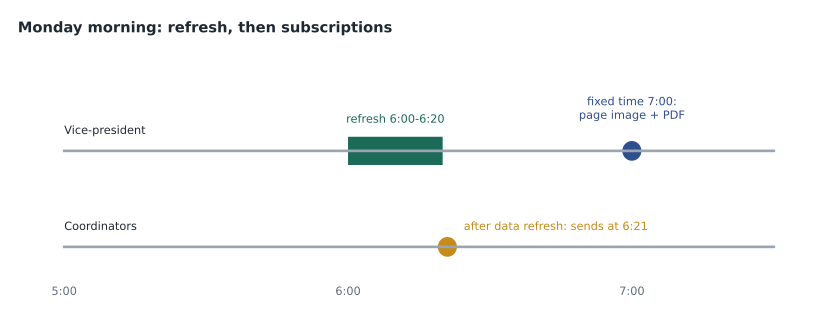
Dr. Okwuosa-Bell wanted the Student Success overview page in her inbox at 7:00 a.m. every Monday, with the full report attached as a PDF to read on her way to the council meeting. Kwabena created the subscription for her, chose the Overview page, attached the full report as PDF and set it to weekly on Monday at 7:00 a.m., after the 6:00 a.m. refresh had time to finish. He added the subscription to the team's release notes and showed Ilsabet where to find it, because a subscription belongs to the person who created it and stops if that person loses access.
Who can subscribe whom
Creating subscriptions for yourself needs only access to the content. Creating subscriptions for other people has more conditions. The creator needs permission on the content, usually a workspace role of Contributor or above, and recipients must have access to the content themselves, because the link in the email opens the report with their own permissions. Licensing matters too: in a Pro workspace, the creator and recipients need Pro licenses, while content on a capacity has more flexible rules, which Microsoft documents. Microsoft also documents limitations for subscribing other people to reports that use row-level security, so Lumenvale asked each dean to create their own subscription to the Student Success report, which then showed their own campus.
For content on a capacity, dynamic per-recipient subscriptions can send each recipient a version of a report filtered for them, based on a table that lists recipients and their filter values. They suit cases such as sending each campus coordinator their own campus's page, and they are configured from the subscription dialog by connecting to the recipient table. Kwabena tested one for the coordinators and planned to use it after the winter term.
Subscriptions and refresh
A subscription set to send after data refresh waits for the semantic model's scheduled refresh and sends once it completes, so readers never receive stale numbers; Microsoft limits how often this can happen in a day. A subscription on a fixed schedule sends whatever the data is at that time. Kwabena used the after-refresh option for the coordinators' daily tutoring email and a fixed time for the vice-president's Monday email, where the arrival time mattered more.
Data alerts
A data alert watches a dashboard tile and notifies its owner when the tile's value goes above or below a threshold. Alerts work on tiles that show a single number: cards, KPIs and gauges. They are personal: each person sets their own alerts on tiles they can see, and an alert respects the person's own data access.
To create one, the reader opens the tile's menu on the dashboard and chooses Manage alerts. The settings are a title, the condition (above or below), the threshold, the maximum frequency of notification (at most once an hour or at most once every 24 hours) and whether to send an email as well as a notification in the service. Alerts are checked when the tile's data changes, typically after a refresh.
Lumenvale's *Council overview* dashboard had a KPI tile for weekly tutoring no-shows. The student success manager set an alert for values above 120, with an email at most once a day, because a spike usually meant a booking problem on one campus. The alert fired once in late October when a scheduling error double-booked a Lakeshore tutor, and the team fixed it the same morning.
Alerts can also start automation. A data alert can trigger a Power Automate flow, so that crossing a threshold posts a message to a Teams channel or creates a task in a planner, instead of only emailing one person. Signe built a flow that posted the no-show alert to the student success team's channel, so the whole team saw it.
Alerts from report visuals with Activator
Data alerts work only on dashboard tiles. In Fabric, Activator extends alerting to report visuals and other data. From a visual in a report, Set alert creates a rule that watches the visual's data and sends an email or Teams message, or starts an action, when a condition is met, optionally for each value of a category, such as each campus separately. The rule is stored in an Activator item in a workspace on a Fabric capacity. Activator rules can watch more complex conditions than a tile alert, such as a value rising for three days in a row.
Kwabena created one Activator rule as a pilot: an email to each campus coordinator when their campus's daily tutoring hours fell more than a set amount below the same weekday's average. It went beyond what the PL-300 exam tests, but it showed the team where alerting was going.
| Need | Use | Why |
|---|---|---|
| A regular snapshot by email | Subscription | Sends an image and optional attachment on a schedule |
| Each person gets their own filtered version | Dynamic per-recipient subscription | Filters by a recipient table; needs capacity |
| Know when a headline number crosses a threshold | Data alert on a dashboard tile | Personal, simple, works on cards, KPIs and gauges |
| Notify a team or start a process | Data alert with Power Automate | Posts to Teams or creates tasks automatically |
| Alert on a report visual or per category | Activator rule | Watches visuals and complex conditions; needs Fabric |
Worked problem
Choosing between a subscription and an alert
Three requests reach Kwabena. (1) The registrar wants the Registration Holds report page every weekday morning. (2) The student success manager wants to know only when weekly no-shows pass 120. (3) Each of the three campus coordinators wants their own campus's attendance page each Friday. What should he set up for each?
Show solution
- Request 1 is a regular snapshot: a subscription on the Registration Holds page, sent after the morning refresh on weekdays.
- Request 2 is a threshold: a data alert on the no-show KPI tile on the dashboard, above 120, at most once a day, optionally with a Power Automate flow to the team channel.
- Request 3 is a filtered snapshot per person: either a dynamic per-recipient subscription, since the content is on a capacity, or three subscriptions created by the coordinators themselves.
Answer: A subscription for the registrar, a data alert for the manager, and a dynamic per-recipient subscription or individual subscriptions for the coordinators.
Keeping subscriptions and alerts healthy
Subscriptions and alerts fail quietly when their owners change jobs or their content changes. A subscription stops if its owner loses access or leaves, and a report page that is renamed or removed can break the page selection. Each term, Kwabena reviewed the subscriptions listed on the Student Success items' settings, reassigned any owned by people who had left, and asked owners of alerts on removed tiles whether they still needed them. Administrators can also see and manage subscriptions across the tenant.
Subscriptions for paginated reports
Paginated reports, covered in MSBA-262, have their own subscription options because they are designed for print and export. A subscription to a paginated report can attach the report in formats such as PDF, Excel, Word or CSV, and can set the report's parameters for that subscription, such as a campus and a term, so that each subscription produces a specific version. The registrar's office used this to send each campus a weekly class list as an Excel file with the campus parameter set, which replaced a manual export Maribeth had done every Friday for years. For content on a capacity, dynamic per-recipient subscriptions can set the parameters from a recipient table instead.
Email size and content
Subscriptions send an image of the chosen page in the email body and a link to open it. The image shows the page as it renders for the subscription, so very dense pages become hard to read in email. Kwabena designed the overview page with email in mind: large cards and short insight titles that read well in a phone's email app, with detail left for the report itself. Attachments of whole reports can be large, and very large reports may exceed email limits, so the vice-president's PDF attachment was the overview and summary pages only, using a separate small report built on the same model.
Alerts and the meaning of thresholds
A threshold is a business decision, not a technical one. An alert set too low fires every day and is soon ignored; an alert set too high never fires until the problem is serious. The student success manager chose 120 weekly no-shows because the previous year's weekly average was about 90 and the worst normal week about 110, so 120 meant something unusual was happening. Kwabena suggested she review the threshold at the end of each term, and she planned to revisit it after the winter tutoring pilot, which was expected to change the booking pattern.
Alerts also need an owner who acts. Octavia's overdue work orders alert was useful because it posted to a channel where the maintenance leads agreed, in advance, who would respond. An alert that emails a busy person who cannot act on it adds noise without adding value, and Lumenvale's guidance was that every alert should name who responds and what they do.
Teams and mobile notifications
Alert notifications appear in the Power BI notification center and, if chosen, by email. Readers using the Power BI mobile apps also receive notifications on their phones, which suited the facilities supervisors who spent most of the day walking between buildings. Through Power Automate, the same alert can post an adaptive card to a Teams channel with a button that opens the report filtered to the problem, which Signe added to the overdue work orders flow so the maintenance lead could see which orders were late with one tap.
Subscriptions and alerts in exam scenarios
Exam questions on this objective usually describe what a reader wants and ask which feature provides it. *Receive the report every morning* points to a subscription. *Know when a value goes above a limit* points to a data alert, and the question may test that alerts need a card, KPI or gauge tile on a dashboard, so a report visual must first be pinned. *Send different filtered versions to different people* points to dynamic per-recipient subscriptions on capacity, or to each person subscribing themselves when row-level security applies. And *subscribe other people* tests permissions: the creator needs suitable rights on the content, and recipients still need their own access.
Common mistakes
MistakeSetting data alerts on a line chart tile.
InsteadData alerts work on single-number tiles: cards, KPIs and gauges.
MistakeExpecting a subscription to show data a recipient cannot otherwise see.
InsteadRecipients need access to the content; the email link opens it with their own permissions.
MistakeSending a fixed-time subscription before the refresh finishes.
InsteadSchedule after the refresh, or use the after-data-refresh option.
MistakeRelying on one person's subscription for an important distribution.
InsteadReview subscriptions each term and reassign those owned by people who have left.
MistakeUsing an alert that emails one person for a team-wide problem.
InsteadConnect the alert to Power Automate or use Activator to notify the team.
Summary and key terms
- Subscriptions email an image of a report page or dashboard, a link and optional attachments on a schedule.
- Subscribing others needs permission on the content, and recipients need their own access.
- Dynamic per-recipient subscriptions send each person a filtered version and need capacity.
- After-refresh subscriptions send as soon as the model refreshes.
- Data alerts watch card, KPI and gauge tiles on dashboards and can trigger Power Automate.
- Activator in Fabric sets alerts from report visuals and supports more complex conditions.
- Subscription
- A scheduled email with a snapshot of a report page or dashboard and a link back to it.
- Dynamic per-recipient subscription
- A subscription that sends each recipient a version filtered by values in a recipient table.
- Data alert
- A personal notification when a dashboard tile's value crosses a threshold.
- Threshold
- The value above or below which an alert fires.
- Activator
- A Fabric item that watches data, including report visuals, and takes action when conditions are met.
- After data refresh
- A subscription frequency that sends the email when the semantic model finishes refreshing.
Practice problems
Work each problem on paper first, then reveal the answer to check.
Which tile types support data alerts?
Show answer
Cards, KPIs and gauges.
A coordinator receives a subscription email but the link shows an access error. Why?
Show answer
Subscriptions do not grant access; the coordinator needs permission to the report.
How can a data alert notify a whole team?
Show answer
Connect it to a Power Automate flow that posts to the team's channel, or use an Activator rule.
Lesson quiz · 5 questions
Score 60% or more to complete this lesson.
Create a free account to save your progress, take quizzes and earn a certificate.