
MSBA-263 · Lesson 1 of 12 · 19 min
Workspaces and roles
▶ Video coming soon A video version of this lesson is on the way.
By the start of November 2026 the executive Student Success report was finished. Kwabena Asante-Lowe had prepared the data, modeled it and designed pages that Dr. Aurelia Okwuosa-Bell, the Vice-President Academic, could read in five minutes on the Monday before council. What remained was the part that decides whether a report survives its first semester: putting it somewhere safe, giving the right people the right access, keeping the data fresh and changing it without breaking anything. Rupert Ellingsworth, Lumenvale Community Colleges' IT governance lead, put it bluntly at the Tuesday clinic. *A report on your laptop is a draft. A report in a governed workspace is a service.*
This course follows Kwabena and Rupert as they turn Lumenvale's Power BI work into that service. It covers the fourth functional group of Exam PL-300, Microsoft Power BI Data Analyst: Manage and secure Power BI, which the study guide (skills measured as of April 20, 2026) weights at 15 to 20 percent. That group has two parts: creating and managing workspaces and assets, and securing and governing Power BI items. Several lessons also go further than the exam, into incremental refresh, deployment pipelines, monitoring and Microsoft Fabric, because a data analyst who maintains real reports meets them quickly. Each lesson says where it goes beyond the exam.
This first lesson starts where every published report lives: a workspace.
What a workspace is
A workspace is a container in the Power BI service, and in Microsoft Fabric, for related items: reports, semantic models, dashboards, dataflows, paginated reports, apps and, in Fabric, many other item types. It is the unit of collaboration (the people who build content together), the unit of security (the roles that decide who can do what) and the unit of capacity (the license mode or capacity that the content runs on). When Kwabena published the Student Success report from Power BI Desktop, he chose a workspace, and everything after that, from refresh to sharing, depended on the workspace's settings.
Every user also has My workspace, a personal space for drafts and experiments. It is not meant for shared content. Items in My workspace cannot be packaged as an app, cannot use workspace roles and are lost to the organization if the owner leaves, so Lumenvale's rule was simple: nothing anyone else relied on could live in My workspace.
Creating and configuring a workspace
Users create workspaces from the Workspaces area of the service, if the tenant setting that allows workspace creation includes them. At Lumenvale, Rupert had restricted creation to a security group of trained builders, so that workspaces did not multiply without owners. Kwabena was in the group; he created workspaces himself and followed the naming convention Rupert published on the governance site.
The workspace settings pane holds the choices that matter most.
| Setting | What it controls | Lumenvale's choice for Student Success |
|---|---|---|
| Name and description | How people find and recognize the workspace | Student Success Analytics, with a one-line purpose |
| Contact list | Who receives notifications such as refresh failures and access requests | Kwabena and the institutional research mailbox, not just one person |
| License mode | Whether content runs on Pro, Premium per user, a Premium or Fabric capacity, Embedded or a trial | Moved from Pro to Lumenvale's Fabric capacity in November (lesson 9) |
| Workspace OneDrive | A Microsoft 365 group whose SharePoint library the workspace can use | The institutional research team's group |
| Git integration | Connecting the workspace to a repository (lesson 6) | Connected for the development workspace only |
| Domain | Which Fabric domain the workspace belongs to, for governance and discovery | Academic |
The contact list is easy to overlook and important to get right. By default the workspace admins are the contacts. Kwabena added a shared mailbox so that refresh failure messages reached whoever was on duty, not only his own inbox while he was on vacation.
The license mode decides what the workspace can do. A workspace in Pro mode runs on shared capacity: it supports everything a data analyst needs for most reports, with limits such as eight scheduled refreshes a day and a one gigabyte limit on each semantic model. A workspace on a Premium per user license, a Premium capacity or a Fabric capacity raises those limits and adds features such as deployment pipelines and more frequent refresh. A workspace on a Fabric capacity of F64 or larger also lets people with free licenses view its content. Lesson 9 returns to capacity in detail; for now the point is that the license mode belongs to the workspace, not to the report.
The four workspace roles
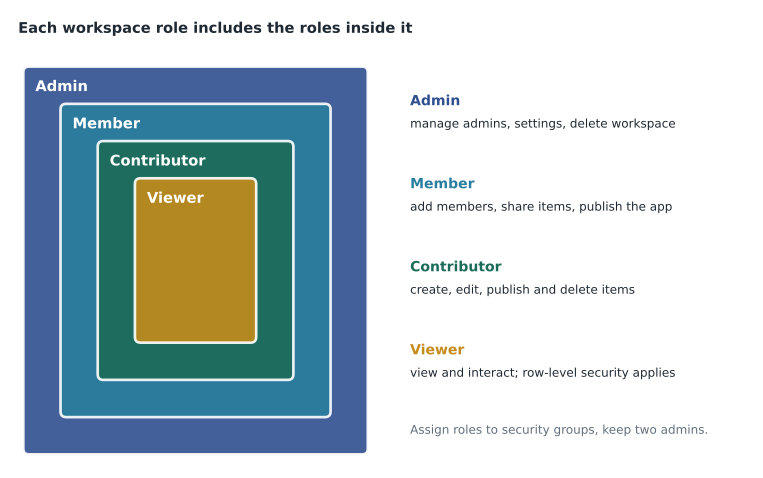
Access inside a workspace is granted through four workspace roles. Each role includes everything the role below it can do.
| Role | Typical holder | Can do (in addition to the roles below) |
|---|---|---|
| Admin | The workspace owner and a backup | Add or remove any user including other admins; update or delete the workspace; change settings |
| Member | A senior builder who also distributes content | Add members and lower roles; publish, update and manage the app; share items and allow others to reshare |
| Contributor | A builder who creates and edits content | Create, edit, publish and delete items in the workspace; schedule refresh on items they own; update the app only if the workspace setting allows it |
| Viewer | A reader who needs to see content in the workspace itself | View and interact with items; read data in semantic models; subject to row-level security |
Three details catch people out. First, row-level security applies only to Viewers. Admins, Members and Contributors can edit the model, so security roles do not restrict what they see; anyone who must see filtered data has to be a Viewer, or reach the content through an app or sharing (lesson 3). Second, a Contributor cannot share items or manage the app unless an admin turns on the setting that lets contributors update the app. Third, roles can be granted to individuals, to Microsoft Entra security groups, to Microsoft 365 groups and to distribution lists, and granting roles to groups is far easier to maintain than adding people one at a time.
Who should be in which role
Rupert's guidance on roles was a short list that Kwabena pinned above his desk.
Two admins, never one. A workspace with a single admin is stranded when that person leaves or is ill. The Student Success workspace had Kwabena and Ilsabet Derrisford, his colleague in institutional research, as admins.
Builders are Contributors. Maribeth Ferreira-Quon, who owned the registration fields, needed to publish a small enrollment-check report to the workspace, so she was a Contributor. She could edit content but could not share it or change who had access.
Readers do not belong in the workspace at all, usually. Deans, campus coordinators and the executive council read the reports through the app (lesson 2). Putting dozens of readers in the Viewer role exposes every item in the workspace, including half-finished drafts, and makes access hard to review. The Viewer role was for a handful of people, such as Ingrith Varsamis, the accessibility services coordinator, who tested drafts before release.
Groups, not people. Every role assignment except the two admins went to a Microsoft Entra security group, so that adding a new dean meant adding one person to one group, not editing five workspaces.
Worked problem
Choosing roles for the Student Success workspace
Six people or groups need access to Student Success Analytics: Kwabena (owns the content), Ilsabet (backup owner), Maribeth (publishes one enrollment report), Signe Tavernier-Mbeki (helps with complex models occasionally), Ingrith (tests drafts for accessibility before release) and the Deans group (about twenty people who read the finished reports). The deans' report uses row-level security by campus. Which role, if any, should each receive?
Show solution
- Kwabena and Ilsabet manage access and settings, so both are Admins.
- Maribeth creates and updates items but should not share them, so she is a Contributor.
- Signe edits models occasionally; Contributor is enough and avoids giving her sharing rights she does not need.
- Ingrith only views drafts, so she is a Viewer.
- The Deans group reads finished content filtered by row-level security. If they were Contributors or higher, the security roles would not filter their view; as Viewers they would see drafts. The right answer is no workspace role: they get access through the app's Deans audience.
Answer: Admin: Kwabena and Ilsabet. Contributor: Maribeth and Signe. Viewer: Ingrith. Deans: no workspace role, access through the app. The deans' row-level security works because they reach the content as app users, not as editors.
Organizing content inside a workspace
As workspaces grow they need order. Fabric workspaces support folders, which group items such as *Executive*, *Campus detail* and *Archive* without creating extra workspaces. Item names should say what an item is for, not who built it; Lumenvale prefixed nothing with personal names and used the same name for a report and its semantic model only when the model served that one report. Descriptions on items appear in search and in the OneLake catalog, so Kwabena wrote one sentence for every semantic model saying what data it held and who owned it.
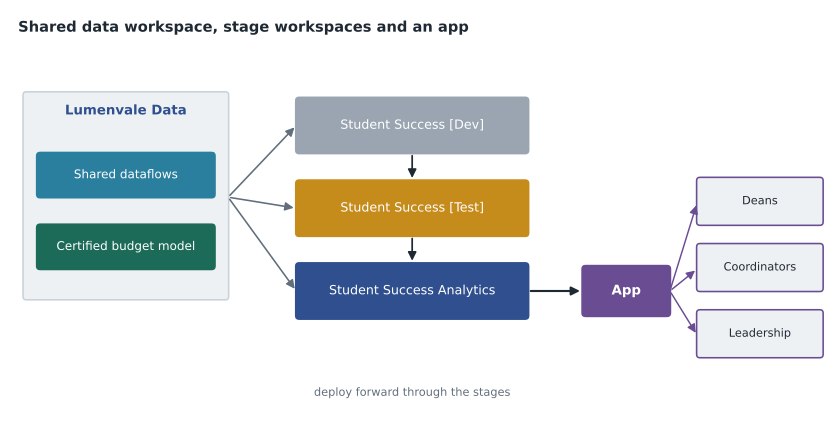
Lumenvale also separated workspaces by purpose rather than putting everything in one. The Student Success content lived in its own workspace; shared dataflows lived in the Lumenvale Data workspace, managed by Rupert's team; and Finance kept its certified budget semantic model in a Finance workspace. A report could use a semantic model from another workspace if the author had Build permission on it, so separating workspaces did not mean copying data.
How many workspaces?
There is no single right number, but there are patterns. A workspace per subject area and audience keeps security simple: everyone with a role in the workspace works on the same subject. A workspace per stage (development, test, production) supports deployment pipelines, covered in lesson 6. A shared data workspace holds semantic models and dataflows reused by many reports, so that report workspaces can be thin. Kwabena's final arrangement for Student Success used all three: Student Success [Dev] and Student Success [Test] for building and checking, Student Success Analytics as production, and the Lumenvale Data workspace for shared sources.
Reviewing access
Access drifts. People change jobs, projects end and temporary access becomes permanent. The Manage access pane of a workspace lists every role assignment, and Rupert asked every workspace admin to review it each term. Because most assignments were to groups, the review was short: confirm the groups were still right, and check that each group's membership was managed by someone who would notice a departure. When Kwabena did his first review in November, he found one former contractor still listed as a Member of an old pilot workspace; the workspace was archived and the contractor removed the same day.
Administrators can also review workspaces across the tenant from the Fabric admin portal, which lists workspaces with their state, capacity and owners and can recover orphaned workspaces whose admins have all left. That is Rupert's job rather than Kwabena's, but knowing it exists explains why naming conventions and contact lists matter: they are what an administrator reads when deciding whether a workspace is still needed.
Workspace roles in exam scenarios
Exam questions on workspace roles usually describe a person and a task and ask for the least privileged role that allows it. Three tasks are worth memorizing. Publishing and updating the app needs Member or higher, unless the admin has allowed Contributors to update the app. Adding other people to the workspace needs Member or higher, and adding or removing Admins needs Admin. Creating, editing and deleting content needs Contributor or higher. Anything that only reads content needs Viewer, and if the reader must be filtered by row-level security, Viewer is the only workspace role that works; an app or sharing is usually better still.
Questions also test the difference between a workspace role and item access. A person can open one report shared with them without having any role in its workspace, and a person in the Viewer role can open every item in the workspace. When a scenario says a reader should see one report and nothing else, the answer is sharing or an app audience, not the Viewer role.
Common mistakes
MistakePublishing shared content to My workspace.
InsteadUse a shared workspace with at least two admins; My workspace is for personal drafts.
MistakeGiving report readers the Contributor or Member role so they can see the content.
InsteadDistribute to readers through an app or sharing; keep workspace roles for builders and a few testers.
MistakeExpecting row-level security to filter what a Member sees.
InsteadRow-level security applies only to Viewers and to app and sharing users, not to Admins, Members or Contributors.
MistakeAdding people one by one to every workspace.
InsteadAssign roles to Microsoft Entra security groups and manage membership in one place.
MistakeLeaving the contact list as a single person.
InsteadAdd a shared mailbox or a second owner so notifications are not missed.
Summary and key terms
- A workspace holds related items and is the unit of collaboration, security and capacity.
- My workspace is personal and should never hold content others rely on.
- The license mode sets limits and features; free licenses can view content only on a capacity of F64 or larger.
- Workspace roles are Admin, Member, Contributor and Viewer, each including the abilities of those below.
- Row-level security filters only Viewers and users who reach content through apps or sharing.
- Assign roles to groups, keep two admins and review access each term.
- Workspace
- A container in the Power BI service or Fabric for related items, with its own roles and license mode.
- My workspace
- A personal workspace for each user, not intended for shared content.
- Workspace role
- Admin, Member, Contributor or Viewer, granting a set of abilities in a workspace.
- License mode
- The workspace setting that decides whether content runs on Pro, Premium per user, a capacity, Embedded or a trial.
- Contact list
- The users or mailbox that receive workspace notifications such as refresh failures.
- Folder
- A way to group items inside a workspace without creating another workspace.
Practice problems
Work each problem on paper first, then reveal the answer to check.
Why should a workspace have at least two admins?
Show answer
So that someone can still manage access and settings if one admin leaves or is unavailable.
A dean is a Member of a workspace and sees every campus despite a row-level security role. Why?
Show answer
Row-level security does not apply to Admins, Members or Contributors. The dean should be a Viewer or reach the report through an app.
What changes when a workspace moves to a Fabric capacity of F64 or larger?
Show answer
Higher limits and capacity features become available, and users with free licenses can view the content.
Lesson quiz · 5 questions
Score 60% or more to complete this lesson.
Create a free account to save your progress, take quizzes and earn a certificate.