
MSBA-241 · Lesson 7 of 12 · 18 min
Prompt tools and model choice
▶ Video coming soon A video version of this lesson is on the way.
Representatives at Quillfield write a service note at the end of every call, and the notes vary from a model of clarity to "cl called re auto, sorted, see email". Tomasz wanted the agent to draft the note from what had happened in the conversation, in a fixed format that underwriters could scan in seconds. Yusra first tried simply asking the agent, in its instructions, to "write a service note in our standard format at the end". The results were good but uneven: sometimes three lines, sometimes ten, sometimes with headings and sometimes without. "Anything you want done the same way every time, with fixed instructions," Bram said, "is a prompt tool, not a general instruction."
What a prompt tool is
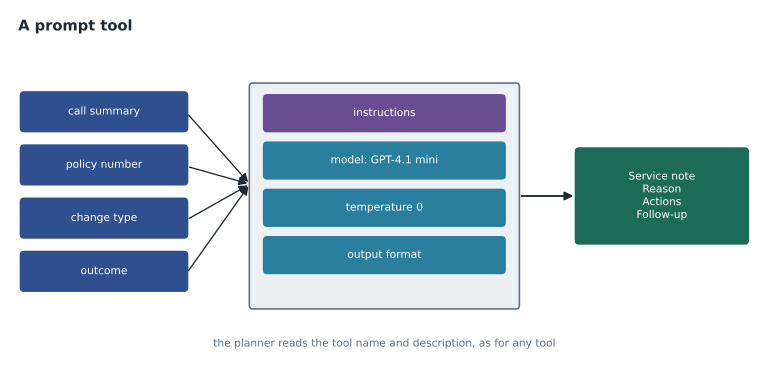
A prompt tool packages a call to a language model with fixed instructions, defined inputs and, optionally, a fixed output format. It is built in the prompt builder, the same prompt authoring experience used across Copilot Studio, Power Apps and Power Automate (historically part of AI Builder). Inside an agent, a prompt tool behaves like any other tool: it has a name and description the planner reads, inputs the planner fills, and an output that comes back to the agent. The difference is that the work inside is done by a model following your instructions, rather than by a connector or flow.
Prompt tools are the right choice when a task needs language understanding but should be narrow and consistent: classifying an email by intent, extracting fields from free text, summarizing to a template, rewriting for tone or reading level, or checking a draft against rules. They are the wrong choice for anything a deterministic rule can do (use a flow), for looking up facts (use knowledge or a tool), or for open conversation (that is the agent itself).
Writing the prompt
A prompt for a tool is written once and used thousands of times, so it repays care. Yusra's service note prompt had five parts: the role ("You write service notes for an insurance broker's service desk"), the task ("Write a service note from the call details below"), the inputs, inserted where they belong, the rules ("Use only the facts given. Never add advice, opinions or promises. Do not include dates of birth, driver ID numbers or banking details"), and the format ("Return: Reason (one line), Actions taken (up to three bullets), Follow-up (one line or None)"). Inputs are referenced inside the prompt text, so the model sees them in context.
You write service notes for an insurance broker's service desk.
Write a service note from the call details below. Use only the facts given.
Never add advice, opinions or promises. Leave out dates of birth, licence
numbers and banking details.

Policy: {PolicyNumber}
Change type: {ChangeType}
Call summary: {CallSummary}
Outcome: {Outcome}

Return the note as:
Reason: one line
Actions taken: up to three bullets
Follow-up: one line, or "None"
Test prompts with real examples, not just one. The prompt builder lets you supply sample input values and run the prompt, so Yusra pasted in twenty anonymized call summaries from the pilot, from the tidy to the chaotic, and read every output. Three changes came out of that: a rule to write "unknown" rather than guessing when the outcome was unclear, a word limit on the reason line, and an instruction to use the client's business name, not the contact's first name, for commercial policies.
Structured output
For prompts whose output feeds another step, ask for JSON output with defined fields rather than free text. The prompt builder can return JSON, and you can give an example of the shape you want. The agent or a flow can then use each field reliably: the follow-up date can go into the Follow-ups table, the reason into a report. Yusra's email triage prompt, used by the autonomous trigger in Lesson 8, returned JSON with intent, policy number, urgency and a one-sentence summary, which a flow could route without any further interpretation.
Worked problem
Instruction or prompt tool?
For each need, decide whether it belongs in the agent's instructions or in a prompt tool: (a) "Always be polite and concise." (b) "Classify an incoming email as a certificate request, a change request, a claim or other." (c) "If a staff member asks about another employee's leave, decline." (d) "Draft a client confirmation letter in Quillfield's standard wording."
Show solution
- Ask whether the need is about the agent's general behavior in conversation. (a) and (c) are.
- Ask whether it is a narrow task with a fixed output, done the same way each time. (b) and (d) are.
- Check whether the output feeds another step. (b) feeds routing, so it should return structured output.
Answer: (a) and (c) belong in instructions. (b) is a prompt tool with JSON output; (d) is a prompt tool, probably called from the change request flow, with the standard wording in its instructions.
Choosing a model
Every prompt tool runs on a model you choose, and the choice affects quality, speed and cost. In November 2026 Microsoft Learn lists the following models for prompts, grouped into three billing tiers. GPT-4.1 mini is the default; Microsoft upgrades the default from time to time and also uses it as the fallback if a selected model is turned off or unavailable.
| Model | Billing tier | Category |
|---|---|---|
| GPT-4.1 mini (default) | Basic | Mini |
| GPT-4.1 | Standard | General |
| GPT-5 chat | Standard | General |
| GPT-5.3 chat | Standard | General |
| Claude Sonnet 4.6 (Anthropic) | Standard | General |
| GPT-5 reasoning | Premium | Deep |
| GPT-5.2 reasoning | Premium | Deep |
| Claude Opus 4.6 (Anthropic) | Premium | Deep |
The billing tiers map to the rows for AI tools in the Copilot Credits table that MSBA-240 introduced: basic at 1 credit per 10 responses, standard at 15 credits per 10 responses, and premium at 10 credits per 1,000 tokens. A basic prompt is therefore very cheap, a standard prompt costs about as much as a generative answer at roughly 1.5 credits each, and a premium reasoning prompt can cost much more on long inputs.
Choose the smallest model that does the job well, and prove it with your test set. For the service note, Yusra ran her twenty samples through GPT-4.1 mini and GPT-5 chat. Both followed the format; the larger model handled the chaotic summaries slightly better, but not enough to justify fifteen times the price at 900 notes a month. She kept the default. For a prompt that checked change requests against Northmark's underwriting rules, which needed careful reasoning over several conditions, a reasoning model was worth its premium cost on a much smaller volume. The AB-620 outline names this skill directly: "Select and configure AI models," and, in its testing domain, "Evaluate AI model candidates for an agent."
Models from other providers
Some models in the list come from outside Microsoft, such as Anthropic's Claude models, and Microsoft marks them as external. Using them may mean data is processed under that provider's terms rather than within Microsoft's own service boundary, and administrators can turn external models on or off for the tenant. Microsoft also flags at least one listed model as less aligned and not recommended for production. For Quillfield, Wendell's rule was simple: external models need his sign-off per use case, and nothing client-identifying goes to a model that is not approved for it. Organizations can also bring their own model from Microsoft Foundry for prompts, which suits specialized or fine-tuned models.
Temperature and other settings
Prompt tools have a temperature setting from 0 to 1. Lower values make output more predictable and consistent; higher values make it more varied and creative. The default is 0, which is right for nearly every business tool: you want the same input to give the same kind of output. Some reasoning models do not offer the temperature setting. Even at 0, output is probabilistic, so do not treat a prompt as a calculator: if a value must be exact, compute it in a flow and pass it in.
Prompts can also be grounded in data. The prompt builder can add Dataverse data as knowledge for a prompt, and some prompts can run code interpreter to perform calculations or work with files. Use these when they simplify a narrow task, but keep each prompt's job small; a prompt that looks up data, calculates, decides and writes is really a flow with a prompt step inside it.
The agent's own model
Prompt tools have their own model setting, separate from the model the agent uses to plan and answer. MSBA-240 covered choosing the agent's primary model. A common and sensible design is an agent on a capable general model for conversation and planning, with prompt tools on the basic model for high-volume narrow tasks and on a reasoning model for the occasional hard one. Microsoft's September 2026 announcements added new primary model choices for agents, which is a reminder that model lists change quickly; the skill being tested is choosing deliberately and measuring, not memorizing model names.
Prompts outside the agent
The same prompt can serve more than one consumer. A prompt saved in an environment can be used as a tool by an agent, as an action called Run a prompt inside an agent flow or a Power Automate cloud flow, and inside Power Apps. Billing follows where it runs: prompts used in agents and agent flows consume Copilot Credits, while in Power Apps and Power Automate they consume prompt builder credits, with any AI Builder credits used first. Quillfield's client confirmation prompt was called from the change request flow rather than from the agent, because the confirmation was written after the underwriter's approval, long after the conversation had ended.
Reusing prompts is good practice, but treat a shared prompt as a shared component. Give it an owner, keep it in a solution, and change it only through the same development, test and production path as the agent. A small wording change that improves one consumer's output can break the format another consumer depends on, which is exactly what happened when someone added a friendly closing line to the email triage prompt and the routing flow failed to parse the JSON for an afternoon.
Evaluating prompt quality
Treat each prompt like a small product with its own test set. Keep the sample inputs you used to design it, add new ones whenever a real output disappoints, and rerun the set whenever you change the wording or the model. For outputs with a right answer, such as a classification, measure the share of samples classified correctly. For outputs judged on quality, such as a summary, have a reviewer score a sample against a short rubric: accurate, complete, within the format, free of invented facts. Hamish kept a simple sheet with the twenty service note samples, each scored by Tomasz on those four points, and the prompt was allowed into production only when every sample passed. The same discipline, applied to whole agents, is the subject of MSBA-242.
Prompt tools and responsible AI
Prompt tools inherit the agent's content moderation and Microsoft's safety systems, but their fixed instructions are also a place to build in protections. Every prompt that writes client-facing text at Quillfield ends with the same two rules: use only the facts provided, and never state that coverage applies or a claim will be paid. Wendell reviewed each client-facing prompt once, and the review was recorded with the prompt in the solution, so that a later change to the wording would show up as a change to a reviewed component. A prompt that classifies or summarizes for staff gets a lighter review, but its outputs are still sampled monthly, because a prompt that quietly drifts in quality is easy to miss when nobody reads its output closely.
Common mistakes
MistakePutting fixed formatting rules in the agent's general instructions.
InsteadUse a prompt tool for narrow tasks that must be done the same way each time.
MistakeTesting a prompt with one example.
InsteadTest with a set of realistic inputs, including messy ones.
MistakeChoosing the largest model by default.
InsteadStart with the default basic model and move up only if your tests show a real gain.
MistakeRaising temperature for business tools.
InsteadKeep temperature at 0 for consistent output.
MistakeAsking a prompt to calculate exact values.
InsteadCompute exact values in a flow and pass them in.
Summary and key terms
- A prompt tool runs a model with fixed instructions, defined inputs and optionally structured output, and the planner calls it like any tool.
- Use prompt tools for narrow language tasks: classify, extract, summarize to a template, rewrite, check against rules.
- Write prompts with role, task, inputs, rules and format, and test them with many realistic examples.
- Models fall into basic, standard and premium billing tiers; GPT-4.1 mini is the default and fallback in November 2026.
- Keep temperature at 0 for business tools, approve external models deliberately, and choose the smallest model that passes your tests.
- Prompt tool
- A tool that runs a language model with fixed instructions and defined inputs and outputs.
- Prompt builder
- The authoring experience for creating and testing prompts across Copilot Studio and the Power Platform.
- Temperature
- A setting from 0 to 1 controlling how varied a model's output is.
- JSON output
- A structured output format that lets later steps use each field reliably.
- Billing tier
- The basic, standard or premium rate at which a prompt's model is charged in Copilot Credits.
- External model
- A model from a provider other than Microsoft, such as Anthropic, offered in Copilot Studio.
Practice problems
Work each problem on paper first, then reveal the answer to check.
Why use a prompt tool rather than an instruction for the service note?
Show answer
The format must be the same every time; a prompt tool fixes the instructions, model and output format for that one task.
What is the default model for prompts in November 2026?
Show answer
GPT-4.1 mini, in the basic billing tier.
A standard-tier prompt runs 900 times a month. Roughly how many credits is that at 15 per 10 responses?
Show answer
900 / 10 x 15 = 1,350 credits.
Lesson quiz · 5 questions
Score 60% or more to complete this lesson.
Create a free account to save your progress, take quizzes and earn a certificate.