
MSBA-241 · Lesson 4 of 12 · 18 min
Custom connectors and REST APIs
▶ Video coming soon A video version of this lesson is on the way.
BrokerDesk, the broker management system Quillfield has run for twelve years, holds every client, policy, driver, location and change request. It has no Power Platform connector. It does have an internal REST API, built three years ago for the client portal and looked after by Pascal Wojtyniak, Quillfield's integration lead. When Yusra and Bram asked whether the agent could use it, Pascal's first answer was a question: "Which endpoints, as whom, and who gets paged when it breaks at 2 a.m.?" Those three questions shape every custom integration, and this lesson works through them.
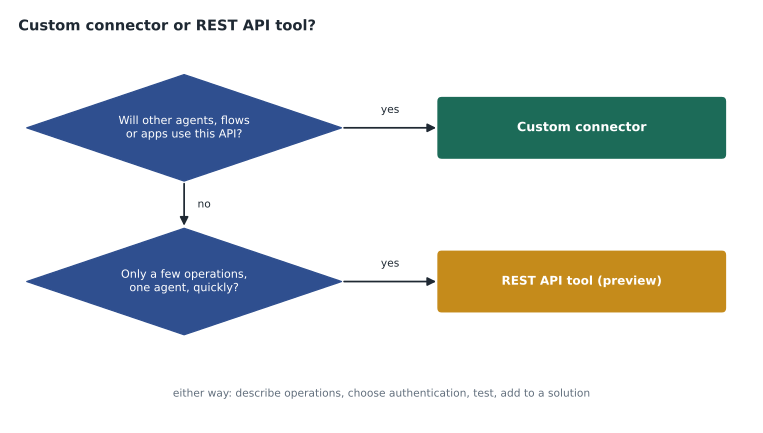
Copilot Studio offers two main ways to call an API that has no prebuilt connector. A custom connector is a connector your organization defines, usable by agents, flows and apps. A REST API tool lets you add selected operations from an API description directly to an agent as tools. Both rest on the same foundation: an OpenAPI description of the API.
OpenAPI in brief
OpenAPI is the standard way to describe a REST API in a machine-readable file, in JSON or YAML. It lists the API's host, base path, security scheme, and each operation: an HTTP method and path, such as GET /policies/{policyNumber}, with its parameters, request body and responses. Each operation has an operationId, a short summary and a description. When Copilot Studio turns an operation into a tool, those fields become the tool's name and description, and the parameter descriptions become input descriptions. A well-written OpenAPI file is therefore half of a well-described tool.
{
  "swagger": "2.0",
  "info": { "title": "BrokerDesk Service API", "version": "3.2" },
  "host": "api.brokerdesk.quillfield.example",
  "basePath": "/v3",
  "schemes": ["https"],
  "paths": {
    "/policies/{policyNumber}": {
      "get": {
        "operationId": "GetPolicy",
        "summary": "Get one client policy",
        "description": "Returns one policy by policy number: type, status, dates, named insureds, drivers or locations, and deductibles. Use when a staff member gives a policy number. Does not search by client name.",
        "parameters": [
          { "name": "policyNumber", "in": "path", "required": true, "type": "string",
            "description": "Policy number: two letters then six digits, for example AU483920." }
        ],
        "responses": { "200": { "description": "The policy" }, "404": { "description": "No such policy" } }
      }
    }
  }
}
Copilot Studio's REST API tools are built from an OpenAPI v2 description, also known as Swagger 2.0. If you upload a version 3 description, Copilot Studio translates it to version 2 during creation, but complex version 3 features may not translate cleanly, so check the result. The upload must be a JSON file. Custom connectors created in Power Apps or Power Automate also start from an OpenAPI 2.0 file, from a Postman collection, or from scratch in a guided editor.
Custom connectors
A custom connector is the reusable choice. Once Pascal publishes a BrokerDesk custom connector in Quillfield's environments, Yusra's agent, the change request flow, a Power App for underwriters and any future agent can all use it, through one definition with one owner. Data policies treat it as a premium connector and can place it in the Business group, block particular operations, or allow it only in certain environments.
Building one involves five parts. The general settings give the host, base URL and an icon. Security sets the authentication type. The definition lists the operations, their summaries, descriptions, parameters and responses, and is where most of the agent-facing quality comes from. Code (optional) lets a connector transform requests and responses with a small script, for example to reshape an awkward response. Test lets you call each operation with a real connection before anyone relies on it. Custom connectors can be added to solutions, which is how they move from development to test to production with the agent.
REST API tools
A REST API tool is the faster route for one agent. From the agent's Tools page you choose to add a REST API tool, upload the OpenAPI file, give the API a name and description, choose authentication and pick which operations to expose. Each selected endpoint and method becomes a separate tool with its own name and description, prepopulated from the file. You can expose GET /policies/{policyNumber} and POST /changeRequests while withholding PUT and DELETE, which is a simple and effective way to limit what the agent can do. Parameter names and types come from the file and cannot be changed in the tool, but you can edit their descriptions, and Copilot Studio insists that every blank description is filled before you continue.
In November 2026 REST API tools are documented as a preview feature, which means Microsoft does not recommend them for production without accepting preview terms. That decided the matter for Quillfield: the production agent would use a custom connector, and REST API tools would be used for quick experiments in development.
| Custom connector | REST API tool | |
|---|---|---|
| Reuse | Any agent, flow or app in the environment | The agent it was added to |
| Built in | Power Apps or Power Automate connector editor | The agent's Tools page |
| Choosing operations | All defined operations are available; data policies can block some | Pick endpoint and method pairs when adding |
| Status (Nov 2026) | Generally available | Preview |
| Best for | Shared, governed integrations | Fast prototypes and single-agent use |
Authentication options
Both routes offer the same three families of authentication. No authentication suits public reference APIs only. API key sends a key in a header or query parameter you name; users may be prompted for the key at run time, which is rarely what an internal agent wants. OAuth 2.0 is the right choice for most business APIs: you register an application with the identity provider, enter its client ID and secret, the authorization, token and refresh URLs, and any scopes, and then each user signs in and the API receives a token that identifies them. When the API is protected by Microsoft Entra ID, as BrokerDesk's is, you can register the connector as an Entra application and restrict it to your organization.
Pascal's answer to "as whom" was firm. BrokerDesk already enforced which brokers and representatives could see which clients, so the connector used OAuth 2.0 with Entra ID and end-user credentials: each representative signed in once and saw only the policies BrokerDesk let them see. The one exception was the service note endpoint, which the change request flow called with a dedicated service identity that could write notes and nothing else.
Worked problem
Choosing operations to expose
The BrokerDesk API has 46 operations, including GetPolicy, SearchClients, ListDrivers, CreateChangeRequest, CancelPolicy, UpdatePremium and DeleteNote. Which should the Policy Service Assistant's connector expose, and how?
Show solution
- List what the agent must do: look up a policy, see its drivers, start a change request.
- Map those to operations: GetPolicy, ListDrivers and CreateChangeRequest (the last called only through the change request flow).
- Exclude anything destructive or financial: CancelPolicy, UpdatePremium and DeleteNote.
- Decide on search: SearchClients by name returns many matches and invites mistakes; leave it out for now and ask for a policy number.
- Define only the chosen operations in the connector, and add a data policy rule blocking any operation added later until reviewed.
Answer: Three operations, two of them read-only. The agent can answer most calls with GetPolicy and ListDrivers, and changes go through a flow that adds approval and a note. Fewer operations also means fewer tools for the planner to choose between, which improves its choices.
Writing descriptions that work
Most APIs were described for developers. "GET /pol/{id} returns pol obj" is fine in a developer portal and useless to a planner. Before importing, Pascal and Yusra rewrote the summaries and descriptions in the OpenAPI file itself, so that every agent, flow and app would benefit. Their pattern for each operation was: what it does, in business words; what it needs, with an example; what it returns; when to use it; when not to. They also described response fields, because the planner uses output descriptions to decide what to say. A field called "stat" with values A, L and C was described as "Policy status: A means active, L lapsed, C canceled", which stopped the agent from telling a representative that a policy was "in state A".
Response size matters as much as description. GetPolicy originally returned 140 fields, including the client's date of birth and banking details for premium payments. Pascal added a lighter response shape for the connector with 22 fields, leaving out financial and sensitive personal data the agent never needs. The principle is the same as in Lesson 1: what the agent cannot see, it cannot repeat.
Who gets paged
Pascal's third question was about operations. An agent that 45 contact center staff rely on turns an internal API into a production dependency. Before launch the team agreed: Pascal's team owns the connector and the API; the BrokerDesk API has a status page that the agent's failure message links to; the connector has a test operation run every morning by a scheduled flow; and changes to the API are announced two weeks ahead so the connector definition can be updated in development first. None of this is Copilot Studio configuration, but every reliable integration needs it.
Testing a custom connector
Test in three layers. In the connector editor, call each operation with a real connection and check status codes and response shapes, including errors such as a 404 for an unknown policy. In the agent's test pane, ask questions that should use each operation, then questions that should not, and inspect the activity map. Then test as different users: a representative from the Saskatoon office should not see a policy that BrokerDesk restricts to the commercial lines team. That last test found a real problem: a test account with broad BrokerDesk rights had been used to create the connection in development, and the tool was briefly set to maker-provided credentials. Switching to end-user credentials fixed it before anyone outside the project saw it.
Policies and code in custom connectors
Custom connectors can do a little processing of their own. Policy templates apply common changes to every request or response without code: setting a header, routing to a different host for test and production, or converting an array into the shape an agent expects. A code section allows a short script to transform requests and responses when templates are not enough. Use these sparingly. Every transformation hidden in a connector is something the next maintainer must discover, and logic that matters to the business, such as deciding whether a change is allowed, belongs in the API or in a flow where it is visible and tested.
Pascal used one policy template. BrokerDesk returned dates as text in day-month-year order, and the agent occasionally misread 03-04-2027 as March rather than April. A template converted dates to the ISO format 2027-04-03 before they reached the agent, and the misreadings stopped.
Versions and change
APIs change, and an agent that depends on one must change with it safely. Version the API itself, as BrokerDesk does with its v3 base path, and keep the old version running while the connector moves to the new one. Keep the connector in a solution with the agent, so a new connector definition travels from development to test to production through the same pipeline. When an operation's inputs change, update its descriptions at the same time, because a description that promises an input the operation no longer accepts confuses the planner in ways that are hard to diagnose from the activity map.
Watch also for silent change on the other side. A carrier's API that adds a field, renames a status code or starts returning paged results can change what the agent says without anyone touching Copilot Studio. Quillfield's morning test flow compared each operation's response shape with a saved example and alerted Pascal's team when they differed. It caught one such change in the first month: a new status value, P for pending renewal, which the agent had been describing as "unknown status" until the response description was updated.
Common mistakes
MistakeImporting an API's developer descriptions unchanged.
InsteadRewrite summaries, parameter and response descriptions for the planner, ideally in the OpenAPI file.
MistakeExposing every operation an API offers.
InsteadExpose only the operations the agent needs; leave out destructive and financial ones.
MistakeReturning large, sensitive response objects.
InsteadUse a lean response with only the fields the agent needs.
MistakeUsing preview REST API tools in production without accepting preview terms.
InsteadUse a custom connector for production integrations in November 2026.
MistakeTesting only with an administrator account.
InsteadTest as ordinary users with different permissions.
Summary and key terms
- APIs without prebuilt connectors are reached through custom connectors or REST API tools, both built from OpenAPI descriptions.
- Copilot Studio REST API tools use OpenAPI v2 and translate v3; they are in preview in November 2026.
- Custom connectors are reusable, governed by data policies and movable in solutions; REST API tools serve one agent.
- Authentication options are none, API key and OAuth 2.0; OAuth with end-user credentials suits most business APIs.
- Descriptions, a small set of operations and lean responses are what make an API usable and safe for an agent.
- OpenAPI
- A standard machine-readable format for describing a REST API's operations, parameters and responses.
- Operation
- One HTTP method and path in an API, such as GET /policies/{policyNumber}.
- Custom connector
- A connector an organization defines for an API without a prebuilt connector.
- REST API tool
- A Copilot Studio tool created directly from selected operations of an OpenAPI description.
- OAuth 2.0
- An authorization standard in which users sign in and the API receives a token on their behalf.
- operationId
- The unique identifier of an operation in an OpenAPI file, often used as the tool name.
Practice problems
Work each problem on paper first, then reveal the answer to check.
When should you choose a custom connector over a REST API tool?
Show answer
When other agents, flows or apps need the same API, or the integration is for production and must be governed.
Why rewrite the OpenAPI descriptions rather than only the tool descriptions?
Show answer
Every agent, flow and app that uses the connector then benefits from the better descriptions.
Name one way to stop an agent repeating sensitive data from an API.
Show answer
Return a lean response without those fields, so the agent never receives them.
Lesson quiz · 5 questions
Score 60% or more to complete this lesson.
Create a free account to save your progress, take quizzes and earn a certificate.