
MSBA-241 · Lesson 3 of 12 · 18 min
Agent flows
▶ Video coming soon A video version of this lesson is on the way.
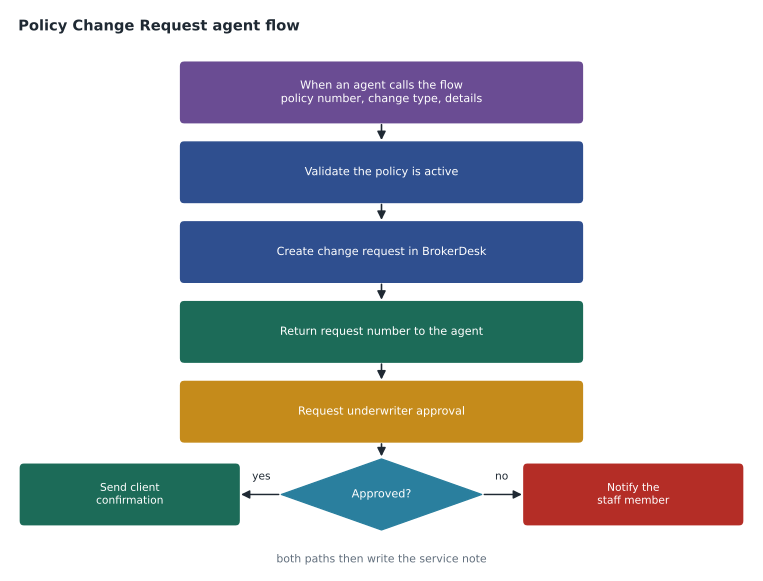
Adding a driver to an auto policy is not one step at Quillfield. The change request must be recorded in BrokerDesk, the underwriter for that carrier must approve it, the client must get a confirmation, and a service note must be written whatever happens. When Yusra first tried to have the agent do all of this with separate connector tools, the planner did it right most of the time and wrong some of the time: once it sent the client confirmation before the underwriter had approved, and twice it forgot the note. "That is exactly what an agent flow is for," Bram said. "If the steps must happen the same way every time, take them away from the model."
What an agent flow is
An agent flow is an automated sequence of steps built in Copilot Studio, using the same designer and building blocks as Power Automate. Every agent flow has a trigger, the event that starts it, and one or more actions. Microsoft describes agent flows as deterministic: given the same input, they take the same path and produce the same result. That is the opposite of generative orchestration, which plans afresh each time, and the two work best together. The agent decides *whether* to start the change process and gathers the details; the flow does the process exactly.
Agent flows can be started in several ways: manually, on a schedule, by an event, or by an agent. A flow that an agent calls as a tool uses the trigger When an agent calls the flow. Its inputs become the tool's inputs, and the flow sends its outputs back to the agent before the agent continues the conversation.
Building blocks
Agent flows offer four kinds of action. Connector actions call Microsoft 365, third-party and custom connectors, exactly as in Lesson 2. Built-in tools handle conditions, loops, variables, data operations, date and time functions and child flows. AI capabilities run a prompt, process a document, generate text, call an agent, or create a natural-language reply for the calling agent. Human-in-the-loop actions pause the flow until a person acts, for example an approval request or a request for information.
| Building block | Examples | Used in the change request flow for |
|---|---|---|
| Connector actions | BrokerDesk custom connector, Outlook, Teams, Dataverse | Creating the request, emailing the client, writing the note |
| Built-in tools | Condition, apply to each, compose, scope, terminate | Checking the policy is active, branching on the approval result |
| AI capabilities | Run a prompt, process a document | Drafting the client confirmation in plain language |
| Human in the loop | Approvals, request for information | Underwriter approval |
Inputs and outputs
Design the flow's interface before its insides. Each input in the trigger should be the smallest piece of information the flow needs, with a type and a description the planner will read: "Policy number, for example AU483920", "Change type: add driver, remove driver, change vehicle or change address", "Details of the change in one or two sentences." Avoid a single free-text input called "request", which pushes the parsing problem into the flow.
The outputs are what the agent hears back. Yusra's flow returned three: the change request number, a status (submitted, invalid policy or error), and a short message. The agent used the message in its reply. Returning a status as well as a message let a topic, or the planner, react differently when the policy was not active.
Responding quickly and continuing in the background
An agent waits for the flow to answer before it continues the conversation, and it will not wait forever. An underwriter might take two hours to approve. The pattern that solves this is to respond early: as soon as the change request exists, the flow sends its outputs back to the agent, which tells the staff member the request number. The flow then carries on with the approval and the client confirmation, finishing without the agent. When the underwriter decides, the flow posts the result to the staff member in Teams.
Worked problem
Where should the approval go?
Yusra's first version of the flow waited for the underwriter's approval and only then returned the request number to the agent. In testing, the agent showed "Something went wrong" after a short time, although the request was created. What happened, and how should she fix it?
Show solution
- Recognize the cause: the agent stopped waiting before the flow responded, because the approval held the flow open.
- Move the step that returns outputs to the agent to just after the change request is created.
- Keep the approval and confirmation after that step, and add a Teams message to the staff member when the approval finishes.
- Retest with an approval left pending for an hour.
Answer: With the response moved earlier, the agent replied within a few seconds with "Change request CR-48213 created and sent to underwriting." The approval completed an hour later and the representative got a Teams message. The rule: anything slow or human goes after the response to the agent.
Errors and reliability
Flows give you real error handling, which is one of the main reasons to use them. Group risky steps in a scope, then add a second scope that runs only if the first fails, using the "configure run after" setting. In that failure path, write a note, alert the service desk and return a clear status to the agent. Set retry policies on connector actions that call flaky services. The AB-620 outline names this skill directly: "Implement error handling in workflows."
Bram added one more rule: the flow, not the agent, writes the service note, and it does so in a final step that runs whether earlier steps succeeded or not. Even a failed change attempt is then recorded in BrokerDesk, which was the gap Wendell had worried about.
Billing for agent flows
Agent flows run on Copilot Studio capacity, not on Power Automate licenses. In November 2026 Microsoft's billing table charges agent flow actions at 13 Copilot Credits per 100 actions. When the agent calls a flow through generative orchestration, the call itself also counts as an agent action. A flow called from a topic counts one classic answer plus its flow actions. Runs in the agent's test chat and tests in the flow designer are not charged. If an environment runs out of credits, new flow runs are blocked while runs in progress finish. Runs started by people with a Microsoft 365 Copilot license chatting with an internal agent are not interrupted, but autonomous runs, such as those started by event triggers, are charged and can be blocked even when the person involved holds a license.
Hamish estimated the change request flow at about 14 actions per run including the approval branch, so 14 x 13 / 100, or a little under 2 credits per run, plus 5 credits for the agent action that called it. At the expected 900 changes a month, that is about 6,100 credits, a small fraction of the contact center's allocation.
Converting cloud flows
Quillfield already had a Power Automate cloud flow for change requests, built years earlier for an internal form. Microsoft lets you convert a cloud flow into an agent flow, which moves its billing to Copilot Studio capacity. The flow must be in a solution, the environment must have Copilot Studio capacity allocated, and you change the flow's plan to Copilot Studio in its settings. The conversion is one-way, and a converted cloud flow becomes an agent flow, not a workflow in the new experience. Bram chose to rebuild rather than convert, because the old flow took a free-text email as input; but for a flow with a clean interface, conversion saves time.
Agent flows and workflows
In the new agent experience, Copilot Studio calls deterministic automations workflows, and the tool list there offers "Workflows" alongside connectors and MCP servers. Agent flows still exist: from the Workflows page you can create an agent flow under the option to build with standard orchestration, and agents in the classic experience keep using agent flows as before. For exam purposes, the AB-620 outline from December 18, 2026 uses "workflows" throughout, with skills such as creating a workflow, creating a human-in-the-loop workflow, configuring actions and connectors, adding input and output parameters, monitoring runs and adding workflows as tools. The design principles in this lesson apply to both.
Monitoring runs
Every agent flow keeps a run history with each step's inputs, outputs and duration. During the pilot, Yusra checked the history each morning for failed runs and for runs where the approval took more than a day. Two patterns emerged: one carrier's underwriters rarely answered approvals in Teams, and a BrokerDesk maintenance window every Sunday night caused a burst of failures. The first was fixed by sending that carrier's approvals by email; the second by a condition that told the agent to say "BrokerDesk is in maintenance until 6 a.m." Run history is also where you find out whether the planner is calling the flow with good inputs, which feeds back into better descriptions.
Human-in-the-loop steps in detail
Approvals are the most common human step. An approval action sends a request to one or more people, through Teams, Outlook and the Power Automate approvals center, and the flow waits until they respond or a time limit passes. Approvals can require everyone to approve, or the first response to decide. They return the outcome, the responder and any comments, which the flow can store and act on. For the change request flow, Bram used "first to respond" across the carrier's two underwriters, so that a request would not wait for the one on holiday.
A request for information step is the human counterpart of a tool input: the flow pauses and asks a person to fill in specific fields, then continues with their answers. Quillfield used one when a change involved a driver with a recent claim: the flow asked the underwriter for a surcharge amount before the confirmation could be written. Human steps can wait days, so always set a time limit and decide what happens when it passes. In the change flow, an unanswered approval after two business days was escalated to the underwriting manager and the staff member was told.
The AB-620 outline asks candidates to create a human-in-the-loop workflow, which reflects how often real processes need one. A useful test when designing a process with an agent is to ask, for each decision, "Would we be comfortable if the model made this alone?" If the answer is no, the decision belongs to a person, and a flow is how you put that person in the loop reliably.
Passing context into a flow
The planner can only pass what the trigger asks for, so think about context. A flow that writes a service note needs to know who is asking. Rather than an input the planner must fill, which it could get wrong, pass the staff member's identity from a system variable when the flow is called from a topic, or have the flow use the end-user connection to look up the caller. For an agent flow that runs with end-user credentials, the connections act as the person chatting, so the BrokerDesk note is written under their name automatically. Yusra preferred that design, because it put an accountable person on every change.
Be careful with large inputs. Passing a whole conversation transcript into a flow makes it slow and may carry personal information into systems that do not need it. Pass the specific facts the flow uses, and let the agent keep the conversation.
Common mistakes
MistakeLetting the planner chain several connector tools for a fixed process.
InsteadPut steps that must always happen, in order, into one agent flow.
MistakeReturning to the agent only after an approval.
InsteadRespond to the agent early and continue slow or human steps afterwards.
MistakeUsing one free-text input for everything.
InsteadGive the flow small, typed, described inputs.
MistakeLeaving errors unhandled.
InsteadUse scopes and run-after settings to log, alert and return a clear status.
MistakeAssuming licensed users' autonomous runs are free.
InsteadAutonomous runs are charged and can be blocked when credits run out.
Summary and key terms
- Agent flows are deterministic sequences of connector actions, built-in tools, AI capabilities and human-in-the-loop steps.
- A flow with the "When an agent calls the flow" trigger becomes a tool whose inputs and outputs the planner reads.
- Respond to the agent quickly and continue approvals and other slow steps in the background.
- Flows give proper error handling, run history and predictable behavior; they bill per 100 actions on Copilot Studio capacity.
- The new experience calls deterministic automations workflows; the design principles are the same.
- Agent flow
- A deterministic automation built in Copilot Studio that agents can call as a tool.
- Trigger
- The event that starts a flow, such as an agent call, a schedule or a new record.
- Human in the loop
- A flow step that waits for a person, such as an approval or a request for information.
- Scope
- A group of flow actions that can be handled together, for example when any of them fails.
- Workflow
- The new agent experience's name for a deterministic automation used as a tool.
- Run history
- The record of each flow run, with every step's inputs, outputs and duration.
Practice problems
Work each problem on paper first, then reveal the answer to check.
Why is an agent flow better than several connector tools for a change request?
Show answer
The steps always happen in the same order, including the note, instead of depending on the planner remembering them.
Where should a human approval go in a flow that an agent calls?
Show answer
After the step that returns outputs to the agent, so the conversation is not held open.
A flow averages 20 actions per run and runs 500 times a month. How many credits do the flow actions cost?
Show answer
20 x 500 = 10,000 actions; 10,000 / 100 x 13 = 1,300 credits, plus the agent actions that called it.
Lesson quiz · 5 questions
Score 60% or more to complete this lesson.
Create a free account to save your progress, take quizzes and earn a certificate.