
MSBA-212 · Lesson 6 of 12 · 19 min
BitLocker and FileVault encryption
▶ Video coming soon A video version of this lesson is on the way.
On October 14, 2026, a home-care nurse at the South Branch came back to her car after a visit to find the rear window broken and her work bag gone. The bag held a Corvallin laptop with the day's visit notes cached in the visit verification app. Ama's first question was not where the laptop was, which nobody would ever know, but whether it was encrypted and whether Corvallin held its recovery key. The answer, after twenty uncomfortable minutes, was yes to both: the laptop had turned on Windows device encryption by itself when it was set up, and its recovery key had been saved to Microsoft Entra ID during the Windows 11 project. Ines reported the theft to the privacy officer as a lost encrypted device. Then she asked Ama how many of the other 519 devices could say the same. Nobody knew. That was the next piece of the project.
What BitLocker does
BitLocker encrypts entire Windows volumes, so that a disk removed from a laptop, or a laptop started from another operating system, yields nothing readable. It uses the device's Trusted Platform Module (TPM) to protect the encryption key: the TPM releases the key only if the device starts normally with its expected boot components, which stops an attacker from simply moving the disk to another computer.
The key can be protected by more than one protector. The most common combinations are below.
| Protector | How it unlocks | Typical use |
|---|---|---|
| TPM only | Automatically at start-up if the boot is unchanged | Most corporate laptops; invisible to users |
| TPM and PIN | The user types a PIN before Windows starts | High-risk devices; adds a step for users |
| Recovery password | A 48-digit numerical password typed at the recovery screen | Recovery when the TPM refuses, for example after firmware changes |
| Recovery key file | A key file on a USB drive | Rarely used in managed fleets |
Corvallin chose TPM only for everyone. A PIN at every start-up would have added a step for nurses already juggling a laptop, a phone and a security key in a client's kitchen, and the main risk, a stolen powered-off laptop, was covered by the TPM, by Windows Hello for Business at sign-in and by the short screen-lock time. Ines agreed, on the condition that every device's recovery password was stored in Entra ID.
Silent encryption with Intune
The BitLocker profile under Endpoint security, Disk encryption can encrypt Windows devices silently, without the user seeing any prompt and without the user needing administrator rights. Silent encryption needs a TPM, a device joined to Microsoft Entra ID or hybrid joined, and no third-party encryption software. Corvallin's profile used these settings.
| Setting | Corvallin value |
|---|---|
| Require device encryption | Enabled |
| Allow warning for other disk encryption | Disabled, so encryption proceeds silently |
| Allow standard user encryption | Enabled |
| Encryption method for OS and fixed drives | XTS-AES 128-bit |
| Encryption method for removable drives | AES-CBC 128-bit, for compatibility with older devices |
| Startup authentication | TPM only; startup PIN and startup key not allowed |
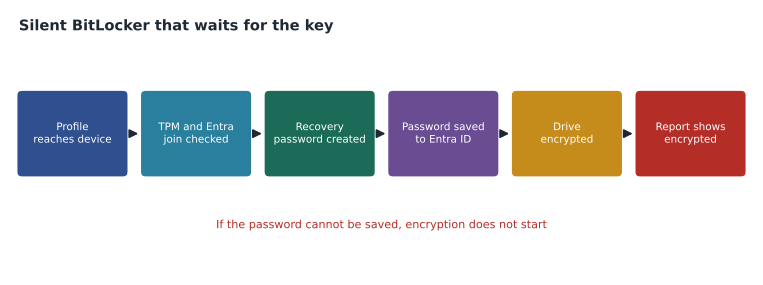
| OS drive recovery | Save recovery information to Microsoft Entra ID, and do not enable BitLocker until it is stored |
| Client-driven recovery password rotation | Enabled for Entra-joined devices |
The setting that matters most is the last recovery one: do not enable BitLocker until recovery information is stored in Entra ID. Without it, a device can encrypt itself and then fail to upload its key, leaving a perfectly encrypted laptop that nobody can recover. With it, encryption waits until the key is safely stored.
Devices that were already encrypted
Many of Corvallin's laptops were already encrypted by Windows' automatic device encryption, using XTS-AES 128 and a TPM protector. For those, the profile did not need to re-encrypt; it needed to confirm that the method matched and that the key was in Entra ID. Changing the encryption method on a device that is already encrypted does not re-encrypt it; the device keeps its existing method and reports as non-compliant with the profile until it is decrypted and encrypted again. Choosing XTS-AES 128, the same as device encryption used, avoided re-encrypting hundreds of laptops.
For devices whose key had never been uploaded, Intune's BitLocker key rotation remote action generates a new recovery password and uploads it, and the client-driven rotation setting makes devices create a new password automatically after one is used, so a password read out to a user over the phone cannot be used again.
Worked problem
Finding the devices at risk
The Intune encryption report for 520 Windows devices shows 471 encrypted with a recovery key in Entra ID, 31 encrypted with no key in Entra ID, and 18 not encrypted. How many devices need a key rotation, and how many need the profile to encrypt them?
Show solution
- Encrypted but no stored key: 31 devices need the BitLocker key rotation remote action.
- Not encrypted: 18 devices need the profile to encrypt them, after which their keys are stored automatically.
- Check: 471 + 31 + 18 = 520.
Answer: 31 key rotations and 18 new encryptions. Ama ran the rotations from a device group in an afternoon; 14 of the 18 unencrypted devices turned out to be desktops whose TPM was switched off in firmware, which a technician fixed at each branch.
Recovery: help desk and self-service
A BitLocker recovery screen appears when the TPM will not release the key, most often after a firmware update, a change to boot settings or a docking station quirk. The user sees a key ID, the first characters of which identify the right recovery password.
The help desk can find the password in the Intune admin center, on the device's Recovery keys page, or in the Entra admin center. Reading a key is logged in the Entra audit log, which Ines reviewed monthly. The MD-102 outline also lists user self-service recovery: users can see the recovery keys of devices they own through the My Account portal or the Company Portal, after signing in on another device. An Entra setting can prevent that if an organization prefers recovery to go through the help desk. Corvallin allowed self-service, because a nurse at a client's home at seven in the evening should not have to wait for the help desk to open, and client-driven rotation replaced each used key automatically.
# On the device: see protectors and encryption state
manage-bde -status C:
Get-BitLockerVolume -MountPoint C: | Select-Object VolumeStatus, EncryptionMethod, ProtectionStatus
(Get-BitLockerVolume -MountPoint C:).KeyProtector | Select-Object KeyProtectorType, KeyProtectorId
Monitoring encryption compliance
Intune's encryption report under Devices, Monitor lists each device's encryption readiness, status and the reason a device is not encrypted, such as a missing TPM. A Windows compliance policy can also require BitLocker, which it checks through Windows device health attestation; such a check reports correctly only after the device restarts once following encryption. Corvallin used the report for day-to-day work and the compliance requirement so that Conditional Access blocked any device that somehow lost encryption.
FileVault on macOS
The eight Macs used FileVault, the macOS full-disk encryption. A macOS FileVault profile under Endpoint security, Disk encryption turns it on and tells the Mac to escrow a personal recovery key to Intune. FileVault is enabled when the user next signs out or restarts, and the user may be prompted to agree. The key appears on the device's page in Intune for the help desk, users can retrieve it through the Company Portal or its website, and Intune can rotate it remotely. As with BitLocker, the profile should be in place before users start storing data, so that no Mac is encrypted with a key Corvallin does not hold.
Removable drives
BitLocker To Go encrypts USB drives. Corvallin had made USB storage read-only through device control in lesson 4, so staff could not copy data to drives, and it did not require encryption of removable drives. An organization that allows writing to USB storage should require BitLocker To Go for it, so that a lost drive is as safe as a lost laptop.
Planning for recovery events
Recovery screens are rare, but they come in clusters. A firmware update from a laptop manufacturer that changes how the TPM measures the boot process can send a whole model into recovery on the same morning. Windows normally suspends BitLocker protection for one restart when it installs firmware through Windows Update, which avoids most of these, but firmware installed another way may not. Ama added two protections. Driver and firmware updates went through the driver policy in lesson 9, so they reached the pilot first. And the help desk runbook had a section for "several recovery screens on the same model", which started with stopping the update and continued with self-service instructions sent to affected staff.
| Cause of a recovery screen | How to reduce it |
|---|---|
| Firmware or BIOS update outside Windows Update | Deliver firmware through driver policies, which suspend protection for the restart |
| Changes to boot settings or Secure Boot | Control them through policy; avoid manual changes |
| A docking station or USB device presenting itself as bootable | Adjust boot order in firmware settings |
| Hardware repair, such as a motherboard replacement | Expect recovery; have the key ready before the repair |
The privacy side
The stolen laptop had shown why encryption matters beyond IT. Under privacy law, the loss of a device holding personal health information can be a reportable breach, but in many places a properly encrypted device whose key is not also lost is treated very differently. Corvallin's privacy officer asked for a monthly report she could rely on, so Ama scheduled an export of the encryption report showing every device, its encryption status and whether its key was stored. If a device was ever lost, the privacy officer could see in a minute whether it had been encrypted at the time.
Fixed data drives and desktops
The BitLocker profile also covers fixed data drives, such as a second internal drive in a desktop. Corvallin's profile encrypted fixed drives automatically with the same method as the system drive and stored their recovery passwords in Entra ID as well. The 14 desktops whose TPM had been switched off in firmware were the slowest part of the work, because each needed a technician to change a firmware setting in person; after that, the profile encrypted them on the next check-in.
Who can read recovery keys
A recovery password unlocks a whole drive, so reading one is a sensitive action. In Microsoft Entra ID, the right to read BitLocker keys is held by a small number of roles, including the Cloud Device Administrator, Helpdesk Administrator and Security Administrator roles, as well as the device's registered owner when self-service is allowed. Corvallin's roles were all eligible through PIM, so a help desk analyst activated a role before reading a key, with a reason, and Ines saw both the activation and the key read in the logs. She asked for one more rule: a key read for a device that was not with its user, for example one returned to the office after a staff member left, needed a second person to agree.
The same care applied to FileVault keys for the Macs, which were visible to the help desk in Intune and to each Mac's user in the Company Portal. Because Dr. Ostrander-Bey's Mac held board papers, its key was rotated after every use, which Intune does on request.
Encryption on new devices
For devices arriving through Autopilot, the order of events matters. The BitLocker profile is assigned to the device group, so it applies during the device phase of setup, before the user signs in. On a new laptop, Windows may already have started automatic device encryption with a protector waiting for a key to be backed up; once the device joins Entra ID and receives the policy, the key is uploaded and encryption completes under Corvallin's settings. Ama checked the first ten devices from the reseller after the profile went live, and all ten showed as encrypted with a stored key within an hour of setup finishing.
The encryption report also became part of the device return process. When a laptop came back from a leaver, the help desk checked that it was encrypted before it was wiped and reissued, and before any laptop went to the recycler it was wiped with the Intune wipe action, which, on an encrypted drive, removes the keys and leaves the data unreadable.
Common mistakes
MistakeAllowing devices to encrypt before their recovery password is stored.
InsteadRequire the key to be saved to Entra ID before BitLocker is enabled.
MistakeChoosing a different encryption method from the one devices already use.
InsteadMatch the method of existing device encryption, or plan to re-encrypt those devices.
MistakeLeaving a recovery password valid after reading it to a user.
InsteadTurn on client-driven rotation so a used password is replaced automatically.
MistakeDeploying FileVault after users have stored data with personal keys only they know.
InsteadDeploy the FileVault profile with escrow before or at enrollment.
Summary and key terms
- BitLocker encrypts Windows volumes and uses the TPM to protect the key; recovery passwords unlock the drive when the TPM will not.
- Intune can encrypt silently on Entra-joined devices with a TPM, including for standard users.
- Require recovery information in Entra ID before encryption, and turn on client-driven rotation.
- The encryption report and compliance policy show and enforce encryption; reading keys is audited.
- FileVault profiles encrypt Macs and escrow personal recovery keys to Intune, retrievable through the Company Portal.
- BitLocker
- Windows full-volume encryption.
- TPM
- Trusted Platform Module, a chip that stores keys and checks the boot process.
- Recovery password
- A 48-digit numerical password that unlocks a BitLocker drive.
- Silent encryption
- BitLocker enabled by policy without user prompts or administrator rights.
- Key rotation
- Replacing a BitLocker or FileVault recovery key with a new one.
- FileVault
- macOS full-disk encryption.
Practice problems
Work each problem on paper first, then reveal the answer to check.
Why did Corvallin choose XTS-AES 128 rather than 256?
Show answer
It matched the method Windows device encryption had already used, so existing devices did not need re-encrypting.
Where can a user find their own device's recovery key if self-service is allowed?
Show answer
In the My Account portal or the Company Portal, after signing in on another device.
What remote action fixes an encrypted device whose key was never uploaded?
Show answer
BitLocker key rotation, which creates a new recovery password and stores it.
Lesson quiz · 5 questions
Score 60% or more to complete this lesson.
Create a free account to save your progress, take quizzes and earn a certificate.