
MSBA-212 · Lesson 11 of 12 · 18 min
Patching macOS and mobile devices
▶ Video coming soon A video version of this lesson is on the way.
Windows was the bulk of Corvallin's fleet, but not all of it. Seventy-four coordinators, managers and senior nurses carried corporate iPhones enrolled through Apple's Automated Device Enrollment. Nine MacBooks belonged to the communications team and to Dr. Ostrander-Bey. And about 260 Samsung phones, enrolled through Knox as Android Enterprise fully managed devices, were carried by home-care staff, alongside a dozen rugged Zebra handhelds in the medical supply room at head office. None of these got updates from Windows Update or Autopatch. In September, Teodor had noticed a message center post that made the timing urgent: Intune was removing its legacy Apple software update policies in its October 2026 service release. If Corvallin's iPhones and Macs were still relying on them, they would stop being managed for updates at all.
Apple updates: from commands to declarations
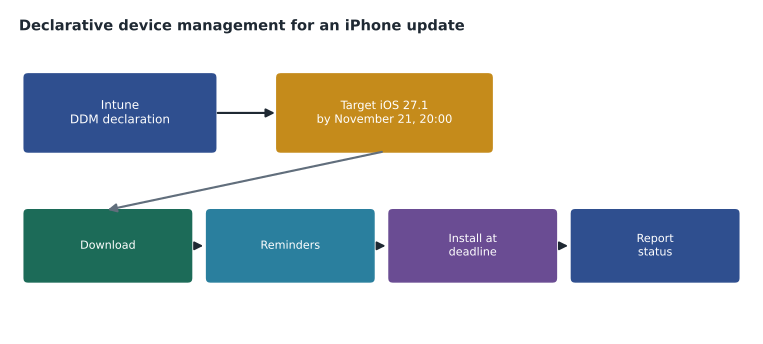
For years, MDM services such as Intune managed Apple updates by sending commands: install this update, defer updates for this many days. Apple has replaced that model with declarative device management (DDM). With DDM, the management service sends the device a declaration of the desired state, such as "be on iOS 27.1 by this date", and the device itself works toward that state, downloading the update, notifying the user and installing it by the deadline, then reporting its status back.
Apple ended support for the legacy software update commands with its OS 26 releases and removed those settings from its OS 27 releases. Intune followed: its October 2026 release removed the legacy iOS/iPadOS and macOS update policies, the software update settings in the device restrictions templates and related settings catalog entries, and the reports that went with them. Microsoft's message center post told administrators to move to DDM settings before then, because devices without a DDM policy might not update as expected.
| Legacy approach (removed) | Replacement |
|---|---|
| iOS/iPadOS and macOS update policies | Settings catalog, Declarative Device Management, Managed software updates |
| Software update deferral in device restrictions | DDM software update settings in the settings catalog |
| Per-device macOS update reports | DDM update status reported by the device |
Managed software updates in the settings catalog
In Intune, Apple DDM update policies are created in the settings catalog for iOS/iPadOS or macOS, under declarative device management. The managed software updates settings let an administrator set a target OS version, optionally a target build, and a target local date and time by which the device must install it. A details URL can point users to an internal page explaining the update. Separate DDM software update settings control the user experience, such as whether users can install updates early and how notifications appear.
Teodor found that Corvallin had two legacy policies: one iOS update policy from 2023 that installed updates at night, and a device restrictions profile that deferred iOS updates by 30 days. He replaced both with DDM policies before the October release, testing on the IT team's phones first.
Choosing versions and deadlines for iPhones
Apple releases minor updates with security fixes often and sometimes urgently. Ama and Teodor set a pattern similar to the Windows rings. The IT phones had a DDM policy targeting each new release within two days of it appearing. The pilot group of 20 coordinators had a target date about five days after release. Everyone else had a target date about ten days after release, at 20:00 local time, after most visits had ended. Major versions, such as moving to a new iOS generation, were held for a month on the broad group while the visit verification app's vendor confirmed support.
Because a DDM policy names a specific version and date, someone has to update it for each release. Teodor added Apple's security release notes to the Monday message center triage from phase 1, so that a new iOS security release triggered an update to the three policies the same week.
Worked problem
Setting the broad deadline
Apple releases a security update on Wednesday, November 11, 2026. Corvallin's rule is a target date ten days after release for the broad group, at 20:00. What date and time go in the broad policy, and what happens to a phone whose user ignores every reminder?
Show solution
- November 11 + 10 days = November 21.
- Target local date and time: November 21, 2026 at 20:00.
- Before then the user sees reminders, more often as the deadline approaches.
- At the deadline the phone installs the update and restarts itself.
Answer: November 21 at 20:00. A phone whose user ignored the reminders installs the update at that time, which is after visit hours for almost every Corvallin user.
macOS
The Macs used the same settings, from the macOS section of the settings catalog. macOS updates are larger and need more time, so the target dates were a few days later than for iPhones, and the policy allowed users to install early. Dr. Ostrander-Bey preferred to install updates on Sunday evenings, which the reminders let her do.
Compliance as the safety net
DDM policies make devices update. Compliance policies, covered in MSBA-211, check that they did. Corvallin's iOS and macOS compliance policies set a minimum OS version, raised a few weeks after each important security release. A device below the minimum became non-compliant and, through Conditional Access, lost access to client data until it updated. That covered the cases DDM could not, such as a phone switched off in a drawer for a month.
Personal phones were a separate case. About 40 staff used Outlook and Teams on their own phones under app protection policies without enrolling the device. Intune cannot update a personal phone, but an app protection policy's conditional launch settings can require a minimum OS version and block or wipe company data in the apps if the phone falls too far behind. Corvallin set a warning at one version behind and a block at two.
Android
Android update management depends on the device's management mode and manufacturer. For Android Enterprise fully managed and dedicated devices, Intune can set a system update policy in a device restrictions configuration profile, with these options.
| System update option | Effect |
|---|---|
| Device default | The device follows its manufacturer's normal behavior |
| Automatic | Updates install as soon as they are available |
| Postponed | Updates are delayed for up to 30 days |
| Maintenance window | Updates install only within a daily time window |
The facilities and courier phones used a maintenance window from 01:00 to 04:00, when they sat on chargers. A freeze period blocked updates in the last two weeks of December, when the supply room was busiest and least staffed.
For some rugged devices, Intune also supports firmware over-the-air (FOTA) deployments, which push a specific firmware version to devices at a scheduled time through the manufacturer's service. Intune's integration with Zebra's over-the-air service let Ama schedule firmware updates for the twelve Zebra handhelds from Intune, choosing a version and a date, rather than visiting each device. Samsung offers a similar enterprise service through its own console. FOTA appears in the MD-102 outline alongside configuration profiles for Android updates.
Monitoring non-Windows updates
For Apple devices with DDM policies, Intune shows the status the devices report, and the device inventory shows each device's OS version. Ama built one view in the Intune device list, filtered by platform and OS version, and checked it alongside the Windows reports each week. The compliance report showed which devices had fallen below the minimum, which was the list the help desk actually called.
Testing Apple updates before the deadline
Before the October Intune release removed the legacy policies, Teodor ran a two-week test. He created DDM policies for the IT phones with a target version and a date two days ahead, and watched what happened on six iPhones. Five installed early when prompted; one, his own, waited until the deadline and installed itself at 20:00 as planned. He then checked what the device reported back to Intune and confirmed that the old legacy policy and the new DDM policy did not fight each other while both were assigned, because the DDM settings took precedence once enforced. Only then did he unassign the legacy policies.
| Group | Devices | Target date after release | Notes |
|---|---|---|---|
| IT | 6 iPhones | 2 days | Test new releases first |
| Pilot coordinators | 20 iPhones | About 5 days | Busy users, good feedback |
| Everyone else | About 144 iPhones | About 10 days at 20:00 | After visit hours |
| Macs | 8 | About 12 days | Users may install early |
Major versions
Apple's major releases, such as a new iOS generation each autumn, change more than minor updates and sometimes break apps. DDM handles them the same way, with a target version and date, but Corvallin waited for the visit verification app's vendor to confirm support before setting a target. While waiting, the broad group's policy kept targeting the latest minor update of the current major version, which kept phones patched without moving them to the new generation too early.
Shared responsibility for personal devices
App protection could protect company data on personal phones, but it could not update them. Corvallin's staff guide asked people using their own phones for work to keep automatic updates switched on and explained, in plain terms, that the Outlook and Teams apps would stop showing work data if the phone fell two versions behind. The help desk could not fix personal phones, but it could explain how to update them, and most calls about blocked apps ended within five minutes with an updated phone.
Reporting across platforms
Ines's monthly security report had used the Windows patch-speed number from lesson 8. With the Apple and Android work done, Ama added the same measure for every platform: the share of active devices on a supported, current version 14 days after the latest security release for that platform. In November the numbers were 96 percent for Windows, 93 percent for iPhones, all nine Macs and 251 of 260 Android phones, the missing nine being in a repair queue. A single table covering every platform made it obvious where the gaps were, and made it equally obvious when there were none.
| Platform | Update mechanism | Safety net |
|---|---|---|
| Windows | Autopatch group with hotpatch | Compliance minimum build |
| iOS and iPadOS | DDM managed software updates | Compliance minimum OS version |
| macOS | DDM managed software updates | Compliance minimum OS version |
| Android Enterprise | System update policy and FOTA | Compliance minimum security patch level |
| Personal phones | The user's own updates | App protection conditional launch |
Android security patch levels
Android devices report a security patch level, the date of the most recent Android security fixes they contain. Intune compliance policies for Android Enterprise can require a minimum patch level, which is the Android equivalent of a minimum OS version. Corvallin set it to a date about three months back and moved it forward each quarter, which caught any device whose manufacturer had stopped sending updates. Two older courier phones failed the check in November because the manufacturer had ended updates for their model; they were replaced in December.
Manufacturers differ greatly in how long and how often they send updates, which matters when buying Android devices. Corvallin's buying rule after this project was to choose models in the Android Enterprise Recommended program, with a published commitment to several years of security updates, and to record each model's end-of-updates date in the asset list.
Common mistakes
MistakeLeaving Apple updates on legacy update policies after Intune removed them.
InsteadMove to DDM managed software update settings in the settings catalog and test first.
MistakeCreating a DDM policy once and never changing it.
InsteadUpdate the target version and date for each Apple release, as part of a weekly routine.
MistakeRelying on update policies alone.
InsteadUse compliance minimum OS versions and app protection conditional launch as safety nets.
MistakeLetting rugged Android devices update during working hours.
InsteadUse a maintenance window, freeze periods and FOTA scheduling where supported.
Summary and key terms
- Apple replaced MDM update commands with declarative device management; Intune removed its legacy Apple update policies in October 2026.
- DDM managed software update settings in the settings catalog set a target OS version and a local date and time to install by.
- Compliance minimum OS versions and app protection conditional launch catch devices that fall behind, including personal phones.
- Android Enterprise system update policies can be automatic, postponed, or limited to a maintenance window, with freeze periods.
- FOTA deployments schedule firmware updates for supported rugged devices from Intune.
- Declarative device management
- Apple's management model in which the device works toward a declared state and reports back.
- Target local date and time
- The deadline in a DDM update policy by which the device installs the update.
- Minimum OS version
- A compliance setting that marks older devices non-compliant.
- Conditional launch
- App protection checks, such as minimum OS version, enforced when a managed app opens.
- FOTA
- Firmware over-the-air: scheduled firmware updates delivered through a manufacturer's service.
Practice problems
Work each problem on paper first, then reveal the answer to check.
Where in Intune do you now create iOS update policies?
Show answer
In the settings catalog, under declarative device management, managed software updates.
How does Corvallin protect data on personal phones that are not updated?
Show answer
App protection conditional launch warns at one version behind and blocks company data at two.
Which Android system update option installs updates only during set hours?
Show answer
The maintenance window option.
Lesson quiz · 5 questions
Score 60% or more to complete this lesson.
Create a free account to save your progress, take quizzes and earn a certificate.