
MSBA-212 · Lesson 4 of 12 · 18 min
Attack surface reduction rules
▶ Video coming soon A video version of this lesson is on the way.
When the monitoring partner reviewed the September phishing incident, its report included a sentence Ama underlined twice: "In most of the attacks we see against small health organizations, the first malicious step is an Office document or a script launching something it should never launch." Antivirus decides whether a file is bad. Attack surface reduction (ASR) rules take a different approach: they stop behaviors that ordinary work rarely needs and attackers often use, whether or not the file involved is known to be malicious. A Word document has no business starting PowerShell. A script downloaded from the internet has no business launching an executable. ASR rules say so, and Windows enforces it.
How ASR rules work
Each ASR rule targets one behavior. Defender for Endpoint enforces the rules on Windows devices with Defender Antivirus in active mode; they are included in Plan 1, so Corvallin's E3 devices could use them before the Plan 2 licenses arrived. Each rule can be set to one of several modes.
| Mode | Effect |
|---|---|
| Not configured | The rule is off and the policy does not manage it |
| Audit | The behavior is allowed but recorded as an event |
| Warn | The user sees a warning and can choose to continue (for most rules) |
| Block | The behavior is stopped and recorded |
| Disabled | The rule is explicitly off |
The rules are delivered from Intune by an Attack surface reduction rules profile under Endpoint security, Attack surface reduction. The same policy type also contains profiles for exploit protection, device control and App Control for Business, covered later in this lesson.
The rules
Microsoft publishes the current list of rules and their identifiers. The list grows; several rules were added in 2024 and 2025. The table groups the rules most organizations deploy.
| Group | Example rules |
|---|---|
| Standard protection | Block credential stealing from the Windows local security authority subsystem (lsass.exe); block abuse of exploited vulnerable signed drivers; block persistence through WMI event subscription |
| Office | Block all Office applications from creating child processes; block Office applications from creating executable content; block Office applications from injecting code into other processes; block Win32 API calls from Office macros |
| Email and web | Block executable content from email client and webmail; block JavaScript or VBScript from launching downloaded executable content; block execution of potentially obfuscated scripts |
| Removable media and tools | Block untrusted and unsigned processes that run from USB; block process creations originating from PSExec and WMI commands |
| Ransomware and reputation | Use advanced protection against ransomware; block executable files from running unless they meet a prevalence, age or trusted list criterion |
| Other applications | Block Adobe Reader from creating child processes; block Office communication applications from creating child processes |
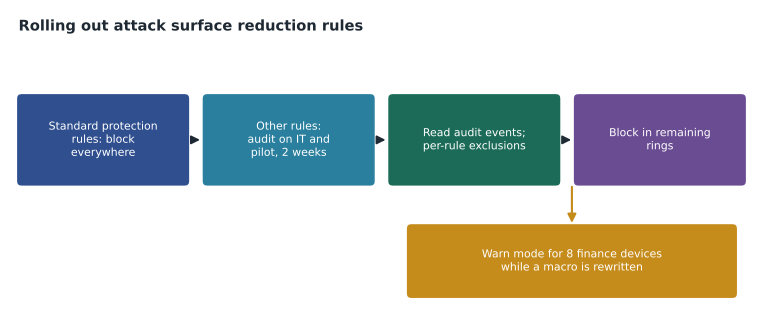
Microsoft calls the first group standard protection rules and recommends turning them on in block mode for almost every organization, because they rarely affect legitimate work. The others need testing, because some legitimate software does exactly what they block. A finance spreadsheet that runs a macro calling the Windows API, or an old line-of-business app that launches a helper process from Word, will stop working when the matching rule blocks.
Audit first
Ama put the three standard protection rules straight into block on every device. The other rules went into audit mode on the IT and pilot rings for two weeks. Audit mode lets the behavior happen but records an event each time the rule would have blocked, so the team could see what would break before anything did.
The Attack surface reduction report in Intune, and the more detailed rule reports in the Defender portal, list each audited event with the rule, the device, the file and the process. After two weeks the results were short and instructive. Most rules had no hits at all. "Block all Office applications from creating child processes" had hits from one finance workbook whose macro opened a PDF printer utility. "Block executable files from running unless they meet a prevalence, age or trusted list criterion" had hits from the visit verification app's updater, which was signed but new enough that few devices had seen it.
Worked problem
Reading the audit results
Over 14 days the pilot logged 412 audit events. Of these, 338 came from the visit verification updater, 61 from the finance workbook on 3 devices, and the rest from 2 devices running an old screen-capture tool nobody could explain. How many events came from the unexplained tool, and what should Ama do about each source?
Show solution
- Known sources: 338 + 61 = 399 events.
- Unexplained: 412 - 399 = 13 events on 2 devices.
- Updater: signed vendor software that will become prevalent; exclude its single file path from the reputation rule until it is.
- Finance workbook: a business process; set the Office child-process rule to warn for the finance group, or fix the macro.
- Screen-capture tool: unexplained software is exactly what ASR is meant to catch; investigate and remove it.
Answer: 13 events came from the unexplained tool. The updater gets a narrow per-rule exclusion, finance gets warn mode while the macro is rewritten, and the screen-capture tool is investigated and removed.
Exclusions and warn mode
ASR exclusions can apply to all rules or to a single rule. Per-rule exclusions are better, because they keep every other rule enforcing for that file. Like antivirus exclusions, they should be specific file paths with a written reason. The visit verification updater's path was excluded only from the reputation rule.
Warn mode is a middle path for rules that affect a few legitimate users. The user sees a notification explaining that the action was blocked and can unblock it for a short period if it is part of their work; the event is still recorded. Ama used warn mode for the Office child-process rule on the finance team's eight devices while the workbook's macro was rewritten, and moved them to block once it was.
Exploit protection and device control
Exploit protection applies mitigations, such as data execution prevention and control flow guard, to the system and to individual programs. Windows applies sensible defaults; organizations that need specific settings for an older application export them as an XML file from one device and deploy it through Intune. Corvallin kept the defaults.
Device control decides what removable devices can do. A device control profile can allow or block USB storage, allow it read-only, or allow only approved devices identified by vendor and product identifiers. At Corvallin, home-care staff had no reason to use USB storage at all; client documents lived in SharePoint. Ama set USB storage to read-only for everyone, so staff could still open a file a client handed them on a drive, and blocked writing to it, so nothing could be copied off a laptop. The training tablets, which used USB drives for the provisioning package, were excluded. The ASR rule that blocks untrusted and unsigned processes from USB added a second layer.
App Control for Business
The MD-102 outline also lists App Control for Business, the feature formerly known as Windows Defender Application Control. Where ASR rules block behaviors, App Control decides which applications may run at all. A policy can trust Windows components, Microsoft Store apps, apps with a good reputation in Microsoft's Intelligent Security Graph, and software installed by a managed installer. In Intune, the Intune Management Extension can be set as a managed installer, so anything Intune deploys is trusted automatically while software a user downloads is not.
App Control is powerful and easy to get wrong. A policy in enforce mode that leaves out a needed app stops that app from starting. The rule is the same as for ASR, only stricter: deploy in audit mode, read the events, adjust, and only then enforce, one ring at a time. Corvallin decided to start App Control only on the lobby kiosk and the two pharmacy devices, which ran a small and fixed set of software, and leave general laptops for 2027.
Zero Trust and the attack surface
The MD-102 outline asks candidates to apply Zero Trust principles to endpoint protection. In practice that means three ideas from phase 1 carried over to devices. Verify explicitly: devices prove their health through compliance and device risk before reaching data. Use least privilege: users are not local administrators, and applications are allowed only what they need. Assume breach: reduce what an attacker can do on a device they control, which is exactly what ASR rules, device control and App Control do. Ines liked to summarize it for the board as "every door locked, and every room smaller."
# On a pilot device: list ASR rule IDs and their current actions
$p = Get-MpPreference
for ($i = 0; $i -lt $p.AttackSurfaceReductionRules_Ids.Count; $i++) {
    [pscustomobject]@{
        RuleId = $p.AttackSurfaceReductionRules_Ids[$i]
        Action = $p.AttackSurfaceReductionRules_Actions[$i]   # 0 off, 1 block, 2 audit, 6 warn
    }
}
Measuring the result
An ASR rollout is easy to measure. Before the project, none of the rules was on. After it, every Windows device had the three standard protection rules in block mode, every rule except two in block mode, the Office child-process rule in warn mode on eight finance devices, and the reputation rule blocking with one narrow exclusion. The ASR report showed the blocks each week. In the first month after full rollout it recorded 23 blocks, of which 19 came from the same cause: an emailed invoice document that tried to start a script, sent to several staff in one campaign the antivirus did not yet recognize.
| Rule area | Before | After |
|---|---|---|
| Standard protection rules | Off | Block on all Windows devices |
| Office rules | Off | Block, with warn mode for 8 finance devices during a macro rewrite |
| Email and script rules | Off | Block |
| USB and tools rules | Off | Block, with USB storage read-only through device control |
| Reputation rule | Off | Block, with one per-rule exclusion |
ASR and licensing
ASR rules are part of Defender for Endpoint Plan 1, and Microsoft 365 E3 includes Plan 1, so most organizations on E3 can use them. The detailed ASR reporting, investigation of blocked events and alerts in the Defender portal are richer with Plan 2. Devices that are not onboarded to Defender for Endpoint still enforce rules delivered by Intune, as long as Defender Antivirus is the active antivirus; the rules depend on Defender's real-time protection.
Communicating with users
A blocked action can look like a broken computer. Before moving rules from audit to block, Ama sent a short note to staff explaining that some risky actions, such as a document starting a program, would now be stopped, that a notification would say so, and that the help desk should be called if the blocked action was part of their normal work. The Windows Security experience profile from lesson 2 already put the help desk's contact details in the notification. In the first week the help desk received four calls; three were the finance macro, which was already on warn, and one was a user who had been sent a suspicious document and wanted to know why it would not open, which was the best possible outcome.
A note on testing in the open
Teodor asked whether audit mode was really necessary for every rule, given that Microsoft publishes guidance on which rules are low risk. Ama's answer was that the guidance describes typical organizations, and every organization has its own exceptions; Corvallin's finance workbook and visit verification updater would not appear in anyone's guidance. Two weeks of audit cost nothing but time, and it turned a rollout that might have broken the finance team's month-end into one nobody noticed. The same reasoning applies to every change in this course: test on the people who expect change, measure, then widen.
She also kept the audit period short on purpose. ASR rules in audit mode protect nothing, and the longer they stay there, the more the organization pays in risk for the information it gains. Two weeks covered a full fortnightly payroll cycle and a month-end, which were the moments most likely to reveal unusual software. After that, the rules moved to block.
Common mistakes
MistakePutting every ASR rule straight into block mode on all devices.
InsteadBlock the standard protection rules, audit the rest on pilot devices first, then block in rings.
MistakeAdding a global ASR exclusion for a file that triggers one rule.
InsteadUse a per-rule exclusion for the specific file path.
MistakeIgnoring audit events from software nobody recognizes.
InsteadTreat unexplained software as a finding and investigate it.
MistakeEnforcing App Control on general laptops without an audit period.
InsteadStart with fixed-function devices, audit, and enforce one ring at a time.
Summary and key terms
- ASR rules block behaviors, such as Office apps starting child processes, that ordinary work rarely needs and attackers often use.
- Modes are not configured, audit, warn, block and disabled; standard protection rules can go straight to block.
- Other rules should run in audit first, with results read in the Intune and Defender reports.
- Per-rule exclusions and warn mode handle legitimate exceptions without weakening every rule.
- Exploit protection, device control and App Control for Business sit in the same policy area and further shrink the attack surface.
- Attack surface reduction rule
- A Defender rule that blocks one risky behavior regardless of file reputation.
- Standard protection rules
- ASR rules Microsoft recommends blocking almost everywhere, such as blocking credential theft from LSASS.
- Audit mode
- Recording what a rule would block without blocking it.
- Device control
- Policy deciding which removable devices can be used and how.
- App Control for Business
- Windows feature that allows only trusted applications to run; formerly WDAC.
- Managed installer
- A trusted deployment tool, such as the Intune Management Extension, whose installs App Control trusts.
Practice problems
Work each problem on paper first, then reveal the answer to check.
Name two standard protection ASR rules.
Show answer
Block credential stealing from LSASS; block abuse of exploited vulnerable signed drivers; block persistence through WMI event subscription.
Why use warn mode for the finance team?
Show answer
It lets them continue a legitimate task while the macro is fixed, and still records the event.
What does setting the Intune Management Extension as a managed installer achieve?
Show answer
Software deployed by Intune is trusted by App Control automatically; other software is not.
Lesson quiz · 5 questions
Score 60% or more to complete this lesson.
Create a free account to save your progress, take quizzes and earn a certificate.