
MSBA-203 · Lesson 7 of 12 · 18 min
Secure Score and exposure management
▶ Video coming soon A video version of this lesson is on the way.
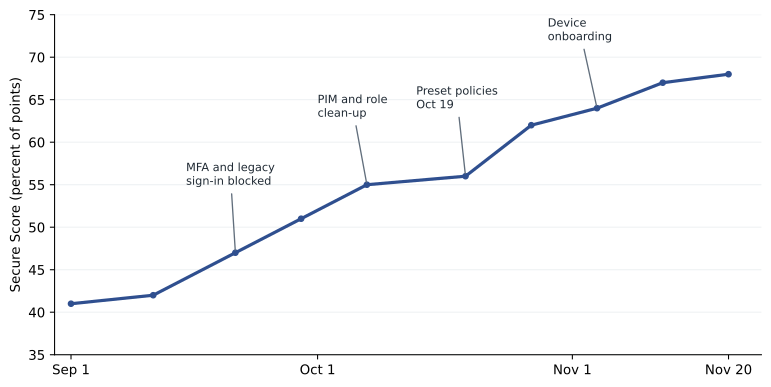
By the middle of November 2026 Corvallin's Microsoft Secure Score had climbed from 41 percent of points possible in September to 68 percent, the rise described in the MSBA-101 course. Ines was pleased and suspicious in equal measure. "Tell me what the number does not measure," she said, "before I show it to the board." This chapter of the workbook is Teodor's answer. It explains how Secure Score is calculated, how to use its recommended actions as a work plan rather than a game, and how the broader exposure management tools in the Defender portal look at risk the way an attacker would.
How Secure Score is calculated
Microsoft Secure Score is a measure of an organization's security posture based on how many of Microsoft's recommended security actions it has completed. Each recommended action carries a number of points, set by Microsoft according to how much the action reduces risk. Some actions award points all at once when completed, such as blocking legacy authentication; others award points in proportion to coverage, such as the share of users registered for multifactor authentication or the share of devices with a protection turned on. The score is the points achieved as a share of points possible, and both numbers are shown.
Only actions that apply to the organization's licenses and products appear. An organization without Defender for Endpoint Plan 2 does not see recommendations that require it. That is why a raw score cannot be compared fairly between two organizations with different licenses, and why Microsoft shows comparisons against organizations of similar size and licensing instead.
Recommended actions are grouped into categories, which also appear as separate scores:
| Category | Typical actions | Corvallin example |
|---|---|---|
| Identity | MFA for all users and admins, blocking legacy authentication, risk-based policies, fewer Global Administrators | Phishing-resistant MFA for admins, finished in October |
| Device | Onboarding devices, attack surface reduction rules, antivirus settings, firewall | Attack surface reduction rules moving from audit to block |
| Apps | Safe Links, Safe Attachments, anti-phishing, mailbox auditing, external forwarding | Preset security policies applied on October 19 |
| Data | Sensitivity labels, data loss prevention, sharing restrictions | Planned for the 2027 Copilot readiness work in the MSBA-102 course |
Working with recommended actions
Each recommended action has its own page that explains the risk it addresses, the points it is worth, the effect on users, the license it needs and the steps to implement it, often with a link straight to the setting. Each also has a status that the organization controls:
| Status | Meaning | Effect on score |
|---|---|---|
| To address | Not yet done | No points |
| Planned | Scheduled, with an owner | No points until completed |
| Risk accepted | The organization has decided not to do it, with a reason | No points; removed from the to-do list |
| Resolved through third party | A non-Microsoft product provides the protection | Points awarded |
| Resolved through alternate mitigation | The risk is addressed another way | Points awarded |
| Completed | Microsoft detects the action is done | Points awarded |
Teodor turned the list into a work plan in Planner, the same plan that tracks Message center changes, with one task per action, an owner, a target date and a link. He sorted it by the risk each action addressed at Corvallin, not by points. Two examples show why. Blocking automatic external forwarding was worth few points but had been central to the September invoice fraud, so it went first. A high-point action to require a particular configuration on macOS devices mattered little in an agency with three Macs, so it waited.
Statuses also need honesty. A team under pressure to raise its score can mark actions as resolved through alternate mitigation without real evidence, and the score will rise while risk does not fall. Teodor's rule was that any status other than completed or to address needed a note in the action's comment field naming the evidence, and that Ines reviewed those notes quarterly.
History, trends and regressions
Secure Score keeps a history of every change: which action gained or lost points, on what date, and whether the change came from a setting, from new coverage, or from Microsoft adding or retiring an action. A metrics and trends view shows the score over time against the comparison group, how many actions were completed or regressed, and how many points are covered by risk acceptance. Changes to settings usually show up within a day or so, because Microsoft recalculates the score periodically rather than instantly.
Regressions are as important as gains. On November 6 Corvallin's score fell by four points overnight. The history showed the cause in seconds: the coverage of the action that checks multifactor authentication registration had dropped after 30 new home care staff were added for the winter season before they had registered any method. Ama's team booked registration sessions at the branches that week, and the points returned as the new staff registered. Teodor added a weekly look at the history to the routine from lesson 1, with a simple rule: any drop of more than two points gets an explanation in the Monday meeting.
Microsoft also adds new recommended actions as products gain features, which can lower the percentage even though nothing in the tenant changed. The summer 2026 arrival of Defender for Office 365 Plan 1 in E3 licenses was an example: several new apps-category actions appeared, the points possible grew, and Corvallin's percentage dipped before the October preset work raised it. Explaining that in advance saved Ines an awkward conversation with the board.
Access to Secure Score
Viewing Secure Score is available to the security reader roles, and changing action statuses or adding notes needs a security administrator role or a Unified RBAC custom role with the right permission for the Secure Score data source. The Identity Secure Score in the Microsoft Entra admin center, covered in the MSBA-101 course, shows the identity slice with its own percentage and history, and its actions also appear in Secure Score's identity category. Teodor reported both, because the board's Zero Trust roadmap had named identity as phase 1 and wanted to see it finished.
Reading the score critically
Ines's question deserved a direct answer, and the workbook gave four.
| What Secure Score does not tell you | Why it matters |
|---|---|
| Whether people follow the controls | A policy can be configured while staff share passwords or approve prompts they did not start |
| Risks outside Microsoft's products | Network devices, the payroll provider's security and paper records are not counted |
| How well incidents are handled | A high score says nothing about how quickly the team detects and responds |
| Which gaps matter most to this organization | Points reflect Microsoft's general view of risk, not an agency's specific threats |
The score is still useful: it is a consistent, external measure that changes when real protections change, and it shows trend. Teodor's advice to the board was to read it as one gauge among several, which is how lesson 11 presents it.
From Secure Score to exposure management
Secure Score looks at controls one at a time. Attackers do not. They look for a path: a phishing message to a user, the user's device, a cached credential on that device, a server the credential can reach, the data on the server. Microsoft Security Exposure Management, an area of the Defender portal, takes that view. It builds an exposure graph of the organization's assets, such as users, devices, cloud resources and data stores, and the relationships between them, and uses it to show where controls are weak in combination.
Exposure management is organized around a few ideas:
| Concept | What it is |
|---|---|
| Security initiatives | Collections of metrics and recommendations for a goal or threat, such as ransomware protection, business email compromise or Zero Trust, each with a score and target |
| Metrics | Measurements within an initiative, such as the share of devices with a vulnerable component or the share of admins without phishing-resistant MFA |
| Recommendations | Actions that improve metrics, many of them shared with Secure Score |
| Critical asset management | Classifying the assets whose compromise would hurt most, such as admin devices or key servers, so that recommendations and paths involving them are prioritized |
| Attack paths | Chains of weaknesses that could let an attacker move from an entry point to a critical asset |
| Attack surface map | A visual exploration of assets and their connections |
Which parts an organization sees depends on licensing and data sources. Microsoft lists Microsoft 365 E5, Microsoft 365 E3 with certain add-ons and Defender suite licenses among the plans that qualify, and several capabilities, such as attack paths through devices and critical asset classification for devices, depend on Defender for Endpoint and Defender Vulnerability Management data. Roles matter too. In Unified RBAC, read access to exposure management lets someone view initiatives and metrics, while setting initiative targets or editing metric weights needs a manage permission or the Security Administrator role.
Using an initiative at Corvallin
The business email compromise initiative was the obvious place to start, because it described the September attack almost exactly. Its metrics covered email authentication, impersonation protection for high-value users, phishing-resistant MFA, external forwarding, inbox rule monitoring and user training. Corvallin's initiative score had been low in September and rose sharply after the October changes. The remaining open metrics pointed to the frontline licensing gap from lesson 1 and to the share of users who had never completed phishing training, which lesson 10 addresses.
Teodor also used critical asset classification for the first time. Microsoft classifies some assets automatically, such as devices used by Global Administrators. He added the two emergency access accounts, the six IT administrators' devices and the payroll lead's laptop as critical, and reviewed the attack paths that ended at any of them. Because attack paths through devices rely on Defender for Endpoint Plan 2 data, the view covered only the IT team's devices, and one path appeared: the help desk's shared walk-up laptop at head office, which several technicians and the occasional visiting nurse used, held a cached credential from an administrator who had signed in to fix a printer. The fix was procedural as much as technical. Administrators would use separate admin accounts only on their own devices or through a dedicated remote support tool, never sign in to shared laptops, and Ama added the rule to the help desk guide.
Threat analytics and exposure
One more view links posture to current threats. Threat analytics reports in the Defender portal describe active campaigns, tools and techniques, written by Microsoft's threat researchers. Each report shows the organization's own exposure: affected devices, related alerts and the recommended actions that would reduce risk from that threat. When a report on an adversary-in-the-middle phishing kit appeared in late October, Teodor checked its exposure section. Corvallin had no active alerts, and every mitigation listed was already in place except phishing-resistant MFA for frontline staff, which was planned. He forwarded the report's summary to Ines with one line: "This is the attack we had. Here is what is left to do."
Worked problem
Prioritizing two recommended actions
Two open actions remain: "Ensure all users can complete multifactor authentication" (worth 9 points, 82 percent complete) and "Turn on audit data recording" (worth a small number of points, not complete because a setting was changed years ago). Teodor has two hours. Which first, and why?
Show solution
- Audit recording underpins every investigation; without it, incidents cannot be reconstructed.
- It is a single setting that can be fixed quickly and verified with a search.
- MFA coverage is valuable but the remaining 18 percent are mostly frontline staff waiting for FIDO2 keys, already planned.
- Points measure general value; the organization's specific risk and the effort required decide the order.
Answer: Fix audit recording first: it is fast and critical for response. Then track the MFA coverage task, which is already in progress.
Common mistakes
MistakeWorking through recommended actions in order of points.
InsteadPrioritize by the organization's actual risk and the effort required, using points as one input.
MistakeMarking actions as resolved through alternate mitigation to raise the score.
InsteadRecord evidence for any such status and review it regularly.
MistakeComparing Secure Score with an organization that has different licenses.
InsteadUse comparisons with similar organizations and focus on your own trend.
MistakeTreating each weakness in isolation.
InsteadUse exposure management initiatives, critical assets and attack paths to see weaknesses in combination.
Summary and key terms
- Secure Score is points achieved out of points possible for Microsoft's recommended actions that apply to the organization's licenses.
- Actions are grouped into identity, device, apps and data, and each has a status the organization controls.
- The score shows trend but not behavior, non-Microsoft risks or response quality.
- Exposure management adds initiatives, metrics, critical asset classification and attack paths built from an exposure graph.
- Threat analytics reports show the organization's exposure to current campaigns and the actions that reduce it.
- Secure Score
- Microsoft's measure of security posture based on completed recommended actions.
- Recommended action
- A specific improvement with points, implementation steps and a status.
- Security initiative
- A goal-based collection of metrics and recommendations in exposure management.
- Critical asset
- An asset whose compromise would cause severe harm, given priority in exposure management.
- Attack path
- A chain of weaknesses that could lead an attacker to a critical asset.
- Threat analytics
- Microsoft threat research reports with an organization's own exposure.
Practice problems
Work each problem on paper first, then reveal the answer to check.
Why can two organizations with the same Secure Score have different risk?
Show answer
Their licenses decide which actions count, and the score ignores behavior, non-Microsoft systems and response capability.
What is the difference between risk accepted and resolved through alternate mitigation?
Show answer
Risk accepted means the organization chose not to act and gets no points; alternate mitigation means the risk is addressed another way and points are awarded.
What does an attack path show?
Show answer
A chain of connected weaknesses that could let an attacker reach a critical asset.
Lesson quiz · 5 questions
Score 60% or more to complete this lesson.
Create a free account to save your progress, take quizzes and earn a certificate.