
MSBA-203 · Lesson 12 of 12 · 20 min
Case study: responding to a phishing campaign
▶ Video coming soon A video version of this lesson is on the way.
The last chapter of Teodor's workbook is a full case, written up after a real campaign against Corvallin in the week of November 16, 2026. It uses every chapter before it. Read it once straight through, then work through the questions at the end before reading the model answers.
Monday, 8:47: the first report
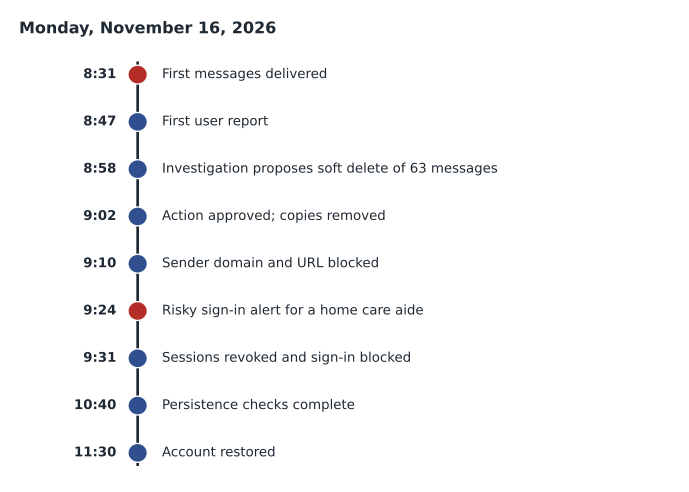
On Monday, November 16, an intake coordinator at head office used the Report button in Outlook on a message she did not like. It claimed to come from a provincial home care referral service and said a new client referral had been sent by secure fax. The body contained a QR code and the text "Scan with your phone to view the referral (expires today)". The sender display name matched the real service; the address came from a newly registered look-alike domain, referral-securefax.example.
Her report arrived in the user reported messages tab and, because the intake team was in the Plan 2 trial, it started an automated investigation. At 8:53 Ama's team saw the report in the morning routine. At 8:58 the investigation finished and proposed soft-deleting 63 similar messages in 61 mailboxes. Teodor, who was on his way in, approved the action from his phone at 9:02 after reading the cluster details.
What the investigation found
Explorer's campaign view grouped the messages into one campaign: 74 messages sent between 8:31 and 8:44 to 72 recipients, from three sending addresses on the same look-alike domain. Of those, 9 had been quarantined at delivery as phishing by the Strict preset, 63 had been delivered and 2 had been delivered to two Corvallin addresses that forwarded to the Kittiwake tenant as part of an integration test, a detail that took twenty minutes to understand because the test was not written down anywhere.
The QR code was the interesting part. QR codes are images, so a link inside one does not appear as clickable text. Defender for Office 365 can extract URLs from QR codes in many messages and check them, and it did so here: the decoded URL pointed to a page on a compromised legitimate website that, at delivery, redirected to a harmless page. By 9:15 the destination had changed to a fake Microsoft sign-in page. The weakness the attackers relied on was not detection at all. It was the phone. A QR code scanned on a phone opens in the phone's browser, where Safe Links on a work account does not help if the phone is personal and unprotected.
| Group | Recipients | What happened |
|---|---|---|
| Intake and billing (Strict preset) | 18 | 9 quarantined at delivery; 9 delivered, then soft-deleted at 9:02; no clicks |
| Other office staff (Standard preset) | 22 | All delivered and soft-deleted; 4 reported it; none scanned the code |
| Home care staff (F3 licenses) | 32 | All delivered and soft-deleted; 1 aide scanned the code on a personal phone before 9:02 and entered her password |
9:10: blocking at the edge
Teodor added the sending domain and the decoded URL to the Tenant Allow/Block List for 30 days, then searched Explorer for any further messages from the domain. Two more arrived at 9:12 and were blocked. He also added the URL as a Defender for Endpoint indicator so that onboarded devices would block it whatever application opened it.
9:24: the compromised aide
At 9:24 Entra ID Protection raised a sign-in risk detection for a home care aide at a branch: a successful password sign-in from an unfamiliar IP address, followed by an MFA prompt. Here the September changes paid off. The aide was one of the home care staff who had been issued a FIDO2 security key, and her account no longer allowed push approvals or SMS. The attacker's relayed sign-in reached the MFA step and failed, because a security key cannot be phished through a relay page. There was no session to steal. The incident in the Defender portal combined the user report, the campaign, the risky sign-in and the failed MFA in one attack story.
Teodor still followed the procedure from lesson 9, because a failed MFA step proves only that one attempt failed. At 9:31 he revoked the aide's sessions and blocked sign-in. Ama phoned her through the branch manager, using the number in the HR record. The aide confirmed she had scanned the code on her personal phone while waiting at a client's home and typed her password before the page asked for her key, which she did not have with her.
9:31 to 10:40: looking for persistence
The persistence checks found nothing, as expected for an attacker who never got past MFA, but each was done and recorded: no new inbox rules, no forwarding, no new mailbox permissions, no new authentication methods, no app consents, no new devices. The audit log showed no mailbox access from the attacker's IP address. Teodor checked one more thing the workbook had added after lesson 6: whether the attacker had tried the same password against any other service. The sign-in logs showed two further failed attempts from the same IP address against the aide's account and none against other users.
11:30: recovery
The aide reset her password at a branch laptop with Ama on the phone, confirmed her security key worked, and was unblocked at 11:30. The incident stayed open while the remaining tasks were finished: classify the campaign, notify the referral service whose name had been used, and decide what to change.
Notifications and reporting
Because no client information had been accessed, the privacy officer recorded the incident as a security event without a privacy breach, after reviewing the evidence that no session had been established. The real referral service was told about the look-alike domain so it could warn other agencies. The incident was classified as a true positive, phishing, with the four-question comment from lesson 8: it started with a QR code phishing campaign against 72 staff; it reached one frontline account's password but not its session; it was contained by fast reporting, automated removal and phishing-resistant MFA; and what will change is guidance on QR codes and the frontline licensing decision already before the board.
Teodor's four-sentence version for the leadership page read: "A phishing campaign on November 16 sent fake referral messages with QR codes to 72 staff. One home care aide entered her password on a personal phone, but her security key stopped the attacker from signing in. Staff reported the message within 16 minutes of the first delivery and the messages were removed from all inboxes within 31 minutes. We are adding QR code guidance to staff training and the frontline email protection decision remains before the board."
| Control | Chapter | Effect in the campaign |
|---|---|---|
| Strict preset for intake and billing | 2 | Quarantined half of the messages to the most targeted group at delivery |
| Report button and reporting culture | 2 and 10 | First report 16 minutes after first delivery |
| Automated investigation (trial) | 9 | Found all 63 delivered copies in 11 minutes |
| Soft delete through the Action center | 9 | Removed every copy within 31 minutes of first delivery |
| Tenant Allow/Block List and endpoint indicator | 9 and 5 | Blocked further messages and the URL on work devices |
| FIDO2 security keys for home care staff | MSBA-101 and 4 | Stopped the stolen password from becoming a stolen session |
| Incident correlation and procedure | 8 and 9 | One attack story; persistence checked even when unlikely |
What did not work so well
The review on Wednesday, November 18 was honest about the weak points. The home care staff, who received 32 of the messages, had no Defender for Office 365 coverage, so their copies were removed only because the investigation started from an office user's report and Teodor extended the action to every mailbox. Had the first report come from a home care aide, there would have been no automated investigation at all. The QR code risk had not been covered in any training, because the first two simulations used links and attachments. Personal phones remained outside every control, which is the reason Corvallin's Conditional Access design requires phishing-resistant methods rather than trusting devices. And twenty minutes were lost understanding the two Kittiwake forwarding test mailboxes, which should have been documented before the test began.
The actions from the review were short: add a QR code simulation to the 2027 plan; add one paragraph about QR codes to the staff newsletter, written by Ama ("If an email asks you to scan a code, report it instead"); document test configurations involving the Kittiwake tenant in the decision log before they start; and attach this case to the board's frontline licensing decision as evidence.
Questions
Practice problems
Work each problem on paper first, then reveal the answer to check.
1. List, in order, the first five actions taken after the first user report, and say which chapter each comes from.
Show answer
Automated investigation triggered by the report (9); review and approval of the proposed soft delete in the Action center (9); block entries for the domain and URL in the Tenant Allow/Block List (9); Defender for Endpoint URL indicator (5 and 6); triage of the risky sign-in incident with containment by revoking sessions and blocking sign-in (8 and 9).
2. Why did Teodor revoke the aide's sessions and block sign-in even though MFA had failed?
Show answer
A failed MFA step shows only that one attempt failed. The procedure contains first in every case, because the cost of containing an account that turns out to be safe is small and the cost of missing a successful attempt is large.
3. The home care staff were not covered by Defender for Office 365. Explain how their copies were removed and why that was partly luck.
Show answer
The investigation started from an office user's report and Teodor extended the soft-delete action to every mailbox in the campaign. If the first report had come from a frontline user, no automated investigation would have started, and removal would have depended on a manual search.
4. Why did Safe Links not protect the aide, and what did?
Show answer
She scanned the QR code on a personal phone, which opened the page outside any work protection. Her phishing-resistant FIDO2 key protected her, because the relay page could not complete the key-based sign-in.
5. Write the classification and the four-question comment for this incident.
Show answer
True positive, phishing. Started: QR code phishing campaign against 72 staff. Reached: one frontline password, no session or data. Contained: user reports, automated investigation and soft delete, blocks, phishing-resistant MFA. Changing: QR code training and guidance, test documentation, frontline licensing decision.
6. Which two measures on the leadership page does this case move, and in which direction?
Show answer
Time to triage (improved: the first report was handled within minutes) and real attacks contained before loss (one more contained). It also supports the report rate goal and the frontline licensing decision.
7. Design one change to prevent the Kittiwake confusion next time.
Show answer
Record every test configuration that touches another tenant, including forwarding, in the decision log with an owner and an end date, and tag related incidents so responders recognize them.
Model answer: the post-incident memo
The last page of the case is the short memo Teodor sent to Ines on November 18, reproduced here as a model of the documentation the workbook asks for.
| Heading | Content |
|---|---|
| Summary | QR code phishing campaign, 74 messages to 72 staff on November 16; one password exposed; no session established; no data accessed. |
| Timeline | First delivery 8:31; first report 8:47; all copies removed 9:02; domain and URL blocked 9:10; risky sign-in 9:24; contained 9:31; restored 11:30. |
| What worked | Strict preset for targeted staff, reporting culture, automated investigation, soft delete, blocks, FIDO2 keys, the compromised account procedure. |
| Gaps | No Defender for Office 365 for frontline staff; QR codes not in training; personal phones outside controls; undocumented test configuration. |
| Actions | QR code simulation in 2027 plan (Teodor); newsletter paragraph (Ama, this week); test documentation rule (Teodor, this week); attach case to board paper (Ines). |
| Notifications | Privacy officer reviewed, no breach; referral service informed of look-alike domain. |
Ines added it to the board paper the same afternoon. Her covering note was one sentence long: "This is what the investment since September bought us, and the next decision is the frontline protection described on page 2."
Common mistakes
MistakeSkipping persistence checks because MFA failed.
InsteadRun the full procedure and record each check, even when the result is expected to be clean.
MistakeAssuming QR codes are covered by link training.
InsteadTrain and simulate each delivery technique attackers use, including QR codes.
MistakeRelying on luck in which user reports first.
InsteadClose licensing and process gaps so every group of users is protected and investigated.
MistakeClosing the incident when the account is restored.
InsteadClose it only after classification, notifications and the agreed changes are recorded.
Summary and key terms
- Fast user reporting and automated investigation turned a 74-message campaign into a 31-minute clean-up.
- Block entries and endpoint indicators stopped further delivery and access on work devices.
- Phishing-resistant MFA stopped a stolen password from becoming a compromised account.
- The compromised account procedure was followed in full even when the attack had failed.
- The review recorded gaps and owners, and the case became evidence for a leadership decision.
- Campaign
- A set of related phishing messages that Microsoft groups as one coordinated attack.
- QR code phishing
- Phishing that hides a malicious link in a QR code image, often to move the victim to a phone.
- Post-incident review
- A meeting and record that captures what worked, what did not and what will change.
- Indicator
- A Defender for Endpoint entry that allows or blocks a URL, domain, IP address or file.
- Containment
- Actions that stop an attacker's current access.
- Post-incident memo
- A short written record of an incident's summary, timeline, gaps, actions and notifications.
Lesson quiz · 5 questions
Score 60% or more to complete this lesson.
Create a free account to save your progress, take quizzes and earn a certificate.