
MSBA-132 · Lesson 10 of 12 · 20 min
Data refresh
▶ Video coming soon A video version of this lesson is on the way.
Three weeks after the report went live, the dean opened it on a Monday morning and saw last Wednesday's numbers. The coordinators had been entering sessions all week, but nothing had changed in Power BI. The reason was simple and common: Kwabena's semantic model used Import mode, and import models show the data as of their last refresh. He had published the model but never set up a schedule. This lesson explains how refresh works, how to schedule it, what a data gateway does and how to keep refresh healthy.
Why refresh is needed
Lesson 4 introduced storage modes. A table in Import mode holds a copy of the data inside the semantic model. That copy is fast, but it does not change until the model is refreshed, which means Power BI reconnects to each source, replays every Power Query step and reloads the results. Tables in DirectQuery mode, and reports with a live connection to another model, do not hold a copy of the data, so they show current data each time a visual loads, without a data refresh. Direct Lake tables on Fabric read the latest data in OneLake. For most beginner reports, built on Import, refresh is what keeps the numbers current.
Power BI uses the word refresh for several related things:
| Kind of refresh | What happens | When |
|---|---|---|
| Data refresh | The semantic model reloads data from its sources | On demand or on a schedule |
| File refresh from OneDrive or SharePoint | A model published from a file stored in OneDrive or SharePoint picks up changes to the file | Automatically, about once an hour |
| Visual cache refresh | Cached query results behind report visuals and dashboard tiles are updated | After a data refresh, and periodically for DirectQuery |
| Automatic page refresh | A report page re-queries DirectQuery sources at a set interval | While the page is open |
This lesson concentrates on data refresh of import models, because that is what most reports need and what the dean was missing.
Refreshing on demand
In the Power BI service, every semantic model has a Refresh now option. It starts a refresh immediately, which is useful after a big data correction or when testing a new model. In Power BI Desktop, the Refresh button reloads the data in the file on the author's computer, but that does not change the published model; the service refreshes its own copy. Beginners sometimes refresh in Desktop and wonder why the published report has not changed. Either publish again, which replaces the model with the file's data, or, better, set up refresh in the service so that no one depends on Desktop at all.
Scheduled refresh
Scheduled refresh runs automatically at times the model owner chooses. It is set on the semantic model's settings page in the service, under Refresh. The owner turns the schedule on, chooses daily or weekly, picks a time zone and adds the times of day. Limits depend on the workspace's license mode, from Microsoft's documentation as of 2026:
- Pro (shared capacity): up to 8 scheduled refreshes per day.
- Premium Per User and capacity (Premium or Fabric): up to 48 scheduled refreshes per day.
Power BI aims to start each scheduled refresh within about 15 minutes of the chosen time. When resources are busy it can start up to an hour late, and it may start up to five minutes early. A refresh at exactly 8:00 a.m. therefore does not guarantee fresh data at 8:01. Kwabena scheduled the tutoring model for 6:00 a.m. and 12:30 p.m., giving the dean fresh numbers before morning meetings and picking up the morning's sessions before the afternoon.
The settings page also holds the data source credentials. Each source needs a way to sign in: OAuth with an organizational account for Dataverse and SharePoint, or a database account for SQL Server. When a password changes or an OAuth token expires, refresh fails until someone updates the credentials, which is the most common refresh failure of all. Kwabena used a dedicated, non-personal account for the SQL Server connection, so that refresh would not stop working the day he changed his own password or left the college.
The on-premises data gateway
Cloud sources such as Dataverse and SharePoint Online can be refreshed by the service directly. Sources inside the college's own network, such as the student information system's SQL Server on a campus server, cannot be reached from the internet. For these, Power BI needs an on-premises data gateway: a small Windows service installed on a computer inside the network that acts as a bridge.
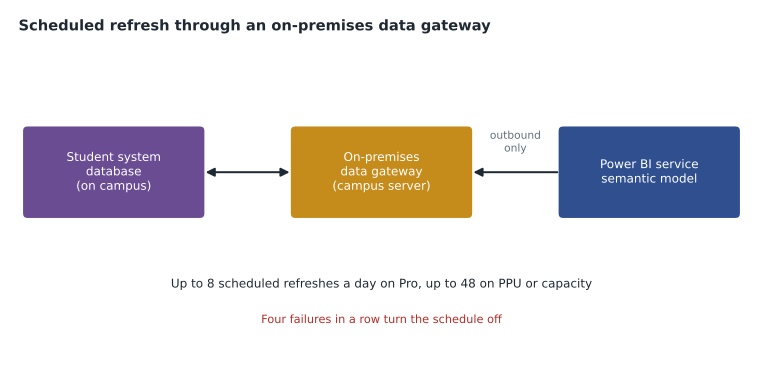
The gateway makes only outbound connections to Azure, so the network does not need to open inbound firewall ports. When a refresh starts, the service sends the query to the gateway through Azure Relay; the gateway runs it against the local source and sends the results back. The gateway can also serve DirectQuery and live connection queries to on-premises sources, and it works for Power Apps, Power Automate and other Microsoft services as well as Power BI.
There are two kinds of gateway:
- The standard mode gateway (often just called the on-premises data gateway) is installed on a server, shared by many users and data sources, and managed by an administrator. It can be installed on several servers as a cluster for high availability, so refresh continues if one server is down.
- The personal mode gateway is installed by one person on their own computer, works only for that person and only for Power BI, and stops working whenever that computer is off or asleep.
Personal mode is fine for a quick experiment and a poor foundation for anything other people rely on. Rupert's team ran a two-server standard gateway cluster on campus. To use it, Kwabena asked them to add a data source connection to the gateway for the student information system, with the reporting credentials, and to add him as a user of that connection. In the semantic model's settings, he then mapped the SQL Server source to that gateway connection. Cloud sources in the same model were refreshed directly by the service.
Sources in virtual networks, such as an Azure SQL database that is not open to the internet, can use a virtual network data gateway, which Microsoft runs for you inside the virtual network. It needs a Premium or Fabric capacity and belongs in later courses.
When refresh fails
Refresh failures are normal and manageable if you know where to look. The model's Refresh history lists every scheduled and on-demand refresh with its start time, duration, status and, for failures, an error message. Common causes include:
- expired or changed credentials;
- a gateway that is offline, or a source not mapped to a gateway connection;
- a column renamed or removed in the source, which breaks a Power Query step that refers to it;
- a source that times out under load;
- a model that has grown beyond the size limit for its license mode.
Two automatic behaviors protect the service. After four consecutive failures, or sooner for errors that cannot fix themselves, such as invalid credentials, Power BI turns off the schedule. The owner must fix the problem and switch the schedule back on. And if no one views any report or dashboard built on a model for two months, Power BI pauses its scheduled refresh and emails the owner; viewing a report built on it and re-enabling the schedule restarts it. Both rules exist so that broken or abandoned models do not waste resources forever.
The owner can choose who is emailed when a refresh fails: the model owner by default, plus other contacts such as a shared team mailbox. Kwabena added the Student Success Analytics group, so that a failure on his day off would still reach someone.
Worked problem
Reading a refresh history
The tutoring model's refresh history shows: Monday 6:00 completed; Monday 12:30 failed with a credentials error on SQL Server; Tuesday 6:00 failed, same error; and the schedule now shows as off. What happened and what should Kwabena do?
Show solution
- A credentials error is one Power BI treats as unrecoverable, so the schedule was turned off sooner than after four failures.
- The most likely cause is that the reporting account's password changed or expired.
- Ask the gateway administrators to update the credentials on the gateway's SQL Server data source connection.
- Run Refresh now to confirm the fix, then switch the schedule back on.
Answer: The SQL Server credentials stopped working and Power BI disabled the schedule. Update the credentials on the gateway connection, refresh on demand to test, and re-enable the schedule.
Refreshing smarter
As models grow, reloading every row on every refresh becomes slow and wasteful. Incremental refresh lets a model reload only recent data, such as the last 10 days, while keeping older data that does not change. The author defines two Power Query parameters, RangeStart and RangeEnd, filters the table by them, and sets a policy, for example to store five years of data and refresh only the last 10 days. Incremental refresh is available for Pro models as well as capacity models, and it is the usual answer when a model with years of history takes too long to refresh. MSBA-260 covers it in detail.
Other settings help too. Turning off Enable load for staging queries, removing unneeded columns and keeping query folding working (lesson 4) all reduce refresh time. A dataflow can do shared preparation once in the service, so that several models reuse its output instead of each repeating the same work against the source.
Telling readers how fresh the data is
Even a perfect schedule leaves readers wondering how current the numbers are. Kwabena added a small Last refreshed card to every page header. A Power Query step returned the current date and time during each refresh, loaded as a one-row table, and the card displayed it. When the dean saw "Last refreshed: today, 6:04 a.m.", she knew exactly what she was looking at, and when it ever showed yesterday, she knew to ask.
Planning a refresh schedule
A good schedule starts from when people read the report and when the source data changes, not from the maximum number of slots allowed. The tutoring data changed throughout the day as sessions were entered, but the dean read the report before 9:00 a.m. and coordinators checked it after lunch. Two refreshes matched those habits. Refreshing every half hour would have used more of the source database's capacity without anyone noticing the difference.
Timing should also respect the sources. The student information system ran its own overnight batch jobs until about 5:00 a.m., and queries during those hours were slow and sometimes failed. Scheduling the morning refresh at 6:00 a.m. avoided the batch window. When several models use the same gateway and source, staggering their schedules by a few minutes spreads the load.
Worked problem
Fitting a schedule to the limits
A coordinator asks for the tutoring model to refresh every hour from 7:00 a.m. to 6:00 p.m. on weekdays. The workspace is on Pro. Can Kwabena do this, and what are the alternatives?
Show solution
- Every hour from 7:00 a.m. to 6:00 p.m. is 12 refreshes a day.
- Pro allows up to 8 scheduled refreshes a day, so 12 is not possible on Pro.
- Option 1: choose 8 times that match when people read the report, such as 7:00, 8:30, 10:00, 11:30, 1:00, 2:30, 4:00 and 5:30.
- Option 2: move the workspace to PPU or capacity, which allows up to 48 a day.
- Option 3: if the coordinator needs live data, consider DirectQuery for the session table.
Answer: Not on Pro. Choose up to 8 well-placed times, move to PPU or capacity, or reconsider the storage mode.
Common mistakes
MistakeRefreshing in Power BI Desktop and expecting the published report to change.
InsteadSet up scheduled refresh in the service, or publish again to replace the model.
MistakeRunning refresh through a personal mode gateway on a laptop.
InsteadUse a standard mode gateway on a server, ideally a cluster, for shared reports.
MistakeConnecting sources with your own personal account.
InsteadUse a dedicated, managed account so refresh survives password changes and staff changes.
MistakeNot noticing that the schedule has turned itself off.
InsteadAdd a team contact for failure emails and check refresh history after any failure.
Summary and key terms
- Import models show data as of their last refresh; DirectQuery and live connections query current data.
- Scheduled refresh allows up to 8 refreshes a day on Pro and up to 48 on PPU or capacity.
- Each source needs valid credentials; expired credentials are the most common failure.
- An on-premises data gateway, installed inside the network, lets the service refresh local sources using outbound connections only.
- Standard mode gateways serve many users and can be clustered; personal mode gateways serve one person.
- Four consecutive failures turn the schedule off; two months without views pauses it.
- Incremental refresh reloads only recent data; a Last refreshed card tells readers how current the data is.
- Data refresh
- Reloading a semantic model's data from its sources by replaying its queries.
- Scheduled refresh
- Data refresh that runs automatically at chosen times.
- On-premises data gateway
- Software inside a private network that lets cloud services reach local data sources.
- Personal mode
- A gateway installed for one person's use with Power BI only.
- Gateway cluster
- Several gateway installations working together for high availability.
- Refresh history
- The record of each refresh with its status and any error message.
- Incremental refresh
- A policy that reloads only recent data and keeps older data in place.
Practice problems
Work each problem on paper first, then reveal the answer to check.
How many scheduled refreshes per day does a Pro workspace allow?
Show answer
Up to 8.
Why does an on-premises data gateway not need inbound firewall ports?
Show answer
It makes only outbound connections to Azure and receives queries through Azure Relay.
What happens to a schedule after four consecutive refresh failures?
Show answer
Power BI turns the schedule off until the owner fixes the problem and re-enables it.
Lesson quiz · 5 questions
Score 60% or more to complete this lesson.
Create a free account to save your progress, take quizzes and earn a certificate.