
MSBA-132 · Lesson 1 of 12 · 18 min
Dataverse tables, columns and relationships
▶ Video coming soon A video version of this lesson is on the way.
Kwabena Asante-Lowe had spent three years as the institutional research analyst for Lumenvale Community Colleges, the three-campus college system in Boise, and in that time he had learned to dread one file. It was a spreadsheet called tutoring_bookings_FINAL_v7.xlsx, and it lived in a shared folder at the Student Success office. Every campus kept its own copy. Every copy had slightly different column names. When the dean asked how many tutoring hours the colleges had delivered last term, Kwabena spent two days reconciling the copies and still was not sure the answer was right.
Maribeth Ferreira-Quon from the registrar's office had just built her first app on Microsoft Power Platform, and she suggested a different home for the bookings: Microsoft Dataverse. This course follows Kwabena and Maribeth as they move the tutoring data into Dataverse, add simple rules, and then build Power BI reports, dashboards and apps on top of it. The first step is understanding what Dataverse is and how it organizes data.
What Dataverse is
Microsoft Dataverse is the managed data platform that sits underneath Power Platform and the Dynamics 365 customer engagement apps. It stores data in tables made of columns and rows, in much the way a relational database does, but it adds a great deal that a plain database leaves to the developer. Security is built in, down to individual rows and columns. Business logic such as rules, calculated values and automated processes can be attached to the data itself. Auditing, search, file and image storage, and a common way for apps, flows, agents and reports to connect are all part of the service. Microsoft runs the infrastructure, so there is no server to patch and no backup job to schedule.
Dataverse lives inside a Power Platform environment. An environment is a container for apps, flows, agents and data, usually tied to one region and one purpose, such as development, testing or production. Each environment can have at most one Dataverse database. Lumenvale's IT governance lead, Rupert Ellingsworth, created two environments in the United States region for the tutoring work, Student Success Dev and Student Success Prod, following the same pattern as the registrar's environments, so that Maribeth could experiment in development without touching real records.
Dataverse compared with a traditional database
The PL-900 exam asks candidates to describe how Dataverse differs from a traditional database, and the differences explain why a college would choose it. A traditional database such as SQL Server gives you tables, keys and queries, and leaves the rest to you: you design a security model, write the application, build the forms, add auditing and plan for backups and scaling. Dataverse starts higher up. It provides a set of ready-made standard tables, such as Account, Contact and User, that many business apps share. It understands rich data types, such as a currency value or a file attachment, not just numbers and text. It applies role-based security through the same Microsoft Entra ID identities people already use to sign in, and it exposes every table through a common interface so that Power Apps, Power Automate, Copilot Studio and Power BI can all reach the same data without custom code.
| Question | Traditional relational database | Microsoft Dataverse |
|---|---|---|
| Who runs the servers? | You or your hosting provider | Microsoft, as a managed service |
| Where do tables come from? | You design every one | Standard tables plus your own custom tables |
| How is access controlled? | Database logins and permissions you design | Security roles, business units, teams and Entra ID sign-in |
| Where does business logic live? | Application code or stored procedures | Business rules, formula columns, flows and plug-ins attached to the data |
| How do apps connect? | Drivers and code you write | Built-in connections from Power Platform and Dynamics 365 |
None of this makes Dataverse the right home for every dataset. Very large analytical stores, such as years of website clicks, belong in a data warehouse or a lakehouse. Data that only one person uses may be fine in a spreadsheet. Dataverse shines when several people and apps need to create, update and secure the same business records, which is exactly the tutoring situation.
Tables
A table holds one kind of record. Each row is one record, such as one tutoring session, and each column holds one fact about that record, such as its start time. Tables used to be called entities, and you will still see that older word in some settings, error messages and older documentation.
Dataverse tables come in several types, and the type is chosen when the table is created.
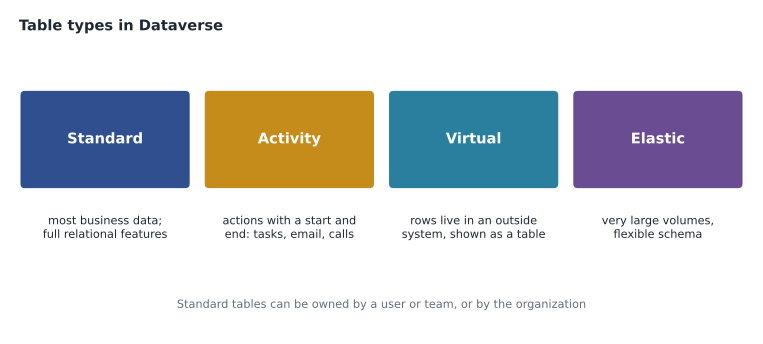
A standard table is the everyday choice. It supports every column type, every kind of relationship and the full security model. When you create one, you choose its ownership: a user or team owned table records an owner on each row, which lets security roles grant access to "my records" or "my team's records", while an organization owned table has no row owner and access is all or nothing. An activity table stores actions that have a start and an end, such as a phone call or an appointment, and those rows appear on a timeline in model-driven apps. A virtual table shows rows that live in an outside system, such as a SQL database, as though they were Dataverse rows, without copying them. An elastic table is designed for very large, fast-changing volumes of data, such as sensor readings, and trades some relational features for scale.
Tables are also described as standard tables in a second sense: the tables Microsoft supplies, such as Account and Contact, as opposed to the custom tables you create. The word does double duty, so read questions carefully. Custom tables you create carry a publisher prefix, such as lmv_ for Lumenvale, in their internal names, which keeps them from clashing with Microsoft's tables or another publisher's.
Display names, plural names and logical names
Every table and column has a display name that people see, a plural name used in navigation, and a logical name (sometimes called the schema name) that code, flows and formulas use. Display names can be changed at any time. Logical names are set when the item is created and cannot be changed afterwards, which is why Maribeth took a few minutes to agree on names with Kwabena before creating anything. A table called Tutoring Session became lmv_tutoringsession internally.
Columns
Columns used to be called fields or attributes. Each column has a data type that controls what it can hold and how apps display it. Choosing the right type matters: a date stored as text cannot be sorted by date, and a campus typed freely as text will soon be spelled five different ways.
| Data type | Holds | Tutoring example |
|---|---|---|
| Single line of text | Short text, with formats such as email, URL or phone | Tutor email |
| Multiple lines of text | Longer notes | Session notes |
| Whole number | Integers | Minutes |
| Decimal or float | Numbers with decimals | Satisfaction score |
| Currency | Money, with exchange rates per row | Tutor hourly rate |
| Date only, or date and time | Dates, optionally with time and time zone behavior | Session start |
| Choice | One value from a defined list | Status: Booked, Completed, No-show |
| Choices | Several values from a defined list | Topics covered |
| Yes/No | A two-option value | First visit? |
| Lookup | A reference to a row in another table | Tutor |
| Autonumber | A generated sequence such as TS-1001 | Session ID |
| File and image | Attachments and pictures | Signed consent form |
| Formula | A value calculated with Power Fx | Hours = Minutes divided by 60 |
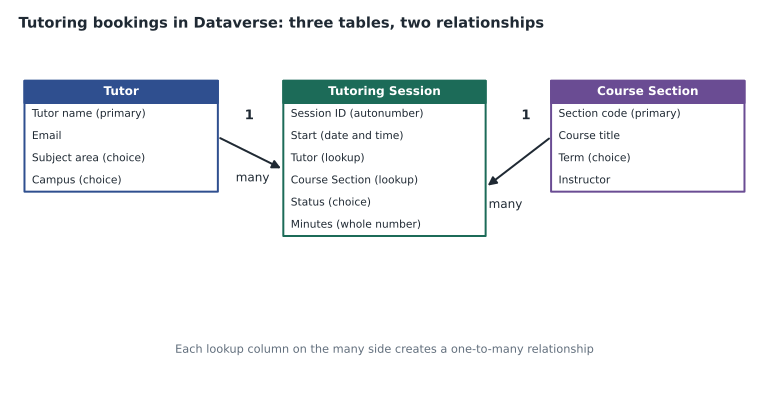
Every table has a primary name column, which is the text people see when a row appears in a lookup or a list. For Tutor it is the tutor's name; for Course Section it is the section code. Dataverse also creates system columns on every table automatically, such as Created On, Modified By and Owner, so you never need to build your own audit stamps.
Some column choices have consequences worth knowing early. A choice column can use a global choice defined once and shared across tables, such as a Campus list used by both Tutor and Tutoring Session; change it once and every table sees the change. Formula columns calculate their value with Power Fx, the same formula language used in canvas apps, and recalculate when the row is read. A required setting can make a column business required, which forms enforce, but data loaded by code can still leave it empty unless other logic checks it.
If(
    ThisRecord.Minutes >= 60,
    "Long session",
    "Standard session"
)
Keys
Each row has a unique identifier, a GUID that Dataverse creates. People rarely use it. When data comes from another system, an alternate key lets Dataverse recognize a row by a business value instead, such as the student system's section code. Alternate keys make imports and integrations safer, because a second import of the same section updates the existing row rather than creating a duplicate.
Relationships
A relationship connects rows in two tables. Dataverse supports two kinds you create directly.
A one-to-many relationship links one row in the first table to many rows in the second: one tutor runs many tutoring sessions. Seen from the session's side, the same relationship is many-to-one, and it appears as a lookup column on Tutoring Session that points to Tutor. Creating a lookup column is the most common way to create the relationship. A many-to-many relationship links many rows on both sides, such as tutors and the courses they are qualified to support; Dataverse manages the hidden intersect table that records each pairing.
Relationship behavior
A one-to-many relationship also defines what happens to related rows when something is done to the parent row, such as deleting it, assigning it to a new owner or sharing it. In a parental relationship the actions cascade: delete a parent and its children are deleted too. In a referential relationship the rows stay independent, and you choose options such as removing the link when the parent is deleted, or restricting the deletion while children exist. A custom behavior lets you set each action separately.
Kwabena wanted tutoring history kept even if a tutor left the college, so Maribeth set the Tutor relationship to referential with restrict delete: a tutor with past sessions cannot be deleted, only deactivated. Deactivating rather than deleting is a common Dataverse habit, because inactive rows keep their history for reporting while disappearing from everyday views.
Forms and views
Tables come with two user-facing pieces that model-driven apps use and that the PL-900 study guide lists. A form is the layout for viewing and editing one row: which columns appear, in which sections and tabs, and in what order. A view is a saved list of rows: which columns appear as list columns, how rows are filtered and how they are sorted. Tutoring Session got a main form for the Student Success staff and three views: Upcoming Sessions, Completed This Term and No-shows. Because forms and views belong to the table, every model-driven app that uses the table can reuse them.
Creating tables with Copilot
The current PL-900 study guide also expects you to know that AI can help create and edit tables, columns and relationships. In the Power Apps maker portal, you can describe the data you need in plain language, such as "a table to track tutoring sessions with a tutor, a course section, start time, length in minutes and a status", and Copilot proposes tables, columns and relationships for you to review. Maribeth tried it in the developer environment. Copilot suggested sensible columns but used free text for Status, so she changed it to a choice column before creating the table. The lesson is the same as with any AI assistant: treat the proposal as a draft, and check names, data types and relationships before you accept them, because logical names cannot be changed later.
Getting data into the tables
With the tables created, Maribeth imported last term's bookings from the cleanest of the seven spreadsheets. Dataverse can import from Excel and CSV files, and Power Query based dataflows can load and transform data from many sources on a schedule. She mapped spreadsheet columns to table columns, let the alternate key on Course Section match existing sections, and fixed the forty rows the import reported as errors. For the first time, every campus was writing to one shared, secured set of records.
Dataverse storage is licensed as capacity, split into database, file and log storage, and the environment's tenant receives an allowance with its Power Platform and Dynamics 365 licenses. Rupert keeps an eye on it in the Power Platform admin center, because large file attachments stored in database columns, rather than in file columns, can use up the more expensive database capacity quickly.
Common mistakes
MistakeStoring values from a fixed list, such as campus or status, in a text column.
InsteadUse a choice column, or a global choice shared across tables, so every row uses exactly the same values.
MistakeCreating tables first and agreeing on names later.
InsteadAgree on names before creating anything, because logical names cannot be changed once a table or column exists.
MistakeLeaving every relationship as parental because it is the default you clicked through.
InsteadChoose behavior on purpose; use referential with restrict delete when history must survive the parent row.
MistakeAccepting a Copilot table proposal without checking it.
InsteadReview suggested columns, data types and relationships, and correct them before creating the table.
Summary and key terms
- Dataverse is a managed relational data platform with built-in security, business logic and connections for Power Platform and Dynamics 365.
- Each environment has at most one Dataverse database; separate environments keep development away from production.
- Tables can be standard, activity, virtual or elastic; standard tables are user or team owned, or organization owned.
- Columns have data types such as text, number, currency, date, choice, lookup, autonumber, file and formula.
- One-to-many relationships appear as lookup columns; many-to-many relationships use a hidden intersect table.
- Relationship behavior decides what happens to child rows when a parent row is deleted, assigned or shared.
- Forms show one row and views list many rows; both belong to the table and are reused by model-driven apps.
- Dataverse
- The managed data platform underneath Power Platform and Dynamics 365 customer engagement apps.
- Environment
- A container for apps, flows, agents and at most one Dataverse database.
- Table
- A set of rows of one kind, such as tutoring sessions; formerly called an entity.
- Lookup column
- A column that refers to a row in another table and creates a many-to-one relationship.
- Alternate key
- A business value, such as a section code, that Dataverse can use to recognize a row.
- Publisher prefix
- The short prefix added to the logical names of custom tables and columns.
- Global choice
- A list of choice values defined once and reused by columns in several tables.
Practice problems
Work each problem on paper first, then reveal the answer to check.
Name two things Dataverse provides that a plain relational database leaves to you.
Show answer
Any two of: managed infrastructure, role-based security with Entra ID, standard tables, rich data types, business logic attached to data, built-in connections for Power Platform.
A Tutoring Session row has a Tutor lookup. Which table is on the "one" side of the relationship?
Show answer
Tutor. One tutor has many sessions.
Why did Maribeth choose restrict delete for the Tutor relationship?
Show answer
So that tutors with past sessions cannot be deleted, which keeps tutoring history for reporting.
Lesson quiz · 5 questions
Score 60% or more to complete this lesson.
Create a free account to save your progress, take quizzes and earn a certificate.