
MSBA-130 · Lesson 9 of 12 · 18 min
Managed environments and governance
▶ Video coming soon A video version of this lesson is on the way.
By October the registrar solution was taking shape in Registrar Dev, and the Lakeshore team had a working safety checklist. Rupert called a governance session before either went live. "Everything we have set up so far is necessary," he said, "but it relies on me checking things by hand. Managed environments let the platform do some of that checking for us." He switched the Registrar Prod environment's Enable Managed Environments setting on while the group watched, and a new set of options appeared.
What managed environments are
Managed environments are a set of premium governance capabilities that an administrator turns on for an environment. They give administrators more visibility, more control and less manual work, and they are included with standalone Power Apps, Power Automate, Copilot Studio, Power Pages and Dynamics 365 licenses. Turning them on is a decision made per environment, and Lesson 8 explained the licensing consequence: everyone actively using apps or flows in a managed environment needs a standalone license or a pay-as-you-go meter.
| Capability | What it does | Why Lumenvale used it |
|---|---|---|
| Environment groups | Organize environments into groups and apply rules to the whole group at once | One set of rules for every registrar environment |
| Limit sharing | Restrict how widely makers can share canvas apps, for example not with everyone | Stops a student-data app being shared with all staff |
| Weekly usage insights | Email administrators a digest of the most-used and inactive apps, flows and agents | Spot unused resources and key apps without searching |
| Data policies | Show and apply data policies for the environment | Confirm the registrar policy is in force |
| Pipelines in Power Platform | Deploy solutions from development to test to production | Release changes safely |
| Maker welcome content | Show makers a custom message and links when they first open the environment | Point makers to the colleges' guidelines |
| Solution checker | Check solutions for problems and, if set, block imports that fail | Catch risky code and patterns before release |
| IP firewall and IP cookie binding | Limit access to the environment to trusted network addresses and protect sessions | Extra protection for student data |
| Customer-managed key and Lockbox | Use the organization's own encryption key; approve any Microsoft engineer access to data | Meet stricter privacy expectations |
| Extended backup | Keep backups for longer | Longer recovery window for production |
| Default environment routing | Send new makers to their own developer environment instead of the default one | Keep the default environment tidy |
| Masking rules | Mask sensitive values for people who do not need to see them | Hide most of a student number in lists |
Other managed environment capabilities include data policies for desktop flows, exporting data to Azure Application Insights for monitoring, administering the catalog where makers publish reusable components, Virtual Network support for connecting securely to private resources, Conditional Access on individual apps, control over which apps may run in an environment, and Copilot help to write app descriptions.
Governance is more than settings
Governance is the set of policies, processes and tools that keep an organization's use of Power Platform safe, compliant and useful. Microsoft's guidance describes it in terms most administrators recognize: know what exists, set guardrails, help makers succeed, and keep improving. Rupert turned that into a governance plan with five parts.
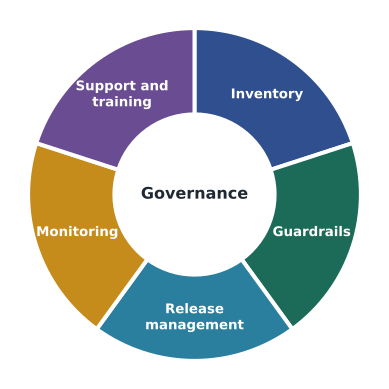
Inventory means knowing what apps, flows, agents and connections exist, who owns them and where they run. The admin center provides inventory and tenant-level analytics, and the weekly digest highlights what is used and what is not. Guardrails are environments, security groups, data policies, sharing limits and tenant settings. Release management is how changes move safely into production. Monitoring watches usage, errors and capacity. Support and training helps makers build well, which Lesson 10 develops.
Application lifecycle management
Application lifecycle management (ALM) is the discipline of managing a solution through its life: building, testing, releasing, updating and eventually retiring it. In Power Platform, ALM rests on solutions and pipelines.
A solution is a package of components that belong together, such as tables, apps, flows, agents, security roles, environment variables and connection references. Solutions come in two forms. An unmanaged solution is used in development, where makers change its components directly. A managed solution is a locked, versioned package exported from development and imported into test and production, where its components cannot be edited directly. Deleting a managed solution removes its components cleanly. Environment variables hold settings that differ between environments, such as the address of the student system, and connection references let each environment use its own connections, so the same solution works everywhere without edits.
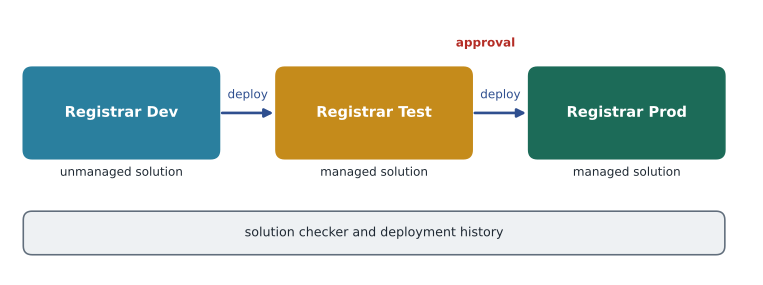
Pipelines in Power Platform automate moving solutions between environments. An administrator defines a pipeline with stages, such as Registrar Dev to Registrar Test to Registrar Prod, and makers deploy with a few clicks. Pipelines can require approvals before a deployment proceeds, run the solution checker, keep a history of every deployment and let administrators see what version runs where. Teams that need more control can connect environments to source control such as Git, or use Azure DevOps or GitHub Actions with the Power Platform CLI. The PL-900 skills ask candidates to describe ALM with pipelines.
Worked problem
Planning a release
Maribeth has added a Rush Fee column and changed a flow in Registrar Dev. Describe how the change should reach Registrar Prod.
Show solution
- Make the changes inside the registrar solution in Registrar Dev, not as loose components.
- Run the solution checker and fix any issues it reports.
- Deploy through the pipeline to Registrar Test, where it is imported as a new managed version.
- Testers confirm the column, the flow and the security roles work with sample data.
- Request deployment to Registrar Prod; Rupert approves; the pipeline imports the managed version and records it in the deployment history.
Answer: Build in the unmanaged solution in development, check it, deploy to test as managed, test, then deploy to production through the pipeline with approval. Nobody edits production directly.
Monitoring and analytics
The PL-900 skills include describing the monitoring and analytics capabilities of Power Platform. Administrators can see usage analytics for apps, flows and agents in the admin center, including how many people use each resource and how often; tenant-level analytics across all environments; capacity use by environment and table; and service health and messages. Makers have their own tools: the Monitor tool in Power Apps records what an app does as it runs, which helps when diagnosing slow screens or errors, and flow run history shows each flow run's inputs, outputs and failures. Copilot Studio shows agent analytics such as sessions, resolution rates and topics used, and supports evaluations that test an agent against a set of questions. For deeper monitoring, managed environments can export telemetry to Azure Application Insights.
| Question | Where to look |
|---|---|
| Which apps are used most, and which have no users? | Admin center analytics and the weekly usage insights digest |
| Why did last night's flow fail? | The flow's run history |
| Why is a screen in the app slow? | Monitor in Power Apps |
| Is the agent answering questions well? | Copilot Studio analytics and evaluations |
| Are we running out of storage? | Capacity in the admin center |
Tenant settings that support governance
Several tenant-wide settings in the admin center support governance. Administrators can restrict who can create production and sandbox environments, who can create trial environments, whether users can sign up for trials themselves, and whether Copilot and other AI features are available. Rupert restricted environment creation to administrators, allowed developer environments for anyone who had completed the colleges' maker training, and turned on default environment routing so that new makers landed in their own developer environments.
Environment groups and rules
As the number of environments grew, applying the same settings to each one by hand became tedious and error-prone. Environment groups solve that. An administrator creates a group, adds managed environments to it and defines rules for the group, such as sharing limits, AI feature settings, backup retention and welcome content. The rules apply to every environment in the group, and environments added later inherit them. Lumenvale created three groups: Registrar, Campus Operations and Personal Development, the last holding every maker's developer environment with strict sharing limits and data policies.
The solution checker
The solution checker analyses a solution against a set of best-practice rules and reports issues such as inefficient queries, deprecated features, accessibility problems in apps and risky patterns in code. Makers can run it at any time from the maker portal. In a managed environment, administrators can set it to warn or to block imports of solutions that fail critical checks, so that problems are caught before they reach production. Signe made running it part of every release.
| Severity | Meaning | Lumenvale rule |
|---|---|---|
| Critical | Likely to cause failures or security problems | Must be fixed before release |
| High | Likely to cause performance or reliability problems | Fix before release or record why not |
| Medium and low | Best-practice improvements | Fix when practical |
A governance review
Every month the CoE held a short governance review. Kwabena brought the numbers from the admin center: how many apps, flows and agents existed in each environment group, which resources had not been used in 60 days, which had no backup owner, how much capacity each environment used, and whether any data policy had blocked a maker's design. Rupert brought requests for new environments and connectors. The review rarely took more than 45 minutes, but it kept the platform's growth visible. Governance, he liked to say, is mostly about noticing things early.
| Measure | Source | Target |
|---|---|---|
| Resources in production without a backup owner | Solution descriptions and inventory | Zero |
| Apps unused for 60 days | Weekly usage insights and analytics | Reviewed each month |
| Data policy blocks in development | Maker reports and admin notices | Each one explained |
| Dataverse capacity used | Capacity in the admin center | Below 80 percent of entitlement |
| Releases without solution checker | Pipeline history | Zero |
Backups and recovery
Production and sandbox environments with Dataverse have system backups that Microsoft takes automatically, and administrators can take manual backups before risky changes, such as importing a major new solution version. Restoring a backup restores the environment to a point in time, usually into a sandbox so that data can be checked before anything is copied back. Managed environments offer extended backup retention for environments that need a longer recovery window. Rupert took a manual backup of Registrar Prod before every major release.
Choosing what to turn on
Not every managed environment capability suits every environment. Rupert matched capabilities to need. In the Registrar group he turned on almost everything: sharing limits, weekly usage insights, solution checker blocking, extended backup, masking rules and IP firewall rules limiting access to the colleges' network and virtual private network. In the Campus Operations group, where data was less sensitive, he used sharing limits, usage insights and solution checker warnings, but no IP firewall, because lab technicians used tablets on public networks during off-site training. In the Personal Development group, which held makers' developer environments, he used sharing limits that allowed sharing with no more than five people and welcome content explaining that personal environments must never hold real student data. Each choice was recorded in the environment strategy so that the next administrator would know why the settings were as they were.
| Capability | Registrar | Campus Operations | Personal Development |
|---|---|---|---|
| Limit sharing | Yes | Yes | Yes, five people at most |
| Weekly usage insights | Yes | Yes | No |
| Solution checker | Block | Warn | Warn |
| IP firewall | Yes | No | No |
| Extended backup | Yes | No | No |
| Masking rules | Yes | No | No |
Common mistakes
MistakeEditing components directly in a production environment.
InsteadImport managed solutions into production through a pipeline.
MistakeHard-coding a server address or email address inside a flow.
InsteadUse environment variables so the same solution works in every environment.
MistakeTurning on managed environments only for the governance features and ignoring licenses.
InsteadConfirm every active user has a standalone license or meter first.
MistakeTreating governance as a one-time setup.
InsteadReview inventory, analytics and policies regularly.
Summary and key terms
- Managed environments add premium governance capabilities such as environment groups, sharing limits, weekly usage insights, pipelines, solution checker enforcement and default environment routing.
- Governance covers inventory, guardrails, release management, monitoring and support.
- Solutions package related components; unmanaged solutions are edited in development and managed solutions are deployed to test and production.
- Environment variables and connection references let one solution work in many environments.
- Pipelines in Power Platform deploy solutions between environments with approvals and history.
- Monitoring uses admin center analytics, Monitor, flow run history, Copilot Studio analytics and Application Insights.
- Managed environments
- A set of premium governance capabilities turned on per environment.
- Environment group
- A collection of environments managed together with shared rules.
- Solution
- A package of related Power Platform components that moves between environments.
- Managed solution
- A locked, versioned solution imported into test or production.
- Environment variable
- A setting stored separately from a solution's logic so it can differ by environment.
- Pipeline
- An automated path that deploys solutions from one environment to the next.
- Application lifecycle management
- Managing a solution through building, testing, releasing, updating and retiring.
Practice problems
Work each problem on paper first, then reveal the answer to check.
What is the difference between a managed and an unmanaged solution?
Show answer
Unmanaged solutions are edited in development; managed solutions are locked, versioned packages deployed to test and production.
Which managed environment capability sends new makers to their own developer environment?
Show answer
Default environment routing.
Which tool shows why a particular flow run failed?
Show answer
The flow's run history.
Lesson quiz · 5 questions
Score 60% or more to complete this lesson.
Create a free account to save your progress, take quizzes and earn a certificate.