
MSBA-130 · Lesson 8 of 12 · 20 min
Licensing basics
▶ Video coming soon A video version of this lesson is on the way.
The eighth session began with the colleges' procurement manager, Lionel Akintola-Reyes, holding up a renewal quote. "Before I sign anything," he said, "tell me what we already have, what we need to buy, and what happens if we get it wrong." Licensing is the least glamorous part of Power Platform and one of the most important. It decides which connectors makers can use, which environments can hold which apps and, increasingly, whether an app opens at all for a user without the right license.
Prices and license names in this lesson are United States list prices in US dollars as published by Microsoft and licensing summaries in 2026. Prices in Canada and other countries differ, education and nonprofit customers often pay less, and Microsoft changes licensing regularly. Always check the current Microsoft Power Platform Licensing Guide and pricing pages before advising anyone.
What Microsoft 365 already includes
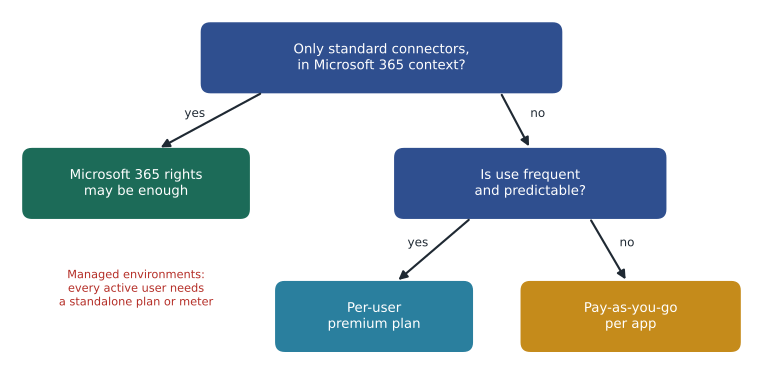
Many Microsoft 365 and Office 365 licenses include limited Power Apps and Power Automate use rights, sometimes called seeded rights. With them, people can build and run canvas apps and cloud flows that use standard connectors such as SharePoint, Outlook, Teams and OneDrive, in the context of Microsoft 365. They can also use Dataverse for Teams inside Microsoft Teams. These rights do not include premium connectors, custom connectors, full Dataverse outside Teams or model-driven apps. Lumenvale's staff already had these rights, which explained the 63 apps in the default environment.
Power Apps licenses
| Option | What it covers | List price (US dollars) |
|---|---|---|
| Power Apps Premium | One user, unlimited apps and Power Pages sites they use internally, premium and custom connectors, Dataverse | 20 per user per month; 12 at large volumes (2,000 or more seats). Microsoft has announced 22 and 14 for terms starting on or after January 1, 2027 |
| Power Apps per app | One user, one app (or one Power Pages site) | About 5 per user per app per month; availability depends on the purchasing channel |
| Pay-as-you-go per app meter | Billed through Azure for each active user of each app in a month | 10 per active user per app per month |
| Developer Plan | A free personal developer environment for learning and building | Free; not for running production apps |
Premium licenses come with Dataverse capacity that adds to the tenant's pool. As of September 2026, licensing summaries list about 250 MB of database capacity and 2 GB of file capacity accrued for each Power Apps Premium license, on top of a default amount for the tenant. Extra database capacity can be bought as an add-on, listed at about 40 US dollars per GB per month.
Power Automate licenses
| Option | What it covers | List price (US dollars) |
|---|---|---|
| Power Automate Premium | One user: cloud flows with premium connectors, and attended desktop flows (RPA) on their machine | 15 per user per month |
| Power Automate Process | One bot: unattended desktop flows, or a cloud flow licensed for everyone who uses it | 150 per bot per month |
| Power Automate Hosted Process | Like Process, but on a Microsoft-hosted virtual machine | 215 per bot per month |
Two ideas matter for the exam. Attended RPA, where a desktop flow runs on the user's own machine while they are signed in, is included in Power Automate Premium. Unattended RPA, where a desktop flow runs on a machine with nobody signed in, needs a Process license (or a hosted process license) for each bot. The exam office's grading-tool automation, which should run overnight with nobody present, would need a Process license.
Copilot Studio and agents
Copilot Studio is licensed mainly by capacity. A Copilot Credit capacity pack of 25,000 Copilot Credits per month is listed at 200 US dollars per pack per month for the tenant. Organizations can instead use pay-as-you-go, paying for credits consumed through an Azure subscription, or prepurchase credits at a discount. Each agent interaction uses credits according to what it does: a simple scripted answer uses fewer credits than a generative answer, and an action that calls tools or flows uses more. Users with a Microsoft 365 Copilot license can use agents within Microsoft 365 and build some internal agents without extra cost, while publishing agents to external channels such as public websites needs Copilot Studio licensing. These rules are detailed and change often; check the Copilot Studio licensing guide.
Power Pages
Power Pages sites are licensed by the number of visitors. Capacity packs cover authenticated users (people who sign in), with a pack of 100 users listed at 200 US dollars a month and lower prices at higher volumes, and anonymous users (visitors who do not sign in), with a pack of 500 users listed at 75 US dollars a month. Pay-as-you-go meters are also available. An alumni transcript site where alumni sign in would be licensed by authenticated users per month.
Pay-as-you-go
Pay-as-you-go links an environment to an Azure subscription so that usage is billed through Azure instead of being covered by licenses bought in advance. It suits apps with unpredictable or occasional use: an app 300 people open twice a year is cheaper to pay for per active user than to license for everyone all year. The administrator sets up a billing policy in the admin center that links one or more environments to the subscription, and Azure cost management tools can then set budgets and alerts.
Worked problem
Comparing license options for the transcript app
The registrar solution uses Dataverse and a custom connector, so its users need premium rights. Six registrar staff use it daily. Forty advisers use it a few times a month, and on average 25 of them open it in any given month. Compare licensing everyone with Power Apps Premium at 20 dollars a month against Premium for the six staff and pay-as-you-go per app for the advisers at 10 dollars per active user per month.
Show solution
- Premium for all 46 people: 46 x 20 = 920 dollars a month.
- Premium for six staff: 6 x 20 = 120 dollars a month.
- Pay-as-you-go for advisers: 25 active users x 10 = 250 dollars a month.
- Mixed approach: 120 + 250 = 370 dollars a month, a saving of 550 dollars a month at these list prices.
Answer: The mixed approach costs about 370 dollars a month against 920 for Premium for everyone. Heavy users suit per-user licenses; occasional users often suit pay-as-you-go. Check that the environment can be set up for pay-as-you-go and that the mix is allowed by current terms.
Trials and developer options
People can start trials of most Power Platform licenses, typically for 30 days, and administrators can control whether users may sign up for trials themselves. The free Developer Plan gives one person a developer environment for learning, building and testing; it is not licensed for running apps that other people rely on, and managed environment features are not included when people run assets under it. Maribeth used the Developer Plan to practice for PL-900 at home.
Licensing and managed environments
When an administrator turns on managed environments for an environment (Lesson 9), licensing becomes stricter: everyone who actively uses apps or flows in that environment needs a standalone license, such as Power Apps Premium or Power Automate Premium, or a pay-as-you-go meter. The seeded Microsoft 365 rights are not enough there. Microsoft has also been tightening enforcement, with notices to administrators and to users who lack the license an app requires. Lionel's question "what happens if we get it wrong" has a real answer: users may be unable to open an app until the right license is assigned.
Capacity
Licenses also bring Dataverse capacity, which every environment with a database consumes. Capacity is measured in three kinds: database (table rows), file (attachments, images and files) and log (audit logs). The tenant's total comes from a default amount plus capacity added by each license, plus any add-ons bought. When the tenant runs short, administrators can buy add-ons, delete old data and environments, or use pay-as-you-go capacity meters. The admin center shows capacity by environment and by table, so Rupert checked it monthly.
| Licensing question | Where to look |
|---|---|
| Is this connector standard or premium? | The connector's page in Microsoft documentation |
| What does a license include? | The Microsoft Power Platform Licensing Guide |
| How are agents charged? | The Copilot Studio licensing guide and the Copilot Credits guide |
| What licenses has the tenant bought? | The Microsoft 365 admin center and the Power Platform admin center licensing area |
| How much capacity is left? | The capacity area of the Power Platform admin center |
Assigning licenses
Licenses are bought through Microsoft's commercial channels and assigned to people in the Microsoft 365 admin center, often through group-based licensing in Entra ID so that membership of a group grants the license automatically. Capacity add-ons and pay-as-you-go billing policies are managed in the Power Platform admin center. Some licenses can also be allocated to specific environments, such as Power Automate Process licenses assigned to the environment where an unattended bot runs. Lionel and Rupert agreed that every premium license would be granted through a group tied to a named solution, so that the colleges could always see why each license existed.
Licensing scenarios
| Scenario | Likely licensing |
|---|---|
| A team uses a canvas app on a SharePoint list with Outlook notifications | Microsoft 365 seeded rights |
| A department uses a model-driven app on Dataverse every day | Power Apps Premium per user |
| Two hundred staff each use one approval app a few times a year | Pay-as-you-go per app, or per app licenses where available |
| A cloud flow uses the SQL Server connector | Power Automate Premium for the flow owner, or a Process license for the flow |
| An unattended bot processes invoices overnight | Power Automate Process (or Hosted Process) per bot |
| An agent answers staff questions in Teams | Copilot Credits through a capacity pack or pay-as-you-go; Microsoft 365 Copilot users have some agent use included |
| A public website lets visitors submit enquiries | Power Pages anonymous or authenticated user capacity |
For the exam, the important skill is recognizing the pattern: standard connectors in Microsoft 365 context are covered by seeded rights; premium connectors, custom connectors, Dataverse and model-driven apps need premium licensing; unattended automation is licensed per bot; agents use credits; external websites are licensed by visitors.
Watching costs over time
Licensing is not a decision made once. People change roles, apps fall out of use and new features appear. Rupert and Lionel agreed on a quarterly license review: compare assigned premium licenses against actual usage in the admin center, remove licenses from people who had not used premium apps in 90 days, check Azure costs for pay-as-you-go environments against budgets, and review Copilot Credit consumption. The first review, planned for February, would also check the effect of the Power Apps Premium list price change Microsoft had announced for 2027 terms.
Worked problem
Spotting idle licenses
The admin center shows that 18 people hold Power Apps Premium licenses, but only 11 opened a premium app in the last 90 days. At 20 dollars per user per month, how much could the colleges save a year by removing the idle licenses, assuming nobody needs them back?
Show solution
- Idle licenses: 18 minus 11 equals 7.
- Monthly saving: 7 times 20 equals 140 dollars.
- Yearly saving: 140 times 12 equals 1,680 dollars.
Answer: About 1,680 dollars a year. Before removing a license, confirm with the person's manager that they will not need it for a seasonal process.
Common mistakes
MistakeAssuming Microsoft 365 licenses cover any app built in Power Apps.
InsteadThey cover standard connectors in Microsoft 365 context; premium connectors, Dataverse and model-driven apps need premium licensing.
MistakeUsing the free Developer Plan to run an app for a whole department.
InsteadThe Developer Plan is for learning and building, not production use.
MistakeLicensing unattended RPA with Power Automate Premium.
InsteadUnattended desktop flows need a Process or Hosted Process license per bot.
MistakeTurning on managed environments without checking licenses.
InsteadManaged environments require standalone licenses or meters for every active user.
Summary and key terms
- Many Microsoft 365 licenses include limited Power Apps and Power Automate rights with standard connectors and Dataverse for Teams.
- Power Apps Premium covers unlimited apps per user with premium connectors and Dataverse; per app and pay-as-you-go options suit narrower use.
- Power Automate Premium covers cloud flows with premium connectors and attended RPA; unattended RPA needs Process licenses.
- Copilot Studio is licensed mainly by Copilot Credits through capacity packs, pay-as-you-go or prepurchase.
- Pay-as-you-go bills environment usage through an Azure subscription using a billing policy.
- Managed environments require standalone licenses or meters for all active users; Dataverse capacity comes from licenses and add-ons.
- Seeded rights
- The limited Power Apps and Power Automate use rights included with many Microsoft 365 licenses.
- Power Apps Premium
- A per-user license for unlimited apps with premium connectors and Dataverse.
- Pay-as-you-go
- Billing for actual usage through an Azure subscription linked to an environment.
- Billing policy
- The admin center setting that links environments to an Azure subscription for pay-as-you-go.
- Copilot Credit
- The unit used to measure and bill agent and AI usage in Copilot Studio.
- Unattended RPA
- Desktop automation that runs on a machine with nobody signed in.
- Capacity
- Dataverse storage in the tenant, measured as database, file and log.
Practice problems
Work each problem on paper first, then reveal the answer to check.
Which Power Automate license covers unattended RPA?
Show answer
Power Automate Process (or Hosted Process), per bot.
What links an environment to an Azure subscription for pay-as-you-go?
Show answer
A billing policy set up in the Power Platform admin center.
Twelve staff need Power Apps Premium at 20 dollars a month. What is the monthly cost?
Show answer
12 x 20 = 240 dollars.
Lesson quiz · 5 questions
Score 60% or more to complete this lesson.
Create a free account to save your progress, take quizzes and earn a certificate.