
MSAZ-349 · Lesson 5 of 12 · 23 min
Review: configuring protections and detections
▶ Video coming soon A video version of this lesson is on the way.
The second half of the largest skill group covers what Defender and Sentinel do automatically: the settings that protect devices, the automation that acts on alerts and incidents, and the rules that create alerts in the first place. On Ama's diagnostic this was the part of the group where her misses clustered, mostly in Defender for Endpoint settings that Sunil administers. This lesson reviews each area the way Nadia asked her to: what the setting does, who it affects, and the one or two details an exam question is likely to turn on.
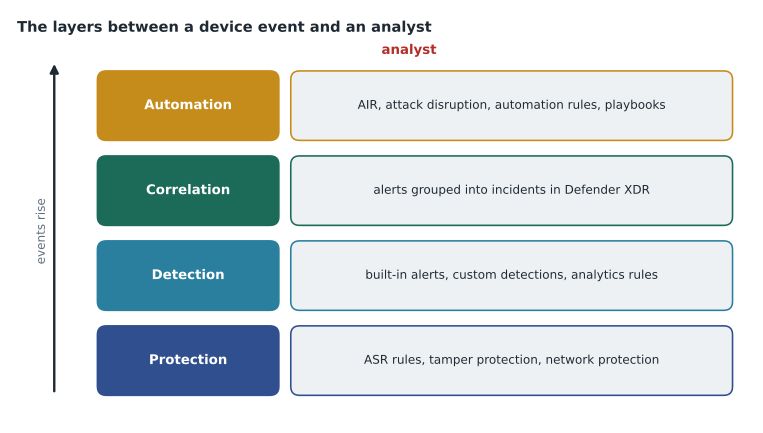
It helps to see the layers together. Protection settings decide what a device blocks before any analyst is involved. Detections decide what becomes an alert. Correlation decides how alerts become incidents. Automation decides what happens to an alert or incident before, or instead of, a person looking at it. A question that asks 'how should you make sure X happens' is usually asking which layer is the right place for it.
Notifications and Defender XDR settings
Defender XDR can send email notifications for new incidents and for threat analytics reports. Incident notification rules choose recipients, severities and, optionally, device groups, so that a store manager group can receive only incidents involving its own devices. The trap is confusing notifications with assignments: a notification tells someone an incident exists, but it does not assign the incident or change its status. Harrow & Finch sends High severity incident emails to the on-call address and to Nadia, and Medium and above for the Finance and Executives device groups to the IT manager.
Defender for Endpoint advanced features
The advanced features page in the Defender portal turns tenant-wide capabilities on or off. The ones most often tested are these: allow or block file, which lets analysts block a file hash across the organization; custom network indicators, which lets indicators of addresses and URLs block connections, and which depends on network protection being enabled on devices; tamper protection, which stops malicious apps or local users from turning off security features; EDR in block mode, which lets Defender for Endpoint remediate malicious items even when another antivirus product is primary; automated investigation, which must be on for automation levels to have effect; and live response, with separate options for servers and for running unsigned scripts.
Exam questions on advanced features usually give a requirement and ask what must be enabled first. 'Analysts must be able to block a malicious domain on all devices' needs custom network indicators and network protection. 'Analysts must be able to run a custom PowerShell script on a device during an investigation' needs live response, and live response for unsigned scripts if the script is not signed. At Harrow & Finch, unsigned scripts are off; Sunil signs the six scripts the SOC uses.
| Requirement | Setting to check |
|---|---|
| Block a file hash everywhere | Allow or block file |
| Block a domain or address on devices | Custom network indicators, with network protection in block mode |
| Stop local admins turning off antivirus | Tamper protection |
| Remediate when a third-party antivirus is primary | EDR in block mode |
| Run a custom script during an investigation | Live response, and live response unsigned script execution if unsigned |
| Let automation remediate | Automated investigation, plus a device group automation level |
Device groups and automation levels
Device groups set two things: which analysts can see and act on which devices, through role-based access in Defender, and how far automated investigation and response (AIR) can go without approval. The automation levels are Full, where remediation happens automatically; three semi-automatic levels, which require approval for any remediation, for remediation in core folders, or for remediation outside temporary folders; and No automated response. New tenants default to Full for devices not in another group. Devices match the first group, in rank order, whose rules they meet, so a device that fits two groups gets the higher-ranked group's level.
Harrow & Finch has six device groups. Servers are semi-automatic with approval for any remediation, with the on-call analyst approving out of hours, because Sunil wants a person to look before anything changes on those machines. Finance and Executives are semi-automatic for core folders. Head office, Stores and Distribution are Full. An exam question that asks why an automated remediation is waiting in the Action center usually has the answer 'the device's group requires approval'.
Attack surface reduction rules
Attack surface reduction (ASR) rules block behaviors that malware often uses, such as Office apps creating child processes, scripts launching downloaded executables, or credential theft from the local security authority subsystem (the defender sees this as MITRE ATT&CK technique T1003, OS Credential Dumping). Each rule can be set to Not configured, Block, Audit, Warn or Disabled. Audit logs what would have been blocked without blocking it, which is how a rule should be tested first. Rules are deployed through Intune, Configuration Manager, Group Policy or PowerShell, not from the Defender portal itself, and the portal's reports show what each rule audited or blocked.
Harrow & Finch has run its standard rules in Audit since the fall. After the threat analytics and vulnerability review on November 9, 2026, the rule that blocks credential stealing from the local security authority subsystem was scheduled to move to Block, and two Office rules stayed in Audit because a legacy stock-ordering macro triggers them, with a ticket to replace the macro. Exam answers about introducing ASR rules safely nearly always include Audit before Block and exclusions only for specific files or folders.
Attack disruption
Automatic attack disruption is a Defender XDR capability that acts during a high-confidence attack in progress, such as human-operated ransomware or business email compromise. It can contain devices, disable compromised user accounts in Active Directory through Defender for Identity, and revoke sessions, and it tags the incident so analysts know disruption happened. It needs Defender for Endpoint, with devices onboarded and in a group that allows automation, and works across the Defender products. The exam can ask how to exclude accounts or devices from automatic containment, for example a service account whose disabling would stop a critical system; that is configured as an exclusion in the attack disruption settings. Ama keeps one rule in mind: attack disruption is something to configure and review, not something to switch off because it might act.
Sentinel automation rules and playbooks
Automation rules in Sentinel run when an incident is created or updated, or when an alert is created. They can change status, severity and owner, add tags and tasks, and run playbooks. They run in a defined order, can have an expiry date and can include conditions on analytics rule names, entities and other properties. Playbooks are Azure Logic Apps workflows that use the Sentinel trigger for incidents, alerts or entities; they do the work that needs a connection to another system, such as posting to Teams, opening a ticket or resetting a password.
The rule of thumb is that automation rules decide and playbooks do. Harrow & Finch's automation rules run in orders from 10 to 60. One tags incidents with the store involved. One raises severity for any sign-in by a break-glass account. One closes known noise from the till service account, svc-till, after tagging it. One assigns incidents, and the last runs the Enrich-IP-Reputation playbook. Because the closing rule runs before the enrichment rule, the playbook never spends calls on noise.
Custom detections in Defender XDR
A custom detection is an advanced hunting query saved as a rule. The query must return the Timestamp column and enough columns to identify the affected entity, such as DeviceId or AccountObjectId, along with ReportId for events from Defender tables. The rule runs on a frequency of continuous (near real time, for eligible queries), every hour, every 3 hours, every 12 hours or every 24 hours, and can take actions on the impacted entities, such as isolating a device, collecting an investigation package or marking a user as compromised. Custom detections now also cover Sentinel data in the unified platform, which makes them a strong choice when a rule needs both Defender and Sentinel tables.
DeviceProcessEvents
| where Timestamp > ago(1h)
| where FileName =~ "certutil.exe"
| where ProcessCommandLine has_any ("-urlcache", "-decode")
| project Timestamp, DeviceId, DeviceName, ReportId,
          AccountName, ProcessCommandLine
The query above looks for the Windows certificate utility being used to download or decode files, which defenders recognize under MITRE ATT&CK technique T1105, Ingress Tool Transfer. It keeps Timestamp, DeviceId and ReportId, so it can be saved as a custom detection. A common exam trap is a query that summarizes the rows first; a summarized result loses ReportId and cannot be saved as a detection without adding the required columns back.
Sentinel analytics rules
Sentinel's analytics rules come in several types. Scheduled rules run a KQL query on an interval from 5 minutes to 14 days, over a lookback of up to 14 days, and create alerts when results meet a threshold. Near-real-time (NRT) rules run every minute over the latest data, with some limits on query shape. The threat intelligence rule matches indicators against log data. Machine learning behavior analytics rules use Microsoft models for specific scenarios. Anomaly rules use machine learning templates that can run in flighting mode to be tested before production. Microsoft incident creation rules, which turned Defender alerts into Sentinel incidents, do not apply once the workspace is in the Defender portal.
The settings inside a scheduled rule are tested as much as the rule types. Entity mapping identifies accounts, hosts, addresses and other entities, up to ten per rule, which makes investigation and correlation work. Custom details surface event fields in the alert. Alert grouping decides whether each event becomes its own alert or one alert summarizes all events. Incident grouping decides whether related alerts within a time window join one incident. Suppression stops the rule running again for a set time after it fires. An exam question that describes 'too many incidents for the same user from one rule' is usually answered by incident grouping, not by suppression, because suppression would hide genuinely new activity.
| Rule type | Runs | Best for |
|---|---|---|
| Scheduled | Every 5 minutes to 14 days | Most custom detections over Sentinel data |
| Near real time | Every minute | Urgent single-event detections |
| Threat intelligence | Continuously, Microsoft managed | Matching indicators against logs |
| Anomaly | Microsoft managed, flighting or production | Behavioral baselines |
| Custom detection (Defender XDR) | Continuous to every 24 hours | Rules that also act on devices or users |
Mapping coverage to MITRE ATT&CK
Sentinel's MITRE ATT&CK page shows which tactics and techniques the workspace's active rules cover, and which are covered only by available templates. The study guide asks candidates to use it to assess coverage. The useful habit is to read it as a list of questions rather than a score: for each important technique with no coverage, is the data there, is there a template, and is the technique relevant to the organization? Harrow & Finch's review on November 13, 2026 listed 24 techniques that matter to a retailer of its size. It had data for 20, a tested rule for 15 and had hunted 17. The clearest gap was T1567, Exfiltration Over Web Service, which needs firewall byte counts that the store firewalls do not yet send; that is planned for January 2027.
Automated investigation in practice
When a Defender alert triggers automated investigation and response, Defender for Endpoint examines the device, the files and processes involved and related evidence, and reaches a verdict on each piece of evidence: malicious, suspicious or no threats found. For malicious and suspicious evidence it proposes remediation actions such as quarantining a file, stopping a process or removing a scheduled task. Whether those actions run immediately or wait depends on the device group's automation level. Pending actions appear in the Action center, where an analyst can approve or reject them, and completed actions can be undone from the history tab within the limits Microsoft documents.
Exam questions sometimes describe an analyst who sees an investigation marked 'pending approval' and ask what to do. The answer depends on the wording: to act on this investigation, approve the pending action in the Action center; to stop such waits in future for that type of device, change the device group's automation level. Ama noticed that the second answer is usually wrong when the scenario mentions servers that the organization treats carefully, because changing the level would remove a control the scenario has just described.
Custom data collection on endpoints
The current study guide also mentions configuring custom data collection rules in Defender for Endpoint. These let an organization collect additional endpoint telemetry that the standard sensor would not send, such as specific file, registry or process events, into tables that can be used in hunting and detections. The feature was new during 2025 and 2026, so its exact options may change before September 2027, and Ama has put it on her list of pages to check in the test tenant in May. The principle an exam is likely to test is stable: collect extra data only for a defined detection or hunting purpose, scoped to the devices that need it, because every extra event costs storage and adds noise.
Worked problem
Choosing a detection tool
Nadia wants a rule that fires when any till PC runs a process from a removable drive, and immediately isolates the device. The rule needs DeviceProcessEvents only. Should Sunil build a Sentinel scheduled rule with a playbook, or a Defender XDR custom detection?
Show solution
- The data, DeviceProcessEvents, is a Defender table, available in advanced hunting without streaming it anywhere.
- The response, isolating the device, is a built-in custom detection action.
- A Sentinel scheduled rule would need the table streamed and a playbook to call the isolation action.
- A custom detection can run continuously, so delay is not a reason to prefer Sentinel.
- So the custom detection meets the requirement with fewer moving parts.
Answer: Build a Defender XDR custom detection with the isolate device action, running continuously.
Common mistakes
MistakeNotifications assign incidents.
InsteadNotification rules only send email; assignment is done by analysts or automation rules.
MistakeCustom network indicators work on their own.
InsteadDevices need network protection in block mode for indicators to block connections.
MistakeASR rules should go straight to Block.
InsteadTest in Audit first, review the report, then move to Block.
MistakeAutomation rules and playbooks are interchangeable.
InsteadAutomation rules decide and change incident properties; playbooks connect to other systems.
MistakeA summarized advanced hunting query can be saved as a custom detection as it is.
InsteadThe rule needs Timestamp, entity identifiers and ReportId in its results.
MistakeSuppression is the fix for many incidents from one rule.
InsteadIncident grouping combines related alerts; suppression hides new activity for a time.
Summary and key terms
- Protection, detection, correlation and automation are separate layers; choose the right layer for each requirement.
- Defender for Endpoint advanced features enable tenant-wide capabilities such as indicators, tamper protection and live response.
- Device groups set automation levels; devices match the highest-ranked group whose rules they meet.
- ASR rules are tested in Audit before Block and deployed through device management tools.
- Sentinel automation rules run in order and call playbooks for work outside Sentinel.
- Custom detections need Timestamp, entity and ReportId columns; Sentinel scheduled rules need good entity mapping and grouping.
- Automation level
- How far automated investigation and response can remediate without approval for a device group.
- Attack surface reduction rule
- A device setting that blocks behavior commonly used by malware.
- Attack disruption
- Automatic containment of users and devices during a high-confidence attack in progress.
- Custom detection
- An advanced hunting query saved as a rule that runs on a schedule and can act on entities.
- Incident grouping
- A rule setting that joins related alerts into one incident within a time window.
Practice problems
Work each problem on paper first, then reveal the answer to check.
What must be enabled for custom network indicators to block a domain on devices?
Show answer
Custom network indicators in advanced features, and network protection in block mode on the devices.
Why might an automated remediation wait in the Action center?
Show answer
The device's group has a semi-automatic level that requires approval.
What is the safe first mode for a new ASR rule?
Show answer
Audit.
Which columns must a custom detection query return?
Show answer
Timestamp, an entity identifier such as DeviceId, and ReportId for Defender events.
Which setting combines repeated alerts for the same user into one incident?
Show answer
Incident grouping in the analytics rule.
Lesson quiz · 5 questions
Score 60% or more to complete this lesson.
Create a free account to save your progress, take quizzes and earn a certificate.