
MSAZ-121 · Lesson 4 of 12 · 18 min
Choosing a non-relational store
▶ Video coming soon A video version of this lesson is on the way.
By the fourth clinic, on November 10, 2026, Keiko had a list. Renata had asked every team to say where its data would live after Project Skylight, and the data team was to review the answers. Some were obvious; others were not. Nikolai turned the review into a lesson: for each item, decide which store fits and say why, using his usual question, "Who reads this data, and how fast do they need it?"
Start from the questions, not the product
Choosing a data store is easier when you describe the data and its use before naming a service. Nikolai uses six questions. What shape is the data: whole files, rows with a fixed structure, documents that vary, or relationships? How is it read: by a single key, by searching inside it, by scanning large ranges, or by following links? How often is it written, and does it change after it is written? How fast must reads and writes be, and from where in the world? How much consistency does the business need between copies? And what will it cost at the expected volume?
The answers point to a service. They also expose cases where two services could work and the decision comes down to cost, skills or features. DP-900 does not expect deep design, but it does expect you to match common needs to the right Azure store.
Blob storage or Azure Files?
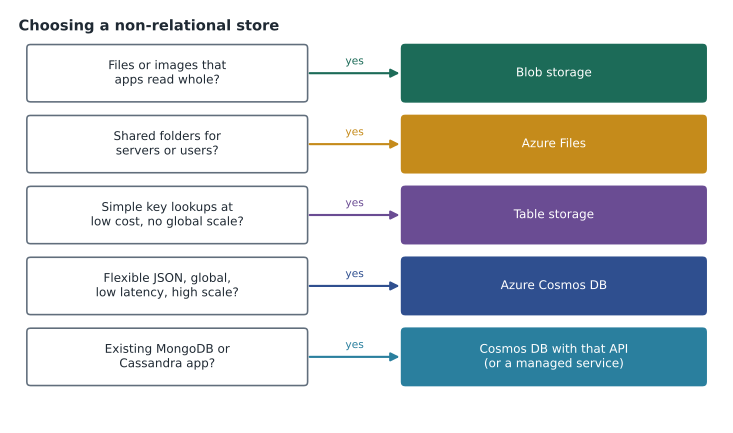
Both store files, so newcomers mix them up. The difference is how the files are reached. Blob storage is reached over HTTPS by applications and tools that use its REST interface or software development kits; it is the natural home for images served on websites, backups, media, archives and data lake files read by analytics engines. Azure Files is reached as a mounted file share over SMB or NFS; it is the natural home for documents people open from a drive letter, for applications that expect a file path, and for replacing on-premises file servers.
Price and scale differ too. Blob storage scales to enormous volumes and offers the Cool, Cold and Archive tiers for data that is rarely read. Azure Files costs more per gigabyte in its premium tier but gives low-latency shared access with file locking. Harrow & Finch put the 60,000 product images and the CCTV archive in Blob storage, and the store and head office shares on Azure Files.
Table storage or Cosmos DB?
Table storage and Cosmos DB can both store key-attribute data, and the Cosmos DB API for Table even uses the same protocol, so this is a common exam comparison. Table storage is cheaper and simpler. It indexes only the partition key and row key, offers throughput that is generous but not guaranteed, and runs in one primary region with optional geo-redundant copies for disaster recovery. Cosmos DB with the API for Table costs more but indexes every property automatically, guarantees single-digit millisecond latency, lets you provision throughput, and can serve reads and writes from many regions.
| Need | Table storage | Cosmos DB for Table |
|---|---|---|
| Cost for large, simple data | Lower | Higher |
| Indexes | Partition key and row key only | All properties by default |
| Latency | Fast, but not guaranteed | Single-digit milliseconds with an SLA |
| Global distribution | Optional read-only copy in the paired region | Reads and writes in any regions you add |
| Throughput | Shared limits of the storage account | Provisioned, autoscale or serverless |
The door-count log from lesson 1 stayed in Table storage: it is large, simple and read by its two keys, and nobody cares whether a lookup takes eight milliseconds or eighty. If the stores' tablets started querying it constantly by other properties, Cosmos DB would become worth the cost.
Cosmos DB or a relational database?
This is the decision Hana made in lesson 2, and it is the one with the biggest consequences. A relational database such as Azure SQL Database suits data with a stable structure, strong rules between entities, multi-table transactions and flexible ad hoc queries with joins. Cosmos DB suits data whose shape varies or evolves, that is read and written by known keys at high volume, that needs low latency everywhere, or that must be distributed globally.
Most organizations use both. Harrow & Finch's split was typical: orders, payments and points transactions stay relational because accounting depends on them, and member profiles, preferences and coupons move to Cosmos DB because the app reads them constantly and their structure changes with every marketing idea. The two are connected by identifiers: an order row carries the member id, and the member document carries nothing about orders.
Five decisions from the review
| Data | Decision | Why |
|---|---|---|
| Product images (60,000) | Blob storage, Hot tier, ZRS | Unstructured files served to the website over HTTPS |
| CCTV clips | Blob storage with a lifecycle rule to Cool and Archive | Rarely read; must be kept cheaply for a fixed time |
| Store and head office shares (9 TB) | Azure Files with Azure File Sync | Staff open files from mapped drives; existing apps expect paths |
| Hourly door counts | Table storage | Simple entities read by store and hour; low cost matters |
| Finch Rewards member profiles | Cosmos DB for NoSQL | Flexible JSON documents read at low latency by member id |
Two items on Keiko's list did not fit any of these stores. The nightly sales history, seven years of every line sold, is read in large scans for reports and trend analysis, not by key. And the planned freezer temperature alerts need data handled as it arrives, not stored first and read later. Nikolai circled both: they are analytical and real-time workloads, and they are the subject of the rest of this course.
Cost and operations matter too
The cheapest store that meets the requirements is usually the right one, but cost includes more than storage. Read and write transactions, data transfer out of a region, redundancy level and, for Cosmos DB, request units all appear on the bill. Operations matter as well: a managed service removes patching and failover work, but teams still need skills to design partition keys, set lifecycle rules and secure access. Nikolai's habit is to write the expected volumes beside every decision so that the estimate can be checked later in the Azure pricing calculator.
# Comparing yearly storage for 9 TB of shares (illustrative prices per gigabyte per month, not real)
gb = 9 * 1024
options = {"Azure Files, standard hot": 0.025, "Azure Files, premium": 0.16, "Blob, cool (not a share)": 0.01}
for name, price in options.items():
    print(f"{name:28s} {gb * price * 12:10,.0f} dollars a year")
print("Blob is cheapest, but staff need a mounted share, so Azure Files is the fit.")Azure Files, standard hot 2,765 dollars a year Azure Files, premium 17,695 dollars a year Blob, cool (not a share) 1,106 dollars a year Blob is cheapest, but staff need a mounted share, so Azure Files is the fit.
What this code does
Compares the yearly cost of 9 TB of shared files in two Azure Files tiers and in cool Blob storage, using made-up prices. Blob storage is cheapest, but staff need a mounted network share. So the code concludes that Azure Files is the right fit despite the higher cost.
The script makes Nikolai's point: the cheapest number on the list is not the answer if the service cannot be used the way people work.
Security and governance questions
Every store choice also raises access questions. Who can read the data, and how is that access granted? Can it be reached from the internet, or only from private networks? Is any of it personal information that must stay in the United States by company policy? Harrow & Finch's answer was the same everywhere: Microsoft Entra identities with role-based access instead of keys, private endpoints for production data, and customer data in US regions. Microsoft Purview, from the governance course, would scan the stores and label sensitive data such as member addresses.
When the answer is more than one store
Real applications often use several stores at once, a pattern sometimes called polyglot persistence. The new harrowfinch.com that Marcus Feldt's team was planning was a good example. Product descriptions and prices would come from the relational catalog in Azure SQL Database, because merchandisers edit them with strict rules and approval steps. Product images would be served from Blob storage through a content delivery network. Each visitor's cart and session would live in a fast key-value cache, Azure Managed Redis, because they are read on every page and lost carts cost sales. Logged-in members' profiles and coupons would be read from the Cosmos DB container Hana was building. And every page view would be sent as an event to the analytics platform for later study.
Each choice followed the same reasoning: the store matches the shape and access pattern of that piece of data. The cost of polyglot persistence is complexity. Each additional store adds something to secure, monitor, back up and pay for, and data that lives in two places must be kept consistent. Nikolai's advice was to add a store only when the simpler option clearly fails a requirement, and to write down why, so that the next person understands the decision.
Questions the exam likes to ask
DP-900 questions about non-relational stores are usually short scenarios with a single deciding detail. Look for words that signal the answer. Files, images, video, backups and data lake point to Blob storage. Shares, mapped drives, SMB, NFS and lift and shift a file server point to Azure Files. Key-attribute, partition key and row key, low cost and semi-structured entities point to Table storage. Globally distributed, single-digit millisecond latency, multi-region writes, JSON documents and elastic scale point to Azure Cosmos DB. MongoDB, Cassandra or Gremlin in the question usually point to the matching Cosmos DB API. When two answers both seem possible, the deciding detail is often cost or latency.
Keiko started a page of these signal words in her study notes. Nikolai added one warning: the exam tests recognition, but real decisions also depend on existing skills, contracts and security rules, so in practice a good answer often starts with "it depends" followed by the questions in this lesson.
Revisiting decisions
Data-store choices are not permanent. Volumes grow, access patterns change and new services appear. Nikolai recorded each decision with a review date and the facts it depended on, such as "under 50 gigabytes, read only by store and hour". If a fact stops being true, for example because store tablets begin querying the door counts by other properties many times a minute, the decision is reopened. Moving between stores later is possible, because Azure provides migration and copy tools, but it is far cheaper to choose well at the start and to keep the reasons written down. Keiko added this habit to her own work: every report she built for the pilot would carry a short note on its data sources and the assumptions behind them.
Worked problem
A store for each workload
Choose a store for each: (a) monthly supplier price lists in PDF that an analytics job reads in bulk; (b) a mobile game's leaderboard that must respond instantly in North America and Europe; (c) an engineering team's shared folder of CAD drawings opened from Windows; (d) millions of small log entries looked up by device id and time, with cost the main concern.
Show solution
- PDFs read in bulk by a job are objects: Blob storage.
- Instant responses in several continents point to Cosmos DB with multi-region distribution.
- Files opened from Windows through a share: Azure Files.
- Simple entities by two keys at low cost: Table storage.
Answer: (a) Blob storage, (b) Cosmos DB, (c) Azure Files, (d) Table storage.
Common mistakes
MistakeChoosing Azure Files for website images because images are files.
InsteadWebsites reach images over HTTPS, which Blob storage serves directly and more cheaply.
MistakePicking Cosmos DB for every new dataset.
InsteadUse it when its latency, scale, flexibility or global distribution is needed; otherwise a cheaper store may do.
MistakeMoving accounting transactions to a document store to avoid joins.
InsteadKeep data that needs strict multi-table transactions in a relational database.
MistakeComparing only the price per gigabyte.
InsteadInclude transactions, request units, redundancy and data transfer.
Summary and key terms
- Choose a non-relational store from the data's shape, how it is read and written, the speed and locations needed, consistency and cost.
- Blob storage serves objects over HTTPS and suits images, backups and data lake files; Azure Files serves mounted SMB or NFS shares.
- Table storage is a low-cost key-attribute store, while Cosmos DB for Table adds automatic indexing, guaranteed latency and global distribution at a higher price.
- Relational databases suit stable, transactional data with joins; Cosmos DB suits flexible data read by key at high volume.
- Large historical scans and real-time processing need analytical and streaming services.
- Access pattern
- The way an application reads and writes data, such as by key or by scanning.
- Mounted share
- A file share connected as a drive or path over SMB or NFS.
- Point read
- A read of one item using its key, the cheapest and fastest kind of read.
- Multi-region writes
- Accepting writes in more than one region of a Cosmos DB account.
- Lifecycle rule
- A Blob storage policy that moves or deletes data automatically by age.
Practice problems
Work each problem on paper first, then reveal the answer to check.
Which store suits a shared folder opened from a mapped drive?
Show answer
Azure Files.
What does Cosmos DB for Table index that Table storage does not?
Show answer
Every property, not just the partition and row keys.
Where would seven years of sales lines read in large scans belong?
Show answer
In an analytical store such as a warehouse or lakehouse.
Lesson quiz · 5 questions
Score 60% or more to complete this lesson.
Create a free account to save your progress, take quizzes and earn a certificate.