
MSAZ-121 · Lesson 3 of 12 · 19 min
Azure Cosmos DB and its APIs
▶ Video coming soon A video version of this lesson is on the way.
Hana's decision from lesson 2 needed a home. On November 5, 2026, she, Nikolai and Keiko spent the clinic designing the Finch Rewards member store on Azure Cosmos DB, Microsoft's fully managed, globally distributable NoSQL database. Keiko's interest was practical: whatever Hana built, Keiko would one day have to report on it.
What Azure Cosmos DB is
Azure Cosmos DB is a platform as a service database. Microsoft runs the servers, applies updates, keeps replicas and handles failover; the customer creates an account, decides how much throughput to pay for, and stores data. Its headline features are the ones the loyalty app needed. Reads and writes typically complete in single-digit milliseconds. Data can be replicated to any Azure region with a few clicks, and an account can accept writes in several regions at once. Throughput and storage scale automatically across partitions. Every property of every item is indexed automatically by default, so new fields are queryable without index design. And Microsoft backs availability, latency, throughput and consistency with service level agreements.
Cosmos DB also stores vectors, the numerical embeddings used by AI search, beside ordinary data, which makes it a common store for AI applications that need to retrieve relevant documents. That capability matters for the customer-service assistant pilot in the AI courses, but for DP-900 the essentials are the data model, the APIs and the use cases.
Accounts, databases, containers and items
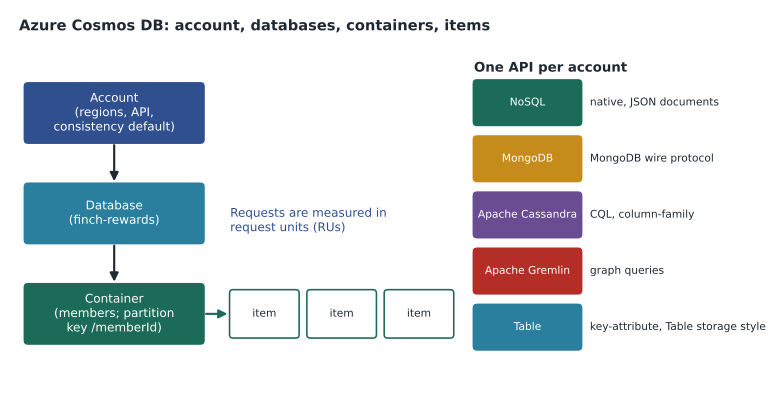
Cosmos DB organizes data in a simple hierarchy. An account is the top-level resource; it sets the API, the regions, and the default consistency level. An account holds one or more databases, which are namespaces that group containers. A database holds containers, which are where data actually lives and where throughput and the partition key are set. A container holds items. What a container and an item are called depends on the API: in the API for NoSQL they are containers and JSON items; in the API for MongoDB, collections and documents; in Cassandra, tables and rows; in Gremlin, graphs with nodes and edges; in Table, tables and entities.
Hana created an account called cosmos-finchrewards-cus, a database called finch-rewards and a container called members. Each member is one JSON item holding the profile, preferences, home store and active coupons, the data the app reads together.
Partitioning and request units
Every container has a partition key, a property chosen when the container is created, such as /memberId. Cosmos DB uses its value to spread items across physical partitions on many servers. Items with the same partition key value form a logical partition and are always stored together. A good partition key has many distinct values and spreads both storage and requests evenly; a bad one, such as /tier with only four values, crowds most of the work into a few partitions and limits scale. Choosing the key well is the most important design decision in Cosmos DB, and it cannot easily be changed later.
Cosmos DB measures work in request units (RUs). Reading a one-kilobyte item by its id and partition key costs about one RU; writes, larger items and queries cost more. You pay for throughput in one of three ways. Provisioned throughput reserves a set number of RUs per second for a container or database. Autoscale provisioned throughput scales between a maximum you set and one tenth of it, charging for the highest level reached each hour. Serverless charges only for the RUs actually consumed, which suits development and spiky, light workloads. Hana chose serverless for testing and planned autoscale for production.
# Rough request-unit planning (illustrative: point reads of small items cost about 1 RU)
reads_per_sec = 300      # members opening the app at peak
writes_per_sec = 20      # profile and coupon updates
read_ru, write_ru = 1, 6 # assumed costs per operation for small items

needed = reads_per_sec * read_ru + writes_per_sec * write_ru
print("Peak RU/s needed:", needed)
print("Autoscale max of 1,000 RU/s scales down to", 1000 // 10, "RU/s when idle")Peak RU/s needed: 420 Autoscale max of 1,000 RU/s scales down to 100 RU/s when idle
What this code does
Estimates the request units per second a Cosmos DB container needs at peak by multiplying reads and writes per second by an assumed cost per operation and adding them. It then shows that an autoscale setting with a maximum of 1,000 request units per second drops to a tenth of that when the app is idle. This is the basic sizing step for Cosmos DB throughput.
Consistency levels
When data is copied to several regions, a read in one region may happen before the latest write from another region has arrived. Cosmos DB lets each account choose how much this matters, using one of five consistency levels. They run from Strong, where every read sees the latest committed write, through Bounded staleness, Session and Consistent prefix, to Eventual, where replicas agree eventually but reads may briefly lag. Stronger consistency gives more certainty at the cost of higher latency and lower availability across regions; weaker consistency is faster and cheaper.
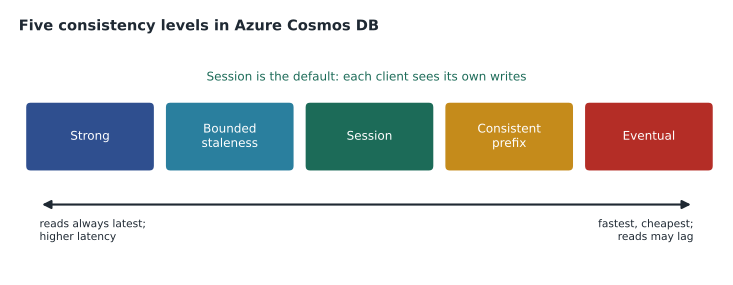
The default, Session consistency, guarantees that within one client session a user always reads their own writes in order, which is what most apps need: when Ana updates her favorite store, her own phone shows the change immediately, even if another reader elsewhere sees it a moment later. Finch Rewards kept the default.
The APIs
Each Cosmos DB account uses one API, chosen when the account is created. The API decides the data model and the protocol applications use, which lets teams use Cosmos DB without learning a new way of working. The current APIs are:
| API | Data model | When to use it |
|---|---|---|
| NoSQL | JSON items queried with a SQL-like language | New applications; the native API, with the newest features first |
| MongoDB | BSON documents over the MongoDB wire protocol | Existing MongoDB applications and tools |
| Apache Cassandra | Wide-column tables queried with CQL | Existing Cassandra applications; column-family data |
| Apache Gremlin | Graphs of nodes and edges | Relationship-heavy data such as recommendations or networks |
| Table | Key-attribute entities | Apps written for Azure Table storage that need more scale, latency guarantees or global distribution |
The API for NoSQL is Cosmos DB's native API. Items are JSON, and queries use a SQL-like language that works with JSON paths, so a developer can write SELECT c.name, c.points FROM c WHERE c.homeStore = 'Ames'. Despite the word SQL, this is not a relational database: there are no joins across containers, only within an item. The API for MongoDB lets applications written for MongoDB connect with their existing drivers. Microsoft also offers Azure DocumentDB, a separate MongoDB-compatible service built on an open-source engine, for teams that want closer MongoDB compatibility or a scale-up architecture. The API for Apache Cassandra accepts Cassandra Query Language, and the API for Apache Gremlin runs Gremlin graph traversals. The API for Table speaks the Azure Table storage protocol, so apps built for Table storage can move up without code changes and gain automatic indexing of all properties, global distribution and guaranteed low latency.
SELECT c.name, c.tier, c.points
FROM c
WHERE c.homeStore = 'Ames' AND c.points > 4000
ORDER BY c.points DESC
Use cases
Cosmos DB suits workloads that need low latency at any scale, flexible data and, often, users in several regions. Common examples are retail and e-commerce (catalogs, carts, order histories, personalization), IoT and telemetry (devices writing readings at high rates), gaming (player profiles and leaderboards that must respond instantly worldwide), web and mobile apps (user profiles, settings, social features), and AI applications (conversation history and vector search). It is not the first choice when data is highly relational with many joins, when complex multi-table transactions are essential, or when the workload is mainly large analytical queries, which belong in the analytical stores later in this course.
For analytics, Cosmos DB can copy its data into an analytical store without affecting the app. Mirroring in Microsoft Fabric replicates a Cosmos DB database into Fabric's OneLake in near real time, and the older Azure Synapse Link served the same purpose for Azure Synapse Analytics. Keiko wrote that down: her report could read loyalty data from the mirror rather than querying the live app's container.
# Imitating a Cosmos DB query over JSON items (the database would use its index instead)
members = [
    {"id": "m1", "name": "Ana Ruiz", "homeStore": "Ames", "points": 4180, "tier": "gold"},
    {"id": "m2", "name": "Ben Ito", "homeStore": "Store 12", "points": 950, "tier": "silver"},
    {"id": "m3", "name": "Chloe Park", "homeStore": "Ames", "points": 5210, "tier": "gold"},
]
rows = sorted((m for m in members if m["homeStore"] == "Ames" and m["points"] > 4000),
              key=lambda m: -m["points"])
for m in rows:
print(m["name"], m["tier"], m["points"])Chloe Park gold 5210 Ana Ruiz gold 4180
What this code does
Imitates a Cosmos DB query over member documents: it filters to members of one home store with more than 4,000 points and sorts them by points. The printed names are the query's result. The real database would use its index instead of checking each document in turn.
Designing the member document
With the API chosen, Hana and Nikolai designed the member item around the app's busiest screens. The home screen needs the member's name, tier, points balance, home store and active coupons, so all of those sit in the member item. Points transactions are different: a long-standing member may have thousands of them, they are appended constantly, and the home screen needs only the balance. Embedding every transaction in the member item would make it grow without limit and make every update expensive, so transactions stay in StockLine's relational database, and the member item stores only the current balance, updated when points are earned or spent.
This is the core rule of document design. Embed data that is read together, belongs to one parent and has a bounded size, such as a member's addresses or active coupons. Reference data that grows without limit, is shared by many parents or changes on its own schedule, such as transactions or store details, by storing its identifier instead. The rule is a guide rather than a law; the right answer always depends on how the application reads and writes.
Global distribution in practice
Finch Rewards is used only by customers in the United States, so Hana did not need many regions. She still added the paired region, East US 2, as a read region, because Cosmos DB then keeps a full replica there and can fail over automatically if Central US has an outage. Adding a region is a setting on the account, not a migration: Cosmos DB copies the data in the background and starts serving reads from the new region when it is ready. Companies with customers on several continents add regions near their users and can enable multi-region writes, so that a customer in Europe writes to a European replica rather than waiting for a round trip across the Atlantic.
Each extra region multiplies the cost of throughput and storage, because every region holds a full copy and serves its own requests. Nikolai's estimate for the loyalty account therefore included both regions. Keiko noted a second benefit for herself: reports and analytics would read from the Fabric mirror described below, so they would never compete with the app for request units in either region.
Backups and recovery
Cosmos DB backs up data automatically. In periodic backup mode, it takes full backups at a set interval and keeps them for a set period, and restores are requested through support or the portal into a new account. In continuous backup mode, it keeps a running record of changes so that an account can be restored to any point within the retention window, for example seven or thirty days, which protects against an accidental deletion or a faulty deployment. Hana chose continuous backup for the production account, because a bad release that corrupted member points would need to be undone to the minute.
Worked problem
Choosing an API
Three teams want Cosmos DB. (a) A vendor's inventory app already uses MongoDB drivers. (b) Hana is building a new loyalty service from scratch. (c) An existing app uses Azure Table storage but now needs guaranteed low latency in two regions. Which API should each choose?
Show solution
- An app that already speaks MongoDB keeps its drivers with the API for MongoDB, or with Azure DocumentDB.
- New applications get the native API for NoSQL, which receives new features first.
- An app written for Table storage can move to the API for Table without code changes.
Answer: (a) MongoDB, (b) NoSQL, (c) Table.
Common mistakes
MistakeTreating the API for NoSQL as a relational database because its queries use SELECT.
InsteadIts query language works on JSON items; there are no joins across containers.
MistakeChoosing a partition key with only a few values.
InsteadPick a key with many distinct values that spreads requests evenly.
MistakeExpecting to switch an account's API later.
InsteadThe API is chosen when the account is created.
MistakeAlways choosing Strong consistency to be safe.
InsteadStrong costs latency and availability; Session suits most apps.
Summary and key terms
- Azure Cosmos DB is a fully managed NoSQL database with low latency, automatic indexing, elastic scale and turnkey global distribution.
- An account holds databases, which hold containers of items; each container has a partition key that spreads data across partitions.
- Work is measured in request units, paid for as provisioned, autoscale or serverless throughput.
- Five consistency levels, from Strong to Eventual, trade certainty for speed, with Session as the default.
- Each account uses one API: NoSQL, MongoDB, Apache Cassandra, Apache Gremlin or Table.
- Azure Cosmos DB
- Microsoft's fully managed, globally distributable NoSQL database service.
- Container
- The unit in Cosmos DB that stores items and has a partition key and throughput.
- Partition key
- The property whose value decides how items are spread across partitions.
- Request unit (RU)
- The measure of work, such as reads and writes, in Cosmos DB.
- Consistency level
- The guarantee about how up to date a read is across replicas.
- API for NoSQL
- The native Cosmos DB API that stores JSON items and supports SQL-like queries.
Practice problems
Work each problem on paper first, then reveal the answer to check.
What is the default consistency level in Cosmos DB?
Show answer
Session.
Which API would an existing Cassandra application use?
Show answer
The API for Apache Cassandra.
Which throughput option charges only for request units actually consumed?
Show answer
Serverless.
Lesson quiz · 5 questions
Score 60% or more to complete this lesson.
Create a free account to save your progress, take quizzes and earn a certificate.