
MSAZ-101 · Lesson 7 of 12 · 21 min
Regions, region pairs and availability zones
▶ Video coming soon A video version of this lesson is on the way.
Renata gives Theo his first real design task in the third week of October: write a one-page memo recommending where in the world Harrow & Finch's Azure resources should live, and how StockLine should survive the loss of a building. "Grace's snowstorm is the test," she says. "If that happens to a Microsoft data center, the stores should keep selling." To write the memo, Theo has to understand how Azure is laid out physically: data centers, availability zones, regions, region pairs and geographies.
Data centers
At the bottom of Azure's physical structure are data centers: buildings full of servers, storage and networking equipment, with their own power supplies, cooling and security. Microsoft operates many data centers, and customers never choose an individual building. Instead, data centers are grouped into larger units that customers can choose: availability zones and regions. Microsoft does not publish exact addresses, and physical access is limited to authorized staff behind several layers of security, one of the responsibilities that always sits with Microsoft under the shared responsibility model.
Regions
An Azure region is a geographical area containing one or more data centers that are close together and connected by a fast, low-latency network. When you create most Azure resources, you choose a region, and the resource lives there. Regions have names such as Central US, East US 2, Canada Central or West Europe, and Microsoft describes its footprint as more than 60 regions worldwide.
Choosing a region matters for four reasons. Latency: resources close to users respond faster. Data residency and compliance: some data must stay in a particular country. Service availability: not every service or virtual machine size is offered in every region, and new services often arrive in large regions first. And price: the same resource can cost different amounts in different regions.
For Harrow & Finch, the obvious candidate is Central US, which is in Iowa, the same state as head office. It offers availability zones, a broad range of services and low latency to the stores in Iowa, Nebraska and Missouri. East US 2, in Virginia, is a natural second choice for disaster recovery.
# Rough minimum network round-trip time from distance.
# Light travels through optical fibre at roughly 200,000 km per second, and real cable routes
# are longer than straight lines; assume the route is 1.5 times the straight-line distance.
def rtt_ms(km, route_factor=1.5):
    one_way_s = km * route_factor / 200_000
    return 2 * one_way_s * 1000
for place, km in (("Winnipeg to Toronto", 1520), ("Des Moines to central Iowa", 60),
                  ("Toronto to Quebec City", 730), ("Iowa to Virginia", 1450)):
print(f"{place}: at least {rtt_ms(km):.1f} ms round trip")Winnipeg to Toronto: at least 22.8 ms round trip Des Moines to central Iowa: at least 0.9 ms round trip Toronto to Quebec City: at least 10.9 ms round trip Iowa to Virginia: at least 21.8 ms round trip
What this code does
Estimates the shortest possible network round-trip time between places from their distance, assuming light in optical fiber travels about 200,000 km per second and that real cable routes are about one and a half times the straight-line distance. It prints the minimum delay for several city pairs. This explains why choosing an Azure region close to users matters for responsiveness.
Real round-trip times are higher than these minimums, because of routers, queues and processing, but the calculation shows why distance matters: every thousand kilometers adds several milliseconds each way. For an inventory lookup, a few milliseconds are irrelevant. For a database that an application calls hundreds of times per page, they add up, which is why the application servers and database for StockLine must sit in the same region.
Most organizations use far fewer regions than they might expect. A company whose customers and staff are in one country often runs nearly everything in a single primary region, with a second region reserved for backups and disaster recovery. Spreading workloads across many regions adds network charges, latency between components and complexity in operations, so it should be done for a reason, such as serving users on another continent. Renata's rule for Skylight is one primary region for production, the paired region for recovery, and any exception approved in writing. That keeps the design easy to explain, which matters when something goes wrong at three in the morning and the person on call needs to know where to look first.
Availability zones
An availability zone is a physically separate location within a region, made up of one or more data centers with independent power, cooling and networking. Regions that support zones have at least three, connected by high-speed private links with very low latency. Zones are close enough that data can be copied between them almost instantly, but far enough apart that a fire, flood or power failure in one is unlikely to affect the others.
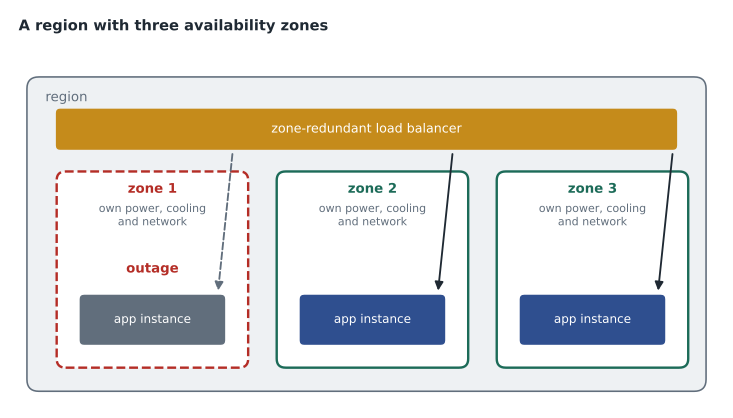
Not every region has availability zones. Central US has three zones, and East US 2 has more. Microsoft is adding zones to more regions over time, and many newer regions launch with them. Microsoft's regions list on Microsoft Learn shows which regions currently support zones.
Azure services use zones in three ways. Zonal services are placed in a specific zone that the customer chooses; a virtual machine pinned to zone 1 is an example. The customer achieves resilience by placing copies in different zones. Zone-redundant services spread themselves across zones automatically; zone-redundant storage and some database tiers copy data to all three zones without the customer managing it. Non-regional, or global, services are not tied to a region at all and are resilient by design; Microsoft Entra ID and Azure DNS are examples.
| Kind | How it uses zones | Example |
|---|---|---|
| Zonal | Customer places the resource in a chosen zone | A virtual machine or managed disk in zone 2 |
| Zone-redundant | The service replicates across zones automatically | Zone-redundant storage, zone-redundant databases |
| Non-regional | Runs globally, independent of a single region | Microsoft Entra ID, Azure DNS, Azure Front Door |
Using zones usually costs a little more, because data moves between buildings and duplicate resources run in each zone. For production systems where downtime is expensive, the extra cost buys protection from the most common large failures. For test systems, a single zone or no zone at all is often enough.
Worked problem
Sizing for the loss of a zone
StockLine's application tier needs the capacity of 6 VMs at the busiest time of year. Theo wants it to keep full capacity even if one of the region's three availability zones fails. How many VMs should he run, and how should they be placed?
Show solution
- If the VMs are spread evenly across three zones, losing one zone removes a third of them.
- To keep 6 VMs running after losing a zone, the remaining two zones must hold 6 VMs between them, so 3 per zone.
- Three per zone across three zones is 3 × 3 = 9 VMs in total.
- An autoscale rule could run fewer most of the year and add more in the spring, keeping the same three-zone spread.
Answer: Nine VMs, three in each zone. Planning for the loss of one zone costs half as much again as the minimum, which is the price of the protection.
A checklist for choosing regions
Theo turns what he has learned into a checklist that the Skylight team now uses for every new workload. First, compliance: does any law, contract or company policy limit where this data can be stored or processed? Second, latency: where are the users, and how often does the application talk across the network? Third, services: does the region offer every service and VM size the design needs, including availability zones if the workload needs them? Microsoft's products-by-region page answers this. Fourth, resilience: what is the plan if a zone fails, and what is the plan if the region fails? Fifth, cost: are prices noticeably different in an otherwise suitable region?
The order matters. A cheaper region that breaks a data residency rule is not an option at all, and a region that lacks a required service cannot be fixed by saving money. For most of Harrow & Finch's workloads, the answers lead to the same primary region, which keeps the design simple. The exceptions are recorded with their reasons.
Some Azure services let the customer choose more than one region for a single resource. Azure Cosmos DB, for example, can replicate a database to several regions and let applications write in any of them, and Azure Front Door can route users to whichever region is healthy. These global designs are more complex and cost more, and they are usually reserved for applications whose users are spread across continents or that must survive a regional outage with no interruption.
Region pairs
Most Azure regions are paired with another region in the same geography, usually several hundred kilometers away. Central US is paired with East US 2. The pairs exist to protect against disasters that could affect a whole region, such as a major natural disaster, and they come with specific behaviors.
- Some services replicate data to the paired region automatically. Geo-redundant storage, covered in lesson 11, copies data to the paired region.
- If a broad outage affects several regions, Microsoft prioritizes recovering one region from each pair.
- Planned platform updates are rolled out to paired regions one at a time, so a faulty update is unlikely to affect both.
- With one exception, Brazil South, paired regions are in the same geography, so data that replicates to the pair stays within it for residency purposes.
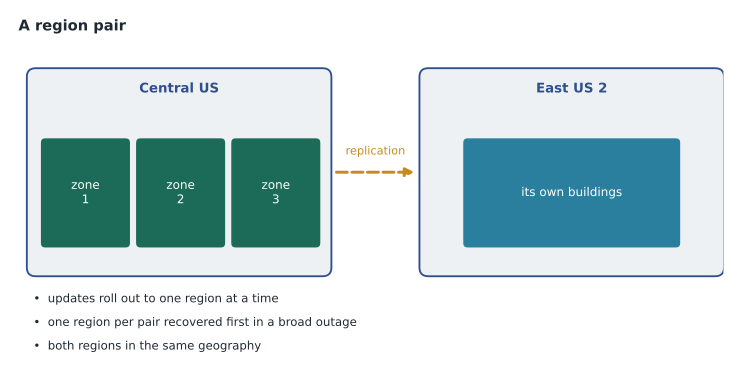
Region pairs are fixed by Microsoft; customers cannot choose their own pair, though they can replicate data between any regions they like using service features or their own tools. Some pairs are asymmetric: West US 3, for example, is paired in one direction with East US. And Microsoft's documentation notes that many newer regions have no pair at all, relying on availability zones instead. For the exam, know what pairs are and why they exist, and know that zones protect within a region while pairs protect across regions.
Geographies and sovereign regions
Regions are grouped into geographies, which usually follow national borders, such as Canada, the United States or the United Kingdom. A geography is a market that respects data residency and compliance boundaries. Most customers stay within one geography for their core systems. Sovereign regions, described in lesson 3, sit apart from this: Azure Government for United States government work and Azure operated by 21Vianet in China are separate instances of Azure, isolated from the public regions.
Theo's memo
Theo's one-page memo, dated October 23, recommends the following. Primary region: Central US, because it is close to head office and the stores, has three availability zones, and offers every service Skylight needs. StockLine's application servers and database will be zone-redundant across all three zones, so the loss of one building does not stop the stores. Backups and geo-replicated storage will use the paired region, East US 2. Test and development systems will run in one zone only, to save money.
Renata adds a note in the margin: the memo should say what happens if the whole primary region is lost, not just one zone. Theo adds a line saying StockLine would be restored in the paired region from replicated backups within one business day, and that a faster option would cost more and is for the business to decide. Renata approves it. "That last sentence," she says, "is the one Grace will read."
Common mistakes
MistakeAn availability zone is a separate region.
InsteadA zone is a separate location within one region, with its own power, cooling and networking.
MistakeEvery Azure region has availability zones.
InsteadMany do, but not all; check Microsoft's regions list for current support.
MistakeCustomers choose which region theirs is paired with.
InsteadMicrosoft defines region pairs; customers can still replicate data to any region with their own tools.
Summary and key terms
- Azure is built from data centers grouped into availability zones and regions.
- A region is a set of nearby data centers; customers choose a region for most resources.
- Choose regions for latency, data residency, service availability and price.
- Availability zones are separate locations within a region with independent power, cooling and networking; zone-enabled regions have at least three.
- Services can be zonal, zone-redundant or non-regional.
- Region pairs protect against regional disasters with replication, sequential updates and recovery priority.
- Geographies group regions within data residency boundaries; sovereign regions are separate instances of Azure.
- Region
- A geographical area containing one or more nearby Azure data centers.
- Availability zone
- A physically separate location within a region with independent power, cooling and networking.
- Zone-redundant
- Spread automatically across the availability zones in a region.
- Zonal
- Placed in a specific availability zone chosen by the customer.
- Region pair
- Two regions in the same geography that Microsoft links for disaster recovery.
- Geography
- A group of regions, usually within one country, that respects data residency boundaries.
- Latency
- The delay for data to travel across a network, usually measured as round-trip time in milliseconds.
Practice problems
Work each problem on paper first, then reveal the answer to check.
What is an availability zone?
Show answer
A physically separate location within a region, with its own power, cooling and networking.
How many zones does a zone-enabled region have, at minimum?
Show answer
Three.
Name the three ways services use zones.
Show answer
Zonal, zone-redundant and non-regional.
What region is Central US paired with?
Show answer
East US 2.
Why are platform updates applied to paired regions one at a time?
Show answer
So a faulty update is unlikely to affect both regions in a pair.
Give two reasons to choose a particular region.
Show answer
Any two of: latency, data residency and compliance, service availability, price.
Lesson quiz · 5 questions
Score 60% or more to complete this lesson.
Create a free account to save your progress, take quizzes and earn a certificate.