
MSAZ-101 · Lesson 10 of 12 · 21 min
Azure networking basics: virtual networks, VPN and DNS
▶ Video coming soon A video version of this lesson is on the way.
At 6:40 on the morning of Tuesday, October 13, Theo and the network team watch a status light in the Azure portal change from "Connecting" to "Connected". The site-to-site VPN between the head office firewall in Des Moines and Harrow & Finch's hub network in Azure is live. For the first time, a test VM in Azure can reach the on-premises domain controllers, and a server in the head office can reach the test VMs, without anything crossing the internet unencrypted. Building that link took three weeks of planning and an hour of work. This lesson explains what was built.
Virtual networks
An Azure virtual network, or VNet, is a private network in Azure. It lets Azure resources such as VMs communicate securely with each other, with the internet, and with on-premises networks. A VNet is scoped to one region and one subscription. When it is created, it is given an address space, a range of private IP addresses written in CIDR notation, such as 10.40.0.0/16. Resources in the VNet receive addresses from that range.
A VNet is divided into subnets, smaller ranges within the address space, such as 10.40.1.0/24. Subnets let a network be organized and secured in sections: web servers in one subnet, databases in another, with rules controlling traffic between them. Some Azure services require their own dedicated subnet; a VPN gateway, for example, must be placed in a subnet named GatewaySubnet.
import ipaddress
hub = ipaddress.ip_network("10.40.0.0/16")
subnets = list(hub.subnets(new_prefix=24))
print("hub address space:", hub, "with", hub.num_addresses, "addresses")
print("number of /24 subnets it can hold:", len(subnets))
for name, net in zip(["GatewaySubnet", "snet-shared", "snet-dns"], subnets[:3]):
    usable = net.num_addresses - 5      # Azure reserves five addresses in every subnet
print(f"{name}: {net}, usable by resources: {usable}")hub address space: 10.40.0.0/16 with 65536 addresses number of /24 subnets it can hold: 256 GatewaySubnet: 10.40.0.0/24, usable by resources: 251 snet-shared: 10.40.1.0/24, usable by resources: 251 snet-dns: 10.40.2.0/24, usable by resources: 251
What this code does
Uses Python's ipaddress module to take the hub network's address range and count how many smaller /24 subnets fit inside it. For the first three subnets it prints the address range and the number of addresses resources can use. Each subnet loses five addresses because Azure reserves five in every subnet.
Azure reserves five addresses in every subnet: the network address, the first three host addresses, which Azure uses for its gateway and DNS services, and the broadcast address. A /24 subnet therefore offers 251 addresses for resources, not 254. Address planning matters. VNet address spaces must not overlap with each other or with on-premises networks that will connect to them, or traffic cannot be routed. Harrow & Finch's head office uses 192.168.0.0/16 and the stores use 172.20.0.0/14, so the Skylight team chose 10.40.0.0/16 and above for Azure.
How resources communicate
Resources in the same VNet can communicate with each other by default, across subnets. Communication with the internet is outbound by default for most resources; inbound connections from the internet need a public IP address or a service such as a load balancer or application gateway in front of the resource. Network security groups, or NSGs, filter traffic with rules that allow or deny connections by source, destination, port and protocol, and can be applied to subnets or network interfaces. Lesson 12 returns to network security as one layer of defense in depth.
Virtual network peering
VNet peering connects two virtual networks so that resources in each can communicate as if they were on the same network, using Microsoft's private backbone rather than the internet. Peering can connect VNets in the same region or in different regions (global peering), and in different subscriptions. Traffic between peered VNets has low latency and does not need a gateway.
Peering is not transitive. If VNet A is peered with B, and B with C, A cannot reach C through B unless extra routing is configured. This shapes how networks are designed. Harrow & Finch uses a hub-and-spoke design: a central hub VNet holds shared services, such as the VPN gateway and DNS, and each workload has its own spoke VNet peered to the hub. Spokes reach on-premises networks through the hub's gateway, an arrangement peering supports through a setting called gateway transit.
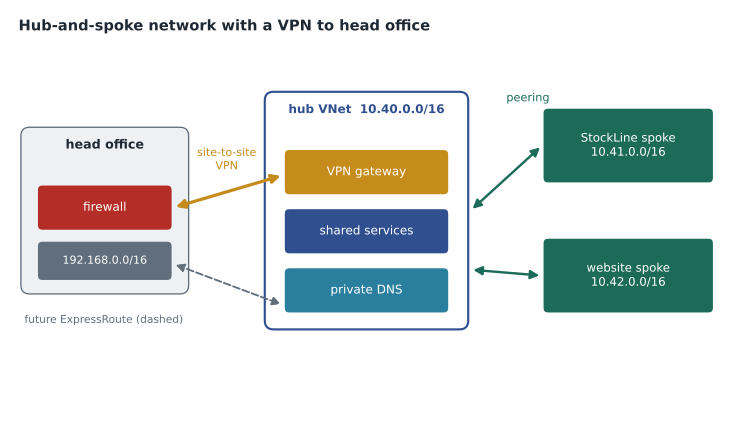
Hub-and-spoke is not the only design. Small environments sometimes use a single VNet with several subnets, and very large ones use Azure Virtual WAN, a Microsoft-managed service that provides hub networking, VPN and ExpressRoute connectivity at global scale. The principle is the same in each case: shared connectivity in one place, workloads separated from each other, and routing that sends traffic where the security team expects it to go.
Azure DNS
The Domain Name System translates names such as stockline.harrowfinch.com into IP addresses. Azure DNS hosts DNS zones on Microsoft's global network of name servers, so organizations can manage their DNS records with the same tools, permissions and billing as their other Azure resources. Azure DNS handles public zones, which answer queries from anyone on the internet, and private zones, which answer only for virtual networks linked to them. A private zone lets resources find each other by name inside Azure, such as db01.internal.harrowfinch.com, without exposing those names publicly.
Azure DNS hosts zones; it is not a domain registrar. The organization still buys its domain name from a registrar and points the domain at Azure's name servers. Theo's team plans to move the harrowfinch.com public zone from the web firm's DNS host to Azure DNS when the website moves.
Azure VPN Gateway
A VPN gateway is a type of virtual network gateway that sends encrypted traffic between an Azure VNet and another location over the public internet. It supports three main connection types. A site-to-site VPN connects an on-premises network, through a VPN device such as a firewall, to Azure; this is what went live on October 13. A point-to-site VPN connects individual computers to Azure, useful for administrators or remote staff. A VNet-to-VNet connection links two VNets through gateways, though peering is usually simpler.
VPN gateways come in route-based and policy-based types. Route-based gateways, the more common and flexible choice, decide which traffic enters the tunnel using routing tables; policy-based gateways use fixed rules based on address prefixes and support fewer features. For resilience, a gateway can run in active-active mode with two instances, and can be zone-redundant in regions with availability zones. Harrow & Finch's gateway is route-based and zone-redundant, and the head office firewall has two tunnels, one to each gateway instance.
az network vnet create --resource-group rg-connectivity-cus --name vnet-hub-cus --location centralus --address-prefixes 10.40.0.0/16 --subnet-name GatewaySubnet --subnet-prefixes 10.40.0.0/27
az network local-gateway create --resource-group rg-connectivity-cus --name lgw-headoffice --gateway-ip-address 203.0.113.10 --local-address-prefixes 192.168.0.0/16
Azure ExpressRoute
ExpressRoute connects an on-premises network to Microsoft's cloud through a private connection provided by a connectivity partner, such as a telecommunications company, instead of the public internet. Because traffic does not cross the internet, ExpressRoute offers more consistent latency, higher bandwidth options and greater reliability than a VPN. It can connect to Azure services and, with the right configuration, to Microsoft 365. ExpressRoute Global Reach can link on-premises sites to each other through Microsoft's network.
ExpressRoute traffic is private, but it is not encrypted by default, because it does not travel over the internet. Organizations that need encryption on the link can add it, for example by running a VPN over the ExpressRoute circuit. ExpressRoute also takes longer to set up and costs more than a VPN, since a provider has to deliver a circuit. Harrow & Finch is evaluating it for 2027, when most of the company's traffic will be going to Azure; the VPN is enough for the pilot.
| Site-to-site VPN | ExpressRoute | |
|---|---|---|
| Path | Encrypted tunnel over the public internet | Private circuit through a connectivity provider |
| Encryption | Yes, built in | Not by default; can be added |
| Latency and reliability | Depends on internet conditions | More consistent and predictable |
| Setup time | Hours to days | Weeks, depending on the provider |
| Typical use | Small and medium sites, pilots, backup links | Heavy or critical traffic, large organizations |
Public and private endpoints
Many Azure PaaS services, such as Azure Storage and Azure SQL Database, have a public endpoint by default: a name and address reachable over the internet, protected by authentication and optional firewall rules. A public endpoint is convenient but means the service is reachable from anywhere, even if access is refused.
A private endpoint gives a PaaS service a private IP address inside a customer's VNet, through a technology called Azure Private Link. Traffic to the service then stays on the private network and Microsoft's backbone, and the public endpoint can be switched off entirely. Sunil's security standard for Skylight requires private endpoints for every database and for storage accounts holding personal information. Private endpoints work together with private DNS zones, so that the service's usual name resolves to the private address from inside the network.
Routing and load balancing in brief
Azure routes traffic within and between virtual networks automatically using system routes. Customers can add user-defined routes to send traffic through a particular device, such as a firewall in the hub, which is how Harrow & Finch makes sure traffic between spokes and to the internet is inspected. Lesson 5's highly available designs also rely on load balancing. Azure Load Balancer distributes network traffic across VMs in a region at the transport layer. Azure Application Gateway does the same for web traffic and can add a web application firewall. Azure Front Door is a global service that routes web users to the closest healthy region and caches content near them. For AZ-900, knowing that these services exist and what kind of traffic each handles is enough.
| Service | What it balances | Scope |
|---|---|---|
| Azure Load Balancer | Network traffic (TCP and UDP) | Regional |
| Azure Application Gateway | Web traffic (HTTP and HTTPS), with optional firewall | Regional |
| Azure Front Door | Web traffic, with global routing and caching | Global |
The VPN go-live
The October 13 go-live went smoothly because most of the work happened before it. The network team agreed the address ranges with the store network contractor, so nothing overlapped. They created the hub VNet and its GatewaySubnet, deployed the VPN gateway, which takes some time to provision, and created a local network gateway describing the head office: its public IP address and its internal address ranges. They configured the head office firewall with matching settings and a shared key, then created the connection. The light turned green on the first attempt, which the network lead says has never happened to him before.
The first test was mundane on purpose: a test VM in a spoke resolved the name of an on-premises domain controller and reached it, proving that peering, gateway transit, routing and DNS all worked together. Only then did the team allow real traffic.
Worked problem
Planning a subnet
The StockLine spoke needs a subnet for application VMs. Theo expects up to 40 VMs over the next three years and wants room to double. What is the smallest subnet size that fits, allowing for Azure's reserved addresses?
Show solution
- Room to double means planning for 80 addresses for VMs.
- A /26 has 64 addresses; minus Azure's 5 reserved, 59 are usable, which is too few.
- A /25 has 128 addresses; minus 5 reserved, 123 are usable, which is enough.
- So the smallest subnet that fits is a /25, such as 10.41.1.0/25.
Answer: A /25, with 123 usable addresses. Planning generously is cheap, because private address space costs nothing, while resizing a subnet that is full of resources is disruptive.
Common mistakes
MistakeA /24 Azure subnet gives 254 usable addresses.
InsteadAzure reserves five addresses in each subnet, so a /24 gives 251.
MistakeIf VNet A is peered with B and B with C, A can reach C.
InsteadPeering is not transitive; extra routing or a hub design is needed.
MistakeExpressRoute traffic is encrypted automatically.
InsteadExpressRoute is a private connection but is not encrypted by default; encryption can be added.
Summary and key terms
- A virtual network is a private network in one region, with an address space divided into subnets.
- Azure reserves five addresses in every subnet; address spaces must not overlap with connected networks.
- VNet peering connects VNets over Microsoft's backbone, within or across regions, but is not transitive.
- Azure DNS hosts public and private DNS zones; it does not register domain names.
- VPN Gateway provides encrypted site-to-site, point-to-site and VNet-to-VNet connections over the internet.
- ExpressRoute provides a private connection through a provider with more consistent performance.
- Private endpoints give PaaS services private addresses in a VNet; public endpoints are reachable from the internet.
- Virtual network
- A private network in Azure, scoped to one region, with its own address space.
- Subnet
- A range of addresses within a virtual network used to organize and secure resources.
- VNet peering
- A low-latency connection between two virtual networks over Microsoft's backbone.
- Hub and spoke
- A network design with a central hub VNet of shared services peered to workload spoke VNets.
- Site-to-site VPN
- An encrypted tunnel over the internet between an on-premises network and Azure.
- ExpressRoute
- A private connection between on-premises networks and Microsoft's cloud through a provider.
- Private endpoint
- A private IP address in a VNet that connects privately to an Azure service.
Practice problems
Work each problem on paper first, then reveal the answer to check.
How many usable addresses does a /24 Azure subnet provide?
Show answer
251.
Is VNet peering transitive?
Show answer
No.
What must a VPN gateway's subnet be called?
Show answer
GatewaySubnet.
Name the three VPN Gateway connection types.
Show answer
Site-to-site, point-to-site and VNet-to-VNet.
Does ExpressRoute use the public internet?
Show answer
No; it uses a private connection through a connectivity provider.
What does a private endpoint do?
Show answer
Gives an Azure service a private IP address inside a VNet so traffic stays off the internet.
Lesson quiz · 5 questions
Score 60% or more to complete this lesson.
Create a free account to save your progress, take quizzes and earn a certificate.