
MSAZ-101 · Lesson 6 of 12 · 21 min
IaaS, PaaS and SaaS
▶ Video coming soon A video version of this lesson is on the way.
By mid-October, the Skylight team has to make real decisions, and the first ones are about service types. The web team wants to move a copy of harrowfinch.com onto a managed web platform. The StockLine developers want to know whether they can keep their SQL Server database or should switch to a managed database. And Grace's team has found a SaaS product for store scheduling that would replace a spreadsheet nobody trusts. At the cloud lunch on October 13, Renata draws a familiar diagram: a stack of layers from the building at the bottom to the data at the top, with three brackets showing how much of the stack each service type covers.
Lesson 2 introduced the three service types through the shared responsibility model. This lesson looks at each in detail, with Azure examples and the use cases the exam expects you to recognize.
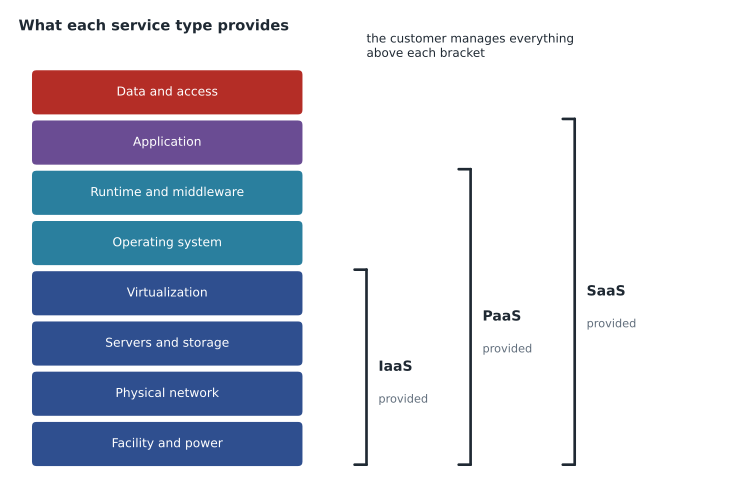
Infrastructure as a service
Infrastructure as a service, or IaaS, provides the basic building blocks of computing: virtual machines, storage, networks and the virtualization layer beneath them. The provider runs the physical hardware; the customer chooses the operating system and installs and manages everything on top. IaaS is the most flexible service type and the closest to running your own servers, which is why it is often the first step for organizations moving existing workloads.
In Azure, the main IaaS services are Azure Virtual Machines, Azure managed disks, Azure Virtual Network and the networking components around them, such as load balancers and VPN gateways. A customer who creates a virtual machine picks its size, its operating system image and its disks, and then has full administrator access to the operating system inside.
Common IaaS use cases include lift-and-shift migration, moving an existing server to the cloud with few changes; testing and development environments that need full control; software that a vendor supports only on a particular operating system; and high-performance or specialized computing. Harrow & Finch's warehouse management system, whose vendor certifies it only on specific Windows Server versions, is a classic IaaS candidate when its turn comes.
Platform as a service
Platform as a service, or PaaS, provides a managed environment for building and running applications. The provider manages the hardware, operating system, runtime and much of the middleware, such as web servers or database engines. The customer brings its application code or data and configures how the service behaves. The customer does not patch operating systems or install runtimes; it decides how big the service should be, how it scales and who can reach it.
Azure has many PaaS services. Azure App Service hosts web applications and APIs written in common languages such as .NET, Java, Node.js and Python. Azure SQL Database is a managed relational database based on the SQL Server engine. Azure Functions runs event-driven code. Azure Cosmos DB is a managed database for non-relational data. Azure Kubernetes Service manages the control plane of a Kubernetes cluster so customers can focus on running containers.
PaaS suits new development and applications that can be adapted to a managed platform. It saves time because developers do not build and maintain servers, and it usually includes features, such as built-in scaling, automatic backups or deployment slots, that would take effort to build on IaaS. The trade-off is less control: the customer can only use the versions and settings the service supports.
One workload, three levels of control
The StockLine database shows that the service types are not only categories but choices along a line. The team has three realistic options. It could run SQL Server on an Azure virtual machine, which is IaaS: full control of the operating system and the database engine, and full responsibility for patching, backups and high availability. It could use Azure SQL Managed Instance, a PaaS service that is close to full compatibility with on-premises SQL Server, including features such as SQL Server Agent jobs, while Microsoft handles patching, backups and high availability. Or it could use Azure SQL Database, also PaaS, which removes even more management but expects the application to work within a narrower set of features.
| Option | Service type | Compatibility with existing SQL Server | Management effort |
|---|---|---|---|
| SQL Server on Azure VMs | IaaS | Full | Highest |
| Azure SQL Managed Instance | PaaS | Very high | Medium |
| Azure SQL Database | PaaS | High for most apps, with some feature differences | Lowest |
The developers expect StockLine to work on Managed Instance with no code changes, which is why it is the first option they will test. The same pattern, a range from "run it yourself on a VM" to "use a fully managed service", appears for many kinds of software, from web servers to messaging systems.
The Azure Marketplace
Not every piece of software in Azure comes from Microsoft. The Azure Marketplace is a catalog of applications and services from Microsoft and its partners that customers can deploy into their own subscriptions: virtual machine images with software preinstalled, managed SaaS applications billed through Azure, and solution templates that deploy several resources at once. A firewall appliance from a security vendor, for example, can be deployed from the Marketplace as a virtual machine (IaaS) that the customer manages. The service type of a Marketplace item follows the same rules as anything else: what matters is who manages each layer.
Worked problem
Moving the website
The web team's copy of harrowfinch.com runs on two Windows servers with IIS at the outside web firm. Marcus wants to stop paying for servers that sit idle in winter. What would the move look like on IaaS and on PaaS?
Show solution
- On IaaS, the team would create two Azure VMs, install IIS and the site, and add a load balancer. They would patch the VMs, set up scaling with a scale set and manage the operating system.
- On PaaS, the team would create an App Service plan and deploy the site's code to a web app. Azure runs the web servers and operating system; the team sets autoscale rules and deploys new versions.
- The site uses only standard .NET features, so it runs on App Service with small changes.
- PaaS removes operating system work and makes scaling a setting, so it fits Marcus's goal better.
Answer: PaaS (Azure App Service) is the better fit. IaaS would also work, but it would keep the patching and server management Marcus wants to leave behind.
Software as a service
Software as a service, or SaaS, provides a complete application that customers use, usually through a web browser or app, without managing any of the infrastructure or software behind it. The provider runs everything: hardware, operating system, application, updates and much of the security. The customer manages its users, its data and the application's settings, and pays a subscription, often per user per month.
Microsoft 365 is Microsoft's best-known SaaS offering, including Exchange Online for email, Teams and SharePoint. Dynamics 365 offers business applications such as sales and customer service. Many other companies provide SaaS products that run on Azure. Harrow & Finch's HR and payroll system is SaaS from a specialist vendor, and the store scheduling tool Grace's team has found would be another.
SaaS suits common business functions where a standard product works well: email, collaboration, customer relationship management, payroll, scheduling. It is the fastest to adopt and needs the least technical work. The trade-off is the least control: the customer cannot change how the application works beyond its settings, and depends on the vendor for features, uptime and data handling.
| IaaS | PaaS | SaaS | |
|---|---|---|---|
| The customer manages | OS, runtime, apps, data, access | Apps, data, access, service settings | Data, users, settings |
| Flexibility | Highest | Medium | Lowest |
| Effort to run | Highest | Medium | Lowest |
| Azure examples | Virtual Machines, managed disks, Virtual Network | App Service, Azure SQL Database, Functions, Cosmos DB | Microsoft 365, Dynamics 365 |
| Typical use cases | Lift-and-shift, full control, vendor-specific software | New apps, web apps and APIs, managed databases | Email, collaboration, business apps |
Serverless as a kind of PaaS
Serverless services, introduced in lesson 1, are usually described as a form of PaaS. They take abstraction one step further: the customer does not choose or size servers at all. With Azure Functions on a consumption-based plan, code runs only when triggered, such as by an HTTP request, a new file in storage or a message in a queue, and the customer pays for the executions and the resources they use. When nothing happens, nothing is billed. Azure Logic Apps does the same for workflows built from connectors, such as "when an order email arrives, add a row to a spreadsheet and post a message in Teams".
Serverless suits small, event-driven tasks with uneven demand. Marcus's photo-resizing job is a good example: a few hundred images on most days, several thousand when the new season's catalog is loaded. Serverless suits less well applications that run constantly at a steady load, where a reserved or always-on service can be cheaper, and work that needs long-running processes or special software.
# Illustrative comparison: an always-on small VM versus serverless executions for photo resizing
vm_month = 0.10 * 730            # made-up hourly rate x hours in a month
per_million = 0.20               # made-up charge per million executions
per_gb_second = 0.000016         # made-up compute charge
def serverless(executions, seconds=2.0, memory_gb=0.5):
    compute = executions * seconds * memory_gb * per_gb_second
    return executions / 1_000_000 * per_million + compute
for n in (10_000, 100_000, 2_000_000):
print(f"{n:>9} images: serverless {serverless(n):7.2f} vs always-on VM {vm_month:.2f}")10000 images: serverless 0.16 vs always-on VM 73.00 100000 images: serverless 1.62 vs always-on VM 73.00 2000000 images: serverless 32.40 vs always-on VM 73.00
What this code does
Compares the monthly cost of a small virtual machine left running all month with a serverless service that charges per run and per unit of compute time, using made-up prices. It calculates the serverless cost for three volumes of photo-resizing jobs. Serverless is far cheaper at low volumes, but the gap closes as volume grows.
With these invented rates, serverless is far cheaper at low volumes and still cheaper at moderate ones, while the always-on machine only wins at very high, steady volumes. Real decisions use real prices from the pricing calculator, but the shape of the comparison is typical.
The same organization often uses all three service types at once. Harrow & Finch already relies on SaaS for email and HR, will use PaaS for its website and database, and will keep IaaS virtual machines for software that needs them. Mixing types is normal; what matters is that each choice is deliberate and that the team knows which responsibilities come with it.
Choosing a service type
Renata's guidance for Skylight is a short list of questions. Is there a SaaS product that does the job well enough? If so, use it, because it costs the least effort. If not, can the application run on a managed platform? If so, use PaaS. Only if the software needs full control of the operating system, or cannot be changed, use IaaS. Many organizations apply the same order, sometimes summarized as "SaaS first, then PaaS, then IaaS". Real systems often mix types: StockLine might run its application on IaaS virtual machines at first, for a quick migration, while its database moves to PaaS.
The decisions that come out of the October 13 lunch are a good illustration. The store scheduling tool will be SaaS. The website will move to App Service, a PaaS service. StockLine's database will be tested on Azure SQL Managed Instance, a PaaS option designed to be compatible with existing SQL Server databases, and its application servers will move to virtual machines first, then be reviewed for App Service in 2027. The warehouse system will stay where it is for now and move to virtual machines when its vendor certifies the new version.
Common mistakes
MistakePaaS means the customer has no responsibilities.
InsteadWith PaaS the customer still manages its application, data, access and the service's settings.
MistakeSaaS and serverless are the same.
InsteadSaaS is a complete application for end users; serverless is a way to run the customer's own code or workflows without managing servers.
MistakeIaaS is outdated and should never be used.
InsteadIaaS is the right choice when full control is needed or software cannot be changed, and it is often the fastest way to migrate.
Summary and key terms
- IaaS provides virtual machines, storage and networks; the customer manages the operating system and everything above it.
- PaaS provides a managed platform; the customer brings code or data and configures the service.
- SaaS provides a complete application; the customer manages users, data and settings.
- Flexibility and effort fall from IaaS to PaaS to SaaS.
- Azure examples: Virtual Machines (IaaS); App Service, Azure SQL Database, Functions (PaaS); Microsoft 365 (SaaS).
- Serverless services such as Functions and Logic Apps run on events and bill per execution.
- A common approach is SaaS first, then PaaS, then IaaS, and real systems often mix types.
- IaaS
- Infrastructure as a service: virtual machines, storage and networking managed by the provider at the hardware level.
- PaaS
- Platform as a service: a managed environment where the provider runs the operating system and runtime.
- SaaS
- Software as a service: a complete application delivered and run by the provider.
- Lift-and-shift
- Moving an existing workload to the cloud with few or no changes, usually onto IaaS.
- Azure App Service
- A PaaS service for hosting web applications and APIs.
- Azure Functions
- A serverless service that runs small pieces of code in response to events.
- Azure Logic Apps
- A serverless service for building automated workflows from connectors.
Practice problems
Work each problem on paper first, then reveal the answer to check.
Which service type gives the customer full control of the operating system?
Show answer
IaaS.
Is Azure SQL Database IaaS, PaaS or SaaS?
Show answer
PaaS.
Is Microsoft 365 IaaS, PaaS or SaaS?
Show answer
SaaS.
What is lift-and-shift?
Show answer
Moving an existing workload to the cloud with few changes, usually onto VMs.
When is serverless a poor fit?
Show answer
For applications with constant steady load, long-running processes or special software needs.
In what order does the 'SaaS first' approach consider service types?
Show answer
SaaS, then PaaS, then IaaS.
Lesson quiz · 5 questions
Score 60% or more to complete this lesson.
Create a free account to save your progress, take quizzes and earn a certificate.