
LVT-310 · Lesson 9 of 12 · 22 min
Displays, projectors and viewing geometry
The classroom drawings at Riverside show a 75-inch display on the front wall of every room. Brightwater's boardroom gets a 98-inch display, its four meeting rooms 65 and 75 inches, and the gym a projector and a motorised screen for assemblies. Maya's first question, as Wendell intends, is why those sizes. The answer is not taste: it comes from a calculation of how far the farthest student or board member sits and how small the text they must read will be. This lesson covers display technologies, sizes and aspect ratios, the AVIXA image size standard and the older rules of thumb it replaced, viewing angles and mounting heights, projectors, throw distance and brightness, ambient light, mounting and safety, and how displays are commissioned.
Display technologies
Most installed displays are flat panels. LCD panels with LED backlights are the common choice for classrooms and meeting rooms, from about 43 to 98 inches; commercial models are rated for long daily hours, offer control over the network or RS-232, and have brighter panels and longer warranties than consumer televisions. OLED panels give deep blacks and wide viewing angles but are less common in commercial work. Direct-view LED walls, built from modules of tiny LEDs, make very large, bright, seamless images for lobbies, auditoriums and some boardrooms; their pixel pitch, the spacing between LEDs, sets how close a viewer can sit before the image looks like a grid of dots. Interactive flat panels add a touch surface, and are common in classrooms where the teacher writes on the display.
Projectors throw an image onto a screen. Laser light sources have largely replaced lamps, lasting around 20,000 hours instead of a few thousand. Projectors suit very large images, such as the gym's assembly screen, and spaces where a display would be in the way. Ultra-short-throw projectors, mounted just above the screen, are used in some classrooms because the teacher does not walk through the beam. For most rooms up to about 120 inches diagonal, flat panels now cost less over their life than projectors and stay bright in daylit rooms.
Size and aspect ratio
Displays are sold by diagonal size in inches, in both Canada and the United States. Nearly all have a 16:9 aspect ratio, sixteen units wide for nine high, matching HD and 4K video. What matters for viewing is the image height, because text size scales with it. For a 16:9 display, the height is the diagonal times 9 divided by the square root of 16 squared plus 9 squared, about 0.49 times the diagonal: a 75-inch display is about 36.8 inches, or about 37 in, high, and a 98-inch display about 48 inches high.
How big must the image be?
For years, AV designers sized images with the 4-6-8 rule: the farthest viewer should sit no farther than four times the image height for detailed inspection, six times for reading text and charts, and eight times for general viewing such as video. The rule is easy to remember but does not consider what is actually being shown. AVIXA's standard for display image size for 2D content, known as DISCAS, replaces it with a method based on the size of the smallest element the viewer must read, such as a line of text, as a share of the image height, and on the task.
For basic decision making, where viewers need to recognize and read content without studying fine detail, such as a presentation or a class lesson, the DISCAS method sets the farthest viewer at no more than about 200 times the element height. If the smallest text is 4 percent of the image height, which is typical for a slide or a document at normal zoom, the farthest viewer can be 200 times 0.04, or 8 image heights away, which is why the old rule's eight survives for general viewing. Smaller text, such as a spreadsheet at 2 percent of image height, needs a closer farthest viewer or a bigger display. For analytical decision making, where viewers must examine detail, such as engineering drawings or medical images, the standard uses a stricter method based on the display's resolution and the viewer's visual acuity. Designers use AVIXA's calculators; the installer should understand the result.
# Display size from the farthest viewer, using basic decision making (farthest = 200 x element height)
import math
SIZES_IN = [55, 65, 75, 86, 98]
H_PER_DIAG = 9 / math.hypot(16, 9)          # image height per inch of diagonal, 16:9
def needed_height(farthest, element_share):
    return farthest / (200 * element_share)
rooms = [  # room, farthest viewer (ft), smallest element as share of image height
    ("Riverside classroom", 24, 0.04),
    ("Brightwater boardroom (spreadsheets)", 28, 0.025),
    ("Brightwater meeting room 6-14", 16, 0.04),
    ("Riverside library teaching area", 31, 0.04),
]
for name, far, share in rooms:
    h = needed_height(far, share)                       # in ft
    h_in = h * 12
    diag = h_in / H_PER_DIAG
    pick = next((s for s in SIZES_IN if s >= diag), None)
    choice = f"{pick} in" if pick else "larger than 98 in: LED wall or projector"
print(f"{name:38s} farthest {far} ft, element {share:.1%}: image {h:.2f} ft high, {diag:4.0f} in diagonal -> {choice}")Riverside classroom farthest 24 ft, element 4.0%: image 3.00 ft high, 73 in diagonal -> 75 in Brightwater boardroom (spreadsheets) farthest 28 ft, element 2.5%: image 5.60 ft high, 137 in diagonal -> larger than 98 in: LED wall or projector Brightwater meeting room 6-14 farthest 16 ft, element 4.0%: image 2.00 ft high, 49 in diagonal -> 55 in Riverside library teaching area farthest 31 ft, element 4.0%: image 3.88 ft high, 95 in diagonal -> 98 in
The classroom's farthest student, about 24 ft away, needs a display of about 70 inches diagonal for normal text, so the board standard's 75-inch display is right. Brightwater's boardroom, used for spreadsheets with small text, needs far more than a 98-inch display at its farthest seat; the design answers that with a second display at the far end of the table for the back half of the room and a rule in the control system that spreadsheets are shown on both, which the installer then has to mount and wire.
Viewing angles and mounting height
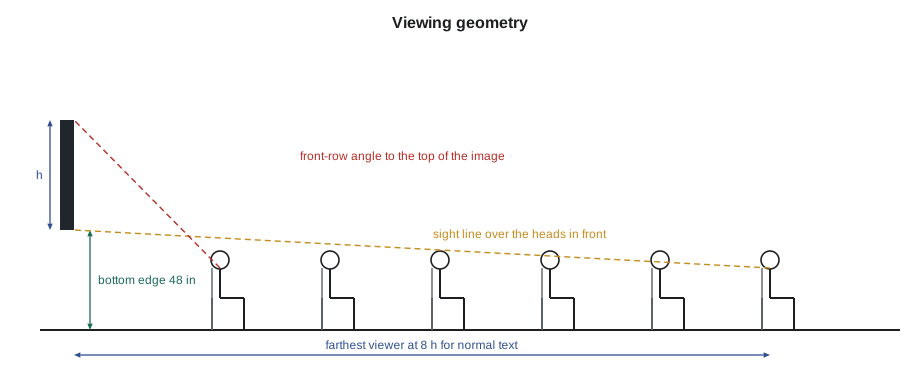
Viewers should not have to tilt their heads far up or turn far to the side. The display's bottom edge is usually mounted at about 48 in above the floor in rooms with seated viewers, high enough to clear the heads in front, and the top edge low enough that the closest viewers do not look up at a steep angle; designs commonly keep the top of the image within about 30 to 35 degrees above the closest viewer's eye line. Off-axis viewers should be within the display's viewing angle; LCD panels lose contrast and color at wide angles, so a room with seats far to the side may need a second display. Interactive displays, which the teacher touches, are mounted lower, with the bottom edge often around 32 in so the teacher, and students of different heights, can reach the whole screen; the school standard sets the height.
# Check a display's mounting height: front-row upward angle and back-row view over the heads in front
import math
EYE = 3.8             # seated eye height (ft)
MAX_UP = 35             # largest comfortable angle up to the top of the image, degrees
def check(bottom, image_h, first_row):
    top_angle = math.degrees(math.atan((bottom + image_h - EYE) / first_row))
    notes = []
    if bottom < EYE:
        notes.append("low: heads in front hide the bottom of the image from the back rows")
    if top_angle > MAX_UP:
        notes.append("high: the front row looks up too steeply")
    return top_angle, notes or ["ok"]
for bottom in (3.00, 4.00, 6.00):
    ang, notes = check(bottom, 3.06, 6.5)
print(f"Bottom edge {bottom:.2f} ft: top of image {ang:4.1f} deg above front-row eyes -> {'; '.join(notes)}")Bottom edge 3.00 ft: top of image 19.2 deg above front-row eyes -> low: heads in front hide the bottom of the image from the back rows Bottom edge 4.00 ft: top of image 26.6 deg above front-row eyes -> ok Bottom edge 6.00 ft: top of image 39.0 deg above front-row eyes -> high: the front row looks up too steeply
The middle height puts the bottom of the image just above seated eye level, so the back rows see it over the heads in front, without making the front row look up uncomfortably. The low height loses the bottom of the image behind heads; the high one strains the front row's necks. Real rooms are more forgiving, because seats stagger and viewers shift, but the check shows why the drawings specify a height rather than leaving it to whoever hangs the mount.
Projectors, throw distance and brightness
A projector's throw ratio is the throw distance, from the lens to the screen, divided by the image width. A lens with a throw ratio of 1.5 makes an image 6.6 ft wide from 9.8 ft away. Zoom lenses cover a range of throw ratios, and lens shift moves the image up, down or sideways without tilting the projector, which avoids keystone distortion. The installer mounts the projector within the throw range for the screen size and uses lens shift, not digital keystone correction, to square the image, because digital correction throws away pixels.
Brightness is rated in lumens. The light falling on the screen, its illuminance, is the lumens divided by the image area, and the image looks washed out if the room light falling on the screen is too high compared with it. A common design approach sets a minimum contrast between projected light and ambient light on the screen; AVIXA also publishes a standard for projected image system contrast ratio. Screen gain, the screen's reflectivity compared with a matte white surface, increases brightness toward the center of the audience but narrows the good viewing angle. Daylit rooms, like Riverside's gym with its high windows, need blinds, much brighter projectors or a different display technology.
# Projector throw distance and the brightness needed against ambient light
import math
def throw(width, ratio): return width * ratio
def lumens_needed(width, height, ambient_lux, contrast, gain=1.0):
    area_m2 = width * height * 0.0929
    return ambient_lux * (contrast - 1) * area_m2 / gain       # projected lux must be (contrast - 1) x ambient
W = 20.0                   # image width (ft), 16:10 screen
H = W * 10 / 16
for ratio in (1.2, 1.6, 2.0):
    print(f"Throw ratio {ratio}: lens {throw(W, ratio):.1f} ft from the screen")
for ambient in (50, 150, 300):
print(f"Ambient {ambient:3d} lux on the screen, contrast 7:1 -> about {lumens_needed(W, H, ambient, 7):6.0f} lumens")Throw ratio 1.2: lens 24.0 ft from the screen Throw ratio 1.6: lens 32.0 ft from the screen Throw ratio 2.0: lens 40.0 ft from the screen Ambient 50 lux on the screen, contrast 7:1 -> about 6967 lumens Ambient 150 lux on the screen, contrast 7:1 -> about 20902 lumens Ambient 300 lux on the screen, contrast 7:1 -> about 41805 lumens
With the gym's blinds closed, a 7,000 to 10,000 lumen laser projector gives a good assembly image; with sunlight on the screen it would need several times that. The design specifies blackout blinds on the screen wall's high windows and a 12,000 lumen projector, and the control system lowers the blinds and the screen together.
Ambient light in rooms with displays
Flat panels are less sensitive to room light than projectors, because they emit their own light, typically 350 to 700 nits for commercial displays; a nit is one candela per square meter. They are still affected by reflections. A window opposite the display, or a downlight directly in front of it, puts a bright reflection on the screen. The designer and the lighting designer address this; the installer notices it during commissioning and reports it if the result is poor, because the fix, a blind, a different light or a matte screen, belongs to someone else.
Mounting and safety
A display mount is a structural item. The wall must have the backing the drawings call for, wood or steel blocking, or the mount must be fastened into studs or the structure with the manufacturer's hardware. The mount's rating must exceed the display's weight with margin, and the VESA hole pattern on the back of the display must match the mount. Projector mounts hang from structure, not from ceiling grid, and include a safety cable. Displays in schools, gyms and public spaces need theft and tamper protection: locking mounts, security screws and, in gyms, impact protection or a protective cage. Cables are dressed neatly behind the display with service loops so it can be pulled out for service, and power and signal are kept separated as the code and the design require. Wall plates and recessed boxes behind displays let the display sit close to the wall.
Commissioning displays
Each display is set up from the design's settings list: input names, default input, picture mode, brightness, energy settings, network address, control protocol, and the power-on behavior the control system needs, such as waking on a network command. Consumer-style features that interfere with a managed system, such as automatic input switching, demo modes and update prompts, are turned off. The installer checks the image at each source and format, confirms the control system can turn the display on and off and select inputs, and records each display's serial number, address and settings. A test pattern with fine lines and text at known sizes, displayed from the farthest seat, is a quick way for the owner to see that the size and sharpness meet the design.
Worked problem
A boardroom display that is too small
During the Brightwater walkthrough, the CFO sits at the far end of the boardroom table, about 28 ft from the 98-inch display, and says she cannot read the quarterly spreadsheet. The spreadsheet's text is about 2.5 percent of the image height. Is the display the wrong size, and what was the design's answer?
Show solution
- A 98-inch 16:9 display has an image height of about 48 inches, about 4.0 ft.
- With basic decision making, the farthest viewer for text at 2.5 percent of image height is 200 times 0.025, which is 5 image heights, about 20 ft.
- The CFO is about 8 ft beyond that, so she is right that she cannot read it.
- The design included a second 75-inch display at the far end, facing the back half of the table, with the control system showing the same content on both; it was not yet installed. Maya confirms the backing and cabling are in place and schedules it.
Answer: With the second display installed, the farthest seats are within about 13 ft of a screen, and the spreadsheet text is readable from every chair.
Common mistakes
MistakeChoosing a display size by eye.
InsteadSize it from the farthest viewer and the smallest element, using DISCAS.
MistakeCorrecting a tilted projector with digital keystone.
InsteadMount it square and use lens shift.
MistakeHanging a projector from the ceiling grid.
InsteadHang it from structure with a safety cable.
MistakeLeaving consumer features enabled.
InsteadTurn off auto input, demo modes and update prompts on managed displays.
MistakeMounting every display at the same height regardless of use.
InsteadFollow the design's height for seated, standing or touch use.
Summary and key terms
- LCD panels suit most rooms; LED walls make large seamless images; laser projectors suit very large images.
- Displays are sized by diagonal; a 16:9 image is about 0.49 times the diagonal high.
- DISCAS sizes images from the smallest element: for basic decisions, the farthest viewer is about 200 element heights away.
- The 4-6-8 rule survives as a rough check: 4, 6 and 8 image heights for inspection, reading and general viewing.
- Mounting height balances sight lines over the rows in front against the front row's upward angle.
- Throw ratio is throw distance over image width; lens shift avoids keystone distortion.
- Projected brightness must exceed ambient light on the screen by the design contrast ratio.
- Mounts are structural, displays are secured and configured for control, and each is commissioned from a settings list.
- Aspect ratio
- The ratio of an image’s width to its height, such as 16:9.
- DISCAS
- AVIXA’s standard for display image size for 2D content.
- Element height
- The height of the smallest item a viewer must read, as a share of the image height.
- Throw ratio
- A projector’s throw distance divided by its image width.
- Lens shift
- Moving a projected image optically without tilting the projector.
- Screen gain
- A screen’s reflectivity compared with matte white.
- Pixel pitch
- The spacing between LEDs in a direct-view LED display.
Practice problems
Work each problem on paper first, then reveal the answer to check.
How high is the image of a 65-inch 16:9 display?
Show answer
About 32 inches.
With text at 4 percent of image height, how far can the farthest viewer be?
Show answer
About 8 image heights.
A projector has a throw ratio of 1.5 and the image is 13 ft wide. How far is the lens from the screen?
Show answer
About 19.5 ft.
Why should lens shift be used instead of digital keystone?
Show answer
Digital keystone discards pixels and softens the image.
Lesson quiz · 5 questions
Score 60% or more to complete this lesson.
Create a free account to save your progress, take quizzes and earn a certificate.