
LVT-310 · Lesson 10 of 12 · 22 min
Conference rooms and unified communications
Brightwater's IT manager, Lucia Ferreira, has one requirement for the sixth floor's meeting rooms, and she repeats it at every site meeting: "Anyone walks in, presses one button, and the call starts. The people on the screen hear us as if they were in the room, and we hear them." Omar Haddad, her network engineer, adds the second requirement: every room device must be on the AV VLAN, patched, managed and reporting to the room management service. Meeting the first takes good microphones, careful acoustics, echo cancellation and a well-placed camera; meeting the second takes the network discipline Maya learned in LVT-220. This lesson covers how modern meeting rooms work, unified communications platforms and room systems, microphones and loudspeakers for conferencing, acoustic echo cancellation, room acoustics, cameras and framing, room types from huddle rooms to boardrooms, and how a room is tested before people rely on it.
What a meeting room has to do
A meeting room serves two audiences at once: the people in the room and the people joining from elsewhere. Local participants need to see shared content and the far-end participants on a display, and hear the far end clearly from loudspeakers. Remote participants need to see the room and its people from a camera, hear every person in the room clearly, without echo, room noise or the sound of their own voices coming back, and see the shared content. The system also needs to be simple: start a call, share a screen, adjust volume, end the call, with nothing to configure. The design's choice of platform, equipment and acoustics serves those needs.
Unified communications and room systems
Unified communications, UC, means calling, video meetings, chat and presence in one platform, such as Microsoft Teams, Zoom, Google Meet or Webex. Each platform has room systems: a dedicated compute unit or appliance in the room, running the platform's room software, with a touch controller on the table and certified cameras, microphones and speakers connected to it. These are often called Teams Rooms, Zoom Rooms and so on. A user walks in, taps the meeting on the touch controller, which shows the room's calendar, and the call starts. The room system appears to the platform as a managed device, with updates and monitoring handled by the platform's management service.
The alternative is bring your own device, BYOD, or bring your own meeting, BYOM: the user connects their own laptop, usually through a single USB-C cable at the table, and the laptop runs the call using the room's camera, microphones, speakers and display as if they were its own peripherals. BYOD suits rooms used with many different platforms, such as Brightwater's client meeting room, where visitors use whatever their company uses. Many rooms support both: a room system for the company's own platform and a USB connection for guests. Brightwater's boardroom and two meeting rooms use the room system; the client room and the huddle rooms are BYOD.
Microphones for conferencing
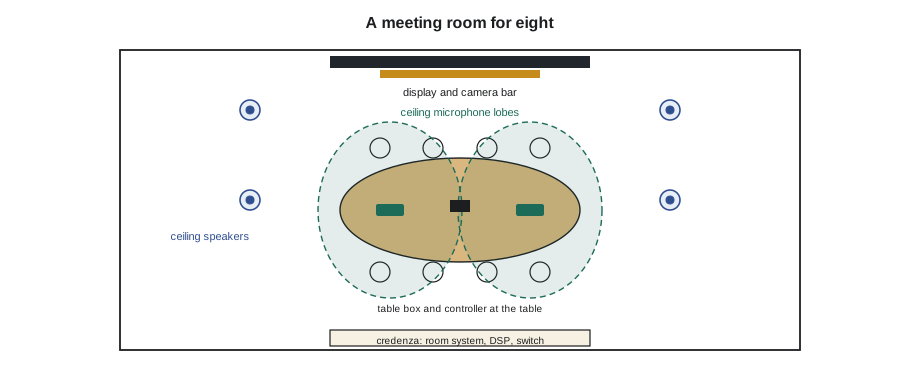
In a meeting room, the microphones must pick up every talker at a good level, regardless of where they sit, while picking up as little of the loudspeakers, the room's reflections and its noise as possible. Several kinds are used. Table microphones, boundary microphones on the table surface, are close to talkers and simple, but they collect paper rustle and keyboard noise and clutter the table. Gooseneck microphones suit boardrooms with fixed seats. Ceiling microphone arrays, mounted in or hanging from the ceiling, form steerable pickup lobes aimed at the seats; they keep the table clear and are now common. Wireless microphones suit presenters who walk around.
With several microphones open, an automatic mixer is essential. It turns up the microphone nearest the person talking and turns down the others, so the far end hears one talker clearly rather than the sum of every open microphone's room noise and reverberation. Each doubling of open microphones adds about 3 dB of noise and reverberation and reduces the gain available before feedback. Automixing is built into most conferencing DSPs and ceiling arrays.
Acoustic echo cancellation
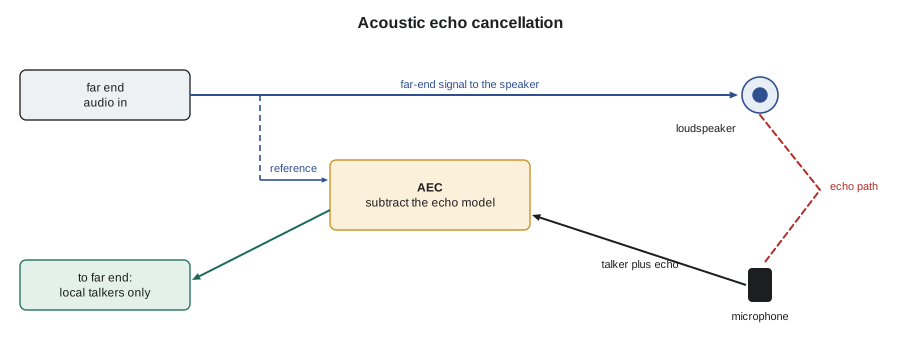
When the far end talks, their voice comes out of the room's loudspeakers, travels around the room and enters the room's microphones. Without treatment, it would be sent back to them, and they would hear their own voice a fraction of a second later, which makes conversation almost impossible. Acoustic echo cancellation, AEC, prevents this. The AEC processor knows what the far end sent, because that is the signal going to the loudspeakers, called the reference. It models how that signal changes on its way from the speakers to each microphone, subtracts the predicted echo from the microphone signal, and sends what remains, the local talkers, to the far end.
AEC works well only if the installer and programmer set it up correctly. The reference must be the exact signal sent to the loudspeakers, taken after any processing that changes it, and the AEC must be applied to each microphone channel before the automixer. The loudspeakers must not be so loud at the microphones that the echo overwhelms the canceller, and the room should not be so reverberant that the echo tail is longer than the canceller can model, which is usually a few hundred milliseconds. Most room systems and certified peripherals include AEC; when a DSP is added, only one device in the chain should cancel echo, so the design states which one does.
Loudspeakers in meeting rooms
Meeting room loudspeakers deliver the far end's voices and the audio of shared content. In small rooms, speakers in the display or the camera bar may be enough. In larger rooms, ceiling speakers spread the sound evenly, laid out as lesson 5 described but often kept to the front half of the room or away from the ceiling microphones, so the echo path is weaker. Levels are set for a natural conversational level at the seats, around 65 to 70 dBA for speech, not for a lecture. Placing loudspeakers so the sound appears to come from the display, where the far-end faces are, helps the room feel natural.
Room acoustics
Acoustics decide how good a meeting room can sound more than any equipment. A room with glass walls, a hard ceiling and a stone table reflects sound so much that every talker sounds distant and hollow to the far end, the AEC struggles, and local listeners strain. The measure of this is the reverberation time, RT60: the time sound takes to decay by 60 dB after it stops. Meeting rooms work best with a short reverberation time, roughly 0.4 to 0.6 seconds, achieved with an absorptive ceiling, carpet or other soft flooring and some wall treatment. Sabine's formula estimates RT60 from the room's volume and the total absorption of its surfaces.
Here A is the sum, for every surface, of its area times its absorption coefficient, a number from 0 for a perfect reflector to 1 for a perfect absorber. In imperial units, the constant is 0.049, with volume in cubic feet and absorption in square-foot sabins. Noise matters too: mechanical systems should be quiet, and a projector fan or a rattling diffuser over the table is a constant problem in calls.
# Sabine reverberation time for Brightwater meeting room 6-14, before and after treatment
K = 0.049                         # 0.161 for metric, 0.049 for imperial
L, W, H = 20.0, 15.0, 9.0         # room size in ft
V = L * W * H
def rt(surfaces):
    A = sum(area * alpha for area, alpha in surfaces)
    return K * V / A, A
floor, ceil = L * W, L * W
walls_glass, walls_dry = 2 * L * H, 2 * W * H
before = [(floor, 0.02), (ceil, 0.10), (walls_glass, 0.04), (walls_dry, 0.05)]   # polished floor, gypsum ceiling, glass, painted drywall
after = [(floor, 0.15), (ceil, 0.50), (walls_glass, 0.04), (walls_dry * 0.7, 0.05), (walls_dry * 0.3, 0.80)]
for name, s in (("Before treatment", before), ("After treatment", after)):
    t, A = rt(s)
print(f"{name}: volume {V:.0f} ft3, absorption {A:.1f} sabins, RT60 about {t:.2f} s")Before treatment: volume 2700 ft3, absorption 63.9 sabins, RT60 about 2.07 s After treatment: volume 2700 ft3, absorption 283.6 sabins, RT60 about 0.47 s
Before treatment the room rings for well over a second, which no echo canceller or microphone choice can fix. An acoustic ceiling, carpet tile and absorptive panels on part of the drywall bring it close to 0.5 seconds. Sabine's formula is approximate, especially in small rooms and rooms with all the absorption on one surface, but it shows the size of the problem and why the design includes the acoustic finishes; when finishes change during construction, the installer should flag it.
Cameras and framing
The camera shows the room to the far end. It is usually mounted at the display, just above or below it, so people looking at the far end appear to look into the camera. Its field of view must cover every seat, which in a wide, short room needs a wide-angle camera and in a long boardroom a camera with zoom. Modern conferencing cameras frame automatically: they detect people and zoom to fit the group, or track the active talker, often using the microphone array's knowledge of where the voice comes from. Some rooms use more than one camera to show faces at a long table from the front. The camera's height should be close to seated eye level, about 4 to 4.5 ft, and lighting should fall on faces from the front, not from a bright window behind them, as the security course explained for surveillance cameras.
# Camera field of view needed to cover a meeting table from the display wall
import math
def fov_needed(width, distance):
    return math.degrees(2 * math.atan(width / 2 / distance))
rooms = [  # room, table width to cover, distance from camera to nearest seats, to far end (ft)
    ("Huddle room 6-03", 8.0, 3.3, 8.0),
    ("Meeting room 6-14", 9.0, 5.0, 15.0),
    ("Boardroom", 10.0, 6.5, 26.0),
]
for name, w, near, far in rooms:
print(f"{name:18s} needs {fov_needed(w, near):5.1f} deg at the nearest seats; at the far end {fov_needed(w, far):5.1f} deg (zoom or framing)")Huddle room 6-03 needs 101.0 deg at the nearest seats; at the far end 53.1 deg (zoom or framing) Meeting room 6-14 needs 84.0 deg at the nearest seats; at the far end 33.4 deg (zoom or framing) Boardroom needs 75.1 deg at the nearest seats; at the far end 21.8 deg (zoom or framing)
Room types
Rooms come in a few standard sizes, and most companies, like Brightwater, have a room standard for each. Huddle rooms seat two to four people with a single display, an all-in-one camera bar with built-in microphones and speakers, and a touch controller or USB connection. Medium meeting rooms seat six to ten, with a larger display, a camera bar or a separate camera, ceiling or table microphones and ceiling speakers. Boardrooms and large rooms seat twelve or more, with multiple displays, multiple cameras, a ceiling microphone system with several arrays and a DSP, and often a control system that handles lighting and blinds. Training and town hall rooms add presenter microphones, lecterns and sometimes streaming. Using standard kits for each room type makes them easier to install, support and use, because every room of a type works the same way.
| Room type | Seats | Typical equipment |
|---|---|---|
| Huddle | 2 to 4 | One display, camera bar with microphones and speakers, controller or USB-C |
| Medium meeting | 6 to 10 | Large display, camera, ceiling or table microphones, ceiling speakers, room system |
| Boardroom | 12 or more | Two or more displays and cameras, ceiling microphone arrays, DSP, control system |
| Training or town hall | 20 or more | Presenter and audience microphones, lectern, streaming, assistive listening |
Network and management
Room systems are network devices, and Omar's requirement is a sensible one. Each room's compute unit, touch controller, camera, microphones and display get addresses on the AV VLAN, with the platform's required network ports and firewall rules opened by the IT team, and their bandwidth allowed for: a high-definition video call usually needs a few megabits per second in each direction per room, more with content sharing and multiple cameras. The devices are registered with the platform's management service and the AV manufacturers' cloud monitoring, so the help desk sees a room with a failed microphone before a meeting fails. Default passwords are changed, firmware is updated to the versions the platform certifies, and the room's configuration is backed up.
Testing a meeting room
A meeting room is tested with real calls, not just signals. The installer and a colleague at the far end, ideally in another building, run through a test script: start a scheduled meeting from the controller; check the far end sees the whole room, framed properly; have someone speak from every seat at a normal level while the far end confirms clarity and level; have the far end speak while local people listen for level and evenness, and while the far end listens for echo; share content from a laptop by wire and wirelessly; and end the call. The DSP's meters and the platform's call quality reports confirm what the ears hear. Every room on the floor is tested the same way, and the results go into the handover.
Worked problem
The far end hears itself
In Brightwater's boardroom, the far end reports hearing a faint echo of their own voices whenever they talk. Local audio sounds fine. The room has two ceiling microphone arrays feeding a DSP, the DSP feeds the room system over USB, and the DSP's outputs drive six ceiling speakers through an amplifier. AEC is turned on in both the ceiling arrays and the room system. What should Maya and the programmer check?
Show solution
- Echo heard at the far end means echo is getting past the canceller, or the canceller has the wrong reference.
- With AEC on in both the arrays and the room system, two cancellers are working on the same signal, and the arrays' reference may not be the actual loudspeaker feed.
- They find the arrays' AEC reference is taken before the DSP's speaker equalization, so the reference does not match what the speakers play.
- The fix is to run AEC in one place only, in the DSP for each array channel before the automixer, with the reference taken from the final speaker output, and turn it off in the arrays and the room system as the design states.
Answer: After the change, the far end hears no echo even when both sides talk at once, and the call quality report shows no echo warnings across a twenty-minute test call.
Common mistakes
MistakeExpecting equipment to fix a reverberant room.
InsteadConfirm the acoustic finishes are installed and flag changes.
MistakeRunning acoustic echo cancellation in two devices.
InsteadCancel echo in one place, with the reference from the final speaker feed.
MistakeLeaving every microphone open.
InsteadUse an automatic mixer so only the talker's microphone is up.
MistakeMounting the camera high on the wall.
InsteadMount it at the display near seated eye level.
MistakeTesting with signals only.
InsteadTest with real calls from every seat to a far end, and record the results.
Summary and key terms
- Meeting rooms serve local and remote participants at once and must be simple to use.
- UC room systems run the platform's room software; BYOD rooms let a laptop use the room's peripherals.
- Ceiling arrays, table, gooseneck and wireless microphones each suit different rooms; automixing keeps one talker up.
- Acoustic echo cancellation subtracts the modeled far-end echo using the loudspeaker feed as reference.
- Meeting rooms need a short reverberation time, about 0.4 to 0.6 s, which Sabine's formula estimates.
- Cameras sit at the display near eye level and frame the room automatically or by zoom.
- Room systems are managed network devices on the AV VLAN with certified firmware.
- Every room is tested with real calls from every seat.
- Unified communications
- Calling, meetings, chat and presence in one platform.
- Room system
- A dedicated device running a UC platform’s room software with certified peripherals.
- BYOD
- Bring your own device: a user’s laptop runs the call using the room’s equipment.
- Acoustic echo cancellation
- Processing that removes the far end’s voice from the room’s microphones.
- Automatic mixer
- A mixer that raises the active talker’s microphone and lowers the others.
- RT60
- Reverberation time: how long sound takes to decay by 60 dB.
- Sabine formula
- An estimate of reverberation time from room volume and absorption.
Practice problems
Work each problem on paper first, then reveal the answer to check.
A room is 7,000 ft3 with 430 ft2 sabins of absorption. Estimate RT60.
Show answer
About 0.8 s.
What signal does acoustic echo cancellation use as its reference?
Show answer
The signal sent to the room's loudspeakers.
Why use an automatic mixer with several microphones?
Show answer
It keeps only the active talker's microphone up, reducing noise and reverberation.
Where should a conferencing camera be mounted?
Show answer
At the display, close to seated eye level.
Lesson quiz · 5 questions
Score 60% or more to complete this lesson.
Create a free account to save your progress, take quizzes and earn a certificate.