
LVT-310 · Lesson 1 of 12 · 21 min
AV systems in buildings
Maya Okonkwo's seventh term at Cobalt Line Systems puts her on the audio-visual crew. So far she has pulled and certified cable, spliced fiber, powered network devices and commissioned security systems. Now she learns the systems that people notice most when they fail: the paging that nobody can understand, the boardroom display that will not wake up, the school gym where the principal's voice turns to mush. The jobs are the ones she knows. Riverside school needs paging in every classroom and corridor, a sound system and assistive listening in the gym, and displays in 64 classrooms. Brightwater Insurance on the Kellerman sixth floor wants its boardroom and four meeting rooms fitted for video calls. Hartwell warehouse needs paging that can be heard over forklifts. Juniper Point wants background music and a lobby display. Her new lead is Wendell Price, an AV technician with twenty years in the trade and the AVIXA CTS credential; Teo Barros joins her as a second-year apprentice, and Sanjay Iyer remains the designer of record. This first lesson describes what AV systems do, the parts they are built from, who does what on a job, and how an AV installation is organized.
What an AV system does
An audio-visual system moves sound and pictures from where they start to where people need them. A microphone picks up a voice and a loudspeaker makes it louder at the back of a room. A laptop's screen appears on a display that a whole table can read. A page from the main office reaches every corridor at once. A video call brings a remote team into a boardroom as if they were sitting at the far end of the table. In every case the system has the same job: deliver sound that is loud enough, clear enough and evenly spread, and pictures that are big enough, bright enough and sharp enough, to every person in the space, and let ordinary users control it without calling for help.
That last part is often forgotten. A system that sounds perfect when the technician runs it, but that a teacher cannot turn on between classes, is a failed system. Good AV design starts with the people who will use the room and what they need to do, and good installation finishes with a system that does those things reliably for years. The installer's work sits between those two ends: placing, mounting, wiring, configuring and testing the equipment so the design works as intended in the real room, which is never quite the room on the drawings.
The building blocks
Every AV system, from a classroom speaker to a stadium, is built from the same kinds of blocks. Sources create or play the signal: microphones, laptops, media players, cameras, a paging console or a music streamer. Processing shapes the signal: mixers combine sources, digital signal processors, DSPs, set levels, equalization, delay and routing, and video switchers and scalers choose and resize pictures. Distribution carries the signal between rooms or across a room: analog audio cable, 70 V speaker lines, HDMI cables, HDBaseT over twisted pair, and audio and video carried over the network. Output devices deliver the result: amplifiers drive loudspeakers, and displays and projectors show pictures. Control ties it together: a touch panel, a wall keypad or software that turns things on, selects sources and sets volume.
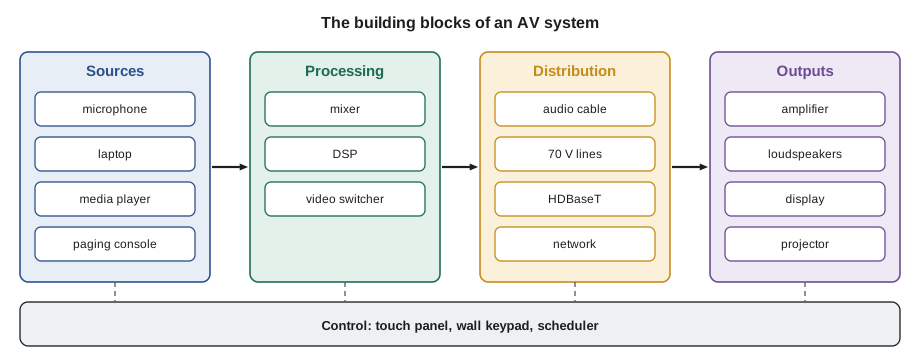
Thinking in blocks helps when something goes wrong. If one microphone is silent and the others work, the fault is between that microphone and the mixer. If every microphone is silent but music plays, the fault is in the microphone path or its processing. If nothing comes out of one loudspeaker zone, the fault is in that zone's amplifier channel or wiring. AV troubleshooting, which lesson 11 covers, is mostly the habit of following the signal from block to block until it stops.
Where AV systems are found
The systems Maya will meet this term show the range of the trade. Paging and background music systems, sometimes called sound reinforcement for speech and music in common areas, are found in schools, warehouses, retail, offices and hospitals. Meeting and conference rooms combine displays, cameras, microphones and loudspeakers for local presentations and video calls. Classrooms add displays, sometimes interactive, and voice reinforcement so that every student hears the teacher. Gyms, auditoriums and places of worship need sound systems that cope with large, reverberant spaces and often assistive listening for people with hearing loss. Lobbies and corridors carry digital signage. Hospitals use paging carefully, because noise harms patients; much of their messaging now goes to staff phones and badges instead.
| Space | Typical systems | What matters most |
|---|---|---|
| Classroom | Display, voice reinforcement, paging speaker | Every student sees and hears; one-touch control |
| Gym | Speech and music system, assistive listening, paging | Clear speech in a reverberant room |
| Boardroom | Displays, cameras, microphones, conferencing | Remote and local people hear each other |
| Warehouse | High-power paging horns, zones | Pages heard over machine noise |
| Lobby | Background music, signage display | Even, unobtrusive sound; reliable content |
| Hospital wing | Limited overhead paging, staff messaging | Low noise, critical messages delivered |
Who does what
AV projects involve more people than most low-voltage work, and the installer needs to know where each decision is made. The owner states what the spaces must do: the school board's standard for classrooms, Brightwater's list of meeting rooms. A consultant or designer, at Cobalt Line usually Sanjay working with an AV specialist, turns those needs into drawings, equipment lists and performance targets: how loud, how even, how intelligible, how big a display. The integrator, the company that supplies and installs the system, is Cobalt Line; its installers mount, wire and configure the equipment, and its programmers write the control system code. Other trades provide what the AV system depends on: the electrician provides power and sometimes conduit, the general contractor provides backing in walls for displays and ceiling access, and the fire alarm contractor provides the interface that silences paging during an alarm.
On a design-build job, the integrator does the design too, and the installer may be asked for opinions on speaker positions or display sizes. On a consultant-led job, the consultant's design governs, and changes go back through formal requests. Either way, an installer who notices a problem in the field, such as a display location that will be blocked by a column or a ceiling speaker shown inside a light fixture, raises it before installing, not after. Wendell's rule for the crew is simple: if the room does not match the drawing, ask before you drill.
Standards and credentials in the AV trade
AV work is less regulated than electrical or fire alarm work, but it has its own standards. AVIXA, the trade association for the audio-visual industry, publishes standards on the subjects installers deal with every day: display image size for 2D content, often called DISCAS, which sets how big a display must be for the farthest viewer; audio coverage uniformity; system documentation; and the rack building and cable labeling practices that make a system maintainable. AVIXA also runs the Certified Technology Specialist program, CTS, with general, design and installation levels, which many owners and consultants ask for on their projects.
Other rules come from outside the AV world. The electrical code covers the power and the class of the speaker and signal circuits, and the cable ratings in ceilings and risers, which LVT-330 covers in detail. The building code and accessibility standards require assistive listening in some assembly spaces, which lesson 12 applies to the gym. Fire alarm and emergency communication standards govern any connection between the AV system and life-safety systems, which lesson 6 covers. Manufacturers' certifications, for network audio, video conferencing platforms and control systems, are often required to buy, configure or program their equipment.
How an AV installation is organized
An AV job runs through the same stages as the other systems in this program, with a few of its own. It starts with design review: the installer reads the drawings, the equipment list and the signal flow diagrams, which show every connection from source to output. Rough-in comes next: back boxes, floor boxes, conduit stubs and cable pulled during construction, often months before any equipment arrives. Equipment racks are frequently built and tested in the integrator's shop, then delivered complete. Device installation follows once the rooms are finished and clean: loudspeakers, displays, cameras, microphones and control panels. Then come configuration and programming, system testing and tuning, owner training and handover with the documentation the owner needs to keep the system running.
The shop rack build is worth a word. Building the equipment rack in the shop, with every unit mounted, wired, labeled, powered and tested before it leaves, saves days on site and catches faulty equipment early. A rack that arrives tested can be set in place, connected to the field cables at its labeled patch panels and powered up. Cobalt Line builds every AV rack this way, following the rack elevation drawing and the labeling scheme from the design.
# Count the AV devices on the Riverside job and estimate install hours by device type
devices = {  # type: (quantity, install hours each)
    "classroom display and mount": (64, 2.5),
    "ceiling speaker (paging and voice)": (210, 0.6),
    "corridor horn or wall speaker": (38, 0.8),
    "classroom microphone receiver": (64, 0.5),
    "wall control panel": (66, 0.75),
    "gym loudspeaker": (8, 4.0),
    "equipment rack (set and connect)": (4, 12.0),
}
total = 0
for name, (qty, hrs) in devices.items():
    total += qty * hrs
    print(f"{name:38s} {qty:4d} x {hrs:4.2f} h = {qty * hrs:6.1f} h")
crew = 3
print(f"Total install hours: {total:.0f}; with a crew of {crew}: about {total / crew / 8:.0f} working days")classroom display and mount 64 x 2.50 h = 160.0 h ceiling speaker (paging and voice) 210 x 0.60 h = 126.0 h corridor horn or wall speaker 38 x 0.80 h = 30.4 h classroom microphone receiver 64 x 0.50 h = 32.0 h wall control panel 66 x 0.75 h = 49.5 h gym loudspeaker 8 x 4.00 h = 32.0 h equipment rack (set and connect) 4 x 12.00 h = 48.0 h Total install hours: 478; with a crew of 3: about 20 working days
The estimate shows why AV device installation is a significant part of the job, and why it has to be scheduled around the finished rooms. Configuration, programming, tuning and training come on top of these hours, and on a school they often account for nearly as much time again.
Working in finished spaces
Much AV installation happens after the painters have left, in rooms that look finished. That changes how the crew works. Ceiling tiles are lifted with clean gloves and replaced unmarked. Drilling for display mounts uses dust collection, and the wall is checked for the backing that the drawings call for; a 165 lb display and mount hung on bare drywall is a falling hazard, not an installation. Finished floors are protected under ladders and lifts. Equipment packaging leaves the building the same day. In occupied buildings such as St. Brendan's or an open school, the crew follows the owner's rules for working hours, infection control, noise and access, as it did on earlier systems.
Safety in AV work follows the same principles as the rest of the low-voltage trade, which LVT-110 covered: ladders and lifts used correctly, two people for heavy displays and loudspeakers, the manufacturer's mounting hardware and safety cables for anything overhead, and lockout before working on any power the AV system shares. Loudspeakers in gyms and auditoriums hang overhead above people for decades, so their rigging is designed by someone qualified, uses rated hardware, and includes a secondary safety connection.
Worked problem
Reading a signal flow diagram
On the Brightwater drawings, the signal flow diagram for meeting room 6-14 shows two ceiling microphones and a table laptop input feeding a DSP, the DSP feeding a two-channel amplifier and the conferencing computer, the amplifier feeding four ceiling speakers, and the computer feeding a display over HDMI. Maya is asked to list the cables she must pull and label for that room before the ceiling closes.
Show solution
- Two microphone cables, ceiling to rack or to the DSP location, or network cables if the microphones are network devices; the equipment list says they are network microphones on PoE, so two Category 6A cables to the room switch.
- One speaker cable home run for the speaker circuit, looping through the four ceiling speakers in parallel as the drawing shows.
- One HDMI or HDBaseT link from the table box to the computer, and one from the computer to the display; the drawing shows HDBaseT for the table link, so one Category 6A cable from the table box to the credenza.
- One control and network cable to the wall touch panel, and network drops for the display and the computer.
- Each cable labeled at both ends with the identifier from the signal flow diagram.
Answer: Seven cables for the room, each one traced to a line on the signal flow diagram, so the installer who connects the equipment later finds every end where the drawing says it is.
Common mistakes
MistakeStarting device installation before the room is finished and clean.
InsteadInstall displays, speakers and panels after the dust-making trades have finished, and protect what is already in place.
MistakeHanging a heavy display on drywall without checking for backing.
InsteadConfirm the backing shown on the drawings is there, and use the mount maker's hardware.
MistakeTreating AV as a box of equipment to plug together.
InsteadRead the signal flow diagram and follow the design's targets for level, coverage and image size.
MistakeChanging a speaker or display position without asking.
InsteadRaise conflicts with the designer before drilling.
MistakeDelivering a rack untested.
InsteadBuild and test racks in the shop, then connect them on site.
Summary and key terms
- AV systems move sound and pictures to the people who need them, and must be easy for ordinary users to control.
- Every system is built from sources, processing, distribution, outputs and control.
- Classrooms, gyms, boardrooms, warehouses, lobbies and hospitals each need different systems and priorities.
- The owner sets needs, the designer sets targets and drawings, the integrator installs and programs, and other trades provide power, backing and fire alarm interfaces.
- AVIXA publishes AV standards such as DISCAS for display size and runs the CTS credential.
- Installations run from design review and rough-in through shop rack builds, device install, programming, tuning, training and handover.
- Device installation happens in finished spaces and must protect them, and overhead equipment needs rated rigging.
- Signal flow diagram
- A drawing that shows every signal connection from source to output.
- DSP
- Digital signal processor: a device that sets levels, equalization, delay and routing for audio.
- Integrator
- The company that supplies, installs, programs and commissions the AV system.
- AVIXA
- The trade association of the audio-visual industry, which publishes AV standards.
- CTS
- Certified Technology Specialist, an AV industry credential.
- Rack elevation
- A drawing showing the position of every unit in an equipment rack.
- Backing
- Solid material in a wall that a display mount can be fastened to.
Practice problems
Work each problem on paper first, then reveal the answer to check.
Name the five kinds of building block in an AV system.
Show answer
Sources, processing, distribution, outputs and control.
Who provides the fire alarm interface that silences paging during an alarm?
Show answer
The fire alarm contractor, connecting to the AV system's input.
Why are AV racks built and tested in the shop?
Show answer
It saves time on site and finds faulty equipment before delivery.
What should an installer do if a speaker on the drawing falls inside a light fixture?
Show answer
Raise it with the designer before installing.
Lesson quiz · 5 questions
Score 60% or more to complete this lesson.
Create a free account to save your progress, take quizzes and earn a certificate.