
LVT-310 · Lesson 8 of 12 · 21 min
Video signals: HDMI, HDBaseT and AV-over-IP
The Brightwater boardroom table has a small cover in its top. Under it are an HDMI cable, a USB-C cable and a power outlet, and when a guest plugs in a laptop, their screen appears on a 98-inch display at the end of the room within a few seconds. Getting there took Maya and Teo a long afternoon: the first laptop showed nothing, the second showed a picture with a pink tint, and the third showed the picture but no sound. Each failure had a different cause, and all three are common. This lesson covers how video signals are described, the HDMI interface and its handshakes, USB-C and DisplayPort, why HDMI cables have short limits, HDBaseT extension over twisted pair, AV-over-IP, video bandwidth and how to calculate it, and how installers test video paths.
Describing a video signal
A digital video signal is a sequence of frames, each a grid of pixels. Four numbers describe it. The resolution is the grid size, such as 1920 by 1080, called 1080p or full HD, or 3840 by 2160, called 4K or UHD. The frame rate is how many frames are sent each second, usually 30 or 60 for presentation and 24 to 60 for video. The bit depth is how many bits describe each color component of a pixel, 8 bits for most content and 10 or 12 for high dynamic range, HDR. The chroma subsampling describes how much color detail is sent: 4:4:4 sends full color for every pixel, while 4:2:2 and 4:2:0 send color at half or a quarter of the resolution and full brightness detail, which the eye barely notices in video but which blurs fine colored text on a spreadsheet.
Multiplying these gives the raw data rate: pixels per frame, times frames per second, times bits per pixel. Blanking intervals and the interface's coding add more. A 4K signal at 60 frames per second in 4:4:4 at 8 bits needs about 12 gigabits per second of picture data and close to 18 Gb/s on an HDMI 2.0 link, which is why such signals push every cable and extender to its limits.
Here W and H are the pixel width and height, f the frame rate, b the bits per component and c the number of components per pixel after subsampling: 3 for 4:4:4, 2 for 4:2:2 and 1.5 for 4:2:0.
HDMI and its handshakes
HDMI, the High-Definition Multimedia Interface, is the standard connection between laptops, media players, cameras and displays. It carries video, multichannel audio and control signals on one cable. Successive versions have raised its capacity: HDMI 1.4 for 1080p and basic 4K, HDMI 2.0 at 18 Gb/s for 4K at 60 frames per second, and HDMI 2.1, now maintained as the 2.1b specification, at up to 48 Gb/s for 4K at high frame rates, 8K and advanced features. A cable must be rated for the speed in use: High Speed cables for HDMI 1.4, Premium High Speed for HDMI 2.0, and Ultra High Speed for HDMI 2.1, each with a certification label.
Three handshakes happen when an HDMI source and display connect, and most video faults are a failure of one of them. Hot plug detect tells the source a display is present. EDID, Extended Display Identification Data, is a small table the display sends to the source listing the resolutions, frame rates, color formats and audio formats it supports; the source chooses an output from that list. HDCP, High-bandwidth Digital Content Protection, is an encryption handshake that protected content, such as streaming services and many media players, requires before it will play; every device in the chain must support the right HDCP version, currently 2.3 for 4K content. A switcher or extender in the middle of the chain must pass all three correctly.
Installed systems usually manage EDID deliberately. A switcher or extender can present a fixed EDID to every source, telling all laptops to send the same format the display handles best, which avoids a laptop choosing an odd resolution that the display then scales badly. The pink tint at Brightwater was a laptop choosing a color format the display decoded incorrectly through the extender; fixing the extender's EDID to a standard RGB format cured it. The missing sound was an EDID that listed no audio, so the laptop sent its audio to its own speakers.
USB-C and DisplayPort
Many laptops no longer have an HDMI port. USB-C ports can carry video in DisplayPort alternate mode, as well as data and power, and adapters or table boxes convert that to HDMI. DisplayPort itself is common on computers and monitors; its own versions set its capacity, and it uses the same ideas of EDID and HDCP. A USB-C cable at the table must support video, which not every USB-C cable does, and should be long enough and rated for the power the laptop draws if the table box charges laptops. Meeting rooms increasingly offer a single USB-C connection that carries the laptop's video to the display, the room's camera and microphones back to the laptop as USB devices, and charging power, all on one cable.
Why HDMI cables are short
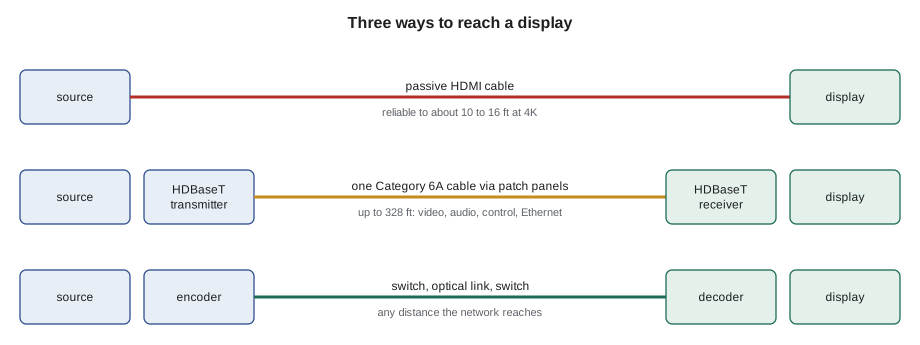
HDMI was designed to connect a player to a television across a living room, and its high-speed signals weaken quickly with distance. A passive cable for 4K at 60 frames per second is reliable to only a few meters, often about 10 to 16 ft depending on quality; longer passive cables work at lower resolutions or not at all. Active cables, with electronics that boost the signal, and active optical cables, which convert to light inside the cable, reach 30 to 330 ft, but they have a direction, source end and display end, and need to be installed the right way round. For anything longer than a few meters in a building, installers use an extender or carry the video over the network.
HDBaseT
HDBaseT, from the HDBaseT Alliance, is the most common way to extend HDMI through a building over twisted-pair cable. A transmitter at the source end converts HDMI to the HDBaseT signal and sends it over one Category 6 or 6A cable, up to 328 ft, to a receiver at the display, which converts it back. HDBaseT carries more than video: the HDMI audio, a 100 megabit Ethernet channel, control signals such as RS-232 and infrared, and in some versions USB. It can also carry power, so a transmitter in a table box can power the receiver behind a display, or the reverse, through power over HDBaseT. Earlier versions carry 4K at 30 frames per second in full color, or 60 frames per second with chroma subsampling; HDBaseT 3.0 products carry uncompressed 4K at 60 frames per second in full color, with gigabit Ethernet and USB 2.0.
HDBaseT is a point-to-point link on structured cabling, but it is not Ethernet: the cable must connect transmitter to receiver directly, through patch panels if needed, never through a network switch. Its signal is demanding, so the cable must be at least the category the product calls for, terminated to the same standard as LVT-130 taught, with the permanent link certified, short patch cords and few connections. Some manufacturers recommend shielded cable for HDBaseT at full distance, especially near electrical noise. A cable that passes Category 6A certification nearly always works; a marginal or untested one is the first suspect when the picture sparkles or drops.
AV-over-IP
AV-over-IP carries video over the network itself. An encoder at each source compresses or packages the video and sends it as packets; a decoder at each display receives the stream it is told to. Because the network is the switch, any source can go to any display, and adding a source or display means adding an encoder or decoder and a switch port. Riverside uses this for the gym and cafeteria, so the gym's scoreboard feed, the stage camera and the media player can be shown on any of the screens, and the classroom displays can be switched to an emergency message during a lockdown.
AV-over-IP systems differ in how much they compress. Systems on 10 gigabit networks, such as those built on the SDVOE specification, send 4K video with very light compression or none, at very low latency, suitable for live presentations and computer content. Systems on 1 gigabit networks use light, visually lossless compression with low latency, enough for most classroom and meeting room use. Streaming systems use H.264 or H.265 compression at a few megabits per second, with more latency, which suits signage and overflow viewing but not a presenter watching their own slides. IPMX, a set of open specifications developed through industry groups and based on the broadcast SMPTE ST 2110 standards, aims to let AV-over-IP products from different makers interoperate.
The network needs the same care as audio networks, more so for video. Video streams are large, often hundreds of megabits each, and usually sent as multicast so many decoders can watch one encoder. The switches need enough capacity, IGMP snooping with a querier so streams reach only the ports that joined them, and often jumbo frames as the product requires. Most designs put AV-over-IP on its own switches or a dedicated VLAN with its own capacity planning, agreed with the IT team, so a gym full of video does not slow the school's network.
Video bandwidth calculations
# Raw video data rates and which links can carry them
FORMATS = {  # name: (width, height, frames per second, bits per component, components per pixel)
    "1080p60 4:4:4 8-bit":   (1920, 1080, 60, 8, 3.0),
    "4K30 4:4:4 8-bit":      (3840, 2160, 30, 8, 3.0),
    "4K60 4:2:0 8-bit":      (3840, 2160, 60, 8, 1.5),
    "4K60 4:4:4 8-bit":      (3840, 2160, 60, 8, 3.0),
    "4K60 4:2:2 10-bit HDR": (3840, 2160, 60, 10, 2.0),
}
LINKS = {"1 GbE AV-over-IP (with ~10:1 compression)": 10.0, "HDBaseT 2.0 (about 10 Gb/s)": 10.2,
         "HDMI 2.0 (18 Gb/s, ~14.4 usable)": 14.4, "10 GbE AV-over-IP (light compression)": 9.5}
for name, (w, h, f, b, c) in FORMATS.items():
    gbps = w * h * f * b * c / 1e9
    ok = [k.split(" (")[0] for k, cap in LINKS.items() if gbps * 1.2 <= cap]   # 20 % for blanking
print(f"{name:24s} {gbps:5.2f} Gb/s picture data -> fits: {', '.join(ok) if ok else 'needs HDMI 2.1 or compression'}")1080p60 4:4:4 8-bit 2.99 Gb/s picture data -> fits: 1 GbE AV-over-IP, HDBaseT 2.0, HDMI 2.0, 10 GbE AV-over-IP 4K30 4:4:4 8-bit 5.97 Gb/s picture data -> fits: 1 GbE AV-over-IP, HDBaseT 2.0, HDMI 2.0, 10 GbE AV-over-IP 4K60 4:2:0 8-bit 5.97 Gb/s picture data -> fits: 1 GbE AV-over-IP, HDBaseT 2.0, HDMI 2.0, 10 GbE AV-over-IP 4K60 4:4:4 8-bit 11.94 Gb/s picture data -> fits: HDMI 2.0 4K60 4:2:2 10-bit HDR 9.95 Gb/s picture data -> fits: HDMI 2.0
The results explain the trade-offs on the drawings. A 4K signal at 60 frames per second in full color does not fit through an older HDBaseT link without chroma subsampling, which is fine for video but softens small colored text; for a spreadsheet on the boardroom display, the design either chose an HDBaseT 3.0 link or set the system to 4K at 30 frames per second, which the text does not mind. The code's figures are approximate; the product's data sheet states exactly which formats each extender supports.
# AV-over-IP multicast load on the switch uplink between floors
streams = [  # source, Mb/s per stream, decoders on the far switch watching it
    ("Gym camera", 600, 3), ("Gym media player", 600, 2), ("Scoreboard feed", 300, 4), ("Emergency message player", 300, 6),
]
uplink_mbps = 10000
total = sum(m for _, m, n in streams if n > 0)       # multicast crosses the uplink once per stream
print(f"Multicast streams across the uplink: {total} Mb/s of {uplink_mbps} Mb/s ({total / uplink_mbps:.0%})")
unicast = sum(m * n for _, m, n in streams)
print(f"Same viewers by unicast would need: {unicast} Mb/s ({unicast / uplink_mbps:.0%})")Multicast streams across the uplink: 1800 Mb/s of 10000 Mb/s (18%) Same viewers by unicast would need: 6000 Mb/s (60%)
Testing video paths
Video paths are tested from the source to the display with the formats the room will actually use. The installer connects a test laptop or a signal generator at each input and confirms the picture, color and audio on the display at each resolution in the design: typically 1080p, 4K at 30 and, where specified, 4K at 60. HDCP-protected content is played to confirm the protection handshake through every switcher and extender. A cable tester for HDMI or an HDBaseT link diagnostic, which many extenders show on their web page or front panel, reports signal quality; a link with a poor margin is fixed now rather than left to fail in a board meeting. The results, with the EDID settings chosen, go into the room's test sheet.
Worked problem
Sparkles on the display
At Riverside, the display in classroom 3.22 shows small white sparkles in dark areas when a 4K source is selected, and goes blank for a second every few minutes. At 1080p the picture is perfect. The HDBaseT link is a Category 6A cable from the teacher's desk wall plate to the receiver behind the display, about 125 ft. The extender's diagnostic page shows the link quality as marginal. What should Maya do?
Show solution
- Sparkles and dropouts at the highest data rate, perfect at lower rates, point to a link with too little signal margin.
- She checks the certification record for that permanent link and finds it was never certified; the label on the plate is handwritten.
- She tests the link: it fails return loss near the wall plate, where the jack was terminated with too much untwist.
- She reterminates the jack, retests the link to Category 6A, replaces a long patch cord with a short one, and rechecks the extender diagnostic.
Answer: After retermination, the link certifies with good margin, the extender reports a strong link, and 4K content plays for an hour with no sparkles or dropouts.
Common mistakes
MistakeUsing a long passive HDMI cable for 4K.
InsteadUse an extender, an active cable installed the right way round, or AV-over-IP beyond a few meters.
MistakeRunning HDBaseT through a network switch.
InsteadConnect transmitter to receiver directly, through patch panels only.
MistakeLeaving EDID to chance.
InsteadSet a fixed EDID that suits the display and includes the needed audio format.
MistakeTesting only at 1080p.
InsteadTest at every format the design uses, including HDCP-protected content.
MistakePutting AV-over-IP on the general network without planning.
InsteadUse dedicated switches or a VLAN with IGMP snooping and capacity agreed with IT.
Summary and key terms
- Video is described by resolution, frame rate, bit depth and chroma subsampling, which together set the data rate.
- HDMI carries video, audio and control; HDMI 2.0 runs at 18 Gb/s and HDMI 2.1 up to 48 Gb/s.
- Hot plug detect, EDID and HDCP handshakes must pass through every device in the chain.
- USB-C carries video in DisplayPort alternate mode, and meeting rooms often use one USB-C cable for video, USB and power.
- Passive HDMI cables are reliable for only a few meters at 4K.
- HDBaseT extends HDMI, Ethernet and control up to 328 ft over certified twisted pair, point to point.
- AV-over-IP uses encoders, decoders and the network, with compression from none to H.264 or H.265.
- Test every path at every format, with protected content, and record the results.
- Resolution
- The number of pixels across and down a video frame.
- Chroma subsampling
- Sending color information at lower resolution than brightness, such as 4:2:0.
- EDID
- Extended Display Identification Data, a display’s list of supported formats.
- HDCP
- High-bandwidth Digital Content Protection, an encryption handshake for protected content.
- HDBaseT
- A standard for extending HDMI, Ethernet, control and power over one twisted-pair cable.
- AV-over-IP
- Carrying audio and video as network streams between encoders and decoders.
- Active optical cable
- An HDMI cable that converts the signal to light inside the cable.
Practice problems
Work each problem on paper first, then reveal the answer to check.
What is the raw data rate of 1080p at 60 frames per second, 8-bit 4:4:4?
Show answer
About 3 Gb/s of picture data.
How far can HDBaseT carry a signal over Category 6A?
Show answer
Up to 100 m, about 328 ft.
A laptop sends no audio to the display. Which handshake is the likely cause?
Show answer
EDID that lists no audio formats.
Why should HDBaseT not pass through a network switch?
Show answer
It is not Ethernet; it needs a direct link from transmitter to receiver.
Lesson quiz · 5 questions
Score 60% or more to complete this lesson.
Create a free account to save your progress, take quizzes and earn a certificate.