
LVT-220 · Lesson 8 of 12 · 21 min
Connecting IP devices: cameras, phones, controllers and sensors
Access points are the most numerous PoE devices on the Brightwater floor, but they are not the only ones, and the others are where the low-voltage trade and the network meet most directly. Cameras, card reader door controllers, intercoms, phones, displays and a growing number of sensors are all IP devices now: each has a MAC address, needs an IP address, draws PoE and talks to a server somewhere. Cobalt Line's security team designs and wires the door hardware, and LVT-230 covers security, access control and video systems in depth. This lesson covers what every IP device has in common from the network side: how to connect it, configure its network settings, prove it reaches its server and leave a record that the owner can maintain.
What IP devices have in common
Every IP device the crew installs goes through the same steps, whatever it does. It is labeled and recorded before it leaves the shop: planned name, model, serial number, MAC address and planned IP address. It is mounted and connected to its outlet, and its outlet is patched to the switch port in the port map. It powers up from PoE, links at its expected speed and gets its address, either from DHCP or set by hand from the plan. It is configured with a name, time server and time zone, and with the address of the server it reports to. Its default password is changed to the one the owner's process provides, as lesson 11 covers. And it is tested in its own application: the camera's picture appears on the recorder, the door unlocks for a card, the phone makes a call.
The device type changes the details but not the order. Dev calls it the device life story, and Maya's commissioning sheet has a column for each step.
Cameras
IP cameras send compressed video to a recorder, usually called a network video recorder or video management system, which stores it and shows it to operators. A camera's network load depends on its resolution, frame rate, compression method and how busy the scene is: a fixed camera watching an empty corridor at night sends far less than one watching a busy entrance in daylight. Modern compression, such as H.265, and smart encoding that lowers the rate when nothing is moving, cut the load substantially, but the recorder and the network must be sized for the busy hours.
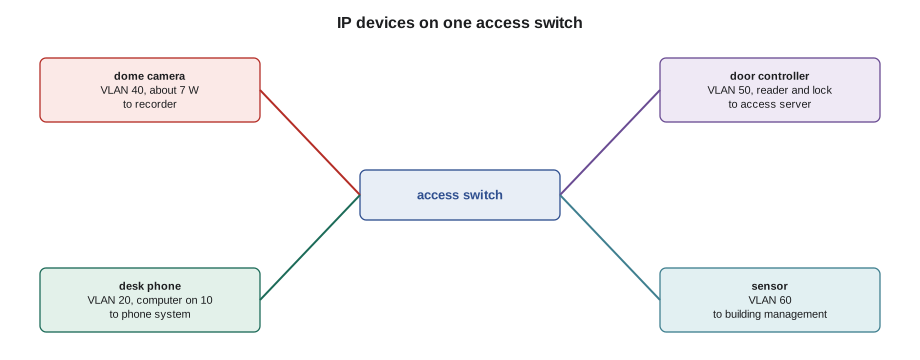
The installer's network tasks for a camera are to connect it, set its fixed address from the plan if the VLAN has no DHCP, set its time server and time zone, confirm it streams to the recorder and check its picture. The field of view, focus and image settings are part of the security work. Brightwater's six cameras each use about 7 W of PoE, except the outdoor loading door camera with its heater. At an average of 4 Mb/s each, they are a light load for the network, but the arithmetic matters on big jobs, where hundreds of cameras share uplinks and storage.
# Camera bandwidth, storage and uplink load
def storage_tb(mbps, days, cameras, hours_per_day=24):
    bits = mbps * 1e6 * 3600 * hours_per_day * days * cameras
    return bits / 8 / 1e12
sites = {
    "Brightwater floor":    (6, 4.0, 30),
    "Juniper Point tower":  (48, 3.0, 30),
    "Riverside school":     (140, 4.0, 30),
}
for name, (cams, mbps, days) in sites.items():
    load = cams * mbps
    print(f"{name:20s} {cams:3d} cameras x {mbps} Mb/s = {load:5.0f} Mb/s, "
          f"{days} days needs {storage_tb(mbps, days, cams):5.1f} TB")
# uplink check for a switch with 40 cameras at a peak of 8 Mb/s each
peak = 40 * 8
uplink = 1000
print(f"40 cameras at peak: {peak} Mb/s on a {uplink} Mb/s uplink ({100 * peak / uplink:.0f} % used)")Brightwater floor 6 cameras x 4.0 Mb/s = 24 Mb/s, 30 days needs 7.8 TB Juniper Point tower 48 cameras x 3.0 Mb/s = 144 Mb/s, 30 days needs 46.7 TB Riverside school 140 cameras x 4.0 Mb/s = 560 Mb/s, 30 days needs 181.4 TB 40 cameras at peak: 320 Mb/s on a 1000 Mb/s uplink (32 % used)
Riverside's 140 cameras need over 200 TB for thirty days of recording, which is why the school board's recorder is a room of disks rather than a box. On the network side, the cameras are spread over many access switches, and each switch's uplink carries only its own cameras, which keeps the load on any one link small. The same check on a switch that carries 40 cameras at their busiest shows a third of a gigabit uplink in use, which is comfortable. Problems come when cameras are added later, to an existing switch, without anyone checking the uplink.
Door controllers and readers
An IP door controller sits above or near the door it controls and connects to the card reader, the lock or strike, the door position switch and the request-to-exit device, as LVT-110 described for Riverside's door 2.14. Some controllers handle one door, others two or four. The controller talks to the access control server over the network: it downloads the list of valid cards and schedules, and reports every event. Brightwater's four controllers each draw about 10 W of PoE, and that power also feeds the reader and, through the controller's relay, a low-power electric strike. A maglock or a heavier strike usually needs its own power supply, as LVT-110 explained.
Door controllers are designed to keep working when the network is down: they store the card list and keep making decisions locally, then upload the events when the network returns. That is reassuring, but it also means a controller that has never reached its server may appear to work for the doors it has been set up for at the factory and then fail later when cards are added. Commissioning is not finished until the access server shows the controller online and a test card added at the server has opened the door.
The network team treats door access as security-critical. On Brightwater's plan, the door access VLAN can reach only the access server, and the controllers' switch ports are set so that a different device plugged into one of them is shut out. Maya does not unplug a door controller to test the cable with a laptop: she asks Omar first, because the switch will log it as a security event.
Phones
IP phones need the voice VLAN, a configuration from the phone system and, usually, PoE. When a phone boots on a desk port, it learns the voice VLAN number from the switch through a discovery protocol or from a DHCP option, restarts its network connection on that VLAN, gets an address from the voice scope, downloads its configuration from the provisioning server and registers with the phone system. A phone that shows its number on the screen and gives a dial tone has done all of that. A phone stuck at a message about provisioning or registration has a network service problem, not a cable problem, and the message on the screen tells Omar where to look.
The computer plugs into the phone's second port, called the pass-through or PC port. Its traffic leaves the phone untagged and lands on the staff VLAN at the switch. If the phone is unplugged or restarting, the computer loses its connection too, which is why the IT team schedules phone firmware updates outside working hours. A phone with a 100 Mb/s pass-through port limits the computer to 100 Mb/s; Brightwater's phones have gigabit ports for that reason.
Displays, intercoms and sensors
Meeting room displays and room booking panels connect to the building systems VLAN and talk to their own management servers. The eight Brightwater displays are large screens with mains power, so their network port carries data only; the room booking panels at each door are PoE. Juniper Point's apartment intercoms and lobby entry panels are IP devices too, with video, and draw Class 3 or 4 PoE through the midspans in each enclosure. They register with a server in the building's management office, and each one's apartment number must match its entry in the server for calls to reach the right unit.
Sensors are the fastest-growing group. Temperature, humidity, occupancy, air quality and leak sensors report to building management systems, and many now use Ethernet, often with PoE, or the single-pair Ethernet types described in lesson 2. St. Brendan's east wing has temperature sensors in every medication fridge, each on PoE, reporting to the pharmacy's monitoring system, and a missing sensor reading sets off an alarm at the nursing station. Small devices like these are easy to overlook in commissioning because they have no screen and do nothing visible; the proof that each works is its reading on the monitoring system, checked by name.
| Device | VLAN at Brightwater | Address | PoE | Proof it works |
|---|---|---|---|---|
| Access point | 30 (management) plus trunked user VLANs | DHCP, reserved | Class 6 | Online in the controller |
| Camera | 40 | Fixed from plan | Class 3 or 4 | Picture on the recorder, correct time |
| Door controller | 50 | Fixed from plan | Class 3 | Online in the access server; test card opens door |
| Desk phone | 20 tagged, 10 for computer | DHCP | Class 2 | Registered, dial tone, test call |
| Display | 60 | DHCP | Mains powered | Online in its management system |
| Room booking panel | 60 | DHCP | Class 2 | Shows the room's calendar |
Setting addresses on fixed-address devices
Fixed-address devices are usually configured from a laptop on the same VLAN, using the manufacturer's discovery tool or the device's built-in web page. On a new device with its factory address, the technician's laptop needs an address on the same subnet as the factory address to reach it, which is why many manufacturers' tools find devices by MAC address with a broadcast instead. The laptop must be on the right VLAN, which usually means a spare switch port that Omar has set to that VLAN for commissioning, or the device's own port with Omar's permission.
Maya works from the commissioning sheet. For each camera or controller, she finds the device by MAC address, confirms the model and serial against the label photo, sets the address, mask, gateway, name and time servers from the plan, sets the device name, saves, and confirms that the device answers at its new address. She then marks the sheet with the time and her initials. When all six cameras are done, she asks the security team to add them to the recorder by address, and checks each picture.
# Commissioning sheet for fixed-address devices: generate settings from the plan
import ipaddress
subnet = ipaddress.ip_network("10.60.40.0/26")
gateway, dns, ntp = "10.60.40.1", "10.60.0.53", "10.60.99.11"
cameras = [("CAM-6-01", "00:40:8c:91:22:11"), ("CAM-6-02", "00:40:8c:91:22:12"),
           ("CAM-6-03", "00:40:8c:91:22:13"), ("CAM-6-04", "00:40:8c:91:22:14"),
           ("CAM-6-05", "00:40:8c:91:22:15"), ("CAM-6-06", "00:40:8c:91:22:16")]
first = 21
print(f"subnet {subnet}, mask {subnet.netmask}, gateway {gateway}, dns {dns}, ntp {ntp}")
for k, (name, mac) in enumerate(cameras):
    ip = subnet.network_address + first + k
    assert ip in subnet and str(ip) != gateway
print(f"{name} {mac} {ip}")subnet 10.60.40.0/26, mask 255.255.255.192, gateway 10.60.40.1, dns 10.60.0.53, ntp 10.60.99.11 CAM-6-01 00:40:8c:91:22:11 10.60.40.21 CAM-6-02 00:40:8c:91:22:12 10.60.40.22 CAM-6-03 00:40:8c:91:22:13 10.60.40.23 CAM-6-04 00:40:8c:91:22:14 10.60.40.24 CAM-6-05 00:40:8c:91:22:15 10.60.40.25 CAM-6-06 00:40:8c:91:22:16 10.60.40.26
Firmware
Most IP devices arrive with firmware that is months or years old. Manufacturers release updates that fix faults and security problems, and the owner's standards often require the current approved version before a device goes into service. Updating is usually done from the management system, the controller or the manufacturer's tool, and it takes a few minutes per device, during which the device restarts. A device must never lose power during an update, so updates are not run while other trades might unplug cords, and devices are not updated in bulk on a switch whose power budget is near its limit, because a device that restarts may come back asking for more power. The version installed on each device is recorded on the commissioning sheet. Lesson 11 covers why firmware matters for security.
Hartwell and Riverside
At the Hartwell warehouse, the IP devices include cameras over the loading docks, card readers on the dock doors and the warehouse's handheld scanners, which connect over the wireless network. The dock cameras are outdoor models with heaters, drawing Class 4, on a switch in the fiber-fed wall enclosure at the far end of the building. Before connecting them, Maya checks that the enclosure's switch has the PoE budget for eight heated cameras on a cold night, when every heater is on at once. It does, with a small margin, and she records the calculation on the job file for whoever adds a ninth.
At Riverside, the school board's standard requires every IP device to be listed in its asset system before it is connected: name, model, serial, MAC address, location and outlet. The crew's commissioning sheets feed that system directly. A device not in the asset system is treated as unknown and blocked by the network, so the record is not paperwork for its own sake; without it, the device does not work.
Worked problem
A camera that streams but shows the wrong time
CAM-6-03 streams to the recorder and the picture is good, but its time stamp is one hour ahead of the recorder's. The camera's network settings show the right time server. What is the likely cause, and why does it matter?
Show solution
- The time server is right, so the clock itself is probably accurate; an exact one-hour difference suggests a time zone or daylight saving setting.
- Maya checks the camera's date and time page: the time zone was left at the factory default, in another zone.
- She sets it to the job's time zone from the commissioning checklist and confirms the displayed time matches her phone.
- It matters because recordings are searched by time; an operator looking for an event at 3 p.m. would find the wrong hour.
Answer: With the time zone set, the camera's stamp matches the recorder. Maya adds the check to her sheet for the remaining cameras.
Common mistakes
MistakeTreating a phone stuck at a provisioning message as a cable fault.
InsteadThe phone has a link and address; report the message to the network team.
MistakeUnplugging a door controller to test its cable without asking.
InsteadAsk the network team first; the port may be locked to the controller.
MistakeFinishing door commissioning when the controller works locally.
InsteadConfirm it is online in the access server and a card added there opens the door.
MistakeUpdating firmware on many devices at once on a switch near its power budget.
InsteadUpdate in small groups, with the budget and the owner's window in mind.
MistakeSkipping sensors in commissioning because they have no screen.
InsteadCheck each sensor's reading in its monitoring system by name.
Summary and key terms
- Every IP device follows the same life story: recorded, mounted, connected, powered, addressed, configured, secured and tested in its application.
- Camera load depends on resolution, frame rate, compression and scene activity; storage grows with every day of recording.
- Door controllers work locally when the network is down but must be proved online with their server.
- Phones learn the voice VLAN and download their configuration; a stuck phone usually has a network service problem.
- Fixed-address devices are configured from the plan using the manufacturer's tool on the right VLAN.
- Firmware is brought to the owner's approved version and recorded; devices must not lose power during updates.
- The proof that a device works is its application: picture, door, call or reading, checked by name.
- Network video recorder
- A system that stores and displays video from IP cameras.
- Door controller
- A device that connects readers, locks and sensors at a door to the access server.
- Pass-through port
- The second port on a phone that connects a computer.
- Provisioning
- Downloading a device's configuration from a server when it starts.
- Firmware
- The software built into a device.
- Asset system
- The owner's record of every device, its identity and location.
Practice problems
Work each problem on paper first, then reveal the answer to check.
Six cameras at 4 Mb/s each: what is their total load?
Show answer
24 Mb/s.
A phone shows a registration message and no number. Is the cable likely at fault?
Show answer
No; it has a link and is talking to the network. The phone system or its settings need checking.
Why must a device not lose power during a firmware update?
Show answer
The update can be left incomplete and the device may not start.
How is a door controller proved online?
Show answer
It shows online in the access server, and a test card added there opens the door.
Lesson quiz · 5 questions
Score 60% or more to complete this lesson.
Create a free account to save your progress, take quizzes and earn a certificate.