
LVT-220 · Lesson 5 of 12 · 21 min
DHCP, DNS and gateways
An IP plan is only a table until each device actually has its address. Some devices are given addresses automatically by a server on the network; others have fixed addresses that someone types in. Either way, a working device also needs to know its gateway, so it can reach other networks, and usually a name server, so it can find servers by name instead of by number. These are the services that most often explain why a device with a perfect cable and a link light still does not work. This lesson covers DHCP, which hands out addresses, DNS, which turns names into addresses, the gateway, and the other network services IP devices often depend on, such as time.
How DHCP works
The Dynamic Host Configuration Protocol lets a device get its address, mask, gateway, name servers and other settings from a server when it connects. The exchange has four steps, easy to remember as DORA. The device, which has no address yet, broadcasts a Discover message on its VLAN. A DHCP server answers with an Offer of an address and settings. The device broadcasts a Request for the offered address, which also tells any other servers their offers were not taken. The server confirms with an Acknowledgment, and the device configures itself. The whole exchange takes well under a second when everything is working.
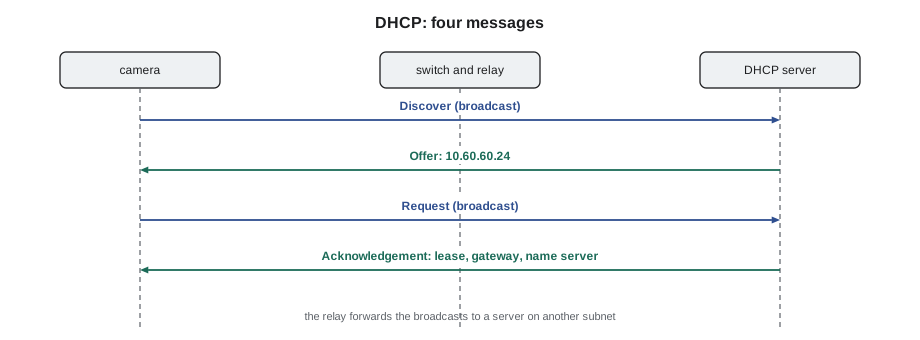
The address is given on a lease: the device may use it for a set time, often a day or a week, and renews it halfway through. A device that is unplugged for longer than its lease may get a different address when it returns, unless the network team has reserved one for it. That is why devices that other systems must find at a known address, such as access points and printers, are either given fixed addresses or have DHCP reservations: the server always gives the same address to the same MAC address.
DHCP messages are broadcasts, and broadcasts stay within a VLAN. In most building networks, the DHCP server is in a data center on another subnet, so each VLAN's gateway has a DHCP relay configured: the router hears the broadcast and forwards it to the server, then returns the reply. If a VLAN's relay is missing or points at the wrong server, every DHCP device on that VLAN fails to get an address, while devices with fixed addresses work normally. A floor where all the displays show 169.254 addresses and the cameras work fine is the signature of that fault, and the fix belongs to the network team.
Sizing a DHCP scope
A scope is the range of addresses a DHCP server can hand out on one subnet, with its settings. Sizing it is the network team's job, but installers should understand the arithmetic, because a scope that is too small runs out, and the last devices to connect get no address. The scope must cover every device that might be connected at the same time, plus the devices whose leases have not yet expired after they left. On a guest wireless network, where phones come and go all day, that second group can be large; on a building systems VLAN, it is almost nothing.
# DHCP scope sizing: will the range cover the devices that need leases?
def addresses_needed(active, visitors_per_day, lease_hours, margin=1.2):
    # devices that left still hold their lease until it expires
    held = visitors_per_day * min(lease_hours, 24) / 24
    return int((active + held) * margin)
cases = {
    "building systems (20 devices, 7-day lease)": (20, 0, 168, 51),
    "staff wireless (180 users, 1-day lease)": (180, 40, 24, 250),
    "guest wireless (40 at once, 300 a day, 8-hour lease)": (40, 300, 8, 250),
    "guest wireless (40 at once, 300 a day, 1-day lease)": (40, 300, 24, 250),
}
for name, (active, visitors, lease, scope) in cases.items():
    need = addresses_needed(active, visitors, lease)
    verdict = "fits" if need <= scope else "TOO SMALL"
print(f"{name:52s} needs {need:4d}, scope {scope:3d}: {verdict}")building systems (20 devices, 7-day lease) needs 24, scope 51: fits staff wireless (180 users, 1-day lease) needs 264, scope 250: TOO SMALL guest wireless (40 at once, 300 a day, 8-hour lease) needs 168, scope 250: fits guest wireless (40 at once, 300 a day, 1-day lease) needs 408, scope 250: TOO SMALL
The guest network with a one-day lease would hold an address for every visitor who passed through that day, and its range would run out by mid-afternoon. A shorter lease or a larger subnet fixes it. Brightwater's guest wireless uses a two-hour lease for exactly this reason.
Fixed addresses
Cameras, door controllers and many building system devices are configured with fixed, or static, addresses instead of DHCP, because the recorder, access server or building management server finds them by address. Setting a fixed address means entering four values from the IP plan in the device's configuration page or setup tool: the address, the mask, the gateway and the name server. Most devices also want a time server and sometimes a host name. Entering them is usually Cobalt Line's job on security devices, and the crew does it carefully, from the plan, never from memory.
Brightwater's cameras arrive with a factory default address, and most also try DHCP first. On a VLAN without DHCP, they fall back to their default or a 169.254 address. The manufacturer's setup tool, run on a laptop connected to the camera VLAN, finds them by their MAC addresses using a discovery broadcast, and lets the technician set each one's fixed address. Maya works through the camera list with the label photos beside her, matching each MAC address to its planned address, and records the result. Lesson 8 covers the rest of the camera setup.
A device with a fixed address does not ask anyone before using it, so a fixed address inside a DHCP range is a duplicate waiting to happen: sooner or later the server will hand the same address to another device. Good IP plans keep the DHCP range and the fixed addresses in separate parts of each subnet, as Omar's does, and installers set only the addresses the plan assigns.
The gateway
The default gateway is the router interface on the device's own subnet. Every device that needs to reach anything beyond its subnet, including servers in another VLAN, the recorder in a data room or the internet, sends that traffic to the gateway. A device with no gateway, or the wrong one, can talk to its neighbors on the same subnet and nothing else. On a camera, that looks like a device the setup laptop on the same VLAN can see perfectly, but the recorder in the data room cannot.
Testing the gateway is the third check in Dev's bottom-up order. Once a device has a link and an address, the question is whether it can reach its gateway. Many devices have a built-in ping tool on their diagnostics page; otherwise the installer's laptop, connected to the same VLAN, can ping the gateway and then the device. Lesson 10 covers these tests in detail.
DNS: names to addresses
People and many systems refer to servers by name: recorder.brightwater.local, the access control server, a cloud management service. The Domain Name System turns those names into IP addresses. A device sends a query to its configured name server, which answers with the address, or asks other servers on its behalf. If DNS is wrong, a device can reach the gateway and the internet by address, but cannot find any server by name, and every service that relies on a name fails.
Access points managed from the cloud are a common example. Brightwater's access points contact their manufacturer's cloud service by name when they boot, download their configuration and show up as online on Omar's dashboard. An access point with a good address and gateway but a wrong or unreachable name server never appears, and its status light shows a fault pattern the manufacturer's guide explains. The cause is almost always a network setting rather than the access point, and DHCP supplies the name servers, so the fix is in the DHCP scope or the firewall.
| Symptom | Likely layer | First check |
|---|---|---|
| No link light | Physical | Cord, cable test, device power |
| Link but 169.254 address | DHCP | Is the port on the right VLAN; does the VLAN have DHCP and a relay? |
| Factory default address on a fixed-address VLAN | Configuration | Has the device been set from the plan? |
| Address correct, cannot ping gateway | Network | Mask and gateway values; VLAN; ask whether the gateway exists |
| Reaches gateway and addresses, but not names | DNS | Name server setting; firewall |
| Reaches everything, but logs show wrong times or certificates fail | Time | Time server setting |
Time
Network devices need the right time more than most people expect. Cameras stamp their recordings with it, and a recording an hour out is of little use as evidence. Door controllers log every badge swipe with it. Secure connections to cloud services check certificates that are valid only within certain dates, and a device whose clock has reset to the year 2000 after a power loss cannot connect to anything that uses encryption. Devices get the time from a time server using the Network Time Protocol, NTP, either from an address DHCP supplies or one configured by hand. Brightwater's plan names the core switches as the time servers for the floor.
Time zones and daylight saving time are a separate setting on many devices. A camera set to the right time server but the wrong time zone records accurate time in the wrong place, which is an easy mistake when devices are configured in a shop in one city for a site in another. Maya sets the time zone from the job's commissioning checklist on every device and confirms the device's displayed time against her phone before she moves on.
Other services devices look for
Some devices depend on other network services as well. Phones download their configuration from a provisioning server whose address comes from DHCP options, special fields in the DHCP reply. Some access points and cameras use DHCP options or DNS records to find their controller. Many devices use a discovery protocol to announce themselves to the switch, or multicast to find each other. The installer does not configure these, but recognizing that a device needs them explains why, for example, a phone that has an address and reaches the gateway still shows a provisioning error: the DHCP option is missing or the provisioning server is unreachable.
When Maya reports a problem to Omar, she reports what the device shows for each service: address, mask, gateway, name server and time server, and any error message, along with the switch port and VLAN. With those values, Omar can usually say within a minute whether the fault is his to fix.
import ipaddress
# Check a device's network settings against the plan before reporting a fault
plan = {"subnet": "10.60.30.0/26", "gateway": "10.60.30.1", "dns": ["10.60.0.53", "10.60.0.54"], "ntp": "10.60.99.11"}
def check(device, cfg):
    net = ipaddress.ip_network(plan["subnet"])
    msgs = []
    ip = ipaddress.ip_interface(cfg["ip"] + "/" + cfg["mask"])
    if ip.ip.is_link_local:
        msgs.append("link-local address: DHCP did not answer")
    elif ip.ip not in net:
        msgs.append("address outside planned subnet")
    if ip.network != net:
        msgs.append(f"mask gives {ip.network}, plan is {net}")
    if cfg["gw"] != plan["gateway"]:
        msgs.append("gateway differs from plan")
    if not set(cfg["dns"]) & set(plan["dns"]):
        msgs.append("no planned name server")
    print(f"{device}: " + ("all settings match the plan" if not msgs else "; ".join(msgs)))
check("AP-6-03", {"ip": "10.60.30.13", "mask": "255.255.255.192", "gw": "10.60.30.1", "dns": ["10.60.0.53"]})
check("AP-6-07", {"ip": "169.254.88.4", "mask": "255.255.0.0", "gw": "", "dns": []})
check("AP-6-11", {"ip": "10.60.30.21", "mask": "255.255.255.192", "gw": "10.60.30.1", "dns": ["8.8.8.8"]})AP-6-03: all settings match the plan AP-6-07: link-local address: DHCP did not answer; mask gives 169.254.0.0/16, plan is 10.60.30.0/26; gateway differs from plan; no planned name server AP-6-11: no planned name server
St. Brendan's: when DHCP is a safety system
At St. Brendan's Hospital, the east wing network carries nurse call, patient monitoring and wireless phones as well as cameras and doors. The hospital's network team treats DHCP as critical: there are two servers, either of which can serve every scope, and the relays on each VLAN point at both. During a planned outage of one server, Dev's crew is asked not to connect any new devices on the clinical VLANs, because a new device's first lease is the moment a misconfiguration would show. The rule is a reminder that on some networks, the ordinary act of plugging a device in has consequences beyond the installer's job, and the owner's change process comes first.
Worked problem
Displays with 169.254 addresses
After the meeting room displays are connected at Brightwater, all eight show addresses beginning 169.254. The cameras, on fixed addresses, work, and so do the access points, which use DHCP on VLAN 30. The displays are on VLAN 60. What does the pattern suggest?
Show solution
- All eight displays fail the same way, so the cause is shared, not eight bad cables or devices.
- Access points on VLAN 30 get DHCP addresses, so the DHCP server itself is working.
- The displays are the only DHCP devices on VLAN 60, so the VLAN 60 scope or relay is the likely fault.
- Maya checks one display's switch port: link up at 1 Gb/s, VLAN 60 as planned. She reports the pattern to Omar.
Answer: Omar finds the DHCP relay missing on the VLAN 60 gateway. Once he adds it, all eight displays get addresses within a minute.
Common mistakes
MistakeTreating a whole group of devices with 169.254 addresses as separate faults.
InsteadLook for the shared cause: the VLAN's DHCP scope or relay.
MistakeSetting a fixed address inside the DHCP range.
InsteadKeep fixed addresses where the plan puts them, outside the range.
MistakeLeaving the time zone on the factory setting.
InsteadSet the time zone and check the displayed time on every device.
MistakeForgetting the name server on a fixed-address device.
InsteadEnter all the plan's values: address, mask, gateway, name server and time server.
MistakeConnecting new devices during the owner's DHCP or network maintenance.
InsteadFollow the owner's change process and windows.
Summary and key terms
- DHCP gives devices an address and settings in four steps: Discover, Offer, Request, Acknowledgment.
- Leases expire and renew; reservations give a device the same address every time.
- DHCP broadcasts need a relay on each VLAN's gateway to reach a server on another subnet.
- Scopes must cover active devices plus unexpired leases; short leases suit guest networks.
- Fixed addresses are set from the plan, outside DHCP ranges, with mask, gateway, name and time servers.
- DNS turns names into addresses; devices that reach addresses but not names have a DNS fault.
- Correct time matters for recordings, logs and secure connections; set the time server and time zone.
- DHCP
- Dynamic Host Configuration Protocol: hands out addresses and settings automatically.
- Lease
- The time a device may use an address given by DHCP.
- Reservation
- A DHCP setting that always gives the same address to the same MAC address.
- DHCP relay
- A router function that forwards DHCP broadcasts to a server on another subnet.
- Scope
- The range of addresses and settings a DHCP server gives out on one subnet.
- DNS
- Domain Name System: turns names into IP addresses.
- NTP
- Network Time Protocol: sets device clocks from a time server.
Practice problems
Work each problem on paper first, then reveal the answer to check.
What are the four DHCP messages, in order?
Show answer
Discover, Offer, Request, Acknowledgment.
A device reaches 10.60.0.53 by address but cannot find the recorder by name. Which service is failing?
Show answer
DNS.
Why do access points often have DHCP reservations?
Show answer
So each gets the same address every time and can be found by management systems.
Why does a guest wireless network use short leases?
Show answer
So addresses held by visitors who have left are freed quickly.
Lesson quiz · 5 questions
Score 60% or more to complete this lesson.
Create a free account to save your progress, take quizzes and earn a certificate.