
LVT-220 · Lesson 4 of 12 · 20 min
IP addressing and subnets
MAC addresses get frames across a single network. To get from one network to another, across a building, a campus or the internet, devices use IP addresses. Every camera, phone, access point and door controller on the Brightwater floor needs one, and most of the questions Maya asks Omar during commissioning are about them: which subnet does this device belong in, what gateway does it use, why does it have that address instead of the one in the plan. This lesson covers how IPv4 addresses are written and divided, how a subnet mask works, how to read an IP plan, and enough about IPv6 to recognize it. The calculations look like arithmetic homework, but they are the same ones network engineers use every day, and a few minutes with them makes an IP plan readable.
IPv4 addresses
An IPv4 address is a 32-bit number, written as four decimal numbers from 0 to 255 separated by dots, such as 10.60.40.21. Each of the four numbers, called an octet, stands for eight bits. Computers work with the bits; people work with the dotted decimal form. Being able to convert between them is the key to understanding subnets, because the boundary between the network part and the device part of an address can fall in the middle of an octet.
Converting a decimal octet to binary means writing it as a sum of the place values 128, 64, 32, 16, 8, 4, 2 and 1. The octet 40 is 32 plus 8, so its bits are 00101000. The octet 255 is all eight place values, 11111111, and 0 is none, 00000000. Hexadecimal, base sixteen, appears in MAC addresses and IPv6; each hexadecimal digit stands for four bits, so an octet is always two hexadecimal digits. The converter below shows the three forms side by side.
# Decimal, binary and hexadecimal for each octet of an address
def octets(addr):
    return [int(x) for x in addr.split(".")]
for addr in ("10.60.40.21", "255.255.255.0", "192.168.1.254"):
    parts = octets(addr)
    binary = ".".join(f"{p:08b}" for p in parts)
    hexa = ":".join(f"{p:02x}" for p in parts)
    print(f"{addr:15s}  binary {binary}  hex {hexa}")
print()
# place values: how 40 is built
n, bits = 40, []
for value in (128, 64, 32, 16, 8, 4, 2, 1):
    bits.append("1" if n >= value else "0")
    if n >= value:
        n -= value
print("40 =", "".join(bits))10.60.40.21 binary 00001010.00111100.00101000.00010101 hex 0a:3c:28:15 255.255.255.0 binary 11111111.11111111.11111111.00000000 hex ff:ff:ff:00 192.168.1.254 binary 11000000.10101000.00000001.11111110 hex c0:a8:01:fe 40 = 00101000
Network and host parts
Every IPv4 address has two parts: a network part that identifies the subnet, and a host part that identifies the device within it. The subnet mask, or prefix length, says where the boundary is. A mask is written either in dotted form, like 255.255.255.0, or as a prefix length after a slash, like /24, which means the first 24 bits are the network part. The two forms are the same thing: 255.255.255.0 is twenty-four 1 bits followed by eight 0 bits.
Two devices are on the same subnet if their network parts are the same. A device sends frames directly to devices on its own subnet, using their MAC addresses, and sends everything else to its default gateway, the router address on its subnet, which forwards it on. That is why a device with the right address but the wrong mask, or the wrong gateway, can reach some things and not others: it may think a neighbor is on another network and send the traffic to the gateway, or think a distant server is local and never send it to the gateway at all.
Within each subnet, two addresses are reserved. The first, with all host bits 0, is the network address, the name of the subnet itself. The last, with all host bits 1, is the broadcast address for the subnet. The rest are usable for devices. A /24 subnet has 8 host bits, so 256 addresses, of which 254 are usable. In general:
where p is the prefix length. A /26 has 6 host bits and 62 usable addresses; a /22 has 10 host bits and 1,022 usable addresses. One of the usable addresses is normally taken by the gateway, and the network team usually reserves a few more for switches and servers.
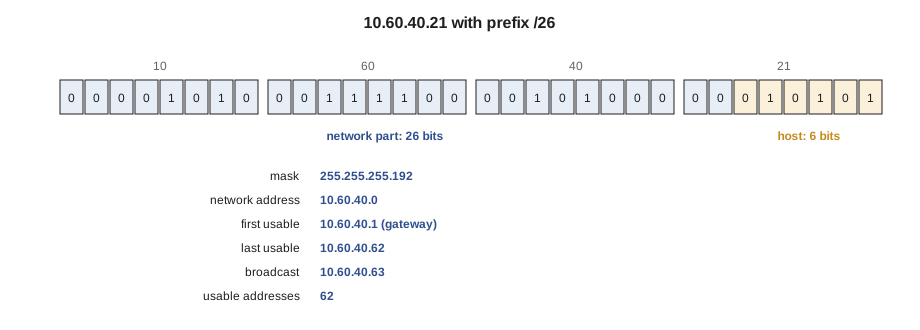
import ipaddress
# Subnet calculator: network, broadcast, usable range and mask
for cidr in ("10.60.40.21/26", "10.60.10.130/24", "10.60.31.7/22", "10.60.99.5/28"):
    iface = ipaddress.ip_interface(cidr)
    net = iface.network
    hosts = list(net.hosts())
    print(f"{cidr:16s} mask {str(net.netmask):15s} network {str(net.network_address):12s} "
          f"broadcast {str(net.broadcast_address):12s} usable {hosts[0]} - {hosts[-1]} ({len(hosts)})")
print()
for p in (24, 25, 26, 27, 28):
print(f"/{p} = {ipaddress.ip_network(f'0.0.0.0/{p}').netmask} usable {2 ** (32 - p) - 2}")10.60.40.21/26 mask 255.255.255.192 network 10.60.40.0 broadcast 10.60.40.63 usable 10.60.40.1 - 10.60.40.62 (62) 10.60.10.130/24 mask 255.255.255.0 network 10.60.10.0 broadcast 10.60.10.255 usable 10.60.10.1 - 10.60.10.254 (254) 10.60.31.7/22 mask 255.255.252.0 network 10.60.28.0 broadcast 10.60.31.255 usable 10.60.28.1 - 10.60.31.254 (1022) 10.60.99.5/28 mask 255.255.255.240 network 10.60.99.0 broadcast 10.60.99.15 usable 10.60.99.1 - 10.60.99.14 (14) /24 = 255.255.255.0 usable 254 /25 = 255.255.255.128 usable 126 /26 = 255.255.255.192 usable 62 /27 = 255.255.255.224 usable 30 /28 = 255.255.255.240 usable 14
Private and public addresses
Some address ranges are set aside for private use inside organizations and are never routed on the internet: 10.0.0.0/8, 172.16.0.0/12 and 192.168.0.0/16. Almost every building network uses them. When a device on a private network reaches the internet, the owner's firewall translates its private address into one of the owner's public addresses, a process called network address translation. For the installer, this means the same private addresses appear on thousands of networks; 192.168.1.10 at Brightwater and 192.168.1.10 at a condo across town are different devices, and an address alone says nothing about which building it is in.
Two other ranges are worth recognizing. Addresses beginning 169.254 are link-local addresses that a device gives itself when it expects an address from DHCP and gets none. A camera showing 169.254.x.x is not configured wrongly; it is telling you DHCP did not answer, as lesson 5 explains. Many IP devices also ship with a fixed factory default address, often in the 192.168 range, used for first setup. Brightwater's devices will all get addresses from the plan, and a device that still shows its factory address after it is connected has not received its configuration.
Reading an IP plan
The network team's IP plan lists each VLAN, its subnet, its gateway, which part is given out by DHCP and which addresses are fixed or reserved. Omar's plan for the sixth floor uses the 10.60.0.0/16 block that Brightwater has set aside for the Kellerman office, with the third octet matching the VLAN number. That is a convention many network teams use, because it makes the plan easy to read: an address 10.60.40.x is a camera, 10.60.50.x a door controller, 10.60.99.x a switch management interface.
| VLAN | Subnet | Gateway | DHCP range | Fixed or reserved |
|---|---|---|---|---|
| 10 Staff | 10.60.10.0/24 | 10.60.10.1 | 10.60.10.50 - 10.60.10.250 | Printers .10 - .19 |
| 20 Voice | 10.60.20.0/24 | 10.60.20.1 | 10.60.20.20 - 10.60.20.250 | None |
| 30 Wireless management | 10.60.30.0/26 | 10.60.30.1 | 10.60.30.10 - 10.60.30.60 | Access points reserved by MAC |
| 40 Cameras | 10.60.40.0/26 | 10.60.40.1 | None | Cameras .21 - .29, recorder .5 |
| 50 Door access | 10.60.50.0/27 | 10.60.50.1 | None | Controllers .11 - .14, server .5 |
| 60 Building systems | 10.60.60.0/26 | 10.60.60.1 | 10.60.60.10 - 10.60.60.60 | None |
| 99 Network management | 10.60.99.0/27 | 10.60.99.1 | None | Switches .11 - .14, UPS .20 |
The plan uses small subnets where few devices will ever be: a /26 for 6 cameras has room for 61 devices besides the gateway, plenty for growth, without wasting a whole /24. Some VLANs use DHCP and some use fixed addresses. Cameras and door controllers get fixed addresses because the recorder and access server are configured to look for them at those addresses. Access points get their addresses from DHCP, but each one is reserved by MAC address so it always gets the same one. Lesson 5 covers how those reservations work and how the crew sets fixed addresses.
An installer reading the plan can answer most of the questions that come up on site. If CAM-6-03 should be 10.60.40.23 with mask 255.255.255.192 and gateway 10.60.40.1, Maya can check those three values on the camera's setup page and know at once whether it is configured as designed.
import ipaddress
# Subnet planning: size a subnet for each device type with room to grow
need = {"Staff": 96, "Voice": 130, "Wireless management": 14, "Cameras": 6,
        "Door access": 4, "Building systems": 20, "Network management": 6}
growth = 1.5          # plan for 50 percent more devices
reserved = 3          # gateway plus a few for switches or servers
def prefix_for(n):
    for p in range(30, 15, -1):
        if 2 ** (32 - p) - 2 >= n:
            return p
for name, n in need.items():
    p = prefix_for(int(n * growth) + reserved)
    print(f"{name:20s} {n:4d} devices -> /{p} ({2 ** (32 - p) - 2} usable)")
# check the camera plan addresses sit inside their subnet
cams = ipaddress.ip_network("10.60.40.0/26")
for a in ("10.60.40.21", "10.60.40.29", "10.60.40.70"):
    inside = ipaddress.ip_address(a) in cams
print(a, "is in" if inside else "is NOT in", cams)Staff 96 devices -> /24 (254 usable) Voice 130 devices -> /24 (254 usable) Wireless management 14 devices -> /27 (30 usable) Cameras 6 devices -> /28 (14 usable) Door access 4 devices -> /28 (14 usable) Building systems 20 devices -> /26 (62 usable) Network management 6 devices -> /28 (14 usable) 10.60.40.21 is in 10.60.40.0/26 10.60.40.29 is in 10.60.40.0/26 10.60.40.70 is NOT in 10.60.40.0/26
Same subnet or not
A test the crew uses often is whether two addresses are on the same subnet. Apply the mask to both and compare the network parts. With a /24 mask, 10.60.10.40 and 10.60.10.200 are on the same subnet, 10.60.10.0. With a /26 mask, 10.60.40.21 and 10.60.40.70 are not: the first is in 10.60.40.0/26 and the second in 10.60.40.64/26. A camera set by mistake to 10.60.40.70 with a /26 mask and gateway 10.60.40.1 would believe its gateway is on another network and would be unable to reach anything at all.
Masks that do not fall on an octet boundary are where mistakes happen, because people read the address and see the same first three numbers. Working the mask out in binary, or with the calculator, avoids the mistake. Omar's habit, which Maya picks up, is to write the network address and broadcast address of each subnet on the commissioning sheet, so that the valid range is visible at a glance.
IPv6, briefly
IPv4 has about four billion addresses, which ran out for new allocation in most of the world in the 2010s. IPv6, its successor, uses 128-bit addresses written as eight groups of four hexadecimal digits separated by colons, such as 2001:db8:60:40::21, where a double colon stands for a run of zero groups. Subnets in IPv6 are almost always /64, giving each subnet an enormous number of addresses, and devices can configure their own addresses from information the router sends, without DHCP.
Many networks run IPv4 and IPv6 side by side, and most modern devices support both. Building systems networks, cameras and door controllers are still mostly configured on IPv4, and Brightwater's plan uses IPv4 for all the devices Cobalt Line installs. An installer should recognize an IPv6 address on a device's status page, and know that the link-local IPv6 address beginning fe80, which every IPv6 device gives itself, is normal and does not mean anything is wrong.
import ipaddress
# Recognizing IPv6 addresses and compressing them
for a in ("2001:0db8:0060:0040:0000:0000:0000:0021", "fe80:0000:0000:0000:021a:2bff:fe3c:4d5e"):
    ip = ipaddress.ip_address(a)
    kind = "link-local" if ip.is_link_local else "global or documentation"
    print(f"{ip.compressed:28s} {kind}")
net = ipaddress.ip_network("2001:db8:60:40::/64")
print("addresses in one /64 subnet:", f"{net.num_addresses:.3e}")2001:db8:60:40::21 global or documentation fe80::21a:2bff:fe3c:4d5e link-local addresses in one /64 subnet: 1.845e+19
Duplicate addresses
Two devices with the same IP address on the same subnet cause intermittent faults that are hard to trace: traffic for the address goes to whichever device answered most recently, so each works some of the time. Duplicates come from fixed addresses set by hand, from a device with a factory default address left on the network, and from DHCP ranges that overlap fixed addresses. Most devices check for a duplicate when they take an address and report a conflict in their logs or on their status page. The crew's protection is the IP plan: fixed addresses are set only from the plan, each one is recorded on the commissioning sheet, and nobody picks an address that looks free.
Worked problem
Checking a door controller's settings
Door controller DC-6-02 is configured with address 10.60.50.12, mask 255.255.255.0 and gateway 10.60.50.1. The plan shows VLAN 50 as 10.60.50.0/27. Is the controller configured correctly, and will it work?
Show solution
- The plan's mask for a /27 is 255.255.255.224; the controller has 255.255.255.0, a /24.
- The address 10.60.50.12 and the gateway 10.60.50.1 are both inside 10.60.50.0/27, so the controller will reach its gateway and the server at 10.60.50.5.
- But it believes addresses up to 10.60.50.254 are local, so it would try to reach anything in 10.60.50.32 to 10.60.50.254 directly instead of through the gateway.
- Today nothing is there, so it will appear to work, but the setting is wrong and will cause faults if the network team later uses that space.
Answer: Correct the mask to 255.255.255.224 as the plan shows and record it on the sheet.
Common mistakes
MistakeReading only the first three octets to decide whether two addresses are on the same subnet.
InsteadApply the mask; with prefixes longer than /24 the boundary is inside the last octet.
MistakePicking an address that looks free.
InsteadUse only addresses the IP plan assigns.
MistakeTreating a 169.254 address as a misconfiguration.
InsteadIt means DHCP did not answer; look for the DHCP problem.
MistakeLeaving a device on its factory default address.
InsteadConfigure every device from the plan before it goes into service.
MistakeSetting the right address with the wrong mask or gateway.
InsteadCheck all three values against the plan.
Summary and key terms
- An IPv4 address is 32 bits written as four octets; each octet is eight bits.
- The subnet mask or prefix length divides the address into a network part and a host part.
- A subnet with prefix p has 2 to the power (32 − p) addresses, two of them reserved.
- Devices reach other subnets through their default gateway; address, mask and gateway must all be right.
- Private ranges 10/8, 172.16/12 and 192.168/16 are used inside buildings; 169.254 means DHCP failed.
- IP plans often match the third octet to the VLAN number; fixed addresses come only from the plan.
- IPv6 uses 128-bit hexadecimal addresses; fe80 link-local addresses are normal.
- IP address
- The address a device uses to be reached across networks.
- Octet
- One of the four eight-bit numbers in an IPv4 address.
- Subnet mask
- The value that marks which bits of an address are the network part.
- Prefix length
- The number of network bits, written after a slash.
- Default gateway
- The router address a device sends traffic to for other networks.
- Broadcast address
- The last address of a subnet, reaching every device on it.
- IP plan
- The network team's table of VLANs, subnets, gateways and assigned addresses.
Practice problems
Work each problem on paper first, then reveal the answer to check.
How many usable addresses are in a /27?
Show answer
30, because 2 to the 5th is 32, minus 2.
Are 10.60.40.21 and 10.60.40.70 on the same /26 subnet?
Show answer
No; the first is in 10.60.40.0/26, the second in 10.60.40.64/26.
What is 255.255.255.192 as a prefix length?
Show answer
/26.
A camera shows 169.254.12.40. What does that mean?
Show answer
It expected an address from DHCP and got no answer.
Lesson quiz · 5 questions
Score 60% or more to complete this lesson.
Create a free account to save your progress, take quizzes and earn a certificate.