
LVT-220 · Lesson 3 of 12 · 22 min
Switches, MAC addresses and VLANs
The access switches in room 6A are where every cable on the Brightwater floor ends up, and where most of the network's decisions about each device are made. A switch decides which port a frame goes out of, which devices can talk to each other directly, how much power each port supplies and how traffic is prioritized when links are busy. The installer does not configure it, but needs to know what it is doing, because the switch's view of each port is the best single source of information about whether a device is working. This lesson covers how switches learn and forward, what VLANs are and why the network team uses them, and what the installer should ask for and read on the switch.
How a switch learns
A switch has a table that links MAC addresses to ports, often called the MAC address table or forwarding table. It builds the table by watching traffic. When a frame arrives on port 12, the switch notes the frame's source MAC address and records that the device with that address is reachable through port 12. When a frame arrives for a destination address that is already in the table, the switch sends it out of that one port only. When the destination is not yet in the table, the switch floods the frame out of every port in the same network except the one it came in on, and the reply teaches it where that device is. Entries that are not refreshed by traffic age out after a few minutes, so the table follows devices that move.
Broadcast frames, sent to the address FF:FF:FF:FF:FF:FF, are flooded to every port in the network by design. Devices use broadcasts to find each other and to ask for addresses, as lesson 5 explains. In a small network that is harmless. In a large flat network with thousands of devices, broadcasts add up, and a single misbehaving device can flood every port. That is one reason networks are divided into VLANs.
For the installer, the MAC address table is a locating tool. If Maya knows a camera's MAC address from its label, Omar can look it up on the switch and say which port it is on. If the camera is on port 23 and the port map says port 32, a cord has been patched to the wrong place. If the address does not appear at all, the camera is not sending anything: it may not be powered, may not have booted, or may be connected to a different switch. This is why the crew records the MAC address of every device before it goes into the ceiling.
# How a switch learns: a tiny MAC address table
table = {}
def frame(in_port, src, dst):
    table[src] = in_port                  # learn where the sender is
    if dst == "ff:ff:ff:ff:ff:ff" or dst not in table:
        return "flood to all ports except " + str(in_port)
    return "forward out port " + str(table[dst])
events = [
    (12, "00:1a:2b:00:00:12", "ff:ff:ff:ff:ff:ff"),   # camera asks for an address
    (48, "3c:52:82:00:00:48", "00:1a:2b:00:00:12"),   # server replies to the camera
    (12, "00:1a:2b:00:00:12", "3c:52:82:00:00:48"),   # camera sends video
]
for port, src, dst in events:
    print(f"in port {port:2d}  {src} -> {dst}: {frame(port, src, dst)}")
print("table:", table)in port 12 00:1a:2b:00:00:12 -> ff:ff:ff:ff:ff:ff: flood to all ports except 12
in port 48 3c:52:82:00:00:48 -> 00:1a:2b:00:00:12: forward out port 12
in port 12 00:1a:2b:00:00:12 -> 3c:52:82:00:00:48: forward out port 48
table: {'00:1a:2b:00:00:12': 12, '3c:52:82:00:00:48': 48}Reading a MAC address
MAC addresses are written in several formats: pairs separated by colons or hyphens, or groups of four hexadecimal digits separated by dots, which is the style some switch makers use. All three name the same 48-bit number, and an installer needs to recognize them as the same thing when comparing a label with a switch screen. The first three bytes, the manufacturer's identifier, are useful: a list of the manufacturers' identifiers on the floor lets Omar spot at a glance which ports have cameras, which have phones and which have something unexpected.
Two bits in the first byte carry meaning. If the lowest bit of the first byte is 1, the address is a group address, used for multicast or broadcast, never a single device. If the second-lowest bit is 1, the address is locally administered: it was set by software rather than burned in by the manufacturer. Phones and computers increasingly use randomized, locally administered addresses on wireless networks for privacy, which is why an address seen on a wireless network may not match the label. Wired IP devices like cameras and controllers almost always use the address on their label.
# MAC address parser: normalize the format and read the flag bits
def parse(mac):
    hexdigits = "".join(c for c in mac.lower() if c in "0123456789abcdef")
    if len(hexdigits) != 12:
        return None
    b = [int(hexdigits[i:i + 2], 16) for i in range(0, 12, 2)]
    return {
        "colon": ":".join(f"{x:02x}" for x in b),
        "dotted": ".".join(hexdigits[i:i + 4] for i in range(0, 12, 4)),
        "oui": ":".join(f"{x:02x}" for x in b[:3]),
        "group": bool(b[0] & 1),
        "local": bool(b[0] & 2),
    }
for raw in ("00-1A-2B-3C-4D-5E", "001a.2b3c.4d5f", "DA:A1:19:22:33:44", "01:00:5e:00:00:fb"):
    p = parse(raw)
    kind = "group (multicast)" if p["group"] else "single device"
    admin = "locally set" if p["local"] else "factory address"
print(f"{raw:18s} -> {p['colon']} {p['dotted']} OUI {p['oui']} {kind}, {admin}")00-1A-2B-3C-4D-5E -> 00:1a:2b:3c:4d:5e 001a.2b3c.4d5e OUI 00:1a:2b single device, factory address 001a.2b3c.4d5f -> 00:1a:2b:3c:4d:5f 001a.2b3c.4d5f OUI 00:1a:2b single device, factory address DA:A1:19:22:33:44 -> da:a1:19:22:33:44 daa1.1922.3344 OUI da:a1:19 single device, locally set 01:00:5e:00:00:fb -> 01:00:5e:00:00:fb 0100.5e00.00fb OUI 01:00:5e group (multicast), factory address
Why VLANs
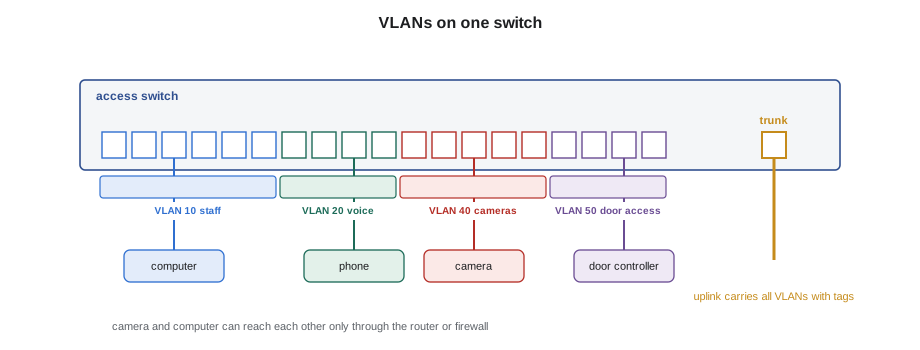
A virtual LAN, or VLAN, divides one physical switch, or a group of connected switches, into several separate networks. Each port is assigned to a VLAN, and frames on one VLAN are never forwarded to ports in another; traffic between VLANs must go through a router or firewall, where the network team decides what is allowed. A switch with ports in VLANs 10, 20 and 30 behaves as if it were three separate switches that happen to share a box.
Owners use VLANs for three reasons. The first is security: the camera system, the door access system and the guest Wi-Fi should not be on the same network as the company's computers, so that a compromised device in one cannot reach the others directly. The second is control of traffic: broadcasts stay within a VLAN, and voice traffic can be given priority on its own VLAN. The third is management: each VLAN gets its own IP subnet, as lesson 4 explains, so the address of a device tells the network team what kind of device it is. Brightwater's plan uses separate VLANs for staff computers, voice, wireless management, staff and guest wireless, cameras, door access, building systems and network management.
| VLAN | Name | Devices | Notes |
|---|---|---|---|
| 10 | Staff | Desk and office computers | Untagged on desk ports |
| 20 | Voice | Desk and meeting room phones | Tagged on desk ports, with priority |
| 30 | Wireless management | Access points | Access points tunnel or tag their users' VLANs |
| 31, 32 | Staff and guest wireless | Wireless users | Guest has internet access only |
| 40 | Cameras | IP cameras and the recorder | No internet access |
| 50 | Door access | Door controllers and the access server | No internet access |
| 60 | Building systems | Displays, room booking panels, sensors | Limited access |
| 99 | Network management | Switch and UPS management interfaces | Network team only |
Access ports and trunk ports
A port connected to a single device is usually an access port: it belongs to one VLAN, and frames go to and from the device without any VLAN information, untagged. The device does not know or care which VLAN it is in; the switch handles it. A port connected to another switch, or to a device that carries several VLANs, is a trunk port: frames carry a four-byte 802.1Q tag that names the VLAN, so many VLANs can share the one link. Uplinks between switches are trunks. Access points are often connected to trunk ports, because they carry their own management traffic and several wireless networks.
Desk ports at Brightwater are a mix. The computer's traffic is untagged on VLAN 10. The phone's traffic is tagged on VLAN 20, which the phone learns from the switch when it boots, usually through a discovery protocol the network team configures. The computer plugs into the phone's pass-through port and never sees the voice VLAN. When Maya plugs a phone into a desk port, a correct configuration shows the phone's address in VLAN 20 and the computer's in VLAN 10 on the same switch port.
The consequence for installers is direct: patching a device to the wrong port puts it on the wrong VLAN, and it will either get no address or get an address on the wrong network. A camera patched to a staff port gets a staff address, cannot reach the recorder and might be reachable from staff computers, which is exactly what the VLAN plan was meant to prevent. That is why the port map Maya follows in room 6A names both the switch port and the VLAN for each outlet, and why she does not move a cord to a different switch port to make something work. If the port seems wrong, she asks Omar.
# Port map check: is each device on a port in the right VLAN?
port_vlan = {1: 10, 2: 10, 13: 40, 14: 40, 21: 50, 22: 50, 33: 30, 34: 30}
expected = {"camera": 40, "door controller": 50, "access point": 30, "computer": 10}
patched = [("CAM-6-01", "camera", 13), ("CAM-6-02", "camera", 2),
           ("DC-6-01", "door controller", 21), ("AP-6-01", "access point", 33),
           ("AP-6-02", "access point", 14)]
for name, kind, port in patched:
    have, want = port_vlan.get(port), expected[kind]
    status = "ok" if have == want else f"WRONG: port is VLAN {have}, needs {want}"
print(f"{name:9s} on port {port:2d}: {status}")CAM-6-01 on port 13: ok CAM-6-02 on port 2: WRONG: port is VLAN 10, needs 40 DC-6-01 on port 21: ok AP-6-01 on port 33: ok AP-6-02 on port 14: WRONG: port is VLAN 40, needs 30
Loops and spanning tree
Ethernet switches have one serious weakness: if two switches are connected by two paths, or a single cord is plugged with both ends into the same switch, broadcast frames circle the loop endlessly, multiplying each time, and within seconds the network is flooded. This is a broadcast storm, and it can take down an entire floor. Switches prevent it with the spanning tree protocol and its faster successors: they exchange messages, find redundant paths and block all but one, unblocking a spare path only if the active one fails.
Spanning tree protects against loops between switch ports the network team knows about, but a loop created at a desk, such as a cord plugged from one wall outlet to another, can still cause trouble, and the network team often enables protections that shut a port down if a loop or an unexpected switch appears on it. An installer sees this as a port that goes dark a few seconds after a device is plugged in. Hollis once spent an hour at St. Brendan's chasing a dead port that turned out to be a nurse's small desk switch with a cord looped back into itself; the hospital's switch had done exactly what it was designed to do and shut the port.
The rule for the crew is simple: never connect two network outlets together, never plug a small unmanaged switch into an owner's network without permission, and never connect two of the owner's switches with a cord unless the network team has asked for that exact connection.
Quality of service
When a link is busy, a switch has to decide which frames to send first. Voice and video calls suffer from even short delays, and building systems like door controllers need their messages delivered promptly, while file downloads can wait a fraction of a second without anyone noticing. Quality of service settings let the switch put frames in different queues by priority. The priority is marked in the VLAN tag or in the IP header, and the network team decides which traffic gets which priority. The installer's part is to put each device on the port the plan names, because the port's configuration often decides the priority.
What the installer asks for and reads
On most jobs, the installer does not have access to the switch's configuration, but Omar can give Maya read-only access to the switch's management web page or a printout of the information she needs. The useful views are the port status, which shows link up or down, speed and duplex for each port; the PoE status, which shows the power class and power drawn on each port; the MAC address table, which shows which addresses are seen on which ports; and the error counters, which show CRC and other errors. Many switches also show neighbor information from a discovery protocol: an access point or phone announces its name and model, so the switch can show what is connected to each port by name.
Maya keeps a commissioning sheet for each switch. For every port in use, she records the outlet label, the device, the device's MAC address from its label, and, once it is connected, the link speed, the PoE power drawn and whether the address appears on the expected port and VLAN. A complete sheet is the evidence that the installation matches the design, and it is handed over with the as-built records.
Worked problem
A camera that cannot reach the recorder
Camera CAM-6-04 at the reception area powers up and has a link at 100 Mb/s, but the recorder cannot find it. The port map shows outlet 6A-C14 on switch 6A-SW2, port 15, VLAN 40. What should Maya and Omar check?
Show solution
- Maya reads the MAC address from her photo of the camera label: 00:40:8c:91:22:14.
- Omar searches the switch for that address and finds it on port 5, not port 15. Port 5 is a staff port on VLAN 10.
- Maya checks the patch cord in room 6A: the cord from 6A-C14 is in port 5. It was patched from the old port map revision.
- She moves the cord to port 15 as the current port map shows, and records the correction.
Answer: The camera appears in VLAN 40 and the recorder finds it. The fault was patching, not the camera or the cable.
Common mistakes
MistakeMoving a cord to a different switch port to make a device work.
InsteadFollow the port map; if the port seems wrong, ask the network team.
MistakeNot recording MAC addresses before devices go into the ceiling.
InsteadPhotograph or scan every label; the address locates the device on the switch.
MistakePlugging a small switch or a looped cord into the owner's network.
InsteadNever connect switches or loops without the network team's request.
MistakeAssuming a port that goes dark is a cable fault.
InsteadIt may have been shut down by loop or security protection; ask the network team.
MistakeExpecting a wireless device's address to match its label.
InsteadMany wireless clients use randomized addresses; wired IP devices use the label address.
Summary and key terms
- A switch learns which port each MAC address is on from the traffic it sees, and forwards frames only where they need to go.
- Broadcasts are flooded to every port in a network; VLANs keep them, and traffic in general, separated.
- Each VLAN is a separate network; traffic between VLANs passes through a router or firewall.
- Access ports carry one VLAN untagged; trunk ports carry several with 802.1Q tags.
- Patching a device to the wrong port puts it on the wrong VLAN.
- Spanning tree blocks loops between switches; never create loops or connect unapproved switches.
- Port status, PoE status, the MAC address table and error counters are the installer's views of the switch.
- MAC address table
- The switch table linking hardware addresses to ports.
- Broadcast
- A frame sent to every device in a network.
- VLAN
- A virtual LAN: a separate network defined in the switch configuration.
- Access port
- A switch port carrying one VLAN, untagged.
- Trunk port
- A switch port carrying several VLANs with tags.
- Spanning tree
- A protocol that blocks redundant paths between switches to prevent loops.
- Quality of service
- Switch settings that give priority to some traffic over others.
Practice problems
Work each problem on paper first, then reveal the answer to check.
A camera's MAC address appears on port 5 instead of port 15. What is likely wrong?
Show answer
It is patched to the wrong switch port.
What is the broadcast MAC address?
Show answer
FF:FF:FF:FF:FF:FF.
Why are cameras on their own VLAN?
Show answer
To keep them separate from staff computers for security and traffic control.
Is 0a:1b:2c:3d:4e:5f a factory address?
Show answer
No; the second-lowest bit of the first byte (0a) is set, so it is locally administered.
Lesson quiz · 5 questions
Score 60% or more to complete this lesson.
Create a free account to save your progress, take quizzes and earn a certificate.