
LVT-210 · Lesson 9 of 12 · 20 min
Cleaning and inspecting end faces
Ask any fiber technician what causes most link failures and the answer is the same: dirty connectors. Industry surveys over many years have put contaminated end faces at the top of the list of network problems, ahead of broken fiber, bad splices and wrong equipment. A single particle of dust on a singlemode core can block a large part of the light. Worse, when a dirty connector is mated, the particle can be pressed into the end face of both connectors, scratching or pitting them so that cleaning no longer helps. The rule the whole industry repeats is short: inspect before you connect.
This lesson covers how contamination happens, how end faces are inspected and graded, how they are cleaned, and the routine that Hollis's crew follows for every connection. It returns to Juniper Point, where the old OM3 connectors are reused in the new enclosure, and to St. Brendan's, where the crew inspects the MPO trunks before handing them over.
How end faces get dirty
Contamination comes from everywhere. Dust settles on any connector or adapter left uncapped. Skin oil is transferred whenever someone touches a ferrule tip. The inside of a dust cap can itself be dirty; caps are made to keep dust out, not to keep the end face clean. Construction sites add drywall dust, which is fine, abrasive and everywhere. And every mating transfers contamination: a dirty connector plugged into a clean adapter leaves dirt on the sleeve, which then dirties the next connector. That is why both connectors in a mated pair are inspected, and why a test cord used on a dirty port becomes a dirty test cord.
| Contaminant | Typical source | Removed by |
|---|---|---|
| Dust and drywall particles | Open ports, uncapped cords, construction | Dry cleaning; wet-dry if stubborn |
| Skin oil | Touching the ferrule tip | Wet-dry cleaning |
| Residue from caps or cleaning fluid | Dirty caps, too much solvent | Dry cleaning after wet |
| Gel or index-matching fluid | Cable gel, mechanical splices | Wet-dry cleaning |
| Pits, chips and scratches | Mating over dirt, impact, poor polish | Not removable: replace or re-terminate |
Inspection scopes
End faces are inspected with a fiber microscope at about 200 to 400 times magnification. Lesson 3 explained why the crew uses only video microscopes: a probe with a camera at the tip shows the image on a handheld display, a tester screen or a phone, and keeps the eye well away from any light in the fiber. The probe takes interchangeable tips for different connectors: one tip for LC bulkheads, which looks into an adapter at the connector behind it, another for LC patch cord ends, and others for SC, APC and MPO. A video probe can inspect inside an adapter without removing the connector from the back of the panel, which is how most installed ports are checked.
Modern probes also grade the image automatically. Software finds the core, draws the inspection zones, counts and sizes the defects and scratches in each zone, and reports pass or fail against a chosen standard, usually IEC 61300-3-35. The automatic result removes the guesswork of an inexperienced eye and saves a record with an image for each end face, which many specifications now require in the handover documents.
Zones and grading under IEC 61300-3-35
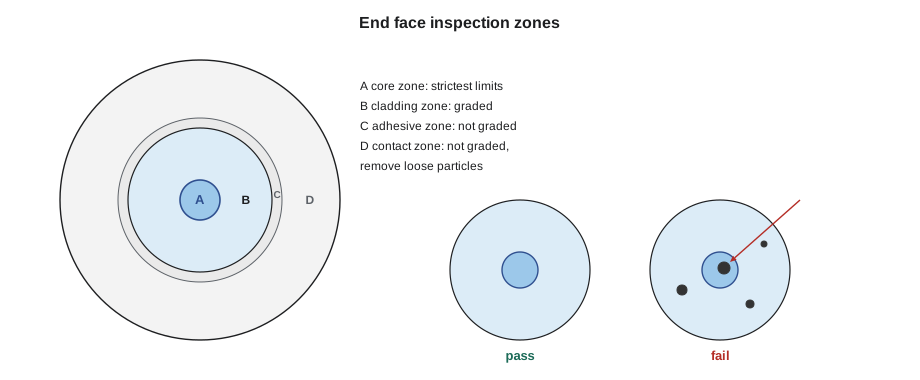
IEC 61300-3-35 divides the end face into concentric zones and sets limits for defects and scratches in each. The zones, from the center out, are the core zone, the cladding zone, the adhesive zone where the glass meets the ferrule, and the contact zone of ferrule around it. The core zone has the strictest limits, because anything there blocks light directly. The cladding zone allows more, and the adhesive and contact zones are not graded pass or fail in the current edition, published in 2022, although loose particles there should still be removed, because they can migrate to the core when connectors are mated.
The 2022 edition made several practical changes. The cladding zone is slightly smaller than before, the limits in the core and cladding zones are somewhat clearer and a little less strict for multimode, and particles that remain in the contact zone after several cleaning attempts are treated as embedded and acceptable. It also allows MPO ferrules to be checked first with a wide field of view for loose debris before each fiber is inspected, and it gives optical performance precedence: a connector that has been cleaned but fails inspection may still be used if it passes its loss and reflectance tests. Singlemode limits remain stricter than multimode, especially in the core zone.
# A simplified multimode grading check, after the IEC 61300-3-35 zone idea (illustrative limits)
LIMITS = {   # zone: (max particles 2-5 um, max particles over 5 um, max scratches over 3 um)
    "core":     (4, 0, 0),
    "cladding": (None, 0, None),   # None = no limit in this simplified version
}
def grade(name, defects):
    ok = True
    for zone, items in defects.items():
        if zone not in LIMITS:
            continue                   # adhesive and contact zones are not graded
        mid, big, scr = LIMITS[zone]
        n_mid = sum(1 for kind, size in items if kind == "particle" and 2 <= size <= 5)
        n_big = sum(1 for kind, size in items if kind == "particle" and size > (5 if zone == "core" else 25))
        n_scr = sum(1 for kind, size in items if kind == "scratch" and size > 3)
        if (mid is not None and n_mid > mid) or n_big > big or (scr is not None and n_scr > scr):
            ok = False
    print(f"{name:30s} {'PASS' if ok else 'FAIL'}")
grade("Juniper port 3, as found", {"core": [("particle", 7)], "cladding": [("particle", 4), ("particle", 30)]})
grade("Juniper port 3, after dry", {"core": [], "cladding": [("particle", 3)], "contact": [("particle", 12)]})
grade("Juniper port 7, after wet-dry", {"core": [("scratch", 6)], "cladding": []})Juniper port 3, as found FAIL Juniper port 3, after dry PASS Juniper port 7, after wet-dry FAIL
Port 3 at Juniper Point failed as found, with a large particle on the core and another in the cladding, and passed after a single dry clean, leaving only a small particle in the cladding and one on the contact zone, which is not graded. Port 7 is different: its core has a scratch that no cleaning will remove. Under the 2022 edition, Hollis could still use it if it passed its loss and reflectance tests, but a scratch across a core is a reason to re-terminate a connector the crew is reusing anyway, and she does.
Cleaning methods
There are two basic methods, and the crew uses them in a fixed order. Dry cleaning uses a lint-free cleaning material, either a reel cleaner, a cassette with a strip of cleaning cloth that the end face is wiped across, or a click cleaner, a pen-shaped tool that pushes a cleaning tape against the end face when its sleeve is pressed. Click cleaners come with tips for bulkheads, so they can clean a connector inside an adapter without removing it, and for exposed cord ends.
Wet-dry cleaning is used when dry cleaning does not remove the contamination, especially oils and residues. A small amount of optical cleaning fluid is applied to a cleaning wipe or a stick, the end face is touched to the wet area and immediately drawn across the dry area, so the solvent loosens the contamination and the dry cloth removes it along with the solvent before it can dry into a residue. Too much fluid leaves a ring of residue that is worse than what was there. Isopropyl alcohol can be used, but specialised optical cleaning fluids dry with less residue and are preferred on connectors.
- Never clean an end face with compressed air alone; it moves dirt around and can blow it into the adapter sleeve.
- Never wipe a ferrule with a shirt, a tissue or a cotton swab; they leave fibers and lint.
- Use each area of a cleaning cloth only once.
- Clean APC and UPC connectors with tools made for each; APC needs angled tips.
- Replace dust caps only on clean connectors, and discard caps that may be dirty.
The inspect-clean-inspect routine
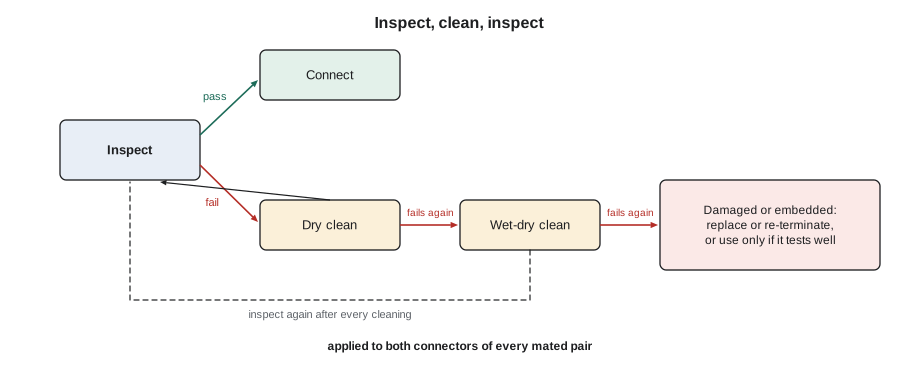
The crew's routine for every connection is a loop. Inspect the end face. If it passes, connect it. If it fails, dry clean and inspect again. If it still fails, wet-dry clean and inspect again. If it still fails, the end face is damaged or the contamination is embedded: for a connector that will be used, the decision is to re-terminate or replace it, unless the optical tests show it performs. Both ends of every mated pair go through the same loop: the connector on the cord and the connector behind the adapter on the panel.
# Logging the inspect-clean-inspect loop for a batch of ports
ports = {"1": ["pass"], "2": ["fail", "pass"], "3": ["fail", "pass"], "4": ["pass"],
         "5": ["fail", "fail", "pass"], "6": ["pass"], "7": ["fail", "fail", "fail"], "8": ["pass"]}
steps = ["as found", "after dry clean", "after wet-dry clean"]
first_pass = sum(1 for r in ports.values() if r[0] == "pass")
print(f"{first_pass} of {len(ports)} ports passed as found")
for p, results in ports.items():
    if results[-1] == "pass":
        print(f"port {p}: passed {steps[len(results) - 1]}")
    else:
print(f"port {p}: failed after wet-dry; replace or re-terminate")4 of 8 ports passed as found port 1: passed as found port 2: passed after dry clean port 3: passed after dry clean port 4: passed as found port 5: passed after wet-dry clean port 6: passed as found port 7: failed after wet-dry; replace or re-terminate port 8: passed as found
Four of the eight Juniper Point ports needed cleaning, which is typical for connectors that have spent years in a riser room. Hollis's view is that the as-found pass rate is the most honest measure of how a site has been looked after, and that a crew's own cords and test reference cords should pass as found every time, because they are cleaned and capped after every use.
MPO connectors
MPO connectors are harder to keep clean, because one end face has twelve or more fibers in a row across a wide ferrule, and a particle anywhere on it can be pushed onto a fiber when the connector is mated. They are cleaned with MPO click cleaners, which wipe the whole ferrule face, and inspected with an MPO tip that scans each fiber in turn, often automatically. Male MPO connectors have guide pins that make cleaning awkward; the cleaner's design allows for them. At St. Brendan's, every trunk end and cassette is inspected and recorded before handover, 312 MPO end faces in all, each with a stored image.
Worked problem
A port that keeps failing
A port on the Riverside room 1A panel fails inspection after a dry clean and again after a wet-dry clean, with a dark spot at the edge of the core that does not move. The connector behind the adapter is a new pigtail spliced the day before. What should Maya check, and what is the likely fix?
Show solution
- A spot that does not move after two cleanings is likely a pit or embedded particle, not loose dirt.
- Check whether she has been inspecting the right side: a bulkhead tip looks at the connector behind the adapter, so the problem is the pigtail.
- Check the inspection of the cord she connected earlier: if it was dirty, it may have damaged the pigtail.
- A new pigtail is cheap: re-splicing a fresh one is quicker and more certain than arguing with the result.
Answer: Maya replaces the pigtail, inspects the new one before connecting it, and checks her test cord, which turns out to be the source of the dirt.
Keeping the crew's own tools clean
The crew's own equipment is the most likely source of contamination on a new installation, because it touches every port. Test reference cords, launch and receive cables, click cleaners and inspection tips are kept in sealed bags or cases, and every connector on them is capped when not in use. Each cord's end faces are inspected at the start of a session and after any test that looked unusual. Click cleaners are counted: each has a rated number of cleans, and a cleaner near the end of its tape is replaced before it starts smearing instead of cleaning.
Hollis also asks for the inspection images to be saved for every port the crew connects, not only the ones that failed. If a port fails a test later, the images show what it looked like on the day it was built. That record has settled more than one argument with another trade about who left the caps off in a room under construction.
Common mistakes
MistakeConnecting first and inspecting only if the link fails.
InsteadInspect before you connect, every time, both sides.
MistakeTrusting a dust cap to keep an end face clean.
InsteadCaps keep dust out but can be dirty inside; inspect after removing one.
MistakeUsing too much cleaning fluid.
InsteadUse a small amount and always finish on the dry area of the cloth.
MistakeCleaning with compressed air or a cotton swab.
InsteadUse lint-free reel or click cleaners made for the connector type.
MistakeInspecting only the cord and not the port.
InsteadUse a bulkhead tip to inspect the connector inside the adapter too.
Summary and key terms
- Contaminated end faces are the most common cause of fiber link problems.
- Every mating transfers contamination, and mating over dirt can permanently damage both end faces.
- Video inspection probes, with tips for bulkheads and cords, show and grade end faces safely.
- IEC 61300-3-35 grades the core and cladding zones; the 2022 edition no longer grades the adhesive and contact zones pass or fail.
- Dry cleaning comes first; wet-dry cleaning follows if needed, always ending on a dry area.
- The inspect-clean-inspect loop is applied to both connectors of every mated pair.
- MPO end faces need their own cleaners and inspection tips.
- Inspection probe
- A video microscope that displays a connector end face on a screen.
- Bulkhead tip
- A probe tip that inspects the connector behind an adapter without removing it.
- IEC 61300-3-35
- The international standard for visual inspection and grading of fiber end faces.
- Core zone
- The central inspection zone, with the strictest limits on defects.
- Click cleaner
- A pen-shaped tool that wipes an end face with a cleaning tape.
- Wet-dry cleaning
- Cleaning with a small amount of solvent followed immediately by a dry wipe.
Practice problems
Work each problem on paper first, then reveal the answer to check.
What is the first thing to do before connecting any fiber?
Show answer
Inspect both end faces.
Dry cleaning has not removed a smudge. What next?
Show answer
Wet-dry clean, then inspect again.
Why must the port be inspected as well as the cord?
Show answer
Either one can be dirty, and dirt transfers in both directions.
A core has a scratch after cleaning. What are the options?
Show answer
Replace or re-terminate the connector, or use it only if it passes its loss and reflectance tests.
Lesson quiz · 5 questions
Score 60% or more to complete this lesson.
Create a free account to save your progress, take quizzes and earn a certificate.