
LVT-210 · Lesson 2 of 12 · 19 min
Fiber types, modes and cable construction
Before the crew pulls any cable, Hollis has Maya and Teo read the cable data sheets for every job this season. The data sheet tells an installer what the glass is, how the strands are packaged, where the cable may be installed, how hard it may be pulled and how tightly it may be bent. Two cables can both be described as 24-strand singlemode and still need completely different handling, termination and testing. This lesson covers the fiber grades, the ways strands are packaged into cable, and how to choose and read a cable for a job.
Multimode grades: OM1 to OM5
Multimode fiber is graded OM1 to OM5 under ISO/IEC 11801 and the matching TIA fiber specifications. The grade describes the core size and, above all, the modal bandwidth, which decides how far a given Ethernet speed can run. OM1 and OM2 are legacy fibers found in older buildings; new multimode installations use OM3, OM4 or OM5. Each grade has a standard jacket color for indoor cable, which helps an installer identify fiber that was installed years ago without good records.
| Grade | Core | Jacket color (indoor) | Typical use today |
|---|---|---|---|
| OM1 | 62.5 µm | Orange | Legacy only; found in older buildings |
| OM2 | 50 µm | Orange | Legacy only |
| OM3 | 50 µm, laser-optimized | Aqua | 10 Gb/s to about 984 ft; existing risers |
| OM4 | 50 µm, higher bandwidth | Aqua, or erika violet in some regions | 10 Gb/s to about 1,312 ft; data centers |
| OM5 | 50 µm, wideband | Lime green | Short-wave wavelength multiplexing |
The Juniper Point condominium has a 12-strand OM3 riser installed when the building opened. St. Brendan's data room uses OM4 in pre-terminated trunks between racks. The Riverside campus route carries a 12-strand OM4 cable alongside the singlemode, because the school board's existing switches in the gymnasium have multimode optics and the board wanted to keep them for a few years. Sanjay's design notes say the OM4 is for the current equipment and the singlemode is for everything after that.
Singlemode grades: OS1a and OS2
Singlemode fiber in buildings is described as OS1a or OS2. Both use the same glass, a low-water-peak singlemode fiber that has low loss across the whole range from about 1260 to 1625 nm. The difference lies in the cable: OS1a is the designation used for tight-buffered indoor cable, whose maximum cabled attenuation is about 1.0 dB/km, and OS2 for loose-tube and outside plant cable, at about 0.4 dB/km. In practice the glass in either is far better than the cable specification, and most installers see 0.3 to 0.4 dB/km on new singlemode at 1310 nm.
Indoor singlemode cable has a yellow jacket. Outside plant cable is black, whatever the fiber inside, so the strand count and type must be read from the jacket print. A typical print reads something like the manufacturer's name, the cable part number, 24F SM OS2, the rating, the date of manufacture and a length mark repeated every two feet. Maya photographs the print on each reel when it is delivered and attaches it to the job record.
Reach: matching fiber to the application
Whether a link works depends on two things: its loss, which the installer controls, and its bandwidth, which the fiber grade and length decide. A link with a low loss can still fail if it is too long for the fiber's bandwidth at that speed. The table in the code below gives typical Ethernet reaches by fiber type. They are the planning values most designers start from; the exact limits come from the Ethernet standard and the transceiver data sheet.
# Typical Ethernet reach by fiber type (planning values, meters)
reach = {
    "10G short-wave":  {"OM3": 300, "OM4": 400, "OM5": 400},
    "40G 4-lane":      {"OM3": 100, "OM4": 150, "OM5": 150},
    "100G 4-lane":     {"OM3": 70,  "OM4": 100, "OM5": 100},
    "400G 8-lane":     {"OM3": 70,  "OM4": 100, "OM5": 100},
    "10G long-reach":  {"OS2": 10000},
    "100G long-reach": {"OS2": 10000},
}
links = [("Riverside gym", 1050, "OM4", "10G short-wave"),
         ("Riverside gym", 1050, "OS2", "100G long-reach"),
         ("Juniper riser", 243, "OM3", "40G 4-lane"),
         ("St. Brendan's rack row", 125, "OM4", "100G 4-lane")]
FT = 0.3048
for name, length, fiber_type, app in links:
    limit = reach[app].get(fiber_type)
    meters = length * FT
    ok = limit is not None and meters <= limit
    shown = f"{length} ft"
print(f"{name:24s} {shown:>9s} {fiber_type} {app:16s} limit {limit} m: {'OK' if ok else 'TOO LONG'}")Riverside gym 1050 ft OM4 10G short-wave limit 400 m: OK Riverside gym 1050 ft OS2 100G long-reach limit 10000 m: OK Juniper riser 243 ft OM3 40G 4-lane limit 100 m: OK St. Brendan's rack row 125 ft OM4 100G 4-lane limit 100 m: OK
The Juniper Point riser shows why reach matters for upgrades. The building's 12-strand OM3 runs about 243 ft, well inside the 330 ft planning reach for 40 Gb/s on OM3. A 10 Gb/s upgrade on the Riverside OM4 also works. But the OM4 on the campus route could never carry 100 Gb/s with short-wave optics, which is exactly why Sanjay added the singlemode. On fiber, the length that decides an application is the whole channel, from transmitter to receiver, including patch cords and any cross-connects.
How strands are packaged: buffers
The 250 µm coated fiber is too fragile to handle on its own. Cables add protection in one of two ways. In tight-buffered cable, each fiber has a thicker plastic layer applied directly over the coating, bringing it to 900 µm. Tight-buffered strands are stiff enough to be terminated directly with connectors and to be handled in enclosures without extra protection. Indoor distribution cable, riser cable and patch cords are tight-buffered.
In loose-tube cable, the 250 µm fibers lie loosely in a plastic tube, typically 6 or 12 fibers to a tube, often filled with a water-blocking gel or protected with dry water-blocking yarns and tapes. The fibers are slightly longer than the tube, so when the cable stretches or shrinks with temperature, the tube takes the strain and the fibers stay relaxed. Loose-tube cable is the standard for outdoor and campus use, because it handles temperature swings, water and long pulls. Its fibers are too fragile to connectorize directly; they are spliced to pigtails or protected with fan-out kits.
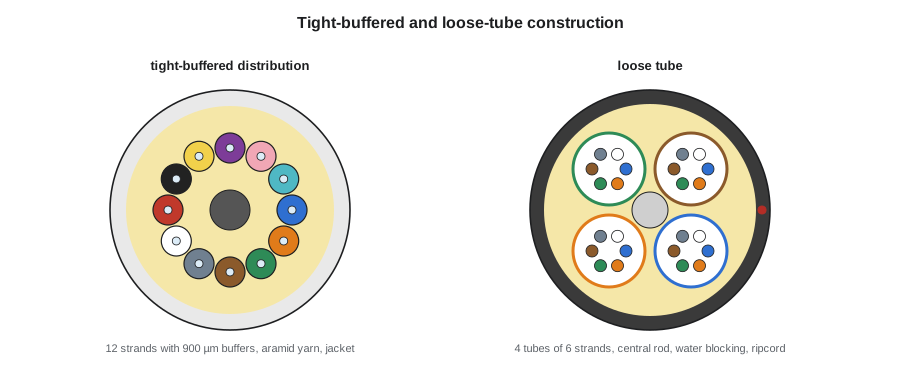
Some cables are rated for both indoor and outdoor use. These indoor/outdoor cables are usually dry loose-tube or tight-buffered designs with a jacket that resists sunlight and water and also meets the fire rating for inside buildings. They let a campus route run from a room in one building to a room in another without a transition splice at the building entrance, as long as the length inside each building and the fire ratings meet the codes, which LVT-330 covers. The Riverside route uses indoor/outdoor loose-tube cable for this reason.
Strength members, armor and jackets
Fiber cables are pulled by their strength members, not by the fibers. The most common strength member is aramid yarn, the same fiber used in protective vests, laid along the cable under the jacket. Outdoor cables often add a central rod of glass-reinforced plastic, which also stops the cable from shrinking in the cold and buckling the fibers. When a cable is pulled, the pulling grip or the knot is made on the aramid yarn or the rod, never on the jacket alone or the tubes.
Armored cable adds a layer of corrugated steel or aluminum tape, or an interlocking metal armor, for protection from rodents, crushing and direct burial. Metal armor makes the cable conductive, which means it must be bonded and grounded where it enters a building, as LVT-330 covers. Dielectric cables, with no metal at all, are often preferred between buildings for exactly that reason: they carry no lightning or fault current from one building's ground to another's.
Jackets carry the fire rating for indoor cable. In Canada, the ratings are the FT ratings, such as FT6 for plenum spaces and FT4 for risers and general use; in the US, the optical fiber cable types are OFNP for plenum, OFNR for riser and OFN for general use, with conductive versions marked OFCP, OFCR and OFC. Where a cable may go is a code question, decided by the designer and checked by the installer against the jacket print before the pull.
Strand counts and cable types for each job
Strand counts in buildings commonly run in multiples of 6 or 12: 6, 12, 24, 48, 72, 96 and 144. Data centers and large campuses use ribbon cables with hundreds or thousands of strands, where twelve fibers are bonded side by side into a flat ribbon that can be spliced in one operation. Hollis's crew splices single fibers this season, but she shows Maya and Teo a ribbon splicer at the shop so they recognize one.
| Job | Cable | Construction | Why |
|---|---|---|---|
| Kellerman backbone | 24-strand singlemode, riser rated | Tight-buffered distribution | Inside one building; easy to handle in enclosures |
| Juniper Point riser | 12-strand OM3, riser rated (existing) | Tight-buffered distribution | Installed with the building |
| St. Brendan's data room | OM4 and singlemode MPO trunks, plenum rated | Factory pre-terminated | Fast installation, factory-tested loss |
| Hartwell far enclosure | 12-strand singlemode, general use | Tight-buffered, in conduit | Long run inside one warehouse |
| Riverside campus route | 24-strand OS2 and 12-strand OM4 | Indoor/outdoor dry loose tube, dielectric | Underground conduit between buildings, no transition splice |
Worked problem
Reading a reel label
A reel arrives at Riverside printed: 24F SM OS2 LT INDOOR/OUTDOOR OFNR DIELECTRIC 2026 00000 FT. What does Maya check before accepting it?
Show solution
- 24F SM OS2: 24 strands of singlemode in the outside plant grade the design calls for.
- LT INDOOR/OUTDOOR: loose tube, rated for both, so it can run into each building without a transition splice.
- OFNR: a riser-level fire rating, which the designer has confirmed is acceptable for the short runs inside each building.
- DIELECTRIC: no metal, so no bonding is needed at the entrances and no conductive path between buildings.
- The length mark: she records the starting mark, so the length used can be calculated after the pull.
Answer: The reel matches the design; Maya records the print and the starting length mark.
Checking a delivered reel before the pull
Hollis does not let a reel go into a conduit until it has been checked. A reel can be damaged in shipping, the wrong cable can arrive, and a fault found after the pull costs the whole pull. The receiving check takes a few minutes and has four parts. First, the reel and its packaging are examined for crushed flanges, nail holes or forklift damage, and the cable's outer layers for cuts and kinks. Second, the jacket print is read and photographed: strand count, fiber type, construction, rating and the starting length mark. Third, the factory test sheet that ships with most reels is compared with the print; it lists the attenuation of each strand measured at the factory.
Fourth, for long or costly outdoor pulls, the cable is tested on the reel. The inner end of the cable is usually accessible through a window in the reel flange. Hollis connects an OTDR to one or two strands at the outer end with a bare fiber adapter, or a temporary splice to a pigtail, and checks that the strands are continuous and that the length matches the reel label. A broken fiber on the reel is the manufacturer's problem before the pull and Cobalt Line's problem after it. At Riverside, both reels pass: every strand tested is continuous, and the OTDR length is within a few meters of the reel label once the fiber's extra length in the tubes is allowed for.
| Check | What it finds | Who acts |
|---|---|---|
| Reel and outer layers | Shipping damage, crushed flanges, cuts | Refuse delivery or claim with the carrier |
| Jacket print | Wrong fiber type, count or rating | Return the reel to the supplier |
| Factory test sheet | Missing data or strands out of specification | Ask the manufacturer for a replacement sheet or reel |
| OTDR on the reel | Breaks or high-loss strands, wrong length | Manufacturer replaces the reel before the pull |
Common mistakes
MistakeIdentifying fiber type from the jacket color on outdoor cable.
InsteadOutdoor jackets are black; read the print to identify the fiber.
MistakePulling cable by the jacket.
InsteadAttach the grip or knot to the aramid yarn or central strength member.
MistakeConnectorizing loose-tube fibers directly.
InsteadSplice them to pigtails or use a fan-out kit to protect them.
MistakeChoosing fiber by loss alone.
InsteadCheck the reach for the application's speed; bandwidth limits the length too.
MistakeInstalling armored cable without planning for bonding.
InsteadMetal armor must be bonded at building entrances.
Summary and key terms
- Multimode grades OM1 to OM5 differ in core size and modal bandwidth; new work uses OM3, OM4 or OM5.
- Singlemode in buildings is OS1a for tight-buffered indoor cable and OS2 for loose-tube and outside plant cable.
- Reach depends on the fiber grade and the application speed; the whole channel length counts.
- Tight-buffered strands are 900 µm and can be terminated directly; loose-tube fibers are 250 µm in tubes and are spliced.
- Cables are pulled by their aramid yarn or rod strength members.
- Jacket prints show the strand count, fiber type, construction, fire rating and length marks.
- Dielectric cable is often preferred between buildings because it carries no current.
- OM3/OM4/OM5
- Laser-optimized 50 µm multimode fiber grades of increasing bandwidth.
- OS1a/OS2
- Singlemode cable designations for indoor tight-buffered and outside plant cable.
- Tight buffer
- A 900 µm plastic layer applied directly over a fiber's coating.
- Loose tube
- A plastic tube in which several coated fibers lie loosely, protected from strain.
- Aramid yarn
- The strength member in most fiber cables; the cable is pulled by it.
- Dielectric cable
- A cable with no metal parts, so it needs no bonding and carries no current.
- Ribbon fiber
- Fibers bonded side by side in a flat ribbon that can be spliced together.
Practice problems
Work each problem on paper first, then reveal the answer to check.
A 10 Gb/s link on OM3 is planned at 1,120 ft. Is it within the typical reach?
Show answer
No; the planning reach is about 984 ft, so OM4 or singlemode is needed.
What jacket color would you expect on indoor OM4?
Show answer
Aqua, or erika violet in some regions.
Why do loose-tube cables carry fibers slightly longer than the tube?
Show answer
So the tube takes strain and temperature changes while the fibers stay relaxed.
What does OFNP on a jacket indicate?
Show answer
Nonconductive optical fiber cable with a plenum rating.
Lesson quiz · 5 questions
Score 60% or more to complete this lesson.
Create a free account to save your progress, take quizzes and earn a certificate.