
JAVA-250 · Lesson 5 of 12 · 22 min
Connection pooling
▶ Video coming soon A video version of this lesson is on the way.
Leif came back for the session on Friday, October 15, carrying a printed graph from his day job. It showed a web service that had been fast in testing and slow in production, and the slow part was not any query. Every request opened a new database connection, used it for a few milliseconds and closed it, and opening the connection took longer than everything else put together. "StockStore will be fine on one computer," he said, "but the web service in JAVA-260 won't be, and the fix is the same in both places: don't open connections, borrow them." This lesson explains connection pools: what they save, how they work, how to configure HikariCP, how big a pool should be and how to find the leaks that drain one.
Why connections are expensive
Opening a connection to a database server is a small project. The driver opens a TCP connection, negotiates TLS encryption, sends the user name and password, and waits while the server checks them; PostgreSQL then starts a separate server process for the new session and allocates memory for it. Depending on the network that takes from a few milliseconds to well over a hundred, and it uses CPU on both sides. A query that reads one part by its primary key, by contrast, takes well under a millisecond on an indexed table. A program that opens a fresh connection for every small piece of work spends most of its time saying hello. SQLite connections are far cheaper, because they only open a file, but they still have set-up work, and a pool still helps by keeping each connection's prepared statements and settings ready.
How a pool works
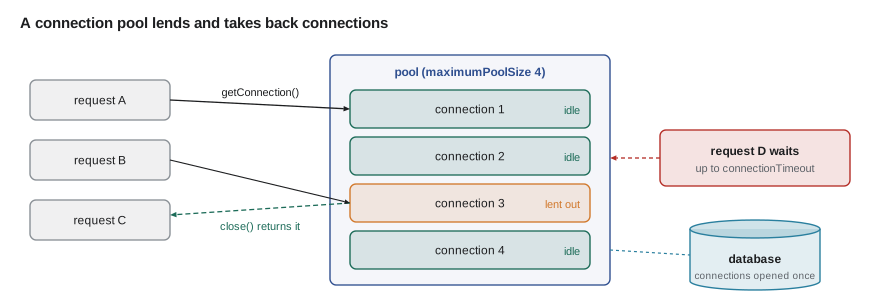
A connection pool opens a few connections in advance and keeps them in a collection. When code asks the pool's DataSource for a connection, the pool lends it one that is already open; when the code calls close(), the pool takes the connection back instead of closing it. The code does not change at all: it still calls dataSource.getConnection() and still closes the connection in try-with-resources. What changes is that close() means "return" rather than "hang up". If every connection is in use, a new request waits, up to a configured timeout, for one to come back.
The heart of a pool fits in a few lines of Java. The class below keeps idle connections in an ArrayBlockingQueue, opens a new one only while it is under its maximum size, and counts how many it actually opened. To keep the example self-contained, a connection is just a numbered object, and opening one only increments a counter where a real pool would call the driver.
import java.util.concurrent.*;

public class Main {
    record Conn(int id) {}

    static class Pool {
        private final BlockingQueue<Conn> idle;
        private final int max;
        private int opened = 0;
        Pool(int max) { this.max = max; this.idle = new ArrayBlockingQueue<>(max); }

        synchronized Conn borrow() {
            Conn c = idle.poll();
            if (c != null) return c;
            if (opened < max) return new Conn(++opened);    // the expensive part, done rarely
            throw new IllegalStateException("pool exhausted");
        }
        synchronized void giveBack(Conn c) { idle.add(c); }
        int opened() { return opened; }
    }

    public static void main(String[] args) {
        int requests = 200;

        int openedWithoutPool = 0;
        for (int i = 0; i < requests; i++) openedWithoutPool++;      // open, query, close, every time

        Pool pool = new Pool(4);
        for (int i = 0; i < requests; i++) {
            Conn c = pool.borrow();
            // ... run the query on c ...
            pool.giveBack(c);
        }
        System.out.println("Requests: " + requests);
        System.out.println("Connections opened without a pool: " + openedWithoutPool);
        System.out.println("Connections opened with a pool:    " + pool.opened());
    }
}Requests: 200 Connections opened without a pool: 200 Connections opened with a pool: 1
What this code does
Without a pool, every one of the 200 requests opens and closes its own connection. With a pool, the first request opens connection 1, gives it back, and every later request borrows the same idle connection, so only one is ever opened. Requests that overlapped in time would make the pool open a few more, up to its maximum of four.
Making close() mean return
Real pools hand out a wrapper around each physical connection. The wrapper passes every call through to the real connection except close(), which it turns into a return to the pool. That is why application code must always call close(), and why it must never keep using a connection after closing it: the same physical connection may already be lent to someone else. The example builds such a wrapper with java.lang.reflect.Proxy around a stand-in Connection, so close() can be watched.
import java.lang.reflect.*;
import java.sql.*;
import java.util.*;

public class Main {
    static final Deque<Connection> idle = new ArrayDeque<>();
    static int physicalCloses = 0;

    static Connection physical(int n) {
        return (Connection) Proxy.newProxyInstance(Connection.class.getClassLoader(), new Class<?>[] {Connection.class},
                (p, m, a) -> switch (m.getName()) {
                    case "close" -> { physicalCloses++; yield null; }
                    case "toString" -> "physical#" + n;
                    case "getAutoCommit" -> true;
                    default -> null;
                });
    }

    static Connection borrow() {
        Connection real = idle.pop();
        boolean[] returned = {false};
        return (Connection) Proxy.newProxyInstance(Connection.class.getClassLoader(), new Class<?>[] {Connection.class},
                (p, m, a) -> {
                    if (m.getName().equals("close")) {
                        if (!returned[0]) { returned[0] = true; idle.push(real); }
                        return null;
                    }
                    if (returned[0]) throw new SQLException("connection already returned to the pool");
                    if (m.getName().equals("toString")) return "wrapper around " + real;
                    return m.invoke(real, a);
                });
    }

    public static void main(String[] args) throws SQLException {
        idle.push(physical(1));
        try (Connection c = borrow()) {
            System.out.println("Using " + c + ", auto-commit " + c.getAutoCommit());
        }
        System.out.println("Idle after close: " + idle.size() + ", physical closes: " + physicalCloses);

        Connection kept = borrow();
        kept.close();
        try {
            kept.getAutoCommit();
        } catch (SQLException e) {
            System.out.println("Use after close: " + e.getMessage());
        }
    }
}Using wrapper around physical#1, auto-commit true Idle after close: 1, physical closes: 0 Use after close: connection already returned to the pool
What this code does
borrow takes the physical connection from the idle deque and returns a wrapper whose close pushes it back instead of closing it, which is why the physical close count stays at zero. Every other method is passed through with Method.invoke. Once a wrapper has been returned it refuses further use, the protection real pools give against code that keeps a reference after close.
HikariCP
You should not write your own pool for production. HikariCP is the most widely used pool for Java: it is small, fast and well tested, and it is the default pool in Spring Boot, which the web service course uses. You configure a HikariConfig, create a HikariDataSource from it, and pass that DataSource everywhere your code needs connections. HikariCP's documentation gives its defaults, two of which matter most: a maximum pool size of 10 and a connection timeout of 30 seconds, after which a borrower gives up and gets an SQLException.
import com.zaxxer.hikari.HikariConfig;
import com.zaxxer.hikari.HikariDataSource;

public final class Pools {
    public static HikariDataSource stockstore(DbConfig cfg) {
        HikariConfig hc = new HikariConfig();
        hc.setJdbcUrl(cfg.url());
        hc.setUsername(cfg.user());
        hc.setPassword(cfg.password());
        hc.setPoolName("stockstore");
        hc.setMaximumPoolSize(4);                 // default 10; small is usually better
        hc.setConnectionTimeout(5_000);           // milliseconds to wait for a free connection (default 30,000)
        hc.setMaxLifetime(30 * 60_000);           // replace each connection after 30 minutes
        hc.setLeakDetectionThreshold(10_000);     // log a warning if a connection is held over 10 s
        return new HikariDataSource(hc);          // also a javax.sql.DataSource
    }
}
What this code does
The pool takes the same URL, user and password as DriverManager did, from the configuration record of lesson 2. The settings cap the pool at four connections, make a borrower wait at most five seconds, retire connections every half hour before the server or a firewall can drop them, and report any connection held for more than ten seconds. The returned object is a DataSource, so the rest of StockStore does not know a pool is there.
| Setting | HikariCP default | What it controls |
|---|---|---|
| maximumPoolSize | 10 | The most connections the pool will open |
| minimumIdle | same as maximumPoolSize | How many idle connections to keep ready |
| connectionTimeout | 30,000 ms | How long getConnection waits before throwing |
| idleTimeout | 600,000 ms (10 minutes) | When an idle connection above minimumIdle is closed |
| maxLifetime | 1,800,000 ms (30 minutes) | When a connection is retired and replaced |
| leakDetectionThreshold | 0 (off) | How long a connection may be held before a leak warning |
How big should a pool be?
The surprising answer is: smaller than you think. A database server does real work for each connection, on a limited number of CPU cores and disks; past a point, more connections at once only add switching and lock contention, and every query gets slower. HikariCP's documentation quotes a formula from the PostgreSQL community as a starting point, connections equal to twice the number of CPU cores plus the number of disks, and stresses that the result should then be tested. A server with four cores and one disk starts from about nine. A pool too small for the load shows up as requests waiting for connections; a pool too large shows up as a slow database.
SQLite adds its own rule. It allows many readers at once but only one writer, so extra connections do not make writes faster; a writer that finds the database locked waits for a busy timeout and then fails. For StockStore on the parts-room computer, Leif suggested a pool of four, which is plenty for a counter, a parts-room screen and an occasional report, and turning on SQLite's write-ahead log so readers do not block the writer.
Leaks and exhaustion
A connection leak is code that borrows a connection and never closes it, usually because an exception skipped a close() call that was not in a finally block or try-with-resources. Each leak permanently removes one connection from the pool. With a pool of ten, ten leaks later every request waits thirty seconds and fails, often long after the code that leaked has run, which makes the cause hard to find. HikariCP's leakDetectionThreshold logs the stack trace of the code that borrowed a connection and held it too long, which points straight at the culprit.
import java.util.concurrent.*;

public class Main {
    static final BlockingQueue<String> idle = new ArrayBlockingQueue<>(2);

    static String borrow() throws InterruptedException {
        String c = idle.poll(50, TimeUnit.MILLISECONDS);   // connectionTimeout, shortened for the example
        if (c == null) throw new IllegalStateException("Connection is not available, request timed out");
        return c;
    }

    static void leakyLookup(String code) throws InterruptedException {
        String c = borrow();
        if (code.isBlank()) throw new IllegalArgumentException("blank code");   // skips the return below
        idle.add(c);
    }

    public static void main(String[] args) throws InterruptedException {
        idle.add("conn-1");
        idle.add("conn-2");
        for (String code : new String[] {"BELL", "", " ", "GRIPS"}) {
            try {
                leakyLookup(code);
                System.out.println("looked up '" + code + "', idle now " + idle.size());
            } catch (IllegalArgumentException | IllegalStateException e) {
                System.out.println("'" + code + "': " + e.getMessage() + ", idle now " + idle.size());
            }
        }
    }
}looked up 'BELL', idle now 2 '': blank code, idle now 1 ' ': blank code, idle now 0 'GRIPS': Connection is not available, request timed out, idle now 0
What this code does
Each blank code throws before the connection is given back, so two bad inputs leak both of the pool's connections. The lookup for GRIPS, which is perfectly valid, then waits for a connection, times out and fails with the same message HikariCP uses. Putting the return in a finally block, or using try-with-resources with a pooled connection, would have made every path give the connection back.
The fix in real code is the habit the course has used since lesson 1: every getConnection() goes in a try-with-resources header, and so does every statement and result set. No other style survives exceptions reliably.
Pools and transactions
A pooled connection keeps its settings between borrowers, so code must leave it as it found it. A transaction left open, auto-commit left off or an isolation level left raised would surprise the next borrower. HikariCP resets the settings it manages and rolls back an unfinished transaction when a connection is returned, but relying on that hides bugs; the transaction pattern of lesson 4 restores auto-commit in finally for this reason. Also, a transaction holds its connection from begin to commit, so long transactions shrink the effective size of the pool as well as holding locks.
$ java -jar stockstore.jar
[main] INFO com.zaxxer.hikari.HikariDataSource - stockstore - Starting...
[main] INFO com.zaxxer.hikari.pool.HikariPool - stockstore - Added connection org.sqlite.jdbc4.JDBC4Connection@5b37e0d2
[main] INFO com.zaxxer.hikari.HikariDataSource - stockstore - Start completed.
[stockstore housekeeper] WARN com.zaxxer.hikari.pool.ProxyLeakTask - Connection leak detection triggered for org.sqlite.jdbc4.JDBC4Connection@5b37e0d2 on thread main, stack trace follows
java.lang.Exception: Apparent connection leak detected
	at org.secondgear.stock.ReorderReport.run(ReorderReport.java:41)
What this code does
A representative log, not captured on this page, of the leak detector catching a report that held a connection for more than ten seconds. The stack trace names the file and line that borrowed the connection, ReorderReport.java line 41 in this made-up case. The exact wording varies between HikariCP versions.
Try it yourself
Refuse a double return
giveBack currently adds whatever it is given to the idle queue, so returning the same connection twice lets two borrowers share it.
Change it to refuse a connection that is already idle by printing refused: conn-1 is already in the pool. The program should print idle: [conn-1, conn-2] then the refusal, then idle: [conn-1, conn-2] again.
import java.util.*;

public class Main {
    static final Deque<String> idle = new ArrayDeque<>();

    static void giveBack(String c) {
        idle.addLast(c);
    }

    public static void main(String[] args) {
        giveBack("conn-1");
        giveBack("conn-2");
        System.out.println("idle: " + idle);
        giveBack("conn-1");
        System.out.println("idle: " + idle);
    }
}
Try it yourself
A starting pool size
Write startingSize using the rule of thumb from the lesson: twice the number of CPU cores plus the number of disks.
The program prints the starting size for three servers, which should be 9, 17 and 3.
public class Main {
    static int startingSize(int cores, int disks) {
        return 10;
    }

    public static void main(String[] args) {
        System.out.println(startingSize(4, 1));
        System.out.println(startingSize(8, 1));
        System.out.println(startingSize(1, 1));
    }
}
Common mistakes
MistakeOpening a new connection for every small piece of work in a server application.
InsteadBorrow connections from a pool through a DataSource.
MistakeMaking the pool as large as possible.
InsteadStart small, measure, and size it to what the database can actually run at once.
MistakeCalling close() only on the success path.
InsteadUse try-with-resources so every path returns the connection.
MistakeKeeping a reference to a connection after closing it.
InsteadTreat close() as giving the connection away; borrow again when needed.
MistakeLeaving auto-commit off or a transaction open on a pooled connection.
InsteadRestore settings in finally and always end transactions.
Summary and key terms
- Opening a connection to a database server is slow, involving a network connection, encryption, authentication and server-side set-up, so applications reuse connections through a pool.
- A pool keeps open connections and lends them through a DataSource; close() on a pooled connection returns it, through a wrapper, instead of closing it.
- HikariCP is the standard pool, with defaults including a maximum pool size of 10 and a 30-second connection timeout, and settings for idle connections, lifetime and leak detection.
- Pools should be small: a starting point is twice the CPU cores plus the disks, then measure; SQLite allows only one writer, so a small pool is enough.
- A connection leak permanently removes a connection from the pool and eventually makes every request time out; try-with-resources prevents leaks and leak detection finds them.
- Pooled connections keep their settings, so code must end its transactions and restore what it changed.
- Connection pool
- A set of open connections that are lent to code and returned for reuse.
- Borrow
- To take a connection from a pool for one unit of work.
- Wrapper
- An object that stands in front of a real connection and turns close() into a return.
- HikariCP
- A widely used, fast connection pool for Java and the default in Spring Boot.
- maximumPoolSize
- The largest number of connections a HikariCP pool will open.
- connectionTimeout
- How long a borrower waits for a free connection before an exception.
- maxLifetime
- How long a pooled connection is used before it is replaced.
- Connection leak
- A borrowed connection that is never returned to the pool.
- Pool exhaustion
- The state in which every connection is in use and new requests must wait.
- Leak detection
- A pool feature that reports code holding a connection longer than a threshold.
Practice problems
Work each problem on paper first, then reveal the answer to check.
Why is opening a PostgreSQL connection slow?
Show answer
It needs a network connection, TLS, authentication and a new server process.
What does close() do to a pooled connection?
Show answer
Returns it to the pool.
What are HikariCP's default maximum pool size and connection timeout?
Show answer
10 connections and 30 seconds.
What is a reasonable starting size for a server with four cores and one disk?
Show answer
About nine, then measure.
What eventually happens when code leaks connections?
Show answer
The pool runs out and every request waits and times out.
Lesson quiz · 5 questions
Score 60% or more to complete this lesson.
Create a free account to save your progress, take quizzes and earn a certificate.