
JAVA-250 · Lesson 2 of 12 · 25 min
JDBC drivers and connections
▶ Video coming soon A video version of this lesson is on the way.
On Friday, September 24, Leif Quarmby came to the parts room for the first hour. Leif had set up the secondgear Gradle build in the spring, and adding a database driver was a build change before it was a code change. "The JDK gives you the interfaces," he said, "and the driver is a dependency like any other. Get the dependency right and the code doesn't know which database it's talking to." This lesson covers where drivers come from, how a JDBC URL names a database, how DriverManager and DataSource open connections, how to keep passwords out of code and how to read the SQLException that every JDBC call can throw.
Adding a driver to the build
A JDBC driver is an ordinary library published to Maven Central, so it goes into the build file as a dependency. Because StockStore's code uses only the java.sql interfaces, it needs the driver only when the program runs, not when it compiles; Gradle's runtimeOnly configuration says exactly that, and it stops anyone from calling the driver's own classes by accident. The SQLite driver most Java projects use is xerial's sqlite-jdbc, which contains SQLite itself as a native library for each common operating system, so nothing else has to be installed. PostgreSQL's official driver is pgjdbc, artifact org.postgresql:postgresql, in its 42.7 series in 2026.
dependencies {
    runtimeOnly("org.xerial:sqlite-jdbc:3.51.1.1")     // check for the current release
    testRuntimeOnly("com.h2database:h2:2.3.232")        // an in-memory database for tests

    // later, when the web service moves to PostgreSQL (JAVA-260):
    // runtimeOnly("org.postgresql:postgresql:42.7.13")
}
What this code does
Each line adds one driver to the build, and runtimeOnly puts it on the class path when the program runs but not when it compiles. The H2 driver is added only for tests, where an in-memory database is fast and leaves nothing behind. Version numbers are examples from 2026; check the project's release page before you copy them.
Without a driver on the class path, JDBC code still compiles, because the interfaces are in the JDK, but it fails as soon as it tries to connect. The program below is the smallest possible connection attempt, run here with no driver at all. The error message names the problem precisely: DriverManager looked at every driver it knew and none of them accepted the URL.
import java.sql.*;

public class Main {
    public static void main(String[] args) throws SQLException {
        String url = "jdbc:sqlite:stockroom.db";
        try (Connection conn = DriverManager.getConnection(url)) {
            System.out.println("Connected to " + conn.getMetaData().getDatabaseProductName());
        }
    }
}
What this code does
The code compiles because Connection and DriverManager are part of the JDK. When it runs with no SQLite driver on the class path, DriverManager has nothing that accepts a jdbc:sqlite: URL and throws SQLException. The fix is a dependency, not a code change.
$ javac Main.java
$ java Main
Exception in thread "main" java.sql.SQLException: No suitable driver found for jdbc:sqlite:stockroom.db
	at java.sql/java.sql.DriverManager.getConnection(DriverManager.java:708)
	at java.sql/java.sql.DriverManager.getConnection(DriverManager.java:253)
	at Main.main(Main.java:6)
JDBC URLs
A JDBC URL tells DriverManager which driver to use and which database to open. It always starts with jdbc:, then a subprotocol that names the driver, such as sqlite or postgresql, then a part whose format the driver defines. For a file-based database that part is a file path; for a server it is usually //host:port/database, followed by optional settings after a question mark.
| URL | Meaning |
|---|---|
| jdbc:sqlite:stockroom.db | The SQLite file stockroom.db in the working directory (created if missing) |
| jdbc:sqlite:/srv/secondgear/stockroom.db | An SQLite file at an absolute path |
| jdbc:sqlite::memory: | A private SQLite database in memory, gone when the connection closes |
| jdbc:h2:mem:test;DB_CLOSE_DELAY=-1 | An H2 in-memory database that lives as long as the program |
| jdbc:postgresql://db.example.org:5432/secondgear | A PostgreSQL database on a server, default port 5432 |
| jdbc:postgresql://db.example.org/secondgear?sslmode=verify-full | The same, requiring an encrypted connection with a checked certificate |
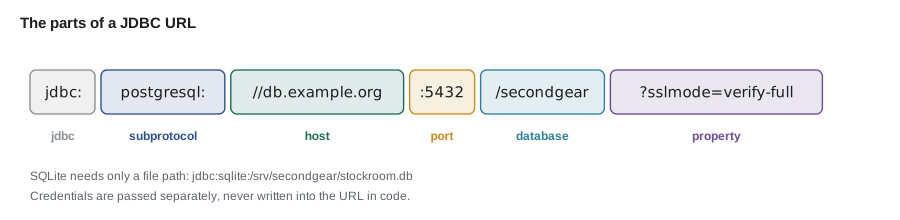
Because the part after jdbc: looks like an ordinary URI, the JDK's java.net.URI class can take a server URL apart, which is handy for logging which host a program connects to without logging the password. The example strips the jdbc: prefix and reads the pieces.
import java.net.URI;

public class Main {
    static void describe(String jdbcUrl) {
        if (!jdbcUrl.startsWith("jdbc:")) throw new IllegalArgumentException("not a JDBC URL: " + jdbcUrl);
        String rest = jdbcUrl.substring("jdbc:".length());
        String subprotocol = rest.substring(0, rest.indexOf(':'));
        System.out.println(jdbcUrl);
        System.out.println("  driver: " + subprotocol);
        if (rest.contains("://")) {
            URI uri = URI.create(rest);
            int port = uri.getPort() == -1 ? 5432 : uri.getPort();
            System.out.println("  host: " + uri.getHost() + ", port: " + port
                    + ", database: " + uri.getPath().substring(1)
                    + (uri.getQuery() == null ? "" : ", options: " + uri.getQuery()));
        } else {
            System.out.println("  target: " + rest.substring(subprotocol.length() + 1));
        }
    }

    public static void main(String[] args) {
        describe("jdbc:sqlite:stockroom.db");
        describe("jdbc:postgresql://db.example.org/secondgear?sslmode=verify-full");
        describe("jdbc:postgresql://localhost:5433/secondgear_test");
    }
}jdbc:sqlite:stockroom.db driver: sqlite target: stockroom.db jdbc:postgresql://db.example.org/secondgear?sslmode=verify-full driver: postgresql host: db.example.org, port: 5432, database: secondgear, options: sslmode=verify-full jdbc:postgresql://localhost:5433/secondgear_test driver: postgresql host: localhost, port: 5433, database: secondgear_test
What this code does
The subprotocol is the text between jdbc: and the next colon, and it decides which driver answers. Server URLs contain ://, so URI can read the host, port, path and query from them, with 5432 filled in when the port is left out. The SQLite URL has no host at all, only a file name.
How DriverManager finds a driver
Before 2006, JDBC code began with a line such as Class.forName("org.postgresql.Driver") to load the driver class so that it would register itself. Since JDBC 4.0 that line is unnecessary: every driver jar contains a file named META-INF/services/java.sql.Driver listing its driver class, and DriverManager uses Java's ServiceLoader to find and register all of them the first time it is used. When you call getConnection, DriverManager asks each registered driver in turn whether it accepts the URL, and the first that says yes opens the connection. You will still see Class.forName in old tutorials; leave it out of new code.
The way DriverManager chooses is easy to see with a toy driver. The program below defines a driver that accepts only URLs starting with jdbc:toy: and registers it by hand, as a driver jar's service file would. It returns a stand-in Connection built with java.lang.reflect.Proxy, so the whole program runs with nothing but the JDK.
import java.lang.reflect.Proxy;
import java.sql.*;
import java.util.Properties;
import java.util.logging.Logger;

public class Main {
    static class ToyDriver implements Driver {
        public boolean acceptsURL(String url) { return url.startsWith("jdbc:toy:"); }
        public Connection connect(String url, Properties info) {
            if (!acceptsURL(url)) return null;                 // the rule: return null for other URLs
            String db = url.substring("jdbc:toy:".length());
            System.out.println("ToyDriver opening '" + db + "' for user " + info.getProperty("user"));
            return (Connection) Proxy.newProxyInstance(Connection.class.getClassLoader(),
                    new Class<?>[] {Connection.class}, (proxy, method, a) -> switch (method.getName()) {
                        case "close" -> { System.out.println("ToyDriver closing '" + db + "'"); yield null; }
                        case "isValid" -> true;
                        case "toString" -> "toy connection to " + db;
                        default -> throw new SQLFeatureNotSupportedException(method.getName());
                    });
        }
        public DriverPropertyInfo[] getPropertyInfo(String url, Properties info) { return new DriverPropertyInfo[0]; }
        public int getMajorVersion() { return 1; }
        public int getMinorVersion() { return 0; }
        public boolean jdbcCompliant() { return false; }
        public Logger getParentLogger() throws SQLFeatureNotSupportedException { throw new SQLFeatureNotSupportedException(); }
    }

    public static void main(String[] args) throws SQLException {
        DriverManager.registerDriver(new ToyDriver());

        try (Connection conn = DriverManager.getConnection("jdbc:toy:stock", "kofi", "not-a-real-password")) {
            System.out.println("Got " + conn + ", valid: " + conn.isValid(2));
        }

        try {
            DriverManager.getConnection("jdbc:sqlite:stockroom.db");
        } catch (SQLException e) {
            System.out.println("SQLite URL: " + e.getMessage());
        }
    }
}ToyDriver opening 'stock' for user kofi Got toy connection to stock, valid: true ToyDriver closing 'stock' SQLite URL: No suitable driver found for jdbc:sqlite:stockroom.db
What this code does
registerDriver adds ToyDriver to the list DriverManager searches, which is what ServiceLoader does for a real driver jar. The jdbc:toy: URL is accepted, so connect runs and try-with-resources calls close at the end of the block. Nothing accepts the jdbc:sqlite: URL, so DriverManager throws the same No suitable driver error as before.
Two details of the Driver contract show up here. A driver's connect method must return null, not throw, when the URL is not its kind, because DriverManager is asking every driver in turn. And the user name and password travel in a Properties object, which is also where drivers take their other settings; the three-argument getConnection is a shortcut that builds those properties for you.
Keeping credentials out of code
SQLite needs no password, but a PostgreSQL server does, and the password must never be written in the source code or committed to Git. Kofi's GitHub Actions setup from the testing course already scanned pushes for secrets; the habit has to start in the code. The usual approach is to read connection settings from environment variables or from a configuration file that is not in the repository, with safe defaults for development. The example uses a map in place of System.getenv so its output is the same everywhere, but the pattern is identical: look the value up, fall back to a default where one is safe, and fail clearly where it is not.
import java.util.*;

public class Main {
    record DbConfig(String url, String user, String password) {
        @Override public String toString() {            // never print the password
            return "DbConfig[url=" + url + ", user=" + user + ", password=" + (password.isEmpty() ? "(none)" : "****") + "]";
        }
    }

    static DbConfig load(Map<String, String> env) {
        String url = env.getOrDefault("STOCKSTORE_DB_URL", "jdbc:sqlite:stockroom.db");
        String user = env.getOrDefault("STOCKSTORE_DB_USER", "");
        String password = env.getOrDefault("STOCKSTORE_DB_PASSWORD", "");
        if (url.startsWith("jdbc:postgresql:") && password.isEmpty()) {
            throw new IllegalStateException("STOCKSTORE_DB_PASSWORD must be set for PostgreSQL");
        }
        return new DbConfig(url, user, password);
    }

    public static void main(String[] args) {
        System.out.println(load(Map.of()));
        System.out.println(load(Map.of("STOCKSTORE_DB_URL", "jdbc:postgresql://db.example.org/secondgear",
                "STOCKSTORE_DB_USER", "stockstore", "STOCKSTORE_DB_PASSWORD", "s3cret-from-the-vault")));
        try {
            load(Map.of("STOCKSTORE_DB_URL", "jdbc:postgresql://db.example.org/secondgear"));
        } catch (IllegalStateException e) {
            System.out.println("Refused: " + e.getMessage());
        }
    }
}DbConfig[url=jdbc:sqlite:stockroom.db, user=, password=(none)] DbConfig[url=jdbc:postgresql://db.example.org/secondgear, user=stockstore, password=****] Refused: STOCKSTORE_DB_PASSWORD must be set for PostgreSQL
What this code does
With no settings, load falls back to the local SQLite file, which needs no password. A PostgreSQL URL without a password is refused at start-up, which is far better than a confusing login failure later. The record's toString masks the password, so a log line that prints the configuration cannot leak it.
DriverManager or DataSource?
DriverManager is fine for small programs and examples, but applications should get connections from a DataSource, an interface in javax.sql with one important method, getConnection(). A DataSource is an object you configure once, with the URL, user and settings, and then pass to the code that needs connections. That code no longer knows or cares where connections come from, which makes it easy to substitute a test database or, in lesson 5, a connection pool that reuses connections instead of opening a new one every time. Every driver provides a simple DataSource class, and pools such as HikariCP provide their own.
import javax.sql.DataSource;
import org.sqlite.SQLiteDataSource;            // from the sqlite-jdbc driver jar

public class Databases {
    public static DataSource stockroom(String file) {
        SQLiteDataSource ds = new SQLiteDataSource();
        ds.setUrl("jdbc:sqlite:" + file);
        ds.setEnforceForeignKeys(true);         // SQLite checks foreign keys only when asked
        return ds;
    }
}

// elsewhere, code depends only on javax.sql.DataSource:
//   try (Connection conn = dataSource.getConnection()) { ... }
What this code does
This is the one place in StockStore that names a driver's own class, so it is the only file to change when the database changes. Turning on foreign key enforcement matters for SQLite, which for historical reasons ignores REFERENCES clauses unless each connection asks it to check them. Everything else receives the finished DataSource and calls getConnection.
A connection is a session
A Connection is a session with the database: it holds a network socket or an open file, memory on the server, and the state of any transaction in progress. That makes connections expensive to open and important to close. Open a connection for one unit of work, such as handling one sale, and close it as soon as the work is done; try-with-resources does the closing for you. Do not share one Connection between threads, because its methods are not designed for concurrent use, and do not keep one open for hours in a static field, because servers close idle connections and the next use fails. conn.isValid(seconds) checks whether a connection still works, and pools call it for you.
Here is a representative run of the LowStock program from lesson 1, compiled with JDK 21 and run with the SQLite driver on the class path against a stockroom.db file holding the sample data. It is not run on this page, because the driver is not part of the JDK; the commands are the ones you would type.
$ javac LowStock.java
$ java -cp .:lib/sqlite-jdbc-3.51.1.1.jar LowStock
BELL 3
CHAIN-11 1
PAD-ROAD 3
PUMP-FLOOR 2
What this code does
A representative run, not captured on this page: the driver jar goes on the class path with -cp, and on Windows the separator is a semicolon instead of a colon. The four rows are the parts with fewer than four in stock in the sample data. Inside a Gradle project, the build puts the driver on the class path for you.
Reading an SQLException
Every JDBC method can throw SQLException, a checked exception. Besides its message it carries an SQLState, a five-character code defined by the SQL standard whose first two characters give the class of error, and a vendor-specific error code. The SQLState is the portable way to decide what happened: class 08 means a connection problem, class 23 an integrity constraint violation such as a duplicate key or a failed CHECK, class 40 a transaction rollback such as a deadlock, and class 42 a syntax error or missing table. Some drivers also throw subclasses, such as SQLIntegrityConstraintViolationException, and some chain several exceptions together, reachable with getNextException.
import java.sql.*;

public class Main {
    static String kind(SQLException e) {
        String state = e.getSQLState();
        if (state == null) return "unknown";
        return switch (state.substring(0, 2)) {
            case "08" -> "connection problem: retry later";
            case "23" -> "constraint violation: the data broke a rule";
            case "40" -> "transaction rolled back: safe to retry the whole transaction";
            case "42" -> "SQL error: fix the statement";
            default -> "other (" + state + ")";
        };
    }

    public static void main(String[] args) {
        SQLException duplicate = new SQLIntegrityConstraintViolationException(
                "UNIQUE constraint failed: part.code", "23505", 19);
        SQLException refused = new SQLNonTransientConnectionException("connection refused", "08001");
        SQLException typo = new SQLSyntaxErrorException("no such table: prat", "42P01");
        duplicate.setNextException(new SQLException("statement aborted", "25P02"));

        for (SQLException e : new SQLException[] {duplicate, refused, typo}) {
            System.out.println(e.getSQLState() + " " + e.getClass().getSimpleName() + ": " + kind(e));
        }
        for (SQLException e = duplicate; e != null; e = e.getNextException()) {
            System.out.println("chain: " + e.getMessage() + " (vendor code " + e.getErrorCode() + ")");
        }
    }
}23505 SQLIntegrityConstraintViolationException: constraint violation: the data broke a rule 08001 SQLNonTransientConnectionException: connection problem: retry later 42P01 SQLSyntaxErrorException: SQL error: fix the statement chain: UNIQUE constraint failed: part.code (vendor code 19) chain: statement aborted (vendor code 0)
What this code does
The three exceptions are built by hand with real SQLState values, so the program runs without a database. The kind method looks only at the first two characters of the state, which is the portable part. Walking getNextException shows how a driver can attach a second exception to the first.
Catch SQLException where you can do something useful, such as telling the user that a part code already exists, and otherwise let it travel up; never catch it and print nothing. Lesson 6 wraps it in an unchecked exception at the edge of the data layer, so the rest of the program is not forced to declare it everywhere.
Try it yourself
Classify SQL states
Write category so it returns CONNECTION for states whose class (first two characters) is 08, CONSTRAINT for 23, ROLLBACK for 40, SYNTAX for 42 and OTHER for anything else.
The program prints each state with its category.
import java.util.*;

public class Main {
    static String category(String state) {
        return "OTHER";
    }

    public static void main(String[] args) {
        for (String s : List.of("23505", "08001", "42P01", "40001", "22012", "23514")) {
            System.out.println(s + " " + category(s));
        }
    }
}
Try it yourself
Build a PostgreSQL URL
Write url so it builds a PostgreSQL JDBC URL from a host, a port and a database name, leaving the port out when it is the default 5432.
The program should print jdbc:postgresql://db.example.org/secondgear and then jdbc:postgresql://localhost:5433/secondgear_test.
public class Main {
    static String url(String host, int port, String database) {
        return "jdbc:";
    }

    public static void main(String[] args) {
        System.out.println(url("db.example.org", 5432, "secondgear"));
        System.out.println(url("localhost", 5433, "secondgear_test"));
    }
}
Common mistakes
MistakeAdding Class.forName("...Driver") before every connection.
InsteadLeave it out; JDBC 4 drivers register themselves through ServiceLoader.
MistakePutting the driver in the implementation configuration and calling its classes directly.
InsteadUse runtimeOnly and code against java.sql interfaces, except in one configuration class.
MistakeWriting the database password in the source code.
InsteadRead it from an environment variable or a configuration file kept out of the repository.
MistakeKeeping one Connection open in a static field for the whole program.
InsteadOpen a connection per unit of work and close it with try-with-resources, or use a pool.
MistakeDeciding what went wrong by searching the exception message.
InsteadUse the SQLState, especially its first two characters.
Summary and key terms
- A JDBC driver is a library added to the build, usually as a runtime-only dependency, because code is written against the java.sql interfaces.
- A JDBC URL starts with jdbc:, then a subprotocol naming the driver, then a driver-specific part such as a file name or //host:port/database.
- DriverManager finds drivers with ServiceLoader, so Class.forName is no longer needed, and asks each one whether it accepts the URL; with none, it throws No suitable driver found.
- Applications should get connections from a DataSource configured in one place, which can later be a pool.
- Keep credentials in environment variables or configuration outside the repository.
- A Connection is an expensive session: open it for one unit of work, close it with try-with-resources and never share it between threads.
- SQLException carries a message, a five-character SQLState whose class tells you what kind of error it was, a vendor error code and sometimes a chain of further exceptions.
- JDBC URL
- A string that names the driver and the database to connect to, such as jdbc:sqlite:stockroom.db.
- Subprotocol
- The part of a JDBC URL after jdbc: that selects the driver.
- DriverManager
- The JDK class that finds a driver for a URL and opens a connection.
- ServiceLoader
- The Java mechanism that finds implementations listed in META-INF/services files.
- DataSource
- An interface in javax.sql for an object that hands out connections.
- runtimeOnly
- A Gradle configuration for dependencies needed when the program runs but not when it compiles.
- Environment variable
- A named setting provided by the operating system to a running program.
- SQLState
- A five-character standard error code carried by an SQLException.
- Error code
- A vendor-specific number carried by an SQLException.
- Connection
- A session with the database, used for one unit of work and then closed.
Practice problems
Work each problem on paper first, then reveal the answer to check.
Why can JDBC code compile with no driver?
Show answer
The interfaces it uses are part of the JDK.
Which part of jdbc:postgresql://db.example.org/secondgear selects the driver?
Show answer
postgresql, the subprotocol.
What does a driver's connect method return for a URL it does not handle?
Show answer
null.
Where should the PostgreSQL password come from?
Show answer
An environment variable or a configuration file outside the repository.
What does an SQLState beginning with 23 mean?
Show answer
An integrity constraint violation.
Lesson quiz · 5 questions
Score 60% or more to complete this lesson.
Create a free account to save your progress, take quizzes and earn a certificate.