
JAVA-250 · Lesson 3 of 12 · 23 min
Prepared statements and result sets
▶ Video coming soon A video version of this lesson is on the way.
On Friday, October 1, Hamza arrived with a question from Kofi. The counter computer was going to get a search box, so that whoever was serving could type part of a code and see what was on the shelves. "Easy," Hamza had said, and he had written the query by gluing the typed text into an SQL string. Ingrid read it, typed one line into the search box on his laptop, and the program listed every part in the database. This lesson is about the right way to send values to the database, the PreparedStatement, and about reading what comes back, the ResultSet.
Statements and prepared statements
JDBC has three ways to run SQL. A Statement, from conn.createStatement(), runs a complete SQL string that you build yourself. A PreparedStatement, from conn.prepareStatement(sql), takes SQL with question-mark placeholders and receives the values separately through set methods. A CallableStatement runs stored procedures, which this course does not need. The rule in professional code is simple: if any part of the SQL comes from a variable, use a PreparedStatement. Use a plain Statement only for fixed SQL with no inputs at all, such as a CREATE TABLE in a test.
The reason is SQL injection, consistently one of the most common and damaging security flaws in web applications. When a program builds SQL by joining strings, text typed by a user becomes part of the SQL itself, and a carefully chosen input changes what the statement means. The example shows what Hamza's search built, first for an ordinary search and then for the line Ingrid typed. Nothing here touches a database; it only prints the SQL that would have been sent.
public class Main {
    static String unsafeSearch(String typed) {
        return "SELECT code, quantity FROM part WHERE code = '" + typed + "'";
    }

    public static void main(String[] args) {
        System.out.println(unsafeSearch("BELL"));
        System.out.println(unsafeSearch("X' OR '1'='1"));
        System.out.println();
        String safe = "SELECT code, quantity FROM part WHERE code = ?";
        System.out.println("Prepared SQL: " + safe);
        System.out.println("Value sent separately: [X' OR '1'='1]");
    }
}SELECT code, quantity FROM part WHERE code = 'BELL' SELECT code, quantity FROM part WHERE code = 'X' OR '1'='1' Prepared SQL: SELECT code, quantity FROM part WHERE code = ? Value sent separately: [X' OR '1'='1]
What this code does
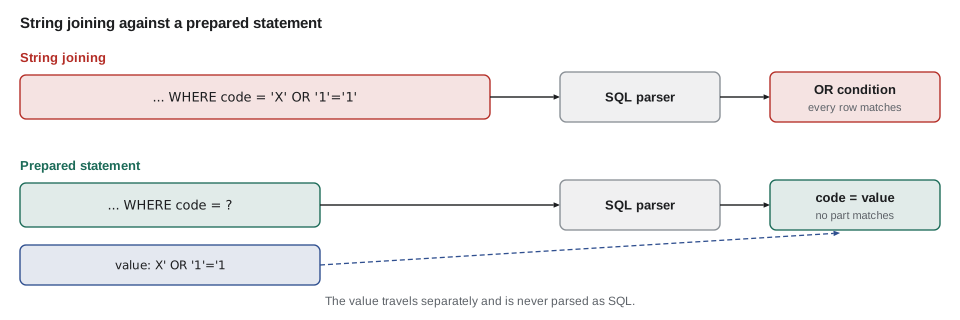
For BELL the joined string is the query Hamza meant. For Ingrid's input the quote marks she typed close the string early and add OR '1'='1', a condition that is true for every row, so the WHERE clause no longer filters anything. With a prepared statement the SQL text never changes, and the typed characters travel as one value that is compared with the code column and matches nothing.
Run against the sample database, the injected query really does return every part. The result below comes from running that exact text in SQLite. On a real system the same mistake can expose customer data or, with other statements, change or delete it, which is why injection has headed lists such as the OWASP Top 10 for years.
SELECT code, quantity FROM part WHERE code = 'X' OR '1'='1';What this code does
The query Hamza's unsafe search would send for Ingrid's input. The OR '1'='1' condition is true for every row, so the database returns the whole table.
| code | quantity |
|---|---|
| TUBE-700x25 | 14 |
| TUBE-26x2.1 | 6 |
| CABLE-BRAKE | 20 |
| PAD-ROAD | 3 |
| PAD-DISC | 8 |
| CHAIN-11 | 1 |
| BELL | 3 |
| GRIPS | 9 |
| PUMP-FLOOR | 2 |
A prepared statement prevents this by design. The driver sends the SQL text and the values to the database separately, or, for drivers that cannot, encodes the values safely itself, so the database parses the SQL before it ever sees the values and nothing in a value can become SQL syntax. Escaping quotes by hand is not a substitute: the rules differ between databases and are easy to get wrong.
Using a PreparedStatement
Placeholders are numbered from 1, not 0, in the order they appear. Each has a set method for its Java type: setString, setInt, setLong, setBigDecimal, setBoolean, and setObject, which since JDBC 4.2 accepts java.time values such as LocalDate. To store NULL, call setNull with the SQL type from java.sql.Types. Then run the statement: executeQuery for a SELECT, which returns a ResultSet, and executeUpdate for INSERT, UPDATE and DELETE, which returns the number of rows changed. A prepared statement can be run many times with different values, which also lets the database reuse its plan for the query.
import java.sql.*;
import java.util.*;

public class PartQueries {
    private final Connection conn;
    public PartQueries(Connection conn) { this.conn = conn; }

    /** Parts whose code starts with the typed text, for the counter search box. */
    public List<String> search(String typed) throws SQLException {
        String sql = "SELECT code, quantity FROM part WHERE code LIKE ? ORDER BY code";
        try (PreparedStatement ps = conn.prepareStatement(sql)) {
            ps.setString(1, typed + "%");
            try (ResultSet rs = ps.executeQuery()) {
                List<String> found = new ArrayList<>();
                while (rs.next()) found.add(rs.getString("code") + " " + rs.getInt("quantity"));
                return found;
            }
        }
    }

    /** Changes a part's shelf; returns false if no part has that code. */
    public boolean moveToShelf(String code, String shelf) throws SQLException {
        try (PreparedStatement ps = conn.prepareStatement("UPDATE part SET shelf = ? WHERE code = ?")) {
            ps.setString(1, shelf);
            ps.setString(2, code);
            return ps.executeUpdate() == 1;
        }
    }
}
What this code does
The search adds the SQL wildcard to the typed text in Java, then binds the whole pattern as one value, so the user can still type anything safely. executeUpdate returns how many rows the UPDATE changed, which is 1 when the code exists and 0 when it does not. Both methods close their statement and result set with try-with-resources.
SELECT code, quantity FROM part WHERE code LIKE 'TUBE%' ORDER BY code;What this code does
What the search box sends when Kofi types TUBE, with the bound value written in so you can run it yourself. The pattern matches every code that starts with TUBE.
| code | quantity |
|---|---|
| TUBE-26x2.1 | 6 |
| TUBE-700x25 | 14 |
Placeholders stand only for values. You cannot use one for a table name, a column name or a keyword such as ASC, because the database must know those to parse the SQL. When a program has to vary them, for example to let Kofi sort the stock list by quantity or by shelf, it must choose from a fixed allowlist in Java and never paste user input into the SQL.
import java.util.*;

public class Main {
    static final Map<String, String> SORTS = Map.of(
            "code", "code",
            "quantity", "quantity",
            "shelf", "shelf, code");

    static String listSql(String sortBy, boolean descending) {
        String column = SORTS.get(sortBy);
        if (column == null) throw new IllegalArgumentException("cannot sort by " + sortBy);
        return "SELECT code, quantity, shelf FROM part ORDER BY " + column + (descending ? " DESC" : " ASC");
    }

    public static void main(String[] args) {
        System.out.println(listSql("quantity", true));
        System.out.println(listSql("shelf", false));
        try {
            listSql("quantity; DROP TABLE part", false);
        } catch (IllegalArgumentException e) {
            System.out.println("Refused: " + e.getMessage());
        }
    }
}SELECT code, quantity, shelf FROM part ORDER BY quantity DESC SELECT code, quantity, shelf FROM part ORDER BY shelf, code ASC Refused: cannot sort by quantity; DROP TABLE part
What this code does
The only text that can reach the SQL is one of the values written in the SORTS map, chosen by key. The sort direction is a boolean, so it can only ever become ASC or DESC. Anything else, including an attempt to sneak in a second statement, is refused before any SQL is built.
Reading a ResultSet
A ResultSet is a cursor over the rows of a query. It starts before the first row, and each call to next() moves to the following row and returns true, or returns false when there are no more rows. While the cursor is on a row, getter methods read its columns, either by label (the column name or its alias in the SELECT) or by index, starting at 1. Reading by label is clearer and survives a reordered SELECT, so use it unless profiling shows a reason not to. By default a result set moves forward only, once, so collect what you need into Java objects as you go.
The JDK contains one complete ResultSet implementation that needs no database: CachedRowSet, in javax.sql.rowset, which holds rows in memory. It exists so that rows can be carried away from a closed connection, but it is also a convenient way to practice the ResultSet methods. The example fills one with three part rows, one of them with a NULL shelf, and reads them exactly as it would read a result from a real query.
import java.sql.*;
import java.util.*;
import javax.sql.rowset.*;

public class Main {
    record Part(String code, int quantity, Optional<String> shelf) {}

    public static void main(String[] args) throws SQLException {
        RowSetMetaDataImpl md = new RowSetMetaDataImpl();
        md.setColumnCount(3);
        md.setColumnName(1, "code");     md.setColumnType(1, Types.VARCHAR);
        md.setColumnName(2, "quantity"); md.setColumnType(2, Types.INTEGER);
        md.setColumnName(3, "shelf");    md.setColumnType(3, Types.VARCHAR);

        CachedRowSet rs = RowSetProvider.newFactory().createCachedRowSet();
        rs.setMetaData(md);
        Object[][] rows = {{"GRIPS", 9, "C-03"}, {"CHAIN-11", 1, null}, {"BELL", 3, "C-03"}};
        for (Object[] r : rows) {            // each insert goes in front, so the last added reads first
            rs.moveToInsertRow();
            rs.updateString("code", (String) r[0]);
            rs.updateInt("quantity", (Integer) r[1]);
            if (r[2] == null) rs.updateNull("shelf"); else rs.updateString("shelf", (String) r[2]);
            rs.insertRow();
            rs.moveToCurrentRow();
        }

        List<Part> parts = new ArrayList<>();
        rs.beforeFirst();
        while (rs.next()) {
            String shelf = rs.getString("shelf");      // null for SQL NULL
            parts.add(new Part(rs.getString("code"), rs.getInt("quantity"), Optional.ofNullable(shelf)));
        }
        for (Part p : parts) {
            System.out.println(p.code() + " x" + p.quantity() + " on " + p.shelf().orElse("(no shelf yet)"));
        }
        System.out.println("Columns: " + rs.getMetaData().getColumnCount() + ", first is " + rs.getMetaData().getColumnName(1));
    }
}BELL x3 on C-03 CHAIN-11 x1 on (no shelf yet) GRIPS x9 on C-03 Columns: 3, first is code
What this code does
The first loop builds the in-memory rows with the update methods, and CachedRowSet happens to place each new row in front of the others, so the rows read back in reverse order of insertion. The while (rs.next()) loop is the standard way to read any result set: it reads each column by label and maps the row to a record. getString returns null for the missing shelf, and Optional.ofNullable records that honestly instead of passing the null along.
Two getters need care. getInt, getLong and the other primitive getters return 0 for SQL NULL, so a NULL count would quietly look like an empty bin; if a column can be NULL, call wasNull() right after the getter, or read it with getObject("column", Integer.class), which returns null. And for dates, read java.time types with getObject("start_date", LocalDate.class) instead of the old getDate.
Getting the key the database generated
When the database chooses a row's key, as SQLite does for stock_movement's AUTOINCREMENT id and PostgreSQL does for an identity column, the program often needs to know what it chose, for example to show a receipt number. Ask for it when preparing the statement with Statement.RETURN_GENERATED_KEYS, then read it from getGeneratedKeys() after the update. Both SQLite and PostgreSQL also support INSERT ... RETURNING, which returns chosen columns as an ordinary result set.
public long recordMovement(String code, int change, String reason, LocalDateTime at) throws SQLException {
    String sql = "INSERT INTO stock_movement (code, change, reason, at) VALUES (?, ?, ?, ?)";
    try (PreparedStatement ps = conn.prepareStatement(sql, Statement.RETURN_GENERATED_KEYS)) {
        ps.setString(1, code);
        ps.setInt(2, change);
        ps.setString(3, reason);
        ps.setString(4, at.format(DateTimeFormatter.ofPattern("yyyy-MM-dd HH:mm")));
        ps.executeUpdate();
        try (ResultSet keys = ps.getGeneratedKeys()) {
            if (!keys.next()) throw new SQLException("no key returned for movement");
            return keys.getLong(1);
        }
    }
}
What this code does
The second argument to prepareStatement asks the driver to return the id the database assigns. After executeUpdate, getGeneratedKeys returns a small result set whose first column is the new id. The time is stored as text in the same format as the sample data, because SQLite has no separate timestamp type.
INSERT INTO stock_movement (code, change, reason, at)
VALUES ('BELL', 6, 'RECEIVED', '2027-10-01 14:20');
What this code does
The same insert with the values written in. The sample log already holds five movements, so the database gives the new one id 6.
| id | code | change | reason | at |
|---|---|---|---|---|
| 6 | BELL | 6 | RECEIVED | 2027-10-01 14:20 |
| 5 | PAD-ROAD | -1 | REPAIR | 2027-09-21 19:30 |
Batches
Inserting Kofi's 612-row parts export one statement at a time works, but each statement is a round trip to the database. A batch sends many sets of parameters at once: call addBatch() after setting each row's values and executeBatch() at the end, which returns an array of update counts. Combined with a transaction (lesson 4), a batch import either loads every row or none of them, which is exactly what a one-off import should do.
String sql = "INSERT INTO part (code, name, shelf, quantity, reorder_at, pack_size, price_cents, supplier_id) "
           + "VALUES (?, ?, ?, ?, ?, ?, ?, ?)";
try (PreparedStatement ps = conn.prepareStatement(sql)) {
    for (ExportRow row : rows) {                     // 612 rows from Kofi's export
        ps.setString(1, row.code());
        ps.setString(2, row.name());
        ps.setString(3, row.shelf());
        ps.setInt(4, row.quantity());
        ps.setInt(5, row.reorderAt());
        ps.setInt(6, row.packSize());
        ps.setInt(7, row.priceCents());
        ps.setInt(8, row.supplierId());
        ps.addBatch();
    }
    int[] counts = ps.executeBatch();
    System.out.println("Inserted " + counts.length + " parts");
}
What this code does
The loop sets the eight values for one row and then adds them to the batch instead of running the insert. executeBatch sends all of them together and returns one update count per row. A representative run on the full export prints Inserted 612 parts.
When a query needs a variable number of values, for example all the parts on Kofi's reorder list, the SQL needs one placeholder per value inside IN ( ). Build the placeholder list in Java, which is safe because it contains only question marks and commas, then bind each value. The exercise below asks you to write that helper.
Try it yourself
Placeholders for an IN list
Write inList(n) so it returns n question marks separated by a comma and a space, such as ?, ?, ? for 3.
The program uses it to print the SQL for three codes and then for one code.
public class Main {
    static String inList(int n) {
        return "";
    }

    public static void main(String[] args) {
        System.out.println("SELECT code, quantity FROM part WHERE code IN (" + inList(3) + ")");
        System.out.println("SELECT code, quantity FROM part WHERE code IN (" + inList(1) + ")");
    }
}
Try it yourself
Handle a NULL shelf
Each map in rows stands for a result-set row; a missing key stands for a NULL shelf.
Write shelfLabel so it returns the shelf, or UNSHELVED when there is none, and print each code with its label as CHAIN-11 UNSHELVED.
import java.util.*;

public class Main {
    static String shelfLabel(Map<String, Object> row) {
        return (String) row.get("shelf");
    }

    public static void main(String[] args) {
        List<Map<String, Object>> rows = List.of(
                Map.of("code", "BELL", "shelf", "C-03"),
                Map.of("code", "CHAIN-11"),
                Map.of("code", "PAD-ROAD", "shelf", "B-07"));
        for (Map<String, Object> row : rows) {
            System.out.println(row.get("code") + " " + shelfLabel(row));
        }
    }
}
By four o'clock the search box used a prepared statement, Ingrid's line found nothing, and Hamza had added a rule to his notes: SQL is written by the programmer, values come from the user, and the two meet only through placeholders.
Common mistakes
MistakeBuilding SQL by joining strings with user input.
InsteadUse a PreparedStatement and bind every value with a set method.
MistakeEscaping quotes by hand instead of using placeholders.
InsteadLet the driver send values separately; escaping rules differ between databases.
MistakeUsing a placeholder for a column name or ORDER BY direction.
InsteadChoose identifiers from a fixed allowlist in Java.
MistakeNumbering placeholders and columns from 0.
InsteadJDBC numbers both from 1.
MistakeTrusting getInt for a column that may be NULL.
InsteadCall wasNull afterwards, or read it with getObject as an Integer.
Summary and key terms
- Use a PreparedStatement whenever any part of the SQL comes from a variable; a plain Statement is only for fixed SQL.
- Building SQL by joining strings allows SQL injection, where input such as X' OR '1'='1 changes the meaning of the statement.
- Placeholders are question marks numbered from 1 and filled with set methods such as setString, setInt and setObject, or setNull. executeQuery returns a ResultSet and executeUpdate returns the number of rows changed.
- Placeholders stand only for values, so identifiers such as sort columns must come from an allowlist.
- A ResultSet is a forward-only cursor: next() moves to each row and getters read columns by label or index; primitive getters return 0 for NULL, so check wasNull.
- CachedRowSet is an in-memory ResultSet in the JDK.
- RETURN_GENERATED_KEYS and getGeneratedKeys return keys the database assigned, and addBatch with executeBatch sends many rows at once.
- PreparedStatement
- A statement with ? placeholders whose values are sent separately from the SQL.
- Placeholder
- A question mark in prepared SQL that stands for one value.
- SQL injection
- An attack in which input changes the meaning of SQL built by joining strings.
- Allowlist
- A fixed list of permitted values, such as the columns a list may be sorted by.
- executeQuery
- The method that runs a SELECT and returns a ResultSet.
- executeUpdate
- The method that runs INSERT, UPDATE or DELETE and returns the number of rows changed.
- ResultSet
- A cursor over the rows a query returns.
- Column label
- The name, or alias, by which a ResultSet column is read.
- Generated key
- A key value, such as an id, that the database assigns to a new row.
- Batch
- A group of parameter sets sent to the database in one call.
Practice problems
Work each problem on paper first, then reveal the answer to check.
What did Ingrid's input X' OR '1'='1 do to Hamza's search?
Show answer
It made the WHERE condition true for every row, so every part was listed.
What number does the first placeholder have?
Show answer
1.
Can a placeholder stand for a column name?
Show answer
No; use an allowlist.
What does next() return when there are no more rows?
Show answer
false.
How do you get the id the database gave a new row?
Show answer
Prepare with RETURN_GENERATED_KEYS and read getGeneratedKeys().
Lesson quiz · 5 questions
Score 60% or more to complete this lesson.
Create a free account to save your progress, take quizzes and earn a certificate.