
JAVA-220 · Lesson 9 of 12 · 22 min
Logging with SLF4J
▶ Video coming soon A video version of this lesson is on the way.
On Thursday, November 11, Kofi reported a mystery. Twice that week the Monday reorder e-mail had not arrived, and PartsDesk, running on the back-office computer, had printed nothing to say why. Hamza's code was full of System.out.println lines he had added while debugging and then commented out. "When a program runs without anyone watching," Ingrid said, "it needs to keep a diary: what it did, what went wrong and enough detail to work out why, written somewhere you can read later." That diary is the program's log, and Java has a standard way to write one.
Why not System.out?
Printing to the console works while you are watching. A program that runs unattended, on a server or a back-office machine, needs more: messages kept in a file that survives a restart, a time and a severity on every line, the ability to turn detail up when hunting a problem and down again afterwards, and all of this without changing the code. A logging library provides exactly that. Code writes messages to a logger, and configuration decides which messages are kept and where they go: the console, a file, a log server.
| System.out.println | A logger |
|---|---|
| Always prints; turning it off means editing code | Configuration chooses which levels are recorded |
| No time, severity or source on the line | Each line carries time, level, logger name and thread |
| Goes only to the console | Can go to the console, rotating files or a central log service |
| Mixed in with the program's real output | Kept separate from the program's real output |
| No standard way to test it | Can be captured and checked in tests |
Log levels
Every log message has a level, a severity. The configuration sets a threshold for each logger, and messages below it are dropped cheaply. Production systems usually record INFO and above; when a problem needs investigating, someone raises one logger to DEBUG for a while. Choosing the right level is part of writing a good message.
| Level (SLF4J) | Use for | Example from PartsDesk |
|---|---|---|
| ERROR | Something failed and needs attention | Could not send the weekly reorder e-mail |
| WARN | Something unexpected that the program handled | Supplier price missing for PAD-ROAD; used last week's price |
| INFO | Significant normal events, a few per operation | Weekly report sent: 3 parts, 60050 cents |
| DEBUG | Detail useful when diagnosing a problem | Checking TUBE-700x25: count 15, level 40 |
| TRACE | Very fine detail, rarely enabled | Entering suggestedOrder(15, 40) |
The JDK has its own logging framework, java.util.logging, usually called JUL, with levels named SEVERE, WARNING, INFO, CONFIG, FINE, FINER and FINEST. It needs no libraries, which makes it ideal for showing how logging works in a single file.
import java.util.logging.*;

public class Main {

    static Logger setUp(String name, Level level) {
        Logger log = Logger.getLogger(name);
        log.setUseParentHandlers(false);
        log.setLevel(level);
        Handler h = new StreamHandler(System.out, new Formatter() {
            @Override public String format(LogRecord r) {
                return String.format("%-7s %s - %s%n", r.getLevel(), r.getLoggerName(), formatMessage(r));
            }
        }) {
            @Override public synchronized void publish(LogRecord r) { super.publish(r); flush(); }
        };
        h.setLevel(Level.ALL);
        log.addHandler(h);
        return log;
    }

    public static void main(String[] args) {
        Logger log = setUp("org.secondgear.parts.ReorderService", Level.INFO);
        log.fine("Checking TUBE-700x25: count 15, level 40");
        log.info("Weekly report sent: 3 parts, 60050 cents");
        log.warning("Supplier price missing for PAD-ROAD; used last week's price");
        log.severe("Could not send the weekly reorder e-mail");

        System.out.println("-- threshold lowered to FINE while diagnosing --");
        log.setLevel(Level.FINE);
        log.fine("Checking TUBE-700x25: count 15, level 40");
    }
}INFO org.secondgear.parts.ReorderService - Weekly report sent: 3 parts, 60050 cents WARNING org.secondgear.parts.ReorderService - Supplier price missing for PAD-ROAD; used last week's price SEVERE org.secondgear.parts.ReorderService - Could not send the weekly reorder e-mail -- threshold lowered to FINE while diagnosing -- FINE org.secondgear.parts.ReorderService - Checking TUBE-700x25: count 15, level 40
What this code does
The setUp method sends the logger's records to standard output with a simple formatter, leaving out the timestamp so the output is the same on every run. With the threshold at INFO, the FINE message is dropped and the other three appear with their levels and the logger's name. Lowering the threshold to FINE, as a person would in configuration when diagnosing a problem, makes the detailed message appear without any change to the logging calls.
SLF4J: one API, many back ends
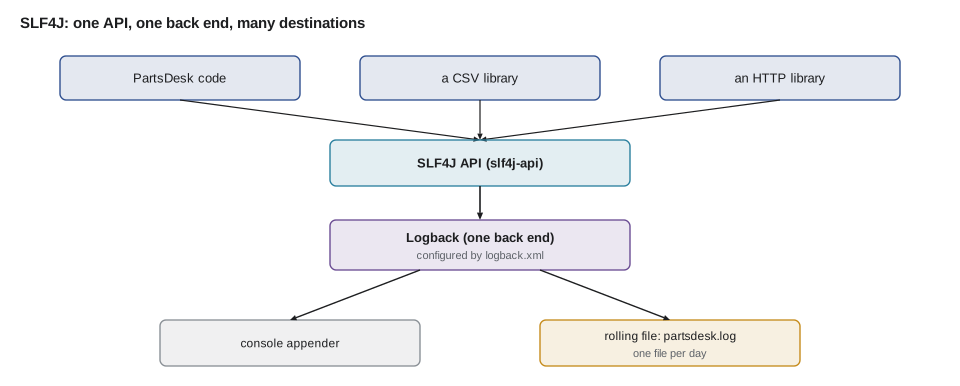
Most Java projects do not use JUL directly. They write to SLF4J, the Simple Logging Facade for Java, which is an API only. At run time SLF4J hands messages to whichever logging back end is on the class path: Logback, the most common choice, Log4j 2, or a bridge to JUL. Libraries log through SLF4J too, so one configuration controls the messages of the whole program. The current versions in late 2026 are SLF4J 2.0 and Logback 1.6. The application depends on slf4j-api for compiling and on exactly one back end at run time.
dependencies {
    implementation("org.slf4j:slf4j-api:2.0.18")
    runtimeOnly("ch.qos.logback:logback-classic:1.6.7")
}
What this code does
The SLF4J API is needed to compile code that logs, so it uses implementation. Logback is only needed when the program runs, so runtimeOnly keeps the code from depending on it directly, and the back end can be swapped later without touching any Java. Exactly one back end should be present; if none is, SLF4J prints a warning and discards all messages.
package org.secondgear.parts;

import org.slf4j.Logger;
import org.slf4j.LoggerFactory;

public class ReorderService {
    private static final Logger log = LoggerFactory.getLogger(ReorderService.class);

    public long sendWeeklyReport(List<Part> parts) {
        log.debug("Checking {} parts", parts.size());
        long total = 0;
        for (Part p : parts) {
            if (p.isLow()) {
                log.debug("{} is low: count {}, level {}", p.code(), p.count(), p.level());
                total += prices.priceCents(p.code()) * p.suggestedOrder();
            }
        }
        try {
            notifier.send("kofi@secondgear.example", "Weekly reorder", body);
            log.info("Weekly report sent: {} cents", total);
        } catch (MailException e) {
            log.error("Could not send the weekly reorder e-mail", e);
        }
        return total;
    }
}
What this code does
Each class gets its own logger, named after the class, so the configuration can set levels per class or per package. The braces are placeholders that SLF4J fills with the arguments only if the message will actually be recorded, which keeps disabled debug messages almost free. Passing the exception as the last argument to error records its full stack trace, which is what finally explained Kofi's missing e-mails.
The next Monday's log told the story in two lines: an ERROR saying the e-mail could not be sent, with a stack trace ending in an authentication failure, because the shop's mail password had been changed in October. Without the log, the program had failed silently.
<configuration>
  <appender name="FILE" class="ch.qos.logback.core.rolling.RollingFileAppender">
    <file>logs/partsdesk.log</file>
    <rollingPolicy class="ch.qos.logback.core.rolling.TimeBasedRollingPolicy">
      <fileNamePattern>logs/partsdesk.%d{yyyy-MM-dd}.log</fileNamePattern>
      <maxHistory>30</maxHistory>
    </rollingPolicy>
    <encoder>
      <pattern>%d{yyyy-MM-dd HH:mm:ss} %-5level %logger{36} - %msg%n</pattern>
    </encoder>
  </appender>

  <logger name="org.secondgear.parts.ReorderService" level="DEBUG"/>

  <root level="INFO">
    <appender-ref ref="FILE"/>
  </root>
</configuration>
What this code does
The appender writes to logs/partsdesk.log, starts a new file each day and keeps 30 days of history. The pattern puts the date and time, the level, a shortened logger name and the message on each line. The root logger records INFO and above for the whole program, while one logger element raises ReorderService to DEBUG for the investigation, without any change to the code.
$ tail -3 logs/partsdesk.log2027-11-15 07:00:02 DEBUG o.s.parts.ReorderService - TUBE-700x25 is low: count 15, level 40 2027-11-15 07:00:03 ERROR o.s.parts.ReorderService - Could not send the weekly reorder e-mail org.secondgear.parts.MailException: 535 Authentication failed
What this code does
Each line has the time, the level, the logger name shortened to fit, and the message with its placeholders filled in. The ERROR line is followed by the exception's class and message and the first lines of its stack trace. These three lines are what explained the missing Monday e-mails.
Cheap messages and lazy arguments
A debug message in a loop over 600 parts runs 600 times, so its cost matters even when DEBUG is off. Building the message with string concatenation does the work every time, whether or not the message is kept. SLF4J's placeholders, and JUL's Supplier overloads, delay that work until the logger has decided to keep the message.
import java.util.function.Supplier;
import java.util.logging.*;

public class Main {
    static int describeCalls = 0;

    static String describe(int i) {
        describeCalls++;
        return "part " + i + " checked";
    }

    public static void main(String[] args) {
        Logger log = Logger.getLogger("demo");
        log.setUseParentHandlers(false);
        log.setLevel(Level.INFO); // FINE messages are disabled

        for (int i = 0; i < 600; i++) log.fine("Detail: " + describe(i));
        System.out.println("Concatenation: describe called " + describeCalls + " times for nothing");

        describeCalls = 0;
        for (int i = 0; i < 600; i++) {
            final int n = i;
            log.fine(() -> "Detail: " + describe(n));
        }
        System.out.println("Supplier: describe called " + describeCalls + " times");
    }
}Concatenation: describe called 600 times for nothing Supplier: describe called 0 times
What this code does
With FINE disabled, the first loop still builds 600 messages, because Java evaluates the argument before calling fine, and the logger then throws each one away. The second loop passes a lambda, a Supplier, which the logger calls only if the message will be recorded, so describe never runs. SLF4J's {} placeholders get the same saving for ordinary messages, which is why log.debug("{} checked", code) is preferred over concatenation.
What not to log
Logs are read by more people and kept longer than most data, and they are a common source of privacy leaks. Never log passwords, API keys, tokens or full payment details. Be careful with personal information such as customers' names, phone numbers and e-mail addresses: log an identifier instead, or mask the value. In the United States, state privacy laws and the shop's own privacy policy apply to personal information in logs exactly as they do in the database.
public class Main {
    static String maskEmail(String email) {
        int at = email.indexOf('@');
        if (at <= 1) return "***";
        return email.charAt(0) + "***" + email.substring(at);
    }

    static String maskPhone(String phone) {
        String digits = phone.replaceAll("[^0-9]", "");
        return "***-***-" + digits.substring(digits.length() - 4);
    }

    public static void main(String[] args) {
        String email = "jordan.mbeki@example.com";
        String phone = "614-555-0147";
        System.out.println("Rental booked for customer " + maskEmail(email) + ", phone " + maskPhone(phone));
        System.out.println("Better still: Rental booked for customer #2071");
    }
}Rental booked for customer j***@example.com, phone ***-***-0147 Better still: Rental booked for customer #2071
What this code does
maskEmail keeps the first letter and the domain and hides the rest, so a log reader can tell two customers apart without learning who they are. maskPhone keeps only the last four digits, a common convention. The last line shows the best option of all, logging the customer's record number, which identifies the booking for anyone with database access and reveals nothing to anyone else.
Testing that code logs
Sometimes the log message is part of the behavior: an alert that operators rely on, or an ERROR that a monitoring system watches for. A test can capture log records by adding a handler that collects them instead of writing them anywhere. With SLF4J and Logback, the same idea uses Logback's ListAppender; with JUL, a small Handler subclass does it.
import java.util.*;
import java.util.logging.*;

public class Main {
    static class CapturingHandler extends Handler {
        final List<LogRecord> records = new ArrayList<>();
        @Override public void publish(LogRecord r) { records.add(r); }
        @Override public void flush() { }
        @Override public void close() { }
    }

    static void sendReport(Logger log, boolean mailWorks) {
        if (!mailWorks) log.severe("Could not send the weekly reorder e-mail");
        else log.info("Weekly report sent");
    }

    public static void main(String[] args) {
        Logger log = Logger.getLogger("org.secondgear.parts.ReorderService");
        log.setUseParentHandlers(false);
        CapturingHandler captured = new CapturingHandler();
        log.addHandler(captured);

        sendReport(log, false);

        boolean ok = captured.records.size() == 1
                && captured.records.get(0).getLevel() == Level.SEVERE
                && captured.records.get(0).getMessage().contains("reorder e-mail");
        System.out.println("Logged " + captured.records.size() + " record(s): " + captured.records.get(0).getLevel() + " " + captured.records.get(0).getMessage());
        System.out.println(ok ? "PASS failure is logged as SEVERE" : "FAIL");
        log.removeHandler(captured);
    }
}Logged 1 record(s): SEVERE Could not send the weekly reorder e-mail PASS failure is logged as SEVERE
What this code does
CapturingHandler stores every LogRecord in a list instead of printing it, and the test attaches it to the logger before acting. After sendReport runs with a broken mail service, the test checks that exactly one record was logged, at SEVERE, with a message about the reorder e-mail. Removing the handler at the end keeps the capture from leaking into other tests, which matters because loggers are shared.
Test only the log messages that matter to someone, such as alerts. Tests that check the exact wording of every debug line make harmless changes to messages break the build.
Try it yourself
Choose the level
Each call in main uses log.info. Change the three calls to the right levels: the price fallback is a warning, the detail about each part is fine, and the summary stays info.
With the threshold at INFO, the program should print the WARNING line and the INFO line only.
import java.util.logging.*;

public class Main {

    static Logger setUp(String name, Level level) {
        Logger log = Logger.getLogger(name);
        log.setUseParentHandlers(false);
        log.setLevel(level);
        Handler h = new StreamHandler(System.out, new Formatter() {
            @Override public String format(LogRecord r) {
                return String.format("%-7s %s - %s%n", r.getLevel(), r.getLoggerName(), formatMessage(r));
            }
        }) {
            @Override public synchronized void publish(LogRecord r) { super.publish(r); flush(); }
        };
        h.setLevel(Level.ALL);
        log.addHandler(h);
        return log;
    }

    public static void main(String[] args) {
        Logger log = setUp("org.secondgear.parts.ReorderService", Level.INFO);
        log.info("Checking BELL: count 9, level 4");
        log.info("Supplier price missing for PAD-ROAD; used last week's price");
        log.info("Weekly report sent: 2 parts");
    }
}
Try it yourself
Mask an e-mail address
Complete maskEmail so it keeps the first character and everything from the @ onward and replaces the rest of the name with ***. If there is no @, or the @ is the first or second character, return ***.
The program should print m***@example.com, *** and ***.
public class Main {
    static String maskEmail(String email) {
        return email;
    }

    public static void main(String[] args) {
        System.out.println(maskEmail("mira.okafor@example.com"));
        System.out.println(maskEmail("not-an-email"));
        System.out.println(maskEmail("a@example.com"));
    }
}
Common mistakes
MistakeLeaving System.out.println debugging lines in a program that runs unattended.
InsteadUse a logger, so messages carry time and level and can be turned up or down in configuration.
MistakeBuilding log messages with string concatenation in loops.
InsteadUse SLF4J {} placeholders or a Supplier, so disabled messages cost almost nothing.
MistakeLogging an error without the exception.
InsteadPass the exception as the last argument so the stack trace is recorded.
MistakeLogging passwords, tokens or customers' personal details.
InsteadLog identifiers or masked values, and never secrets.
MistakePutting two logging back ends, or none, on the class path.
InsteadDepend on slf4j-api and exactly one back end, such as Logback, at run time.
Summary and key terms
- A log is a program's record of what it did and what went wrong, kept for later reading.
- Loggers attach a time, level and source to each message, and configuration chooses which levels are recorded and where they go.
- The usual levels are ERROR, WARN, INFO, DEBUG and TRACE; production records INFO and above and raises a logger to DEBUG while diagnosing. java.util.logging is built into the JDK, while most projects write to SLF4J, a facade, with one back end such as Logback at run time, configured in logback.xml.
- Each class has its own logger; placeholders or Suppliers keep disabled messages cheap, and exceptions are passed as the last argument.
- Secrets are never logged and personal information is masked or replaced with identifiers.
- Tests can capture log records with a collecting handler or appender when a message matters.
- Log
- A program's record of events and problems, written for later reading.
- Logger
- An object code writes log messages to, usually one per class.
- Log level
- The severity of a message, such as ERROR, WARN, INFO, DEBUG or TRACE.
- Threshold
- The lowest level a logger records; messages below it are dropped.
- SLF4J
- The Simple Logging Facade for Java, a logging API with interchangeable back ends.
- Logback
- A widely used logging back end for SLF4J, configured in logback.xml.
- java.util.logging (JUL)
- The logging framework built into the JDK.
- Appender (handler)
- The part of a logging system that writes messages somewhere, such as a file.
- Placeholder
- The {} in an SLF4J message, filled with an argument only if the message is recorded.
- Masking
- Hiding part of a sensitive value, such as all but the last four digits of a phone number.
Practice problems
Work each problem on paper first, then reveal the answer to check.
Why is a logger better than System.out for a program that runs unattended?
Show answer
Messages carry time and level, go to files that survive restarts, and can be filtered by configuration.
Which level suits "Supplier price missing; used last week's price"?
Show answer
WARN: something unexpected that the program handled.
What does SLF4J need at run time to record anything?
Show answer
Exactly one logging back end, such as Logback.
Why prefer log.debug("{} checked", code) to string concatenation?
Show answer
The message is only built if DEBUG is enabled.
How should a log mention a customer?
Show answer
By an identifier, or a masked value, never with full personal details.
Lesson quiz · 5 questions
Score 60% or more to complete this lesson.
Create a free account to save your progress, take quizzes and earn a certificate.