
JAVA-220 · Lesson 2 of 12 · 22 min
Unit tests with JUnit 5
▶ Video coming soon A video version of this lesson is on the way.
On Thursday, September 16, Ingrid asked Hamza how many lines of his check method had grown into PartsDesk over the past year. There were three versions, in three files, each printing PASS and FAIL a little differently, and none of them ran when he built the program. "That is the moment to use a real testing library," she said. "Everyone in the Java world uses the same one, so every IDE, build tool and CI server already knows how to run it and read its results." The library is JUnit, and today's job is to add it to the secondgear build and write the first real tests for Money.
JUnit: versions and names
JUnit has been the standard Java testing library since the late 1990s. JUnit 5, released in 2017, was a complete redesign with three parts: the JUnit Platform, which launches tests and reports results to IDEs and build tools; JUnit Jupiter, the programming model and API you write tests with, in packages named org.junit.jupiter; and JUnit Vintage, which runs old JUnit 4 tests. JUnit 6, released on September 30, 2025, kept the same Jupiter API, raised the minimum Java version to 17 and gave all parts one version number. By late 2026 the current stable release is 6.1.3. When people say "JUnit 5 style" they mean Jupiter tests, which is what this course teaches and what works unchanged on JUnit 5 and 6.
| Part | What it does | Package or artifact |
|---|---|---|
| JUnit Platform | Discovers and launches tests; IDEs and build tools talk to it | junit-platform-launcher |
| JUnit Jupiter | The annotations and assertions you write tests with | org.junit.jupiter.api |
| Jupiter engine | Runs Jupiter tests on the platform | junit-jupiter-engine |
| JUnit Vintage | Runs old JUnit 4 tests on the platform (for migrations) | junit-vintage-engine |
| JUnit BOM | Keeps all JUnit artifacts on the same version | org.junit:junit-bom |
Adding JUnit to the build
Tests need JUnit only while they compile and run, never in the shipped program, so JUnit goes in the testImplementation configuration, as lesson 6 of JAVA-120 explained. The BOM, a bill of materials, fixes one version for every JUnit artifact. The test task must also be told to use the JUnit Platform, because Gradle's default is the older JUnit 4 runner.
plugins {
    java
}

repositories {
    mavenCentral()
}

dependencies {
    testImplementation(platform("org.junit:junit-bom:6.1.3"))
    testImplementation("org.junit.jupiter:junit-jupiter")
    testRuntimeOnly("org.junit.platform:junit-platform-launcher")
}

tasks.test {
    useJUnitPlatform()
    testLogging {
        events("passed", "skipped", "failed")
        exceptionFormat = org.gradle.api.tasks.testing.logging.TestExceptionFormat.FULL
    }
}
What this code does
The platform line imports the JUnit BOM, so the next two dependencies need no version of their own and always match. junit-jupiter brings the API for writing tests and the engine for running them, and the launcher is needed at run time by Gradle. The testLogging block makes Gradle print each test's result, and the full exception format includes each failure's message.
<dependencyManagement>
  <dependencies>
    <dependency>
      <groupId>org.junit</groupId>
      <artifactId>junit-bom</artifactId>
      <version>6.1.3</version>
      <type>pom</type>
      <scope>import</scope>
    </dependency>
  </dependencies>
</dependencyManagement>
<dependencies>
  <dependency>
    <groupId>org.junit.jupiter</groupId>
    <artifactId>junit-jupiter</artifactId>
    <scope>test</scope>
  </dependency>
</dependencies>
What this code does
Maven imports the BOM in dependencyManagement and then declares junit-jupiter with test scope and no version. Recent versions of the Surefire plugin, which runs tests in the test phase, detect the JUnit Platform automatically. With Maven the tests run as part of mvn test and every later phase, including mvn package.
The first test class
A JUnit test is an ordinary method marked with the annotation @Test, in a class under src/test/java. The method takes no parameters and returns nothing. Inside, it calls the code under test and uses assertions, static methods from the Assertions class, to state what must be true. If every assertion holds, the test passes; the first assertion that does not hold throws an AssertionFailedError, which ends the test and marks it failed with a message.
package org.secondgear.core;

import org.junit.jupiter.api.Test;

import static org.junit.jupiter.api.Assertions.assertEquals;

class MoneyTest {

    @Test
    void formatsCents() {
        assertEquals("8.99", new Money(899).toString());
    }

    @Test
    void formatsWholeDollars() {
        assertEquals("12.00", new Money(1200).toString());
    }

    @Test
    void refundUnderOneDollarKeepsSign() {
        assertEquals("-0.50", new Money(-50).toString());
    }

    @Test
    void addsTwoAmounts() {
        assertEquals(new Money(1798), new Money(899).plus(new Money(899)));
    }
}
What this code does
Each @Test method checks one behavior of Money and is named after that behavior, so a failure report reads like a broken promise. The static import lets the tests write assertEquals instead of Assertions.assertEquals, and the expected value always comes first. The class and its methods can be package-private, because JUnit finds them by reflection rather than by calling them by name.
Three conventions are worth adopting from the start. Test classes are named after the class they test, plus Test. Test methods are named after the behavior they check, in plain words, such as refundUnderOneDollarKeepsSign, not test1. And assertEquals takes the expected value first and the actual value second, so the failure message reads the right way round.
How JUnit finds and runs tests
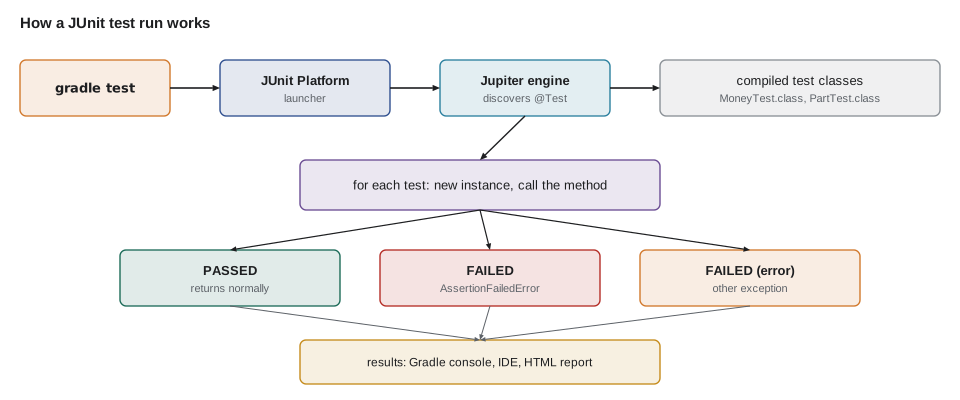
JUnit has no list of tests to run. It scans the compiled test classes, finds every method carrying @Test, creates a new instance of the test class for each one and calls the method. If the method returns normally the test passed; if it throws an AssertionFailedError it failed; any other exception counts as an error in the code. Because every test gets a fresh instance, tests cannot share state through fields by accident. This machinery is simple enough to imitate in a page of plain Java, which makes it much less mysterious.
import java.lang.annotation.*;
import java.lang.reflect.*;
import java.util.*;

public class Main {
    @Retention(RetentionPolicy.RUNTIME)
    @Target(ElementType.METHOD)
    @interface Test { }

    static class MoneyTest {
        static String format(long cents) {
            String sign = cents < 0 ? "-" : "";
            long a = Math.abs(cents);
            return String.format("%s%d.%02d", sign, a / 100, a % 100);
        }

        @Test void formatsWholeDollars() { assertEquals("12.00", format(1200)); }
        @Test void formatsCents() { assertEquals("8.99", format(899)); }
        @Test void refundUnderOneDollarKeepsSign() { assertEquals("-0.50", format(-50)); }
        @Test void deliberatelyWrong() { assertEquals("9.00", format(899)); }
        void helperNotATest() { }
    }

    static void assertEquals(Object expected, Object actual) {
        if (!Objects.equals(expected, actual)) {
            throw new AssertionError("expected: <" + expected + "> but was: <" + actual + ">");
        }
    }

    public static void main(String[] args) throws Exception {
        List<Method> tests = new ArrayList<>();
        for (Method m : MoneyTest.class.getDeclaredMethods()) {
            if (m.isAnnotationPresent(Test.class)) tests.add(m);
        }
        tests.sort(Comparator.comparing(Method::getName));
        int passed = 0, failed = 0;
        for (Method m : tests) {
            Object instance = MoneyTest.class.getDeclaredConstructor().newInstance();
            try {
                m.invoke(instance);
                passed++;
                System.out.println("  PASSED  " + m.getName());
            } catch (InvocationTargetException e) {
                failed++;
                System.out.println("  FAILED  " + m.getName() + ": " + e.getCause().getMessage());
            }
        }
        System.out.println(tests.size() + " tests, " + passed + " passed, " + failed + " failed");
    }
}FAILED deliberatelyWrong: expected: <9.00> but was: <8.99> PASSED formatsCents PASSED formatsWholeDollars PASSED refundUnderOneDollarKeepsSign 4 tests, 3 passed, 1 failed
What this code does
The Test annotation is kept at run time so the program can look for it, and the loop collects every method in MoneyTest that carries it, skipping the helper. Each test gets a new MoneyTest object and is called by reflection; an AssertionError thrown inside it arrives wrapped in an InvocationTargetException, whose cause holds the failure message. JUnit does the same work with far more care, but the shape of the result, one line per test and a total, is the same.
The deliberately wrong test shows what a failure looks like. The runner sorts the methods by name only so this page always prints them in the same order; JUnit's default order is deterministic but intentionally not obvious, and good tests never depend on running in any particular order.
import java.util.*;

public class Main {
    static class CartTest {
        final List<String> cart = new ArrayList<>();

        void addsTube() {
            cart.add("TUBE-700x25");
            System.out.println("  addsTube sees " + cart.size() + " item(s)");
        }

        void addsBell() {
            cart.add("BELL");
            System.out.println("  addsBell sees " + cart.size() + " item(s)");
        }
    }

    public static void main(String[] args) {
        System.out.println("One shared instance (not how JUnit works):");
        CartTest shared = new CartTest();
        shared.addsTube();
        shared.addsBell();

        System.out.println("A new instance for each test (how JUnit works):");
        new CartTest().addsTube();
        new CartTest().addsBell();
    }
}One shared instance (not how JUnit works): addsTube sees 1 item(s) addsBell sees 2 item(s) A new instance for each test (how JUnit works): addsTube sees 1 item(s) addsBell sees 1 item(s)
What this code does
When both test methods run on one shared object, the second test sees the item the first one added, so its result depends on what ran before it. Creating a new CartTest for each method gives every test an empty cart, which is exactly what JUnit does by default. That per-method instance is what makes JUnit tests independent even when they keep state in fields.
Running tests and reading the results
In the secondgear build, gradle test compiles the main and test code of every module and runs all the tests. gradle :core:test runs only core's. In an IDE, a green triangle beside each test class and method runs just that test, and a failed test is shown with its message and a link to the line. The build also writes an HTML report under build/reports/tests/test/index.html, which is the easiest place to read many results at once.
$ ./gradlew :core:test> Task :core:compileJava
> Task :core:compileTestJava
> Task :core:test
MoneyTest > formatsCents() PASSED
MoneyTest > formatsWholeDollars() PASSED
MoneyTest > refundUnderOneDollarKeepsSign() FAILED
org.opentest4j.AssertionFailedError: expected: <-0.50> but was: <0.50>
at app//org.junit.jupiter.api.AssertionFailureBuilder.build(AssertionFailureBuilder.java:158)
at app//org.junit.jupiter.api.AssertEquals.failNotEqual(AssertEquals.java:197)
at app//org.junit.jupiter.api.AssertEquals.assertEquals(AssertEquals.java:182)
at app//org.junit.jupiter.api.Assertions.assertEquals(Assertions.java:1156)
at app//org.secondgear.core.MoneyTest.refundUnderOneDollarKeepsSign(MoneyTest.java:22)
MoneyTest > addsTwoAmounts() PASSED
4 tests completed, 1 failed
FAILURE: Build failed with an exception.
BUILD FAILED in 2sWhat this code does
Gradle compiles the code, runs the four tests and prints one line per test because of the testLogging setting. The failure message shows the expected and actual values exactly as assertEquals reported them, and the last stack line points at the assertion in MoneyTest.java. The build ends with BUILD FAILED, so a later task such as jar or installDist will not run until the test is fixed.
JUnit, Mockito and the other libraries in this course cannot be downloaded on the machine these lessons were prepared on, so their output is shown as representative: written to match what the current versions print, not captured from a run. Every plain Java example, like the runner above, was compiled and run, and its output is exactly what Java printed.
One behavior per test
A test should check one behavior, so that its name says what broke when it fails. That does not mean one assertion per test: checking two fields of one result is still one behavior. It does mean not writing a single test called testMoney that checks formatting, adding, multiplying and comparison together, because the first failure stops the method and hides whether the rest still work. Many small tests also make a failure report a useful list of exactly which promises are broken.
public class Main {
    static String format(long cents) {
        return String.format("%d.%02d", cents / 100, Math.abs(cents % 100)); // the April bug
    }

    static void assertEquals(String expected, String actual) {
        if (!expected.equals(actual)) throw new AssertionError("expected <" + expected + "> but was <" + actual + ">");
    }

    static void run(String name, Runnable test) {
        try { test.run(); System.out.println("PASSED " + name); }
        catch (AssertionError e) { System.out.println("FAILED " + name + ": " + e.getMessage()); }
    }

    public static void main(String[] args) {
        System.out.println("One big test:");
        run("testMoney", () -> {
            assertEquals("-0.50", format(-50));
            assertEquals("8.99", format(899));
            assertEquals("-12.50", format(-1250));
        });
        System.out.println("Three small tests:");
        run("refundUnderOneDollar", () -> assertEquals("-0.50", format(-50)));
        run("cents", () -> assertEquals("8.99", format(899)));
        run("largerRefund", () -> assertEquals("-12.50", format(-1250)));
    }
}One big test: FAILED testMoney: expected <-0.50> but was <0.50> Three small tests: FAILED refundUnderOneDollar: expected <-0.50> but was <0.50> PASSED cents PASSED largerRefund
What this code does
The big test stops at its first failed assertion, so the report says only that testMoney failed and hides that the other two cases work. The three small tests each run and report on their own, which shows at a glance that only refunds under a dollar are broken. A lambda passed as a Runnable stands in for a test method, which keeps the example short.
Try it yourself
Add a test to the runner
The tiny test runner below finds methods marked with its own @Test annotation. Add a test method formatsZero to MoneyTest that checks format(0) returns "0.00".
The program should report 4 tests, 4 passed, 0 failed, with your test listed in alphabetical order.
import java.lang.annotation.*;
import java.lang.reflect.*;
import java.util.*;

public class Main {
    @Retention(RetentionPolicy.RUNTIME)
    @Target(ElementType.METHOD)
    @interface Test { }

    static class MoneyTest {
        static String format(long cents) {
            String sign = cents < 0 ? "-" : "";
            long a = Math.abs(cents);
            return String.format("%s%d.%02d", sign, a / 100, a % 100);
        }

        @Test void formatsWholeDollars() { assertEquals("12.00", format(1200)); }
        @Test void formatsCents() { assertEquals("8.99", format(899)); }
        @Test void refundUnderOneDollarKeepsSign() { assertEquals("-0.50", format(-50)); }
        void helperNotATest() { }
    }

    static void assertEquals(Object expected, Object actual) {
        if (!Objects.equals(expected, actual)) {
            throw new AssertionError("expected: <" + expected + "> but was: <" + actual + ">");
        }
    }

    public static void main(String[] args) throws Exception {
        List<Method> tests = new ArrayList<>();
        for (Method m : MoneyTest.class.getDeclaredMethods()) {
            if (m.isAnnotationPresent(Test.class)) tests.add(m);
        }
        tests.sort(Comparator.comparing(Method::getName));
        int passed = 0, failed = 0;
        for (Method m : tests) {
            Object instance = MoneyTest.class.getDeclaredConstructor().newInstance();
            try {
                m.invoke(instance);
                passed++;
                System.out.println("  PASSED  " + m.getName());
            } catch (InvocationTargetException e) {
                failed++;
                System.out.println("  FAILED  " + m.getName() + ": " + e.getCause().getMessage());
            }
        }
        System.out.println(tests.size() + " tests, " + passed + " passed, " + failed + " failed");
    }
}
Try it yourself
A better failure message
Complete assertEquals so that it does nothing when the values are equal and throws an AssertionError with the message expected: <E> but was: <A> when they differ, where E and A are the two values.
The program catches the error and prints the message, so it should print ok and then expected: <9.00> but was: <8.99>.
import java.util.Objects;

public class Main {
    static void assertEquals(Object expected, Object actual) {
    }

    public static void main(String[] args) {
        assertEquals("8.99", "8.99");
        System.out.println("ok");
        try {
            assertEquals("9.00", "8.99");
            System.out.println("no error thrown");
        } catch (AssertionError e) {
            System.out.println(e.getMessage());
        }
    }
}
Common mistakes
MistakeWriting one large test method that checks everything.
InsteadWrite one test per behavior, named after it, so a failure says exactly what broke.
MistakePutting the actual value first in assertEquals.
InsteadExpected first, actual second, so the failure message reads correctly.
MistakeDeclaring JUnit with implementation.
InsteadUse testImplementation, so JUnit never ships with the program.
MistakeForgetting useJUnitPlatform() in Gradle.
InsteadWithout it Gradle looks for JUnit 4 tests and silently runs none of your Jupiter tests.
MistakeMixing JUnit artifact versions by hand.
InsteadImport the JUnit BOM so every JUnit artifact uses the same version.
Summary and key terms
- JUnit is the standard Java testing library.
- JUnit 5 introduced the JUnit Platform, which launches tests, and JUnit Jupiter, the API tests are written with; JUnit 6, released in September 2025, keeps the Jupiter API and needs Java 17.
- In Gradle, JUnit goes in testImplementation through the JUnit BOM, and tasks.test needs useJUnitPlatform().
- A test is a method marked @Test in a class under src/test/java that calls the code and uses assertions such as assertEquals, expected value first.
- JUnit discovers tests by reflection, runs each in a new instance of its class and reports passed or failed. gradle test runs the tests, a failure stops the build, and an HTML report is written under build/reports.
- Each test should check one behavior and be named after it.
- JUnit
- The standard testing library for Java.
- JUnit Platform
- The part of JUnit that discovers and launches tests for IDEs and build tools.
- JUnit Jupiter
- The JUnit programming model and API for writing tests, in org.junit.jupiter.
- @Test
- The annotation that marks a method as a test.
- Assertion
- A statement in a test that must hold, such as assertEquals; a false one fails the test.
- AssertionFailedError
- The error a failed JUnit assertion throws, carrying the expected and actual values.
- Test discovery
- Finding test methods by scanning compiled classes for @Test.
- useJUnitPlatform()
- The Gradle setting that makes the test task run JUnit Platform tests.
- Test report
- The HTML summary of a test run written under build/reports/tests.
Practice problems
Work each problem on paper first, then reveal the answer to check.
Which configuration should junit-jupiter use in Gradle?
Show answer
testImplementation, through the JUnit BOM.
What does JUnit do with a method marked @Test?
Show answer
Creates a new instance of its class, calls the method and records passed or failed.
Which argument comes first in assertEquals?
Show answer
The expected value.
What happens if useJUnitPlatform() is missing?
Show answer
Gradle runs no Jupiter tests, often without any error.
Did JUnit 6 change how tests are written?
Show answer
No; it keeps the Jupiter API, so JUnit 5 style tests work unchanged.
Lesson quiz · 5 questions
Score 60% or more to complete this lesson.
Create a free account to save your progress, take quizzes and earn a certificate.