
JAVA-220 · Lesson 4 of 12 · 21 min
Test fixtures and life cycle
▶ Video coming soon A video version of this lesson is on the way.
On Thursday, September 30, Hamza started on tests for ShopBook, and the first five all began with the same eight lines: a fleet of four city bikes, one cargo bike and one tandem, a booking calendar and a fixed date to work from. Copying setup code is tedious, and worse, when the fleet changes every copy has to change with it. Ingrid showed him the JUnit features that run setup and cleanup code around each test, and the patterns for building test data that keep tests short and readable.
Arrange, act, assert
Almost every unit test has three parts, and many teams lay them out with a blank line between each. Arrange creates the objects and data the test needs. Act calls the one method being tested. Assert checks the result. The objects and data a test arranges, together with any setup they need, are called the test fixture. When several tests share the same fixture, JUnit can build it for them.
@Test
void tandemCanBeBookedForAFreeWeekend() {
    // Arrange
    Fleet fleet = Fleet.standard();
    Calendar calendar = new Calendar(fleet);
    LocalDate saturday = LocalDate.of(2027, 10, 2);

    // Act
    Booking booking = calendar.book("TANDEM-1", saturday, saturday.plusDays(1));

    // Assert
    assertEquals("TANDEM-1", booking.bikeId());
    assertEquals(2, booking.days());
}
What this code does
The arrange part builds the fleet, a calendar and a fixed Saturday, so the test does not depend on today's date. The act part is a single call to book, the behavior under test. The assert part checks the bike and the length of the booking, and the comments name the three parts for readers new to the pattern.
Keeping the act part to one call is a good discipline: if a test has to call three methods to get to the behavior, either the test checks too much or the code is awkward to use. The fixed date matters too. A test that uses LocalDate.now() gives different results on different days, which breaks the R of FIRST, repeatable.
Life cycle methods
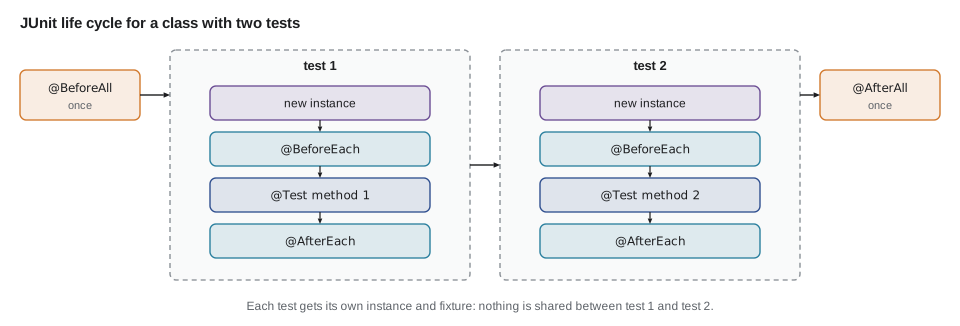
JUnit runs methods marked with four life cycle annotations at fixed moments. A method marked @BeforeEach runs before every test in the class, and @AfterEach after every test, even one that failed. @BeforeAll and @AfterAll run once, before the first test and after the last; because JUnit creates a new instance for each test, these two must be static by default. Fields set in @BeforeEach give every test a fresh fixture.
| Annotation | Runs | Typical use |
|---|---|---|
| @BeforeEach | before every test method | Build a fresh fixture: objects, test data |
| @AfterEach | after every test method, pass or fail | Release resources, clear a static cache |
| @BeforeAll | once, before the first test (static) | Start something expensive and shared, such as a test database |
| @AfterAll | once, after the last test (static) | Stop what @BeforeAll started |
class CalendarTest {
    private Calendar calendar;
    private final LocalDate saturday = LocalDate.of(2027, 10, 2);

    @BeforeEach
    void setUp() {
        calendar = new Calendar(Fleet.standard());
    }

    @Test
    void tandemCanBeBookedForAFreeWeekend() {
        Booking b = calendar.book("TANDEM-1", saturday, saturday.plusDays(1));
        assertEquals(2, b.days());
    }

    @Test
    void sameBikeCannotBeBookedTwice() {
        calendar.book("TANDEM-1", saturday, saturday.plusDays(1));
        assertThrows(BookingException.class,
                () -> calendar.book("TANDEM-1", saturday, saturday));
    }
}
What this code does
setUp runs before each of the two tests, so each one starts with an empty calendar built on the standard fleet. The second test books the tandem and then expects a second booking for the same day to be refused. Because the first test's booking was made on a different Calendar object, it cannot leak into the second test.
The order in which the life cycle methods and tests run is easy to see with the tiny runner from lesson 2, extended to call before-each and after-each methods around every test.
import java.lang.annotation.*;
import java.lang.reflect.*;
import java.util.*;

public class Main {
    @Retention(RetentionPolicy.RUNTIME) @interface Test { }
    @Retention(RetentionPolicy.RUNTIME) @interface BeforeEach { }
    @Retention(RetentionPolicy.RUNTIME) @interface AfterEach { }

    static class RackTest {
        List<String> rack;

        @BeforeEach void setUp() {
            rack = new ArrayList<>(List.of("CITY-1", "CARGO-1"));
            System.out.println("  setUp: rack has " + rack.size());
        }

        @AfterEach void tearDown() { System.out.println("  tearDown"); }

        @Test void addingABikeGrowsTheRack() {
            rack.add("TANDEM-1");
            System.out.println("  test 1: rack has " + rack.size());
        }

        @Test void removingABikeShrinksTheRack() {
            rack.remove("CITY-1");
            System.out.println("  test 2: rack has " + rack.size());
        }
    }

    static List<Method> marked(Class<?> c, Class<? extends Annotation> a) {
        List<Method> found = new ArrayList<>();
        for (Method m : c.getDeclaredMethods()) if (m.isAnnotationPresent(a)) found.add(m);
        found.sort(Comparator.comparing(Method::getName));
        return found;
    }

    public static void main(String[] args) throws Exception {
        for (Method test : marked(RackTest.class, Test.class)) {
            System.out.println(test.getName());
            Object instance = RackTest.class.getDeclaredConstructor().newInstance();
            for (Method m : marked(RackTest.class, BeforeEach.class)) m.invoke(instance);
            try {
                test.invoke(instance);
            } finally {
                for (Method m : marked(RackTest.class, AfterEach.class)) m.invoke(instance);
            }
        }
    }
}addingABikeGrowsTheRack setUp: rack has 2 test 1: rack has 3 tearDown removingABikeShrinksTheRack setUp: rack has 2 test 2: rack has 1 tearDown
What this code does
For each test, the runner makes a new RackTest object, calls every BeforeEach method, then the test, and finally every AfterEach method inside a finally block, so cleanup happens even if the test throws. Each test starts with the same two bikes, because setUp builds a new rack each time. The output shows the same sequence JUnit follows: setUp, test, tearDown, and again for the next test.
Sharing expensive setup carefully
@BeforeAll is for setup that is too slow to repeat, such as starting a database container for integration tests in lesson 7. Anything it creates is shared by every test in the class, which brings back the danger that tests affect each other through shared state. Share only things that tests read and do not change, or reset them in @BeforeEach. Annotating the class with @TestInstance(Lifecycle.PER_CLASS) makes JUnit use one instance for all its tests, which lets @BeforeAll be an instance method, but it also makes shared fields easy to misuse, so use it deliberately.
Organizing tests
Several JUnit features help keep a large set of tests readable. @DisplayName gives a test a readable name with spaces. @Nested marks an inner class as a group of related tests that runs its own life cycle methods after the outer ones, which suits behaviors that share a starting state, such as "when the tandem is already booked". @Tag labels tests, for example as slow, so the build can run fast tests on every change and slow ones less often. @Disabled skips a test, and must always carry a reason.
@DisplayName("Booking calendar")
class CalendarTest {
    private Calendar calendar;

    @BeforeEach
    void setUp() { calendar = new Calendar(Fleet.standard()); }

    @Nested
    @DisplayName("when the tandem is booked for Saturday")
    class WhenTandemBooked {
        private final LocalDate saturday = LocalDate.of(2027, 10, 2);

        @BeforeEach
        void bookTandem() { calendar.book("TANDEM-1", saturday, saturday); }

        @Test
        @DisplayName("another booking for Saturday is refused")
        void secondBookingRefused() {
            assertThrows(BookingException.class, () -> calendar.book("TANDEM-1", saturday, saturday));
        }

        @Test
        @DisplayName("Sunday is still free")
        void sundayFree() {
            assertTrue(calendar.isFree("TANDEM-1", saturday.plusDays(1)));
        }
    }

    @Test
    @Tag("slow")
    @Disabled("Waiting for Odile to confirm the holiday closing dates")
    void closedOnHolidays() { }
}
What this code does
The outer setUp runs first and the nested bookTandem runs second, so both nested tests start with a calendar where the tandem is taken on Saturday. Display names make the report read as sentences, such as Booking calendar, when the tandem is booked for Saturday, Sunday is still free. The disabled test is skipped and reported as skipped, and its reason says exactly what it is waiting for.
Building test data
Tests often need objects with many fields, and most fields do not matter to the test. Writing every field in every test hides the one that matters and makes tests break when a field is added. A test data builder solves this: a small class that starts with sensible defaults and lets each test change only what it cares about. The result is a test that says, in effect, "a rental like any other, except it is the cargo bike and it lasts five days".
import java.time.*;

public class Main {
    record Rental(String bikeId, String customer, LocalDate start, LocalDate end, boolean helmet) {
        long days() { return Duration.between(start.atStartOfDay(), end.atStartOfDay()).toDays() + 1; }
    }

    static class RentalBuilder {
        private String bikeId = "CITY-1";
        private String customer = "Test Customer";
        private LocalDate start = LocalDate.of(2027, 10, 2);
        private int days = 1;
        private boolean helmet = false;

        RentalBuilder bike(String id) { bikeId = id; return this; }
        RentalBuilder days(int n) { days = n; return this; }
        RentalBuilder withHelmet() { helmet = true; return this; }
        Rental build() { return new Rental(bikeId, customer, start, start.plusDays(days - 1), helmet); }
    }

    static RentalBuilder aRental() { return new RentalBuilder(); }

    public static void main(String[] args) {
        Rental plain = aRental().build();
        Rental cargo = aRental().bike("CARGO-1").days(5).build();
        Rental tandem = aRental().bike("TANDEM-1").withHelmet().build();
        for (Rental r : new Rental[] {plain, cargo, tandem}) {
            System.out.println(r.bikeId() + ": " + r.days() + " day(s), " + r.start() + " to " + r.end() + (r.helmet() ? ", with helmet" : ""));
        }
    }
}CITY-1: 1 day(s), 2027-10-02 to 2027-10-02 CARGO-1: 5 day(s), 2027-10-02 to 2027-10-06 TANDEM-1: 1 day(s), 2027-10-02 to 2027-10-02, with helmet
What this code does
The builder holds a default value for every field, including a fixed start date, so a test that does not care about dates still gets a repeatable one. Each method changes one field and returns the builder, so calls chain into a readable description of the rental. A test for cargo pricing would write aRental().bike("CARGO-1").days(5).build() and mention nothing else.
A related pattern, sometimes called an object mother, is a class of static methods that return ready-made objects such as standardFleet() or kofisPartsList(). Builders are more flexible; object mothers are simpler. Both put test data in one place, so a change to a record means one change in the tests, not fifty.
Temporary files
Tests that read and write files must not touch real files, and must clean up after themselves. JUnit provides @TempDir: a field or parameter of type Path marked @TempDir receives a fresh, empty temporary directory that JUnit deletes after the test. With the standard library alone, Files.createTempDirectory creates one, and the test deletes it in a finally block or an after-each method.
import java.io.IOException;
import java.nio.file.*;
import java.util.*;

public class Main {
    static void save(Path file, Map<String, Integer> counts) throws IOException {
        List<String> lines = new ArrayList<>();
        for (var e : counts.entrySet()) lines.add(e.getKey() + "," + e.getValue());
        Files.write(file, lines);
    }

    static Map<String, Integer> load(Path file) throws IOException {
        Map<String, Integer> counts = new TreeMap<>();
        for (String line : Files.readAllLines(file)) {
            String[] p = line.split(",");
            counts.put(p[0], Integer.parseInt(p[1]));
        }
        return counts;
    }

    public static void main(String[] args) throws IOException {
        Path dir = Files.createTempDirectory("partsdesk-test");
        try {
            Path file = dir.resolve("counts.csv");
            Map<String, Integer> before = new TreeMap<>(Map.of("A-02", 15, "B-11", 32, "C-14", 6));
            save(file, before);
            Map<String, Integer> after = load(file);
            System.out.println("Saved and loaded the same counts: " + before.equals(after));
            System.out.println("Loaded: " + after);
        } finally {
            try (var files = Files.walk(dir)) {
                files.sorted(Comparator.reverseOrder()).forEach(p -> p.toFile().delete());
            }
            System.out.println("Temporary directory removed: " + !Files.exists(dir));
        }
    }
}Saved and loaded the same counts: true
Loaded: {A-02=15, B-11=32, C-14=6}
Temporary directory removed: trueWhat this code does
The test writes three part counts to a file in a new temporary directory, reads them back and checks that nothing changed, which is a typical round-trip test for saving and loading. The finally block deletes the files and then the directory, deepest paths first, whether the check passed or not. The program never prints the directory's name, which differs on every run, so its output is repeatable.
@Test
void countsSurviveSaveAndLoad(@TempDir Path dir) throws IOException {
    Path file = dir.resolve("counts.csv");
    Map<String, Integer> before = Map.of("A-02", 15, "B-11", 32, "C-14", 6);

    PartsFile.save(file, before);

    assertEquals(before, PartsFile.load(file));
}
What this code does
JUnit creates the temporary directory, passes it in as the dir parameter and deletes it after the test, so the test needs no cleanup code of its own. The test is the same round trip as the plain Java version in arrange, act, assert form. Maps compare equal when they hold the same keys and values, whatever their order.
Try it yourself
Run setUp before each test
The runner below finds @Test methods but ignores @BeforeEach, so both tests fail with a NullPointerException. In main, call every @BeforeEach method on the new instance before invoking the test.
The program should print two PASSED lines.
import java.lang.annotation.*;
import java.lang.reflect.*;
import java.util.*;

public class Main {
    @Retention(RetentionPolicy.RUNTIME) @interface Test { }
    @Retention(RetentionPolicy.RUNTIME) @interface BeforeEach { }

    static class StockTest {
        Map<String, Integer> stock;

        @BeforeEach void setUp() { stock = new TreeMap<>(Map.of("BELL", 4)); }

        @Test void a_sellOneBell() { stock.merge("BELL", -1, Integer::sum); check(stock.get("BELL") == 3); }
        @Test void b_receiveTwoBells() { stock.merge("BELL", 2, Integer::sum); check(stock.get("BELL") == 6); }

        static void check(boolean ok) { if (!ok) throw new AssertionError("wrong count"); }
    }

    static List<Method> marked(Class<?> c, Class<? extends Annotation> a) {
        List<Method> found = new ArrayList<>();
        for (Method m : c.getDeclaredMethods()) if (m.isAnnotationPresent(a)) found.add(m);
        found.sort(Comparator.comparing(Method::getName));
        return found;
    }

    public static void main(String[] args) throws Exception {
        for (Method test : marked(StockTest.class, Test.class)) {
            Object instance = StockTest.class.getDeclaredConstructor().newInstance();
            try {
                test.invoke(instance);
                System.out.println("PASSED " + test.getName());
            } catch (InvocationTargetException e) {
                System.out.println("FAILED " + test.getName() + ": " + e.getCause().getClass().getSimpleName());
            }
        }
    }
}
Try it yourself
A builder for parts
Finish PartBuilder so that each test can change only the fields it cares about. Add methods count(int) and level(int) that set those fields and return the builder.
The program should print A-02 700x25c tube 15/40 low=true and then A-02 700x25c tube 41/40 low=false.
public class Main {
    record Part(String bin, String name, int count, int level) {
        boolean isLow() { return count <= level; }
    }

    static class PartBuilder {
        private String bin = "A-02";
        private String name = "700x25c tube";
        private int count = 15;
        private int level = 40;

        Part build() { return new Part(bin, name, count, level); }
    }

    static void show(Part p) {
        System.out.println(p.bin() + " " + p.name() + " " + p.count() + "/" + p.level() + " low=" + p.isLow());
    }

    public static void main(String[] args) {
        show(new PartBuilder().build());
        show(new PartBuilder().build());
    }
}
Common mistakes
MistakeCopying the same setup lines into every test.
InsteadMove shared setup into a @BeforeEach method or a test data builder.
MistakeUsing LocalDate.now() or the real clock in a test.
InsteadUse fixed dates so the test gives the same result every day.
MistakeSharing mutable objects through @BeforeAll.
InsteadShare only read-only or expensive resources, and reset changing state in @BeforeEach.
MistakeWriting or reading real files from a test.
InsteadUse @TempDir or a temporary directory that the test deletes.
MistakeDisabling a failing test with no explanation.
InsteadGive @Disabled a reason, and fix or delete the test soon.
Summary and key terms
- Unit tests follow arrange, act, assert: build the fixture, call one method, check the result. @BeforeEach and @AfterEach run around every test, and @BeforeAll and @AfterAll, static by default, run once for the class; @AfterEach runs even when the test fails.
- A fresh fixture for each test keeps tests independent, while state shared through @BeforeAll must be read-only or reset. @DisplayName, @Nested, @Tag and @Disabled with a reason keep large test classes readable and organized.
- Test data builders give objects sensible defaults so each test states only what matters, and object mothers return ready-made objects.
- File tests use @TempDir or a temporary directory that is removed afterwards.
- Fixed dates and no shared state keep tests repeatable.
- Test fixture
- The objects, data and setup a test needs before it acts.
- Arrange, act, assert
- The three-part layout of a unit test: set up, call one method, check.
- @BeforeEach / @AfterEach
- Methods JUnit runs before and after every test in a class.
- @BeforeAll / @AfterAll
- Methods JUnit runs once before the first and after the last test of a class.
- @Nested
- An inner class grouping related tests that share a starting state.
- @Tag
- A label on a test, such as slow, used to choose which tests to run.
- @Disabled
- An annotation that skips a test; it should give a reason.
- Test data builder
- A helper that builds test objects with defaults, changing only what a test needs.
- Object mother
- A class of static methods returning ready-made test objects.
- @TempDir
- JUnit's annotation giving a test a temporary directory that is deleted afterwards.
Practice problems
Work each problem on paper first, then reveal the answer to check.
What are the three parts of a typical unit test?
Show answer
Arrange, act and assert.
Does @AfterEach run when a test fails?
Show answer
Yes; it runs after every test, pass or fail.
Why must @BeforeAll methods be static by default?
Show answer
JUnit creates a new instance for each test, so a once-per-class method cannot belong to one instance.
What problem does a test data builder solve?
Show answer
Tests no longer list every field, only the ones that matter, and survive new fields.
Why use fixed dates in tests?
Show answer
So the result is the same whenever the test runs.
Lesson quiz · 5 questions
Score 60% or more to complete this lesson.
Create a free account to save your progress, take quizzes and earn a certificate.