
GCP-191 · Lesson 5 of 12 · 22 min
Review: Google Cloud generative AI offerings
▶ Video coming soon A video version of this lesson is on the way.
Ravi warns Jules at the start of the second session that this section is both the biggest and the most slippery. In the guide we read, Google Cloud's generative AI offerings covered roughly 35 out of every 100 questions, more than any other section. It is also the section where product names change most often: offerings are renamed, merged into suites or folded into platforms, sometimes more than once a year. The guide itself mixed older and newer names in places. "Learn each offering by what it does and who it is for," Ravi says. "If you know that, a new name will not throw you, because the question will describe the job." This lesson reviews the offerings in the guide we read in November 2026 by audience, then gives you original practice scenarios. Always check the current guide and product pages for the names in use when you sit the exam.
Google Cloud's strengths
The first objective asks you to explain why an organization might choose Google Cloud for generative AI. The guide's list can be grouped into five ideas. An AI-first approach: Google has researched AI for many years and builds it into its products. An enterprise-ready platform: responsible, secure, private, reliable and able to scale. A comprehensive and open ecosystem: generative AI built into many Google products, with a choice of Google's own models and models from other providers and the open community. AI-optimized infrastructure: Google describes an AI Hypercomputer approach that combines its custom chips, called Tensor Processing Units or TPUs, with GPUs, data centers and networking designed for training and serving models. And data control with democratized development: organizations keep control of their data, and low-code tools, pre-trained models and APIs let people without deep AI skills build solutions.
Questions on this objective often describe a concern and ask which strength addresses it. A bank worried that its data will be used to train public models is asking about data control and privacy commitments. A company that wants to avoid being locked into a single model is asking about the open approach and model choice. A start-up with no machine learning engineers is asking about democratized development. Match the concern to the strength.
Prebuilt offerings for everyday work
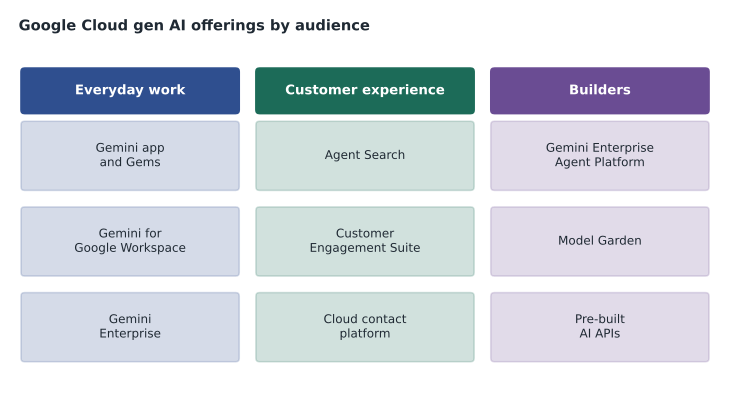
The guide groups several offerings under AI-powered work. The Gemini app is Google's AI assistant for individuals, which can write, summarize, plan and answer questions; Gems are custom versions of Gemini that a person sets up with instructions for a repeated task, such as a writing coach or a meeting-notes helper. The guide also mentioned a paid tier it called Gemini Advanced; Google has changed the names of its paid tiers over time, so treat the tier names as something to check. Gemini for Google Workspace builds Gemini into Gmail, Docs, Sheets, Slides, Meet and other Workspace tools, so employees can draft, summarize and analyze inside the tools they already use. Gemini Enterprise brings an organization's own data into an AI experience for work: it can search across company sources, answer questions grounded in them, and host agents, including custom agents the company builds or adds.
The signposts for these offerings are about who and where. An individual wanting a personal assistant points to the Gemini app. Employees working in documents, email and meetings point to Gemini for Google Workspace. A company that wants staff to search and ask questions across many internal systems, with access controls respected and agents available, points to Gemini Enterprise. None of them requires developers, which makes them the usual best fit when a scenario says the organization has none.
Offerings for customer experience
The next objective covers improving customer experience. Agent Search, which the guide placed on the agent platform and which earlier materials called Vertex AI Search, gives websites and apps a search and question-answering experience grounded in an organization's content, such as product pages or help articles. Grounding with Google Search connects model answers to current information from the web. The Customer Engagement Suite gathers Google's contact center offerings: Conversational Agents for virtual agents that talk or chat with customers; Agent Assist, which gives human agents real-time suggestions, answers and summaries during live conversations; Conversational Insights, which analyses conversations at scale to find trends, sentiment and topics; and Google Cloud's contact center as a service, a cloud platform for running a contact center.
| Customer experience need | Offering that usually fits |
|---|---|
| Shoppers search and ask questions on the website, answered from product content | Agent Search |
| Answers must reflect current public information | Grounding with Google Search |
| A virtual agent handles common customer requests by chat or voice | Conversational Agents |
| Human agents get suggested answers during live calls | Agent Assist |
| Managers want trends and sentiment across thousands of calls | Conversational Insights |
| The company wants to run its whole contact center in the cloud | Contact center as a service |
Offerings for builders
For developers and technical teams, the guide centers on Google Cloud's AI platform, which it called Gemini Enterprise Agent Platform in some places and Agent Platform in others; earlier materials call it Vertex AI. The platform is where teams choose models, prompt and evaluate them, tune them, ground them, build agents and deploy and monitor the results. Model Garden is its catalog of models, including Google's own, partner models and open models, so teams can compare and choose. AutoML on the platform lets teams train custom models on their own data with little machine learning code. For retrieval-augmented generation, the guide named two routes: prebuilt RAG through Agent Search, which handles indexing and retrieval for you, and RAG APIs for teams that want to assemble their own retrieval pipeline. And the platform supports building custom agents for tasks that the prebuilt offerings do not cover.
The guide also lists pre-built AI APIs that solve common tasks without training a model: Speech-to-Text, Text-to-Speech, Translation, Document Translation, Document AI for extracting information from documents such as invoices and forms, Cloud Vision for images, Video Intelligence for video, and Natural Language for analyzing text. Along with Cloud Storage, databases, Cloud Run functions and Cloud Run, these are the building blocks agents and applications call. A library that wants to transcribe and translate recorded talks does not need a custom model; it needs the speech and translation APIs.
Tools for agents
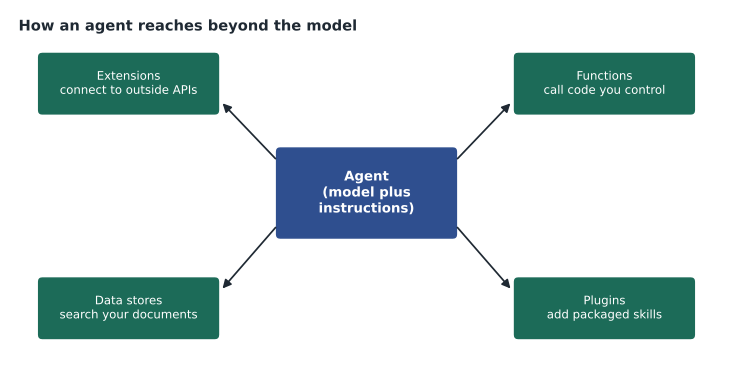
An agent is software that uses a model to reason toward a goal and take actions, often in several steps. Agents become useful when they can reach beyond the model, and the guide names four kinds of tool. Extensions connect an agent to outside APIs and services. Functions let an agent call code that the organization controls, such as a function that checks stock levels. Data stores let an agent search and use an organization's documents and data. Plugins add packaged capabilities. In GCP-110, Birchline's shopping assistant used read-only functions to check stock and pickup slots and a data store of product content, and deliberately had no functions for orders, prices or refunds. On the exam, recognize which tool type fits a described need.
The guide also asks when to use Agent Studio and when to use Google AI Studio. Google AI Studio is a quick, browser-based place for developers to try Google's models, write prompts and get started with the Gemini API, suited to prototyping and individual developers. Agent Studio is part of the enterprise platform and is meant for building, managing and deploying agents with the governance, security and integration an organization needs. A question about a single developer trying an idea in an afternoon points to Google AI Studio; a question about an enterprise building a governed agent connected to company systems points to Agent Studio. Check the current names, because these tools have been reorganized before.
# A quick self-test: who is the offering for?
offerings = {
    "Gemini for Google Workspace": "employees in email, documents and meetings",
    "Gemini Enterprise": "staff searching company data, with agents",
    "Agent Assist": "human support agents during live conversations",
    "Model Garden": "builders choosing among many models",
    "Google AI Studio": "a developer prototyping quickly",
}
for name, audience in offerings.items():
print(f"{name:28} -> {audience}")Gemini for Google Workspace -> employees in email, documents and meetings Gemini Enterprise -> staff searching company data, with agents Agent Assist -> human support agents during live conversations Model Garden -> builders choosing among many models Google AI Studio -> a developer prototyping quickly
What this code does
Five Google offerings are listed with the audience each one is for, and the script prints them as a quick lookup table. It works as a self-test: cover the right-hand side and check whether you can say who each offering serves.
Practice scenarios
Here are original scenarios with reasoning. First: a travel agency's staff spend hours writing client itineraries in documents and email. They have no developers and already use Google Workspace. Which offering fits best? Gemini for Google Workspace, because it works inside the tools they use. Second: a utility's call center wants human agents to see the right policy passage during a live call. Which offering fits? Agent Assist. Third: a retailer wants shoppers to ask questions on its website and get answers drawn only from its product pages, with little development. Which offering fits? Agent Search, the prebuilt grounded search offering. Fourth: a software company wants to compare several models from different providers before choosing one for a new feature. Which part of the platform helps? Model Garden. Fifth: an accounting firm wants to pull totals and dates from thousands of scanned invoices. Which pre-built API fits? Document AI.
Why the offerings overlap
Some offerings in the guide genuinely overlap, which is why the exam tests the fit rather than the existence of a product. Gemini Enterprise and Agent Search both answer questions from an organization's content; the difference is the audience, staff at work versus customers on a website or in an app. Custom agents on the platform and the agents hosted in Gemini Enterprise can both automate tasks; the difference is how much the organization builds and controls. When two offerings seem to fit, ask who the users are, where they are, and how much the organization wants to build. Those three questions settle most of the overlap.
Worked problem
Separating three similar answers
A hospital network wants its staff to ask questions such as "What is our policy on visitor hours in the maternity ward?" and get answers from policy documents spread across several internal systems, with each person seeing only documents they are allowed to see. The options are the Gemini app, Gemini Enterprise and Google AI Studio. Which fits best, and why not the others?
Show solution
- The need is grounded answers from many internal systems for staff.
- The constraint is access control: each person sees only what they may see.
- The Gemini app is a personal assistant and does not connect to the hospital's internal systems by itself.
- Google AI Studio is a developer prototyping tool, not a staff-facing search experience.
- Gemini Enterprise searches across company sources, respects access controls and answers from them.
Answer: Gemini Enterprise fits best. The audience and the access-control constraint rule out the other two.
This section costs Jules the most marks in the first diagnostic: three misses out of ten, all from mixing up offerings that sound alike. Ravi asks Jules to build a set of cards with an offering's name on one side and its audience and job on the other, and to rebuild the cards whenever Google renames something.
Common mistakes
MistakeLearning offerings only by name.
InsteadLearn each by its audience and job, so a renamed offering is still recognizable.
MistakeChoosing a custom agent when a prebuilt offering does the job.
InsteadPrefer prebuilt offerings when the scenario has no developers or a short deadline.
MistakeConfusing Agent Assist with Conversational Agents.
InsteadAgent Assist helps human agents; Conversational Agents talk to customers directly.
MistakeTreating Google AI Studio as an enterprise agent platform.
InsteadGoogle AI Studio is for quick prototyping; Agent Studio is for governed enterprise agents.
MistakeTraining a model for a common task such as translation.
InsteadUse the pre-built API for common tasks.
Summary and key terms
- Google Cloud's strengths: AI-first, enterprise-ready, open ecosystem, AI-optimized infrastructure, data control.
- Everyday work: the Gemini app and Gems, Gemini for Google Workspace, Gemini Enterprise.
- Customer experience: Agent Search, grounding with Google Search and the Customer Engagement Suite.
- Builders: the AI platform, Model Garden, AutoML, RAG offerings, custom agents and pre-built AI APIs.
- Agent tool types: extensions, functions, data stores and plugins.
- Google AI Studio is for quick prototyping; Agent Studio is for enterprise agents. Names change; check them.
- Gems
- Custom versions of Gemini set up with instructions for a repeated task.
- Gemini Enterprise
- An AI experience for work that searches company data and hosts agents.
- Agent Assist
- Real-time help for human contact center agents during conversations.
- Model Garden
- The platform's catalog of Google, partner and open models.
- TPU
- Tensor Processing Unit, Google's custom chip for machine learning.
- Data store
- An agent tool that lets the agent search an organization's content.
Practice problems
Work each problem on paper first, then reveal the answer to check.
About what share of questions did the guide we read give this section?
Show answer
About 35 in 100.
Which offering builds Gemini into Gmail and Docs?
Show answer
Gemini for Google Workspace.
Which offering gives human agents suggestions during live calls?
Show answer
Agent Assist.
What is Model Garden?
Show answer
The platform's catalog of models from Google, partners and the open community.
Name the four agent tool types.
Show answer
Extensions, functions, data stores and plugins.
Which pre-built API extracts fields from invoices?
Show answer
Document AI.
When is Google AI Studio the better choice?
Show answer
For a developer prototyping quickly with Google's models.
Lesson quiz · 5 questions
Score 60% or more to complete this lesson.
Create a free account to save your progress, take quizzes and earn a certificate.