
GCP-110 · Lesson 5 of 12 · 19 min
Prompt design and prompt engineering
▶ Video coming soon A video version of this lesson is on the way.
Jules's first attempt at a product description is disappointing. He types "Write a description for the Ridgeback 2 tent" and gets three paragraphs of cheerful, generic copy that mentions a rainfly the tent does not have and calls it "perfect for every adventure". Ravi reads it and says, "The model did exactly what you asked. You asked for very little." This lesson is about asking well: how to design prompts that produce useful, accurate, consistent output, and the techniques the exam expects leaders to recognize.
What a prompt is
A prompt is the input given to a generative model to tell it what to do. It can contain instructions, context, examples, the data to work on, and a description of the output wanted. Prompt design is the practice of writing that input clearly. Prompt engineering is the broader discipline of designing, testing and refining prompts systematically, often with templates, versions and evaluation, so that a model performs a task reliably at scale.
Prompting is the cheapest and fastest way to change a model's behavior. It needs no training, no new data pipeline and no special hardware: change the words, run again, compare. For that reason it is almost always the first technique to try, and many production systems rely on carefully engineered prompts alone.
The parts of a good prompt
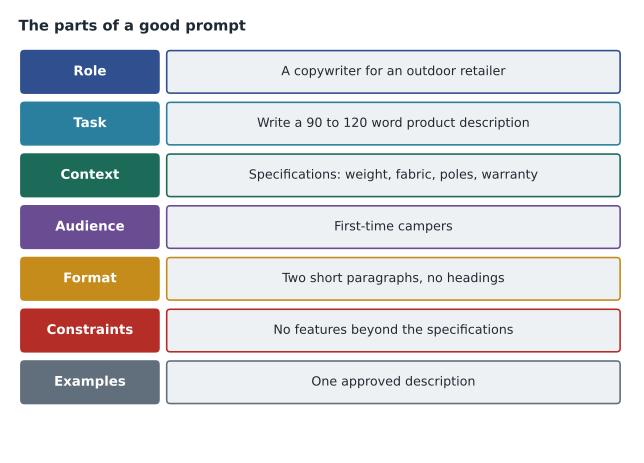
Ravi rewrites Jules's request using a checklist he keeps on his desk. Not every prompt needs every part, but thinking through them catches most problems.
- Task: state exactly what to produce. "Write a product description of 90 to 120 words" is clearer than "write a description".
- Context: give the facts the model needs. Paste the tent's real specifications, so the model does not invent features.
- Role or persona: say who the model should act as, such as "a copywriter for an outdoor-gear retailer who writes plainly and accurately".
- Audience: say who will read the output: first-time campers, experienced hikers, store staff.
- Format: describe the shape of the answer: paragraphs, bullet points, a table or a JSON object with named fields.
- Constraints: state what to avoid: no features beyond the specifications, no superlatives such as "best", no claims about weather the tent has not been tested for.
- Examples: show one or more samples of the output you want (covered below).
The improved prompt runs to about two hundred words, most of them specifications. The new draft is accurate, in Birchline's voice and the right length. Jules notes that the extra effort is a one-time cost: once the prompt works, it becomes a template with a slot for each product's specifications, reused for all six thousand items.
Zero-shot, one-shot and few-shot prompting
Prompts are often described by how many examples they include. In zero-shot prompting the model gets instructions but no examples, relying on what it learned in training. Modern models handle many tasks zero-shot, such as summarizing an email or translating a sentence.
In one-shot prompting the prompt includes a single example of an input and the desired output. In few-shot prompting it includes several. Examples are powerful because they show rather than tell: the model picks up the format, tone, length and level of detail from them. For Birchline's email sorting, a few-shot prompt with one example per queue (an order question, a return, a product question, a complaint and a wholesale enquiry) dramatically improves consistency.
examples = [
    ("Where is my order? It was due Tuesday.", "order_status"),
    ("The zip on my jacket broke after a week.", "return_or_repair"),
    ("Is the Ridgeback 2 tent freestanding?", "product_question"),
]
allowed = sorted({label for _, label in examples} | {"other"})

def build_prompt(email):
    lines = ["Classify the customer email into exactly one label from: " + ", ".join(allowed) + ".",
             "Reply with the label only.", ""]
    for text, label in examples:
        lines += ["Email: " + text, "Label: " + label, ""]
    lines += ["Email: " + email, "Label:"]
    return "\n".join(lines)

print(build_prompt("Can I still exchange boots I bought in March?"))Classify the customer email into exactly one label from: order_status, other, product_question, return_or_repair. Reply with the label only. Email: Where is my order? It was due Tuesday. Label: order_status Email: The zip on my jacket broke after a week. Label: return_or_repair Email: Is the Ridgeback 2 tent freestanding? Label: product_question Email: Can I still exchange boots I bought in March? Label:
What this code does
The program builds a few-shot prompt from three labeled example emails. It lists the allowed labels, tells the model to reply with the label only, shows the examples, and finishes with the new email waiting for its label. The printed prompt is what would be sent to the model.
The template states the allowed labels, shows three examples and ends exactly where the model should continue. A few points matter in practice. Examples should be realistic and varied, covering edge cases, not five near-identical ones. They should all follow the format exactly, because the model copies inconsistencies too. And they consume tokens on every request, so a handful of well-chosen examples usually beats dozens.
Role prompting and system instructions
Role prompting assigns the model a persona or expertise: "You are a patient help desk agent for an outdoor retailer." Roles shape vocabulary, tone and the level of detail. They do not give the model knowledge it lacks; a model told it is a lawyer is not suddenly a reliable legal adviser.
Many platforms separate system instructions from the user's message. System instructions are standing directions that apply to a whole conversation or application: the assistant's role, rules, tone and boundaries. The user's messages then carry the specific requests. For the shopping assistant, Birchline's system instructions say what the assistant may and may not do, such as answering product and policy questions, never changing orders or prices, and handing off to a person for complaints. Those instructions sit in every request, written once by the team rather than by each shopper.
Prompt chaining
Some tasks are too complex for one prompt. Prompt chaining breaks a task into steps, each with its own prompt, where the output of one step becomes input to the next. Ravi designs the review digest as a chain: first, classify each review by topic (fit, durability, warmth, value); second, summarize the reviews in each topic; third, write a short digest for the product manager highlighting changes since last month. Each step is simpler to test and fix than one giant prompt, and a failure can be traced to a specific step.
Chain-of-thought and ReAct
Two advanced techniques appear in the exam guide by name. Chain-of-thought prompting asks the model to work through a problem step by step before giving its final answer, for example "Work out the shipping cost step by step, then state the total." On tasks with several steps of reasoning, such as calculations, comparisons and policy decisions, this often improves accuracy, because the model generates intermediate steps it can build on. Many current models reason internally before answering, but asking for explicit steps is still useful when people need to check the logic.
ReAct, short for reasoning and acting, is a pattern in which the model alternates between reasoning about what to do next and taking an action, such as calling a search tool or a stock-lookup function, then observing the result and reasoning again. A ReAct-style shopping assistant asked "Do you have the Ridgeback 2 in stock near me?" reasons that it needs the shopper's location, asks for it, calls the store inventory tool, reads the result and answers. ReAct is the bridge between prompting and agents, which lesson 8 covers.
| Technique | What it does | When to use it | Birchline example |
|---|---|---|---|
| Zero-shot | Instructions only | Simple, common tasks | Summarize this supplier email |
| One-shot or few-shot | Instructions plus examples | When format, tone or labels must be consistent | Classify emails into five queues |
| Role prompting | Assigns a persona | To set tone and level of detail | A patient help desk agent |
| Prompt chaining | Splits a task into linked prompts | Complex, multi-stage work | Classify, summarize, then write the review digest |
| Chain-of-thought | Asks for step-by-step reasoning | Calculations and multi-step decisions | Work out a return refund under the policy |
| ReAct | Alternates reasoning with tool actions | Tasks that need live information or actions | Check store stock, then answer |
Asking for structured output
When software, not a person, reads the model's output, the format must be predictable. Prompts can ask for structured output, such as JSON with named fields, and many platforms let developers supply a response schema that the model's output must follow. Birchline's spec-sheet extractor requests a JSON object with fields for fabric, weight in grams, warranty in years and care instructions. The application then validates every response in code and rejects anything malformed.
import json
# A model response to the spec-sheet extraction prompt (sample text, not a live call):
response = '{"fabric": "70D ripstop nylon", "weight_g": 1840, "warranty_years": 5, "care": "air dry"}'
required = {"fabric": str, "weight_g": int, "warranty_years": int, "care": str}

def validate(text):
    data = json.loads(text)
    problems = [k for k, t in required.items() if not isinstance(data.get(k), t)]
    return data, problems

data, problems = validate(response)
print("parsed:", data)
print("problems:", problems or "none")parsed: {'fabric': '70D ripstop nylon', 'weight_g': 1840, 'warranty_years': 5, 'care': 'air dry'}
problems: noneWhat this code does
A sample model reply in JSON format is read into Python and checked against the fields and types the application expects. Any field that is missing or of the wrong type is listed as a problem. Here every field is present and correct, so the reply passes.
Iterating and managing prompts
Prompt engineering is iterative. Ravi's process with Jules is the same each time: write a first version, run it on a set of real examples (twenty products with known good descriptions), compare the outputs against criteria, change one thing, and run again. The examples and criteria become an evaluation set, which lesson 9 develops. Prompts that reach production are stored with version numbers, like code, so that a change can be reviewed, tested and rolled back. Google Cloud's prompt management tools, covered in GCP-111, support saving, versioning and comparing prompts.
Prompts also have limits. A brilliant prompt cannot give a model facts it does not have, such as today's stock levels, so prompts must be combined with grounding (lesson 6). Prompts written for one model may behave differently on another or on a newer version, so tests must be rerun after a model changes. And prompts cannot fully guarantee safety: a determined user may try prompt injection, writing input designed to override the system instructions. Defenses include clear separation of instructions from user content, filtering, limiting what tools the model can use, and products such as Model Armor that screen prompts and responses. GCP-112 returns to these risks.
Common mistakes
MistakeWriting vague prompts and blaming the model.
InsteadState the task, context, audience, format and constraints; most poor output comes from underspecified prompts.
MistakeUsing near-identical few-shot examples.
InsteadUse varied, realistic examples that cover edge cases and follow the exact format.
MistakeExpecting a role to add knowledge.
InsteadA persona changes tone and focus, not the model's actual knowledge.
MistakeTrusting structured output without checking it.
InsteadValidate every response in code and handle malformed output.
MistakeAssuming a prompt works forever.
InsteadVersion prompts and rerun evaluations when models or data change.
A prompt library
As more teams start using generative AI, Jules proposes a shared prompt library: a folder of tested templates for common tasks, each with its purpose, owner, version, the model it was tested on and a link to its evaluation results. The help desk's email-sorting prompt, the copy team's description template and the buyers' extraction prompt all live there. A shared library stops each team reinventing prompts, spreads what works, and makes it obvious when a prompt has not been retested since a model changed. It also makes reviews easier: Teresa can read every customer-facing system instruction in one place.
Worked problem
Rewriting a weak prompt
A store manager writes: "Tell me about returns." The assistant answers with a long general essay. Rewrite the request as a well-designed prompt for Birchline's internal policy assistant.
Show solution
- Task: "Explain whether a customer can return an item and how."
- Context: include the case: "Boots bought 40 days ago, worn outdoors twice, original receipt."
- Constraints and grounding: "Answer only from the attached returns policy; if the policy does not cover the case, say so."
- Format and audience: "Answer in three short bullet points for a store associate, then cite the policy section."
Answer: A prompt that names the task, gives the case details, limits the answer to the policy, and asks for a short cited answer produces a usable reply.
Summary and key terms
- A prompt is the input that tells a model what to do; prompt engineering designs, tests and versions prompts systematically.
- Good prompts state the task, context, role, audience, format and constraints, and may include examples.
- Zero-shot prompts give instructions only, while one-shot and few-shot prompts add examples that show format and tone.
- Role prompting and system instructions set persona and standing rules.
- Prompt chaining splits complex tasks into linked steps.
- Chain-of-thought asks for step-by-step reasoning, and ReAct alternates reasoning with tool actions.
- Structured output and schemas make responses machine-readable, but must be validated.
- Prompts cannot supply missing facts or guarantee safety on their own.
- Prompt
- The input given to a generative model to tell it what to do.
- Prompt engineering
- Systematically designing, testing and refining prompts for reliable results.
- Zero-shot prompting
- Giving instructions without examples.
- Few-shot prompting
- Including several examples of inputs and desired outputs in the prompt.
- System instructions
- Standing directions that set a model's role, rules and boundaries for an application.
- Prompt chaining
- Linking several prompts so each step's output feeds the next.
- Chain-of-thought
- Prompting a model to reason step by step before answering.
- ReAct
- A pattern alternating reasoning with actions such as tool calls.
- Prompt injection
- Input crafted to override a model's instructions.
Practice problems
Work each problem on paper first, then reveal the answer to check.
What is the difference between one-shot and few-shot prompting?
Show answer
One-shot includes a single example; few-shot includes several.
Why is prompting usually the first technique to try?
Show answer
It is fast and cheap, needing no training data, pipelines or special hardware.
A task needs live stock levels. Can a better prompt alone solve it?
Show answer
No. The facts must come from grounding or a tool call, such as a ReAct-style stock lookup.
Lesson quiz · 5 questions
Score 60% or more to complete this lesson.
Create a free account to save your progress, take quizzes and earn a certificate.