
FILM-220 · Lesson 9 of 12 · 30 min
Sound editing for picture editors
Many filmmakers say that sound is half the experience of a film, and audiences often forgive weak pictures more readily than poor sound. Picture editors are not usually the people who finish a soundtrack; that work belongs to dialogue editors, sound effects editors, Foley artists, music editors and re-recording mixers. But the picture editor builds the first soundtrack, the one that everyone hears through months of screenings and notes. A cut with careful temporary sound plays far better than the same cut with raw production audio, and it gives the sound team a clear guide. This lesson covers the picture editor's sound responsibilities: track organization, sync, sound bridges, temporary effects and music, working levels, loudness targets, music rights and preparing for the handover to sound post-production.
Organizing tracks
A disciplined track layout makes the cut easier to work with and easier to hand over. Most editors group audio into dialogue, sound effects and music, often abbreviated as dialogue, effects and music, or DME. Within dialogue, tracks may be split by character or by microphone type. Keeping each kind of sound on consistent tracks means the editor can adjust a whole category at once and the sound team receives an orderly session.
| Tracks | Content | Notes |
|---|---|---|
| A1 to A4 | Production dialogue | Boom and radio mics, split by character |
| A5 to A6 | Dialogue fill and room tone | Smooths gaps and changes |
| A7 to A10 | Sound effects | Hard effects, spot effects |
| A11 to A12 | Ambience | Backgrounds and atmospheres |
| A13 to A14 | Music | Temp score or source music |
| A15 to A16 | Guide tracks | Scratch narration, temp voice-over |
Sync and frame accuracy
Sync means that sound and picture are aligned, so that lips match words and impacts match their sounds. Production sound is usually recorded on a separate recorder and synced in the edit using a slate clap, matching timecode or waveform analysis. Once synced, the editor must keep it locked: dragging only the picture or only the sound of a clip creates sync errors, which most systems flag with a red number showing the offset in frames.
Audiences notice lip-sync errors quickly. International broadcast research, summarized in ITU recommendation BT.1359, suggests that viewers can detect sound arriving early by around 45 milliseconds and late by around 125 milliseconds. Sound early is more noticeable because in nature light always arrives before sound.
Worked problem
How many frames before sync errors show?
Using detection thresholds of about 45 ms for sound early and 125 ms for sound late, how many frames of error can go unnoticed at 24 fps and at 29.97 fps?
Show solution
- One frame at 24 fps lasts \( 1000 / 24 \approx 41.7 \) ms; at 29.97 fps, \( 1000 / 29.97 \approx 33.4 \) ms.
- Sound early: at 24 fps, \( 45 / 41.7 \approx 1.1 \) frames; at 29.97 fps, \( 45 / 33.4 \approx 1.3 \) frames.
- Sound late: at 24 fps, \( 125 / 41.7 \approx 3.0 \) frames; at 29.97 fps, \( 125 / 33.4 \approx 3.7 \) frames.
Answer: About one frame early or three frames late before many viewers notice. In practice editors aim for perfect sync, since errors add up through the delivery chain.
Worked problem
Audio samples per frame
Professional audio for picture is usually recorded at 48 000 samples per second. How many samples are in one frame at 24 fps and at 25 fps?
Show solution
- At 24 fps: \( 48\,000 / 24 = 2\,000 \) samples.
- At 25 fps: \( 48\,000 / 25 = 1\,920 \) samples.
Answer: 2,000 and 1,920 samples. Audio can be edited more finely than one frame, which is why sound editors can slip a sound by a fraction of a frame to perfect sync.
A related issue is speed. If audio recorded for 24 fps is played against picture running at 23.976 fps without adjustment, the two drift apart by 0.1 percent: about 3.6 seconds per hour, or one frame roughly every 42 seconds. Productions avoid this by agreeing the project frame rate and recorder settings before shooting.
Sound bridges and transitions
A sound bridge carries sound across a cut between scenes. A J-cut brings the next scene's sound in early; an L-cut lets the previous scene's sound linger. Bridges smooth transitions, link ideas and pull the audience forward. A ringing alarm clock can bridge into the next morning; a scream can bridge into a train whistle. Editors also use ambience changes to mark transitions: cutting from a busy street to a silent room is itself a sound transition with strong effect.
- Use J-cuts to draw the audience into the next scene.
- Use L-cuts to let an emotion linger after the picture moves on.
- Use sound matches, where one sound rhymes with another, to link scenes.
- Use sudden silence as a powerful accent.
Temporary sound effects and music
In the edit, picture editors add temporary sound effects for doors, footsteps, cars, gunshots and anything else the scene needs to make sense. They also lay temp music, often from existing film scores or library music, to set mood and pace. Temp tracks are invaluable for screenings, but they carry a known risk called temp love: directors and producers can grow so attached to temp music that the composer's original score struggles to compete. Editors should discuss the role of temp music early and, where possible, use material from the film's composer.
- Choose temp music for function, such as tension, warmth or pace, not just preference.
- Keep temp music at a level that supports dialogue.
- Mark temp material clearly on the timeline so it is not mistaken for cleared music.
- Keep a cue list of temp music to help the composer understand what worked.
Working levels and loudness
Picture editors set rough levels so that dialogue is clear and effects and music sit beneath it. Most work is monitored on calibrated speakers at a consistent level so the editor's ear stays reliable. Loudness, however, is formally measured for delivery using integrated loudness in LKFS or LUFS, which are the same unit. The final mix and its compliance are the re-recording mixer's job, and delivery specifications are covered in CINE-430, but editors should understand the targets their screenings and deliverables will eventually meet.
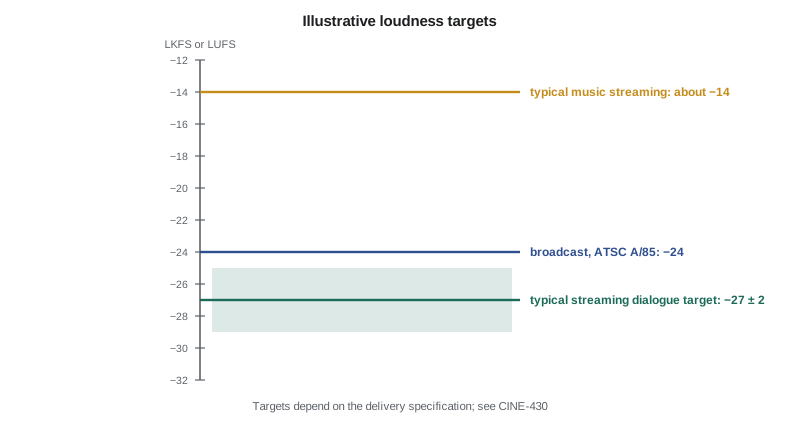
In the United States, the CALM Act requires broadcasters to follow the ATSC A/85 recommended practice for the loudness of commercials, which uses a target of −24 LKFS, and networks commonly apply the same target to programs in their delivery specifications.
Worked problem
Adjusting a mix to a loudness target
A rough mix of a broadcast promo measures −19 LKFS integrated. The delivery specification is −24 LKFS. How much gain change is needed, and roughly how much does that change the signal level?
Show solution
- Difference: \( -24 - (-19) = -5 \) dB, so reduce the overall level by 5 dB.
- A 5 dB reduction lowers the amplitude by a factor of \( 10^{-5/20} \approx 0.56 \).
Answer: Lower the mix by 5 dB, reducing amplitude to about 56 percent. In practice the mixer also checks true peak limits and dialogue level, since a simple gain change may not satisfy every part of the specification.
Music rights
Every piece of music in a finished film must be cleared. For an existing song, that usually means two licenses: a synchronization license from the publisher for the composition, and a master use license from the record label for the specific recording. Library music is licensed under the library's terms. Original score is commissioned from a composer under contract. Performing rights organizations collect royalties when the finished film is broadcast or performed publicly, using cue sheets that list every piece of music, its duration and its use.
In the United States, performing rights organizations such as ASCAP and BMI collect public performance royalties for composers and publishers, and productions file music cue sheets so that broadcasts can be matched to the music used.
Worked problem
Building a music cue sheet entry
A source cue begins at 00:41:12:08 and ends at 00:42:03:20 in a 24 fps film. How long is it, rounded to the nearest second, for the cue sheet?
Show solution
- Start in frames from 00:41:00:00: \( 12 \times 24 + 8 = 296 \).
- End in frames from 00:41:00:00: \( 63 \times 24 + 20 = 1\,532 \), since 42:03 is 63 seconds past 41:00.
- Duration: \( 1\,532 - 296 = 1\,236 \) frames, or \( 1\,236 / 24 = 51.5 \) seconds.
Answer: About 52 seconds, recorded as 0:52 on the cue sheet, along with the title, composer, publisher and type of use, such as background or visual vocal. Picture editors help by keeping accurate music logs.
Rates for music licenses are negotiated and vary enormously with fame, use and territory, so budgets should never assume a song is affordable until it is cleared.
Preparing for the sound handover
When picture is locked, or close to locked, the editor or assistant prepares a turnover for the sound team. This usually includes an AAF or OMF file containing the audio clips and their positions with handles, a reference video with burned-in timecode, the guide mix, and lists of temp music and effects. Lesson 11 covers turnovers in detail. A clean, well-organized timeline makes the sound team's job faster and the final film better.
- Remove unused and muted clips, or move them to clearly labeled tracks.
- Check that every dialogue clip is linked to its original multitrack audio.
- Export with handles, often several seconds, so editors can extend sounds.
- Include a guide mix so the sound team hears what the editor intended.
Silence and restraint
Some of the most powerful sound choices are subtractions. Removing music from a scene the audience expects to be scored can make it feel raw and real. Dropping ambience to near silence at a moment of shock can make the audience lean in. Picture editors often find that temp music added early in a project is doing work the scene could do alone, and that removing it lets the performances breathe. A useful exercise is to watch a scene with the temp music muted and ask whether the music is adding emotion or replacing it.
Communicating with the sound team
Before the turnover, many editors hold a spotting session with the supervising sound editor and composer, watching the film together and discussing what each scene needs. The editor explains the intent behind temp effects and music, flags lines that may need ADR and points out moments where silence or a particular sound is important to the story. Notes from this session guide the sound team's work and reduce misunderstandings later.
Common mistakes
MistakeLeaving production audio unbalanced in screenings
InsteadBuild a rough mix with fill, temp effects and levels before showing a cut
MistakeSlipping sound and picture separately
InsteadKeep clips locked in sync and check offset indicators
MistakeFalling in love with temp music
InsteadDiscuss temp music's role early and keep a cue list for the composer
MistakeAssuming a song is cleared because it is easy to find
InsteadClear sync and master licenses before relying on any track
MistakeIgnoring loudness until delivery
InsteadKnow the delivery target and keep rough levels sensible throughout
Summary and key terms
- Picture editors build the first soundtrack that shapes every screening.
- Organize audio into dialogue, effects, ambience and music tracks.
- Viewers notice sync errors of around one frame early or three frames late.
- Sound bridges and silence are strong transitional tools.
- Temp effects and music help screenings but carry the risk of temp love.
- Broadcast loudness commonly targets −24 LKFS, and many streaming specifications use about −27 LKFS on dialogue.
- Songs usually need sync and master licenses, and cue sheets support performance royalties.
- DME
- Dialogue, music and effects, the main categories of a soundtrack
- Sync
- Alignment of sound and picture
- Sound bridge
- Sound that carries across a cut between scenes
- Temp music
- Temporary music used during editing
- Temp love
- Attachment to temp music that makes the final score harder to accept
- LKFS
- Loudness, K-weighted, relative to full scale; equivalent to LUFS
- Synchronization license
- Permission from a publisher to use a composition with picture
- Master use license
- Permission from a label to use a specific recording
- Cue sheet
- A list of music used in a production with durations and uses
- AAF
- A file format for exchanging timelines and media references between systems
Practice problems
Work each problem on paper first, then reveal the answer to check.
How many audio samples are in one frame at 30 fps with 48 kHz audio?
Show answer
1,600 samples.
How long is one frame at 25 fps in milliseconds?
Show answer
40 ms.
A mix measures −21 LKFS; the target is −24. What change is needed?
Show answer
Reduce the level by 3 dB.
Which licenses does an existing song usually need?
Show answer
A sync license for the composition and a master use license for the recording.
What does a J-cut do at a scene transition?
Show answer
Brings the next scene's sound in before its picture.
How far does 24 fps audio drift against 23.976 picture in 30 minutes?
Show answer
About 1.8 seconds.
Why keep temp music at a modest level?
Show answer
So it supports dialogue rather than covering it.
What is a cue sheet used for?
Show answer
Matching music use to performance royalties and documenting clearances.
Why is early sound more noticeable than late sound?
Show answer
In nature sound never arrives before light, so early sound feels wrong.
A cue runs from 00:10:00:00 to 00:10:45:12 at 24 fps. How long is it?
Show answer
45.5 seconds.
Lesson quiz · 5 questions
Score 60% or more to complete this lesson.
Create a free account to save your progress, take quizzes and earn a certificate.