
DCT-110 · Lesson 9 of 12 · 20 min
Physical security and access
Getting into Hall A for the first time takes Jamal longer than he expects. He shows his photo identification to the officer at the gatehouse, badges through the vehicle gate, badges again at the building entrance, passes through a turnstile, then steps into a small glass booth that will not open its inner door until he has badged and placed his hand on a palm reader. A camera watches each step. Ike Adeyemi, the security supervisor, explains that every customer in the building trusts Stonebridge to keep strangers away from its equipment, and that most of what looks like inconvenience is the price of that trust. This lesson explains how physical security in a data center works and what it asks of every person who works there.
Why physical security matters
Most attacks on computer systems come over the network, but a person who can touch a server can do things no firewall stops: plug in a device that copies data, remove a drive, pull a cable, power off a system or install hidden hardware. A person in the wrong place can also simply make a mistake, such as unplugging the wrong cable, that takes down a customer. Colocation customers often store the most sensitive data they have in the building: payment records, health information, government systems. Their auditors check the data center's security as carefully as their own, and the data center's contracts promise specific controls.
Physical security therefore has two goals: keep out everyone who has no business inside, and make sure that those who are inside can reach only the spaces and equipment they are authorized for, with a record of where they went.
Layers of security
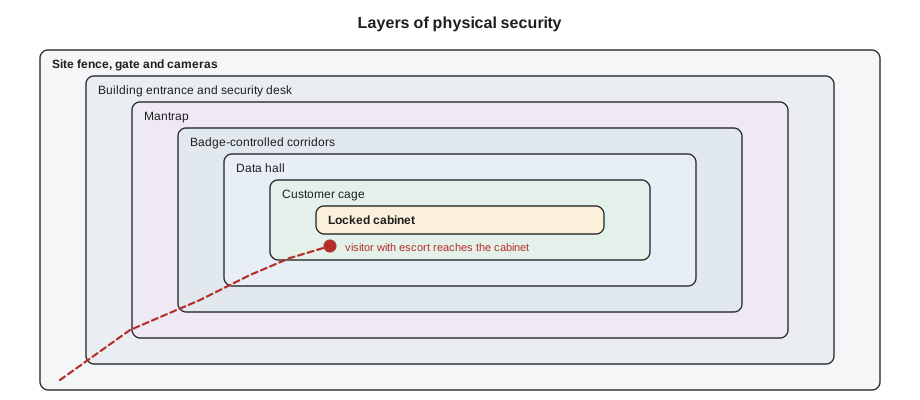
Data centers use defense in depth: several layers, each of which has to be passed, so that the failure of one layer does not leave the equipment open. From the outside in, the layers at Stonebridge are:
- Site perimeter: fencing, anti-ram barriers at the vehicle entrances, gates, lighting and cameras covering the whole fence line.
- Gatehouse and vehicle control: an officer checks every visitor and every delivery against the day's list before the gate opens.
- Building entrance: a reception and security desk, staffed around the clock, where identities are checked and badges issued.
- Mantrap or security portal: a small enclosed space with two doors that cannot both be open at once, so only one authorized person passes at a time. Many use a weight sensor or camera to detect a second person.
- Interior zones: badge readers, often with a second factor such as a PIN or biometric, on doors between corridors, halls and support rooms.
- Cage or suite: the customer's own locked enclosure, sometimes with its own reader and camera.
- Cabinet: a locked rack, with keys, combination locks or electronic locks controlled by the customer.
Identity, badges and biometrics
Every person who enters is identified, and their access is limited to what they need. Access control systems use one or more factors:
- Something you have: an access badge or card.
- Something you know: a PIN entered at the reader.
- Something you are: a biometric, such as a fingerprint, palm vein pattern, hand geometry or face.
Using two factors at sensitive doors means a lost or stolen badge alone does not open them. Badges are personal and must never be lent. Access lists are reviewed regularly, and access is removed the moment a person leaves the company or a customer's authorization ends. Customer access is managed by the customer's own authorized administrator, who tells the data center which of its people may enter which spaces.
Many sites also use anti-passback, which refuses a badge that is presented at an entry reader twice without having been used at an exit reader in between. That stops one person from passing their badge back through a door to a second person.
Tailgating and piggybacking
The most common way layers are defeated is not technical at all. Tailgating is when an unauthorized person follows an authorized person through a door before it closes. Piggybacking is the same thing done with the authorized person's consent, often out of politeness: holding the door for someone carrying a box. In a data center both are forbidden, whatever the reason. Every person badges through every controlled door for themselves, and an authorized person who sees someone trying to follow them stops and directs them to security, politely and firmly.
Ike tells new staff that the people most likely to try tailgating are not criminals but colleagues in a hurry, delivery drivers with their hands full and contractors who have forgotten their badge in the truck. All of them are turned back the same way. Security staff test this regularly, and passing the test is part of every technician's evaluation.
Visitors, contractors and escorts
Not everyone who works in the building has a permanent badge. Visitors, contractors, carrier engineers and customers without standing access are registered in advance by an authorized contact. At arrival they show government identification, sign in, receive a visitor badge that is clearly different from staff badges, and are escorted for their whole visit. An escort stays with the visitor, keeps them to the spaces their work requires and signs them out at the end. Escort rules usually limit how many visitors one escort may take, often to a small number such as two or three, and forbid leaving a visitor alone even for a moment.
Contractors who work on the building systems, such as electricians and cooling technicians, often have their own longer-term badges after background checks, but work only under the site's permits and procedures, described in Lesson 11.
Cameras, logs and alarms
Video cameras cover the perimeter, entrances, corridors, hall aisles and cage doors. Recordings are kept for a period set by policy and contract, often ninety days or more, so that any incident can be reviewed. Every badge swipe, door opening and alarm is logged. A door held open too long raises a door-held alarm; a door forced open without a valid badge raises a forced-door alarm; both bring a security officer at once. The security operations center watches the cameras and alarms around the clock and works closely with the network operations center that watches the building systems.
Technicians help by keeping doors closed, reporting any door that does not latch, wearing their badge visibly at all times and challenging, politely, anyone in a controlled space without a visible badge.
Equipment and media
Security covers things as well as people. Equipment coming in is checked against the customer's delivery notice and logged. Equipment going out needs an authorized removal request from the customer; an officer checks the serial numbers against it before anything leaves. Storage media, drives that may hold customer data, follow the strictest rules: a failed drive removed from a server stays in the customer's custody or goes into a locked bin for certified destruction, with a chain-of-custody record of every hand it passes through. Many customers require their drives to be destroyed on site and never leave the building intact.
Photography is also controlled. Most sites forbid photos in the white space without permission, because a photo can show a customer's equipment, labels and layout. When a ticket requires a photo, for example to show a customer a status light, the technician takes only what the ticket asks for, of that customer's equipment only, and sends it through the ticket system.
Audits and standards
Customers and their auditors expect data centers to hold independent certifications that cover physical security, among other controls. Common ones are SOC 2 reports, ISO/IEC 27001 certification, and, for sites that host payment card systems, compliance with the PCI DSS standard. Each audit checks that the site's written controls exist and that they are followed: access reviews, visitor logs, camera retention, escort records and media handling. For a technician this means that the paperwork is not optional. A visitor who was not signed out, or a drive that was not logged, is an audit finding.
# Find entries in a badge log that have no matching exit (possible tailgating or a missed exit)
log = [  # time, person, door, direction
    ("06:58", "J. Pierce", "Hall A", "in"), ("07:40", "J. Pierce", "Hall A", "out"),
    ("08:05", "R. Kerr", "Hall A", "in"), ("08:06", "Visitor 214", "Hall A", "in"),
    ("09:12", "R. Kerr", "Hall A", "out"), ("09:30", "J. Pierce", "Hall A", "in"),
    ("09:31", "J. Pierce", "Hall A", "in"), ("10:15", "Contractor 77", "Hall B", "in"),
    ("11:02", "Contractor 77", "Hall B", "out"),
]
inside = {}
flags = []
for t, who, door, way in log:
    key = (who, door)
    if way == "in":
        if inside.get(key):
            flags.append(f"{t}  {who:13s} badged in to {door} twice without exiting (anti-passback)")
        inside[key] = True
    else:
        inside[key] = False
for (who, door), still in inside.items():
    if still:
        flags.append(f"end   {who:13s} still shown inside {door}")
for f in flags:
print(f)09:31 J. Pierce badged in to Hall A twice without exiting (anti-passback) end J. Pierce still shown inside Hall A end Visitor 214 still shown inside Hall A
The flags do not prove anything by themselves: Visitor 214 may have left with Roz through a door without an exit reader, and Jamal's double entry may be a faulty reader. But each one is checked, because each could also be a real breach. Security teams review such reports daily.
Worked problem
A door held open
Late on a night shift, Jamal is carrying four boxes of blanking panels from the storeroom to Hall C. The hall door is heavy, his hands are full, and a contractor walking behind him offers to hold the door and follow him in.
Show solution
- Stop at the door and put the boxes down on the corridor side.
- Thank the contractor and ask him to badge in for himself if he has access to Hall C.
- The contractor's badge is not valid for Hall C; his work is in Hall B. Jamal directs him to security to check his work permit.
- Badge in alone, prop nothing, and carry the boxes in two trips, or call for a cart.
Answer: It takes three extra minutes. Holding the door would have let an unauthorized person into a customer hall and would have been logged as a door-held alarm, with Jamal's badge on it.
Customer access and the access list
Each customer names one or more access administrators. Only they can ask the site to add a person to the customer's access list, remove one, or register a visitor for the customer's space. The list states which spaces each person may enter: the lobby and corridors, a particular hall, the customer's cage. Some customers add their own controls, such as a second lock on the cage door that only their staff can open, or a rule that their cabinets are opened only with two of their people present.
When a customer's employee arrives, security checks government identification against the list, issues or activates the badge and records the visit. If the person is not on the list, they wait in the lobby while security contacts the customer's administrator. Technicians follow the same principle in tickets: a request is acted on only if it comes from someone the customer has authorized for that kind of request.
Security during emergencies
Security and safety sometimes pull in different directions. In a fire alarm or an evacuation, life safety comes first: doors on exit routes release, and everyone leaves by the nearest exit without stopping to badge out. Security officers then account for every person on the site using the badge records and visitor log, which is one more reason visitors must always be signed in and escorted. Once the building is safe, security checks that every door is secured again before normal work resumes.
Technicians learn the evacuation routes and assembly points for every space they work in, and take their visitors with them.
Security staff also run regular drills and tests: a stranger trying a side door, a caller claiming to be a customer, a delivery with paperwork that does not match. The results are reviewed with every shift, and the habits they test are the same ones in this lesson: identify, verify, escort and record.
Common mistakes
MistakeHolding a door for someone behind you.
InsteadEveryone badges through every controlled door for themselves.
MistakeLending your badge to a colleague who forgot theirs.
InsteadBadges are personal; send the colleague to security for a temporary badge.
MistakeLeaving a visitor alone for a minute.
InsteadAn escort stays with the visitor for the entire visit.
MistakeTaking photos in the white space for your own records.
InsteadTake photos only when a ticket requires it, of the customer's equipment only, and send them through the ticket system.
MistakePutting a failed drive in a toolbag to deal with later.
InsteadFollow the media chain of custody immediately: customer custody or the locked destruction bin, logged.
Summary and key terms
- Physical access to equipment allows attacks and mistakes that network security cannot stop.
- Defense in depth uses layers from the fence to the locked cabinet.
- Sensitive doors use two factors, such as a badge and a biometric or PIN; badges are personal.
- Tailgating and piggybacking are forbidden; everyone badges through every door alone.
- Visitors are registered in advance, identified, badged and escorted for the whole visit.
- Equipment, media and photos are controlled, logged and audited.
- Layered security
- Defense in depth: several security layers, so that one failure does not leave assets exposed.
- Mantrap
- An enclosed entry with two doors that cannot both be open, admitting one person at a time.
- Tailgating
- An unauthorized person following an authorized one through a door.
- Anti-passback
- A control that refuses a badge used twice at an entry without an exit in between.
- Escort
- An authorized person who stays with a visitor throughout their visit.
- Chain of custody
- A record of everyone who handles an item such as a storage drive.
Practice problems
Work each problem on paper first, then reveal the answer to check.
What is the difference between tailgating and piggybacking?
Show answer
Tailgating is without the authorized person's consent; piggybacking is with it. Both are forbidden.
Name the three kinds of factor used for authentication.
Show answer
Something you have, something you know and something you are.
What must happen before equipment leaves the building?
Show answer
An authorized removal request from the customer, checked against the serial numbers.
Why is photography controlled in the white space?
Show answer
Photos can reveal customers' equipment, labels and layout.
Lesson quiz · 5 questions
Score 60% or more to complete this lesson.
Create a free account to save your progress, take quizzes and earn a certificate.