
DCT-110 · Lesson 7 of 12 · 20 min
Network and connectivity at a glance
Power and cooling keep the servers alive, but a server that cannot talk to anything is useless. Connectivity is the third essential service of a data center, and for many colocation customers it is the main reason they chose the building. In this lesson Jamal follows a fiber from the street to a customer's server, learns the names of the network equipment he will see every day and learns why technicians handle cabling with such care. The details of switching, routing and fiber work belong to later courses; here the goal is to know what is where and why.
Getting connected to the world
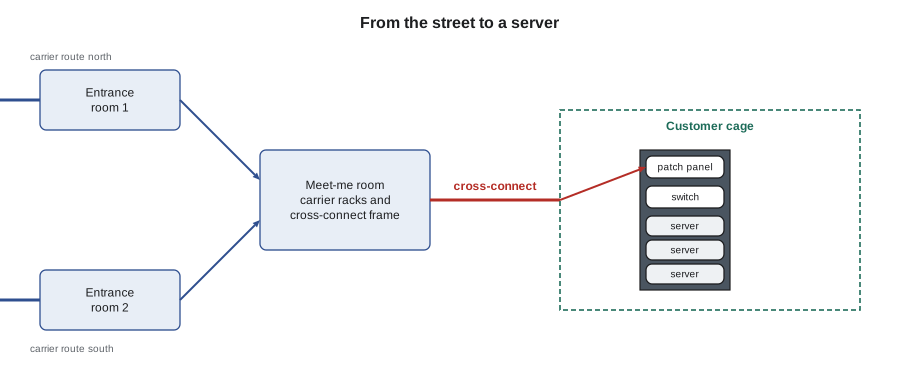
Data centers connect to the outside world through fiber optic cables owned by carriers: telephone companies, cable companies, long-distance fiber networks and specialist data center network providers. The cables run in underground conduit along roads and rail lines and enter the building through the entrance rooms described in Lesson 4. A well-connected site has fiber from many carriers, arriving by different routes from different directions, so that a backhoe cutting one duct does not isolate it. This is called route diversity, and customers ask about it as carefully as they ask about power.
IAD-3 has two entrance rooms, one on the north side of the campus and one on the south, fed by more than twenty carriers along three corridors. Northern Virginia grew as a data center market partly because some of the earliest internet exchange points were built nearby, and fiber routes from all over the continent and from the transatlantic cables landing on the Virginia coast meet there.
The meet-me room and cross-connects
In a colocation building, carriers place their equipment in the meet-me room. A customer that wants to buy service from a carrier orders a cross-connect: the provider installs a fiber or copper cable from the carrier's panel in the meet-me room to the customer's panel in its cage. Once the cross-connect is in place and tested, the carrier turns up service over it. Cross-connects also link customers to each other, to cloud on-ramps and to internet exchange ports.
Each cross-connect has a circuit identifier and is recorded in the site's database with both ends: panel, position and port. Technicians install them to a work order, label both ends, test the light level or continuity and close the order with the results. Removing the wrong cross-connect can cut a customer off from a carrier, so removals are checked against the database and the labels at both ends before anything is unplugged. Lesson 11 shows how such a job runs from ticket to closure.
Network equipment in the racks
Inside each customer cage and each cloud hall, the network looks broadly the same. At the top of most racks is a patch panel where the structured cabling from the row terminates. Below or beside it sits a switch, often called a top-of-rack switch, that connects all the servers in that rack. The top-of-rack switches connect upward to larger switches that serve the row or the hall, often arranged in a design called leaf and spine: every leaf switch in the racks connects to every spine switch, so that any server can reach any other in two hops. At the edge of the network, routers connect it to the carriers and the internet. Firewalls and load balancers sit between the outside world and the servers.
- Patch panel: a passive panel of ports where permanent cables terminate and short patch cords make connections.
- Switch: an active device that connects servers and forwards traffic between them.
- Router: an active device that connects networks together and to the outside world.
- Transceiver: a small plug-in module that converts electrical signals to light for a fiber port; its type must match the fiber and the far end.
- Patch cord: a short cable with connectors at both ends, copper or fiber.
Many servers also have a separate management port, connected to a separate management network. Through it, customers and operators can reach the server's remote management controller, see its health, power it on and off and watch its console, even when the server's main network is down. Much of what remote hands requests ask technicians to do, such as checking a status light, is needed only when this management access has failed too.
Copper and fiber
Two kinds of media carry data in a data center. Copper twisted-pair cable, the familiar Ethernet cable with RJ45 connectors, is used for short links of up to 100 m (328 ft), mostly from servers to top-of-rack switches and for management networks. Fiber optic cable carries light through glass strands and is used for longer links and for the highest speeds. Data centers use both singlemode fiber, with a very small core, for long distances and most new high-speed links, and multimode fiber, with a larger core, for shorter links. Connectors include the LC, a small duplex connector, and the MPO, a multi-fiber connector holding 8, 12, 16 or 24 fibers in one ferrule, which is used for the high-speed links of AI clusters. The details of both belong to later courses on structured cabling and fiber.
Fiber is fragile in ways copper is not. A fiber bent too tightly loses light and can crack. A speck of dust on a connector end face can block enough light to cause errors or damage the connector it is mated to. The rules technicians learn first are to keep dust caps on unused connectors, to inspect and clean every fiber connector before mating it, and never to look into the end of a fiber or a transceiver, because some carry invisible laser light.
Cable management
A data hall carries tens of thousands of cables. Good cable management keeps them organized, labeled, supported and out of the airflow, so that anyone can find, trace and change a connection without disturbing the others. Poor cable management, sometimes called spaghetti, blocks airflow, hides labels, strains connectors and makes every change risky. The basic rules are:
- Every cable is labeled at both ends with an identifier that matches the records.
- Cables are routed in trays, managers and lacing bars, not draped across equipment or the fronts of other servers.
- Hook-and-loop straps hold bundles; tight plastic cable ties crush cables and are not used on data cabling.
- Each cable is the right length, with neat service loops, not coils of spare cable stuffed into the rack.
- Power and data cables are kept apart, usually on opposite sides of the rack.
- Nothing blocks the fronts or backs of servers where air enters and leaves.
Customers inspect their cages and judge a provider partly by the state of its cabling. Roz judges new technicians the same way.
How much room a network needs
Network equipment and cabling take space that cannot be used for servers. Every hall has racks set aside for network distribution, rows of patch panels and room for trays overhead. When planners decide how many server racks fit in a hall, they subtract the space for aisles, cooling units, network racks and clearances first. The example below shows how quickly the count falls from the naive figure.
# How many server racks fit in a hall?
hall_area = 12900          # usable hall floor, ft2
rack_footprint = 7.75       # one 24 x 48 in cabinet, ft2
gross_factor = 2.6          # aisles, clearances and access, typical for air-cooled rows
cooling_units = 12
cooling_area_each = 97  # ft2 each including service space
network_racks = 24
naive = hall_area / rack_footprint
usable = hall_area - cooling_units * cooling_area_each
positions = usable / (rack_footprint * gross_factor)
server_racks = int(positions) - network_racks
print(f"Naive count (wall-to-wall racks): {naive:.0f}")
print(f"Floor left after cooling units  : {usable:,.0f} ft2")
print(f"Rack positions after aisles     : {positions:.0f}")
print(f"Server racks after network racks: {server_racks}")Naive count (wall-to-wall racks): 1665 Floor left after cooling units : 11,736 ft2 Rack positions after aisles : 582 Server racks after network racks: 558
The naive count assumes racks could cover the whole floor. Once aisles, cooling units and network racks are counted, the hall holds about a third as many server racks. That is the hall area per rack figure from Lesson 4 seen from the other side.
Latency: why distance matters
Light in fiber travels at about two thirds of its speed in a vacuum, roughly 124,000 miles a second, or 8 microseconds per mile. That sounds instantaneous, but for some applications every millisecond counts. Trading systems want to be as close as possible to an exchange; online games and video calls want to be close to their users; AI clusters want every processor as close as possible to every other. Inside a building, the cable length between servers in the same AI cluster is planned so that every link stays within the reach of its transceivers and within the timing the cluster expects. Between buildings and cities, latency is one reason data centers cluster in a few well-connected markets and edge sites exist at all.
# Round-trip time over glass for some distances (light in glass, about 5 microseconds per km)
routes = [("Hall D to Hall A, same campus", 1), ("Campus to Reston carrier hotel", 16), ("Campus to New York", 280), ("Campus to Chicago", 680), ("Campus to Los Angeles", 2700)]
for name, dist in routes:
    km = dist * 1.609
    rtt_ms = 2 * km * 5 / 1000
print(f"{name:34s} {dist:6,d} mi round trip about {rtt_ms:5.2f} ms")Hall D to Hall A, same campus 1 mi round trip about 0.02 ms Campus to Reston carrier hotel 16 mi round trip about 0.26 ms Campus to New York 280 mi round trip about 4.51 ms Campus to Chicago 680 mi round trip about 10.94 ms Campus to Los Angeles 2,700 mi round trip about 43.44 ms
Real routes are longer than straight lines and add equipment delay, but the arithmetic shows why the physical route of a fiber matters to customers and why carriers advertise their latency.
The technician's network work
On the network side, a data center technician's typical tasks include installing and labeling patch cords and cross-connects, cleaning and inspecting fiber connectors, testing links with light meters or cable testers, seating transceivers, reading port and status lights for a customer, tracing a cable to confirm where it goes, and moving connections when a customer asks. Configuring switches and routers is usually the customer's or a network engineer's job. A technician may connect a laptop to a console port at a customer's request, but only under a ticket and following the customer's instructions exactly.
Worked problem
Tracing an unlabeled cable
During an audit of a customer cage, Jamal finds a fiber patch cord with no label running from the customer's top-of-rack switch out of the cage into the overhead tray. The customer's ticket asks him to identify where it goes.
Show solution
- Do not unplug it. An unlabeled cable may still be carrying live traffic.
- Note the switch name and port, take a photo, and check the cross-connect database for any circuit assigned to that cage and port.
- The database shows cross-connect XC-41877 from the customer's panel position 14 to a carrier panel in the meet-me room. The patch cord at panel position 14 runs to this switch port.
- Report the result in the ticket, and with the customer's approval label both ends of the patch cord with the cross-connect identifier.
Answer: Tracing by records and labels, rather than by pulling cables to see what happens, finds the answer without any risk of an outage.
Labels and records
Every connection in the building exists twice: once as a physical cable and once as a record. The record shows each end of the cable, the panel and port, the circuit or cross-connect identifier, the customer and the date it was installed. Labels on the cable and the panel carry the same identifier. When the two agree, any technician can find and change a connection safely. When they disagree, the record wins only after it has been checked, because a cable moved without updating the record is a trap for the next person. Technicians update the record in the same ticket as the physical work, never later.
Audits compare the records with the floor. A cage audit lists every cable leaving the cage and checks it against the cross-connect database. Cables that match no record are traced, as in this lesson's example, and either recorded or removed with the customer's agreement.
Common mistakes
MistakeLooking into a fiber connector or transceiver port.
InsteadNever look into fiber ends or ports; some carry invisible laser light.
MistakeMating a fiber connector without inspecting it.
InsteadInspect and clean every connector before mating.
MistakeUsing tight plastic cable ties on data cable.
InsteadUse hook-and-loop straps that do not crush cables.
MistakeUnplugging an unlabeled cable to find out what it does.
InsteadTrace it with records and labels; it may carry live traffic.
MistakeRemoving a cross-connect from its label at one end only.
InsteadCheck the database and the labels at both ends before removal.
Summary and key terms
- Carrier fiber enters through entrance rooms by diverse routes; route diversity protects the site from single cuts.
- In colocation, carriers sit in the meet-me room and cross-connects link them to customers.
- Racks typically hold a patch panel and a top-of-rack switch; leaf and spine networks connect the hall.
- Copper serves short links; singlemode and multimode fiber serve longer and faster links, with LC and MPO connectors.
- Labeled, supported, tidy cabling is essential for safe changes and good airflow.
- Light in fiber travels about 8 microseconds per mile, so distance adds latency.
- Route diversity
- Carrier fiber arriving by physically separate paths.
- Top-of-rack switch
- A switch in each rack connecting its servers.
- Leaf and spine
- A network design in which every leaf switch connects to every spine switch.
- Transceiver
- A plug-in module that converts electrical signals to light for a fiber port.
- MPO connector
- A connector holding many fibers in one ferrule.
- Latency
- The time it takes data to travel between two points.
Practice problems
Work each problem on paper first, then reveal the answer to check.
Why does a site want carrier fiber from several directions?
Show answer
So that a single cut or damaged duct does not isolate it.
What is a cross-connect used for?
Show answer
To link a customer's equipment to a carrier, another customer, a cloud on-ramp or an exchange.
What should you do before mating a fiber connector?
Show answer
Inspect and clean it.
About how long does light take to cross 60 miles of fiber?
Show answer
About 0.5 ms one way, 1 ms round trip.
Lesson quiz · 5 questions
Score 60% or more to complete this lesson.
Create a free account to save your progress, take quizzes and earn a certificate.