
CSCO-121 · Lesson 5 of 12 · 23 min
Social engineering and phishing
▶ Video coming soon A video version of this lesson is on the way.
At 9:40 on the morning of November 3, 2026, the receptionist at Prairie Paws Veterinary Clinic forwarded an email to the Brightline help desk with one line: "Is this real?" The email appeared to come from the clinic's veterinary supply company. It said an invoice was overdue and asked her to open an attached file and sign in to confirm the amount. Jordan opened ticket BL-25102 and walked the email over to Keisha. It took her about 20 seconds to point out four warning signs. The receptionist had done exactly the right thing: she had stopped, doubted and reported.
Social engineering is the manipulation of people into doing something that helps an attacker: revealing a password, opening a file, sending money, or letting someone into a building. It works because it targets human nature rather than technology, and it is involved in a large share of real incidents. Phishing, social engineering by email or message, is the most common way attacks begin. This lesson describes the main techniques, the psychology behind them, the signs that help people recognize them, and the technical and procedural controls that reduce the damage.
Why social engineering works
Social engineers use the same levers that legitimate persuasion uses, but for harm. Authority makes people comply with someone who appears to be a manager, a police officer or the IT department. Urgency pushes people to act before they think: an account will be closed today, a payment is overdue, a package will be returned. Fear and intimidation threaten consequences. Scarcity offers something that will soon be gone. Familiarity and liking build rapport, sometimes over several messages. Social proof suggests that everyone else has already done it. Helpfulness exploits the fact that most people want to help a caller who seems to be in trouble.
The invoice email at Prairie Paws used authority, because it seemed to come from a known supplier; urgency, because the invoice was overdue; and fear, because it hinted that the clinic's account would be suspended. Keisha told Jordan that recognizing the lever is often easier than spotting the technical tricks. When a message makes you feel rushed or anxious and asks you to click, sign in, pay or share, that feeling itself is the first warning sign.
Kinds of social engineering
| Technique | Channel | What it looks like |
|---|---|---|
| Phishing | Mass messages that imitate a brand and link to a fake sign-in page or carry a harmful attachment | |
| Spear phishing | A message tailored to one person or team, using names and details from public sources | |
| Whaling | Spear phishing aimed at senior people such as owners, partners or executives | |
| Business email compromise | A real or lookalike account of a manager or supplier asks for a payment or a change of bank details | |
| Smishing | Text message | A text about a parcel, a bank or a prize with a link |
| Vishing | Phone | A caller claims to be from a bank, a government agency or IT support |
| Pretexting | Any | An invented scenario that gives the attacker a reason to ask for information |
| Baiting | Physical or online | A free download or a USB stick left where someone will find and plug it in |
| Tailgating | In person | Following an authorized person through a secured door |
| Quid pro quo | Phone or chat | Offering help, such as fake tech support, in exchange for access |
| Watering hole | Web | Compromising a website the target group is known to visit |
Newer variations use artificial intelligence. Attackers can now write fluent, error-free messages in any language, which removes the spelling mistakes that once gave phishing away. Voice cloning lets a caller sound like a known manager, and video deepfakes have been used to impersonate executives on calls. These developments make procedures more important than ever: if a payment or a password reset is confirmed through a separate, trusted channel, a convincing voice is not enough.
Business email compromise deserves special attention because the losses are large and the messages often contain no link or attachment at all. The attacker may break into a real supplier's mailbox and reply within an existing conversation, or register a domain that differs from the real one by a single letter. The request is usually simple: please update our bank details, or please send this urgent wire before the end of the day. The bakery's near miss in September, described in lesson 2, was this kind of attack. The defense is a payment-change procedure that requires confirmation by phone using a number already on file, never one given in the email.
Recognizing phishing
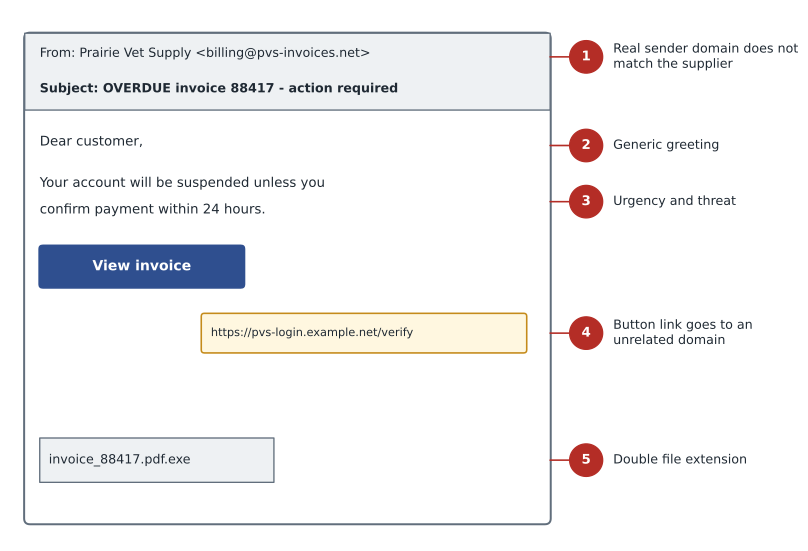
Keisha's four warning signs in the Prairie Paws email were typical. The display name said the supplier's name, but the actual address came from an unrelated domain. The greeting was generic. The message demanded action within 24 hours. And the button, when Jordan hovered over it without clicking, pointed to a web address that had nothing to do with the supplier. Other common signs include attachments with unusual or double file extensions, requests to enable macros, messages that ask you to sign in to read a document, and unexpected requests for gift cards or payment.
A key skill is reading web addresses. The part that matters is the registered domain just before the first single slash, read from the right. In an address such as supplies.example.com.billing-check.net/login, the domain is billing-check.net, not example.com. Lookalike domains swap letters that look alike, such as rn for m, add words like secure or support, or use a different ending. Shortened links and QR codes hide the destination altogether, so they deserve extra caution.
from urllib.parse import urlsplit
links = ["https://portal.prairievetsupply.ca/invoices/8841",
         "https://prairievetsupply.ca.invoice-review.net/login",
         "https://prairievetsuppIy.ca/pay"]
trusted = "prairievetsupply.ca"
for link in links:
    host = urlsplit(link).hostname
    ok = host == trusted or host.endswith("." + trusted)
print(f"{host:<42} {'matches' if ok else 'DOES NOT MATCH'} {trusted}")portal.prairievetsupply.ca matches prairievetsupply.ca prairievetsupply.ca.invoice-review.net DOES NOT MATCH prairievetsupply.ca prairievetsuppiy.ca DOES NOT MATCH prairievetsupply.ca
The program checks whether each link's host name really belongs to the trusted domain. The second link starts with the supplier's name but actually belongs to invoice-review.net. The third uses a capital I in place of a lowercase l, which looks almost identical in many fonts. Mail security tools apply this kind of check automatically, along with many others, but people still need to recognize the pattern.
Technical controls
Email authentication standards help receiving servers detect forged senders. SPF, the Sender Policy Framework, lets a domain publish a list of servers allowed to send its mail. DKIM, DomainKeys Identified Mail, adds a digital signature to outgoing messages so that receivers can check that a message really came from the domain and was not altered. DMARC, Domain-based Message Authentication, Reporting and Conformance, tells receivers what to do when a message fails those checks, such as reject it or send it to quarantine, and sends reports back to the domain owner. Together they make it much harder to send mail that pretends to come from a protected domain, although they do nothing against lookalike domains.
Other technical controls include mail filters that scan links and attachments and hold suspicious messages; banners that mark messages from outside the organization; web filtering that blocks known phishing sites; sandboxing that opens attachments in an isolated environment to see what they do; and, most importantly, multi-factor authentication, so that a password typed into a fake page is not enough to sign in. Phishing-resistant methods, such as security keys and passkeys, go further because they will not work on a lookalike site at all. Lesson 10 covers these.
Procedures and people
Technology catches most phishing but never all of it, so procedures and people form the last layer. Staff need to know what to look for, and they need a quick, blame-free way to report. Brightline gives every client a report button in their mail program that sends the message straight to the help desk. Keisha emphasizes that reporting a message that turns out to be safe is a success, not a waste of time, and that someone who clicks and then reports quickly has helped rather than failed. Early reports let the team block a campaign before others are caught.
Procedures close the gaps that attackers rely on. Payment details are changed only after confirmation through a known phone number. The help desk verifies a caller's identity before resetting a password, using a method the attacker is unlikely to know. Visitors sign in and are escorted. Doors are not held open for people without badges. Unknown USB devices go to IT rather than into a computer. Many organizations also run simulated phishing exercises, sending harmless test messages and using the results to target training, though these work best when they are used to teach rather than to shame.
Social engineering in person
Not all social engineering arrives by email. A person in a high-visibility vest carrying a ladder can walk into many offices unchallenged. A caller who says they are from the internet provider and need a technician let into the server cupboard may sound perfectly reasonable. Shoulder surfing, watching someone type a PIN or password, works in reception areas and on buses. Dumpster diving, going through discarded paper, still finds invoices, client names and even printed passwords.
The defenses are mostly habits. Staff should feel comfortable asking a visitor who they are there to see and calling to check, even when the visitor seems confident. Contractors should be expected, logged and escorted. Screens in public areas should face away from visitors or have privacy filters. Paper with personal or client information should be shredded. At Prairie Paws, Keisha suggested a simple sign at the reception desk asking anyone claiming to be from IT to wait while staff call Brightline to confirm, which costs nothing and stops most in-person pretexts.
Measuring awareness
Brightline measures the success of awareness work by the reporting rate as much as the click rate. A client where few people click but nobody reports is in a weaker position than one where a few people click but most report quickly, because early reports let the team block a campaign for everyone. After the November campaign, the clinic's reception staff had the highest reporting rate of any Brightline client, and the receptionist who reported ticket BL-25102 was thanked by name at the next staff meeting.
Worked problem
Handling the Prairie Paws report
The receptionist reported the invoice email before clicking. What should Brightline do with ticket BL-25102?
Show solution
- Thank the receptionist and confirm she did not open the attachment or sign in anywhere.
- Check whether the same message reached other staff at the clinic, or other Brightline clients, and remove copies from mailboxes.
- Block the sending domain and the link's domain in the mail and web filters.
- Record the details in the ticket: time received, sender, subject, link domain and actions taken.
- Share a short alert in the team chat so that other technicians recognize the campaign.
Answer: Because nothing was clicked, this is a near miss rather than an incident. The response is to contain the campaign, record it and learn from it.
Worked problem
Deciding when it becomes an incident
Two days later, a staff member at the same clinic reports that she clicked a similar link and typed her email password on the page it opened. What changes?
Show solution
- This is now a possible account compromise, a security incident.
- Escalate to Keisha immediately and record the time of the sign-in on the fake page.
- Reset the password, end active sessions and check that multi-factor sign-in is enrolled.
- Review the mailbox for new forwarding rules or sent messages the user did not write.
- CSCO-122 covers the full incident response process from here.
Answer: Entering credentials turns a phishing report into an incident. Speed matters, and so do the records.
Common mistakes
MistakeTrusting the display name of a sender.
InsteadCheck the actual address and domain; display names are easy to fake.
MistakeAssuming phishing always has spelling mistakes.
InsteadAI tools let attackers write fluent messages; look for the levers and the links.
MistakeConfirming a payment change by replying to the email.
InsteadConfirm through a separate channel using contact details already on file.
MistakeThinking SPF, DKIM and DMARC stop all phishing.
InsteadThey stop forged sender domains but not lookalike domains or compromised real accounts.
MistakePunishing staff who click.
InsteadBlame discourages reporting; quick reporting limits damage.
Summary and key terms
- Social engineering manipulates people using levers such as authority, urgency, fear and helpfulness.
- Techniques include phishing, spear phishing, whaling, business email compromise, smishing, vishing, pretexting, baiting and tailgating.
- Signs of phishing include mismatched sender domains, urgent demands, links to unrelated domains and unexpected attachments.
- SPF, DKIM and DMARC authenticate sending domains; filters, banners and multi-factor sign-in reduce harm.
- Procedures such as out-of-band payment confirmation and caller verification defeat many attacks.
- A blame-free reporting culture lets teams contain campaigns early.
- Social engineering
- Manipulating people into actions that help an attacker.
- Spear phishing
- Phishing tailored to a specific person or group.
- Business email compromise
- Fraud using a compromised or lookalike email account to request payments or changes.
- Vishing
- Voice phishing by phone.
- Pretexting
- Inventing a scenario to justify a request for information.
- SPF
- A DNS record listing the servers allowed to send mail for a domain.
- DKIM
- A digital signature on email that lets receivers verify the sending domain.
- DMARC
- A policy telling receivers how to handle mail that fails SPF or DKIM checks.
Practice problems
Work each problem on paper first, then reveal the answer to check.
Which persuasion levers did the Prairie Paws email use?
Show answer
Authority, urgency and fear.
In the address shop.example.com.secure-pay.net/login, what is the real domain?
Show answer
secure-pay.net.
What does DMARC add to SPF and DKIM?
Show answer
A policy for handling failures and reports to the domain owner.
How should a change of supplier bank details be confirmed?
Show answer
By phone, using a number already on file.
Why are security keys called phishing-resistant?
Show answer
They will not authenticate to a lookalike site.
What turns a phishing report into an incident?
Show answer
A user opening a harmful file or entering credentials, or another sign of compromise.
Lesson quiz · 5 questions
Score 60% or more to complete this lesson.
Create a free account to save your progress, take quizzes and earn a certificate.