
CSCO-121 · Lesson 10 of 12 · 21 min
Authentication, authorization and accounting
▶ Video coming soon A video version of this lesson is on the way.
Riverside Family Law's managing partner had read about a firm in another city whose email was taken over through a single stolen password, and she asked Brightline what it would take to make sure that could not happen at Riverside. Keisha's answer filled a page, and its first line was in capitals: turn on multi-factor sign-in for everything. The rollout was planned for December 2026, starting with email and the document management system. Jordan's job was to help draft the plan, and that meant learning how identity and access actually work.
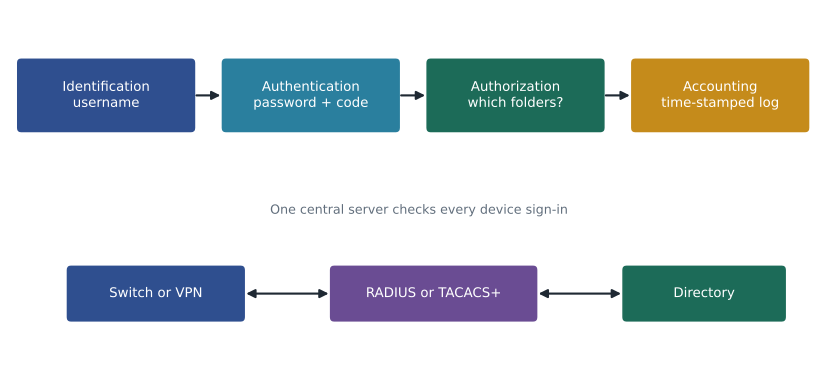
Controlling access to systems involves four steps that are easy to blur together. Identification is claiming an identity, such as typing a username. Authentication is proving that claim, such as entering a password and a code. Authorization is deciding what the authenticated identity may do. Accounting is recording what it actually did. The last three are known together as AAA. This lesson covers each step, the main authorization models, the life cycle of an account, and the RADIUS and TACACS+ protocols that network devices use for AAA.
Authentication factors
Authentication relies on one or more factors, each a different kind of evidence. Something you know is a password, passphrase or PIN. Something you have is a phone running an authenticator app, a hardware security key, a smart card or a badge. Something you are is a biometric trait such as a fingerprint, face or voice. Some systems also use somewhere you are, such as the network or country a request comes from, and something you do, such as typing rhythm. Location and behavior are usually treated as signals for risk-based decisions rather than as factors on their own.
Multi-factor authentication, MFA, requires two or more different kinds of factor. A password plus a code from an authenticator app is two factors: something known and something held. Two passwords are still one factor, because both are something you know. MFA is powerful because an attacker who phishes or guesses a password still lacks the second factor. Studies by major cloud providers have repeatedly found that MFA blocks the large majority of automated account attacks, which is why Keisha put it first.
| Method | Factor | Strength | Watch for |
|---|---|---|---|
| Password or PIN | Know | Weak alone | Reuse, guessing, phishing |
| SMS or voice code | Have (phone number) | Better than nothing | SIM swap, interception, phishing |
| Authenticator app code (TOTP) | Have (phone) | Good | Can still be phished in real time |
| Push approval | Have (phone) | Good with number matching | Push fatigue: users approving prompts they did not start |
| Hardware security key or passkey (FIDO2) | Have, often with know or are | Strongest common choice | Lost keys need a recovery plan |
| Smart card with PIN | Have and know | Strong | Card readers and management |
| Biometric | Are | Convenient, usually unlocks a local key | Cannot be changed if copied; privacy |
Not all MFA is equal. Codes sent by text message can be intercepted or redirected if an attacker persuades a mobile carrier to move the victim's number to a new SIM card. Codes from an app can be phished in real time if an attacker relays them from a fake sign-in page. Push notifications can be abused by sending many prompts until a tired user taps approve, called push fatigue or MFA bombing; requiring the user to type a number shown on the sign-in screen reduces this. Phishing-resistant methods, such as FIDO2 security keys and passkeys, use public key cryptography tied to the real website's address, so they simply will not work on a lookalike site. They are the strongest common choice.
import hmac, hashlib, struct
def totp(secret, unix_time, step=30, digits=6):
    counter = int(unix_time // step)
    mac = hmac.new(secret, struct.pack(">Q", counter), hashlib.sha1).digest()
    offset = mac[-1] & 0x0F
    value = struct.unpack(">I", mac[offset:offset + 4])[0] & 0x7FFFFFFF
    _, code = divmod(value, 10 ** digits)
    return f"{code:0{digits}d}"
secret = b"12345678901234567890"          # the test key from RFC 6238
for t in (59, 1111111109, 1111111111):
print(t, totp(secret, t, digits=8))59 94287082 1111111109 07081804 1111111111 14050471
Authenticator apps compute time-based one-time passwords, TOTP, with the method shown above. The app and the server share a secret key when the user enrolls. Every 30 seconds both compute a keyed hash, called an HMAC, of the current time step and turn it into a short code. Because the server can compute the same code, it can check the user's entry without the code ever having been sent. The test key and times above are the published test values from the TOTP standard, and the outputs match the standard's expected codes.
Passwords done well
Passwords remain part of most sign-ins, so they should be managed well. Current guidance, such as the NIST digital identity guidelines that many organizations follow, favors length over complicated rules. A long passphrase is stronger and easier to remember than a short string of symbols. New passwords should be checked against lists of passwords known from breaches. Forced periodic changes are no longer recommended, because they push people toward predictable patterns; passwords should be changed when there is a reason to think they are compromised. Systems should allow paste so that password managers work, and should limit or slow repeated failed attempts.
Password managers let people use a different long, random password for every service while remembering only one strong master passphrase, protected by MFA. Brightline uses a business password manager for its own staff and its client credentials, with separate vaults for each client so that a technician sees only the clients they support. Default passwords on devices must be changed before the device goes live; many attacks on cameras, routers and printers rely on nobody ever doing so.
Single sign-on and federation
Single sign-on, SSO, lets a user authenticate once with an identity provider and then reach many applications without signing in to each. It improves security as well as convenience: there are fewer passwords to steal, MFA can be enforced in one place, and disabling one account removes access everywhere. Federation extends SSO across organizations, for example letting Riverside staff use their firm accounts to sign in to a cloud document service. Common standards include SAML, used widely for business web applications, and OpenID Connect, built on the OAuth 2.0 authorization framework and common for modern web and mobile apps. OAuth itself is about granting an application limited access to resources on a user's behalf, such as letting a scheduling app read a calendar, without giving it the password.
Authorization models
After authentication, authorization decides what a user may do. Several principles guide it. Least privilege gives each user and process only the access needed for their job, for only as long as needed. Need to know limits access to sensitive information to people whose work requires it, even among people with the same clearance or role. Separation of duties splits critical tasks so that no single person can complete them alone, such as one person entering a supplier payment and another approving it, which would have stopped the bakery's near miss even if the fake email had fooled the first person.
| Model | How access is decided | Example |
|---|---|---|
| Discretionary access control (DAC) | The owner of a resource decides who may use it | A user shares a folder with a colleague |
| Mandatory access control (MAC) | The system enforces labels such as secret or confidential; users cannot override | Government classified systems |
| Role-based access control (RBAC) | Permissions are given to roles, and users are given roles | Veterinarian, receptionist and billing roles at Prairie Paws |
| Attribute-based access control (ABAC) | Rules combine attributes of user, resource and context | Lawyers may open a client file only if assigned to the matter and on a firm device |
| Rule-based access control | Fixed rules apply to everyone | Firewall rules, or no sign-in outside business hours |
Most small organizations use role-based access in practice, often through groups in a directory. At Prairie Paws, receptionists can book appointments and take payments but cannot change medical notes; veterinarians can change medical notes but not delete billing records; only the practice manager can manage staff accounts. Riverside Family Law adds attribute-like rules in its document system: a file is visible only to the lawyers and staff assigned to that client's matter. Privileged accounts, such as domain administrators and firewall administrators, deserve extra care: they should be separate from everyday accounts, protected by the strongest MFA, used only when needed and logged closely.
The account life cycle
Accounts need managing from creation to removal, a process often described as joiners, movers and leavers. A joiner gets an account with the access for their role, after their identity and the request are verified. A mover changes role, and should gain the new access and lose the old; people who keep collecting access as they move around an organization end up with far more privilege than they need, called privilege creep. A leaver's access must be removed promptly, ideally on their last day, including remote access, email, cloud services and any shared passwords they knew. Lesson 3's example of a former employee's forgotten account is a leaver failure.
Regular access reviews catch what the process misses: a manager confirms that each person on their team still needs each access right. Service accounts, used by applications rather than people, need owners, strong secrets and limited rights too. Shared accounts, where several people use one login, should be avoided because they defeat accounting; nobody can say which person took an action.
Accounting and AAA protocols
Accounting records who did what and when: sign-ins and failures, changes to settings, access to sensitive files, and commands run on network devices. Those records support investigations, prove compliance and provide non-repudiation, provided the logs are protected from tampering and their clocks are synchronized. CSCO-122 covers logging and monitoring in depth.
Network devices use central AAA servers so that administrators and users do not need separate local accounts on every switch and access point. RADIUS, the Remote Authentication Dial-In User Service, is the standard for network access such as Wi-Fi, VPN and 802.1X; it usually runs over UDP ports 1812 for authentication and 1813 for accounting, and it encrypts only the password field of its messages. TACACS+, developed by Cisco, is used mainly for administering network devices; it runs over TCP port 49, encrypts the entire message body, and separates authentication, authorization and accounting so that each command an administrator types can be authorized and logged individually.
| Feature | RADIUS | TACACS+ |
|---|---|---|
| Main use | Network access: Wi-Fi, VPN, 802.1X | Device administration |
| Transport | UDP 1812 and 1813 | TCP 49 |
| Encryption | Password field only | Entire message body |
| AAA functions | Authentication and authorization combined | Authentication, authorization and accounting separate |
| Command authorization | Limited | Per command |
Worked problem
Planning Riverside's MFA rollout
Riverside has nine users, firm laptops and phones, cloud email and a document management system that supports SSO. Put together a plan that balances security and disruption.
Show solution
- Connect the document system to the firm's identity provider with SSO, so that MFA is enforced in one place.
- Enroll each user in an authenticator app with number matching, and issue FIDO2 security keys to the partners and the office manager, who hold the most sensitive access.
- Block legacy sign-in methods that cannot do MFA.
- Give each user two methods so that a lost phone does not lock them out, and write a recovery procedure that verifies identity in person or by a known phone number.
- Roll out in December 2026 on a quiet day, starting with Brightline's own test account and one volunteer.
Answer: SSO plus MFA for everyone, phishing-resistant keys for the most privileged users, legacy sign-in blocked and a tested recovery procedure.
Common mistakes
MistakeTreating two passwords as two-factor authentication.
InsteadBoth are something you know; MFA needs different kinds of factor.
MistakeForcing password changes every 90 days by default.
InsteadCurrent guidance favors length and change on evidence of compromise.
MistakeUsing an administrator account for email and browsing.
InsteadKeep privileged accounts separate and use them only when needed.
MistakeRemoving a leaver's email but forgetting VPN and cloud apps.
InsteadOff-boarding must cover every system, ideally through SSO.
MistakeConfusing RADIUS and TACACS+.
InsteadRADIUS: UDP, network access, password field encrypted. TACACS+: TCP 49, device administration, whole body encrypted.
Summary and key terms
- Identification claims an identity; authentication proves it; authorization grants access; accounting records actions.
- Factors are something you know, have or are; MFA combines different kinds.
- Phishing-resistant methods such as FIDO2 keys and passkeys are strongest; SMS codes are weakest; number matching reduces push fatigue.
- Good password practice favors length, breach checks, password managers and no forced periodic changes.
- SSO and federation centralize authentication with standards such as SAML and OpenID Connect.
- Authorization follows least privilege, need to know and separation of duties, using models such as RBAC and ABAC.
- Accounts follow a joiner, mover, leaver life cycle with regular reviews.
- RADIUS serves network access over UDP; TACACS+ serves device administration over TCP 49.
- Authentication
- Proving a claimed identity.
- Authorization
- Deciding what an authenticated identity may do.
- Accounting
- Recording the actions an identity takes.
- MFA
- Multi-factor authentication, using two or more different kinds of factor.
- TOTP
- Time-based one-time password, a code computed from a shared secret and the time.
- Least privilege
- Giving only the access needed, for only as long as needed.
- Separation of duties
- Splitting critical tasks so no one person can complete them alone.
- RBAC
- Role-based access control, granting permissions to roles.
- Privilege creep
- Accumulating access over time as people change roles.
- TACACS+
- A Cisco AAA protocol for device administration over TCP 49 that encrypts the whole message.
Practice problems
Work each problem on paper first, then reveal the answer to check.
A user types a password and then taps a security key. How many factors are used?
Show answer
Two: something known and something held.
Why are FIDO2 keys called phishing-resistant?
Show answer
They are tied to the real site's address and will not work on a lookalike.
What is push fatigue, and how is it reduced?
Show answer
Users approving prompts they did not start; number matching reduces it.
Which principle splits payment entry and approval between two people?
Show answer
Separation of duties.
What is privilege creep?
Show answer
Access accumulating as a person moves between roles without losing old access.
Which ports does RADIUS usually use?
Show answer
UDP 1812 for authentication and 1813 for accounting.
Lesson quiz · 5 questions
Score 60% or more to complete this lesson.
Create a free account to save your progress, take quizzes and earn a certificate.